ORE Studio Service Component
Main server application for ORE Studio.
Component Architecture
Diagram:
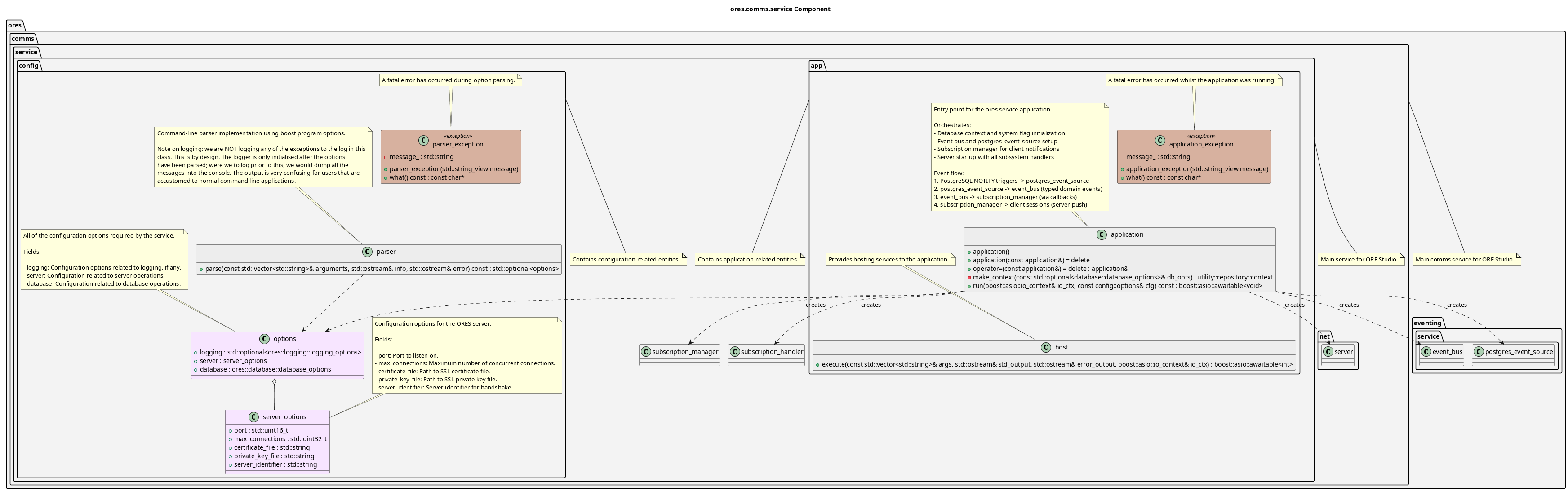
Figure 1: ORE Studio Service Component Diagram
Multi-client server application hosting the ORE Studio backend services. Key features:
- Server hosting: Runs the ORE Studio comms server with SSL/TLS
- Subsystem integration: Registers message handlers for accounts, risk, and other subsystems
- Database access: Provides database context to all subsystems
- Configuration: Boost program_options parser for server, database, and logging configuration
- Concurrent connections: Supports multiple simultaneous client connections
- Asynchronous I/O: Built on Boost.Asio coroutines for scalable async operations
The component is organized into namespaces: config (option parsing and configuration), and app (application hosting and execution).
Configuration
The service is configured via command-line arguments and environment variables.
Environment variables use the SERVICE_ prefix (e.g., SERVICE_PORT=8080).
Server Options
| Option | Env Variable | Default | Description |
|---|---|---|---|
--port, -p |
SERVICE_PORT |
55555 | Port to listen on |
--max-connections, -m |
SERVICE_MAX_CONNECTIONS |
10 | Max concurrent connections |
--certificate, -c |
SERVICE_CERTIFICATE |
server.crt | Path to SSL certificate |
--private-key, -k |
SERVICE_PRIVATE_KEY |
server.key | Path to SSL private key |
--identifier, -i |
SERVICE_IDENTIFIER |
ores-service-v1 | Server identifier for handshake |
Database Options
See ores.database for database configuration options (--db-host, --db-port,
--db-name, --db-user, --db-password).
Logging Options
See ores.telemetry for logging configuration options.
Session Tracking
The service tracks user sessions with the following data:
- Session lifecycle: start time, end time, duration
- Client information: IP address, client identifier, protocol version
- Traffic metrics: bytes sent/received
- Geolocation: country, city, coordinates (from PostgreSQL geoip tables)
Geolocation Setup
Geolocation maps client IP addresses to physical locations using PostgreSQL geoip tables populated with MaxMind GeoLite2-City CSV data.
Setup Instructions
Create the geoip tables:
psql -d ores -f projects/ores.sql/create/geolocation_create.sql
- Download GeoLite2-City-CSV.zip from MaxMind (requires free account): https://dev.maxmind.com/geoip/geolite2-free-geolocation-data
Extract and import the data:
psql -d ores -v data_dir='/path/to/GeoLite2-City-CSV' \
     -f projects/ores.sql/data/geolocation_import.sql
The import creates indexed tables for efficient IP range lookups using PostgreSQL's native inet type with GiST indexes.
Session Statistics
Session data is aggregated into daily statistics including:
- Session counts
- Average duration
- Total bytes transferred
- Unique countries/cities
Use the shell commands to view session data:
accounts sessions- List session historyaccounts active-sessions- Show active sessionsaccounts session-stats- Show 30-day statistics
| Top: Documentation | Previous: System Model |