System Model
Table of Contents
This file documents the architecture of the ORE Studio system —
what it is and what it's for live in Product identity. This
page is the index from which each component's
component_overview.org hangs, organised into the four
architectural layers below.
In MASD terms, the four layers and the components within them are instances of physical-space meta-layer and meta-component concepts defined in the logical space. For the complementary view — how MASD's TS→Part→Facet→Archetype hierarchy maps to ORE Studio's code generation — see ORE Studio Technical Spaces.
To operate on the system architecture, see the
System Architectskill.
System Architecture
ORE Studio is a four-layer system with a single invariant: a layer may only depend on layers below it. This constraint is not an accident of history — it is a deliberate architectural boundary that keeps the system testable in isolation, replaceable one layer at a time, and understandable without reading the whole codebase. Every component in the system belongs to exactly one of these layers:
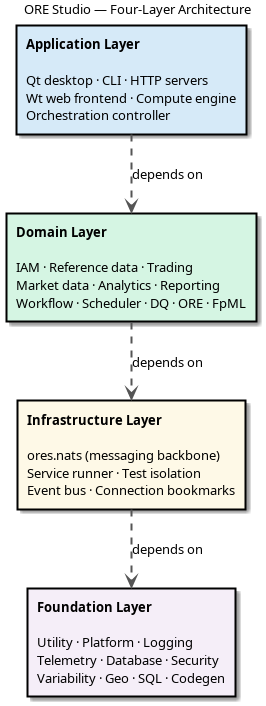
Figure 1: ORE Studio four-layer architecture
- Foundation Layer: the bedrock. No ORE Studio dependency anywhere in this layer. Utilities, platform abstractions, logging, database access, cryptography, and code generation live here. If it existed before ORE Studio had a domain model, it belongs here.
- Infrastructure Layer: communication and testing. Depends only on Foundation. ores.nats messaging, the service runner, and the Catch2 integration that isolates every test into its own PostgreSQL schema.
- Domain Layer: the business. Depends on Foundation + Infrastructure but never on Application. Reference data, IAM, trading, market data, reporting, data quality — the financial domain model that justifies the system's existence.
- Application Layer: the surfaces. Depends on every layer below. Qt desktop, CLI, HTTP servers, Wt web frontend, and the compute engine. If a user touches it, it lives here.
- Tooling Layer: the instruments contributors reach for to build, test, and document the system. Not a runtime layer — these components carry no production dependency. ores.compass, ores.codegen, ores.lisp, and ores.sql live here.
See Also
- See Architectural philosophy for why the system is shaped this way — the narrative complement to this descriptive model.
- For GitHub, Doxygen, Discord, and CDash see Developer Links.
- See Applied MASD for how these layers and components instantiate MASD's meta-layer and meta-component concepts.
- See Component architecture for how CMake targets enforce these layer boundaries.
- See CMake setup for how the build is organised.