ORE Studio Geo Component
Geolocation services for IP-to-location lookups in ORE Studio.
Component Architecture
Diagram:
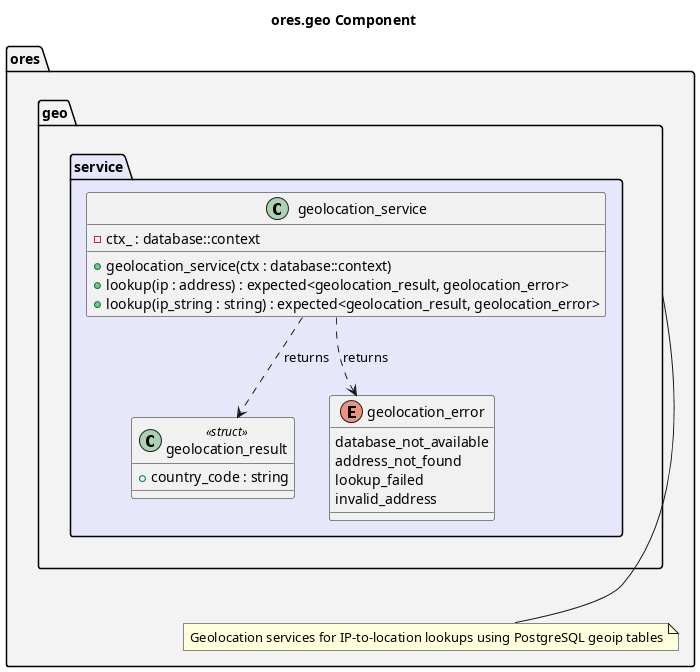
Figure 1: ORE Studio Geo Component Diagram
Provides geolocation capabilities for mapping IP addresses to geographic locations. Used primarily for session tracking to record where logins originate from. Key features:
- PostgreSQL Storage: Stores MaxMind GeoLite2-City data in PostgreSQL
- IP to Location: Maps IP addresses to country, city, and coordinates
- Thread Safe: All lookup operations are thread-safe for concurrent access
- GiST Indexes: Uses PostgreSQL native inet type with GiST indexes for efficient lookups
The service namespace provides the geolocation_service implementation that queries PostgreSQL geoip tables.
Data Source
MaxMind GeoLite2-City CSV
The data source is the MaxMind GeoLite2-City database in CSV format:
- Download: https://dev.maxmind.com/geoip/geolite2-free-geolocation-data
- Format: CSV files for import into PostgreSQL
- Updates: Monthly updates available from MaxMind
- License: CC BY-SA 4.0 (requires attribution)
PostgreSQL Schema
Geolocation data is stored in PostgreSQL with the following tables:
geoip_locations: Country, city, and timezone datageoip_blocks_ipv4: IPv4 CIDR blocks mapped to locationsgeoip_blocks_ipv6: IPv6 CIDR blocks mapped to locationsgeoip_lookup(): Function to lookup IP address and return location data
Setup Instructions
Create the schema:
psql -d ores -f projects/ores.sql/create/geolocation_create.sql
- Download and extract GeoLite2-City-CSV.zip from MaxMind
Import the data:
psql -d ores -v data_dir='/path/to/GeoLite2-City-CSV' \
     -f projects/ores.sql/data/geolocation_import.sql
| Top: Documentation | Previous: System Model |