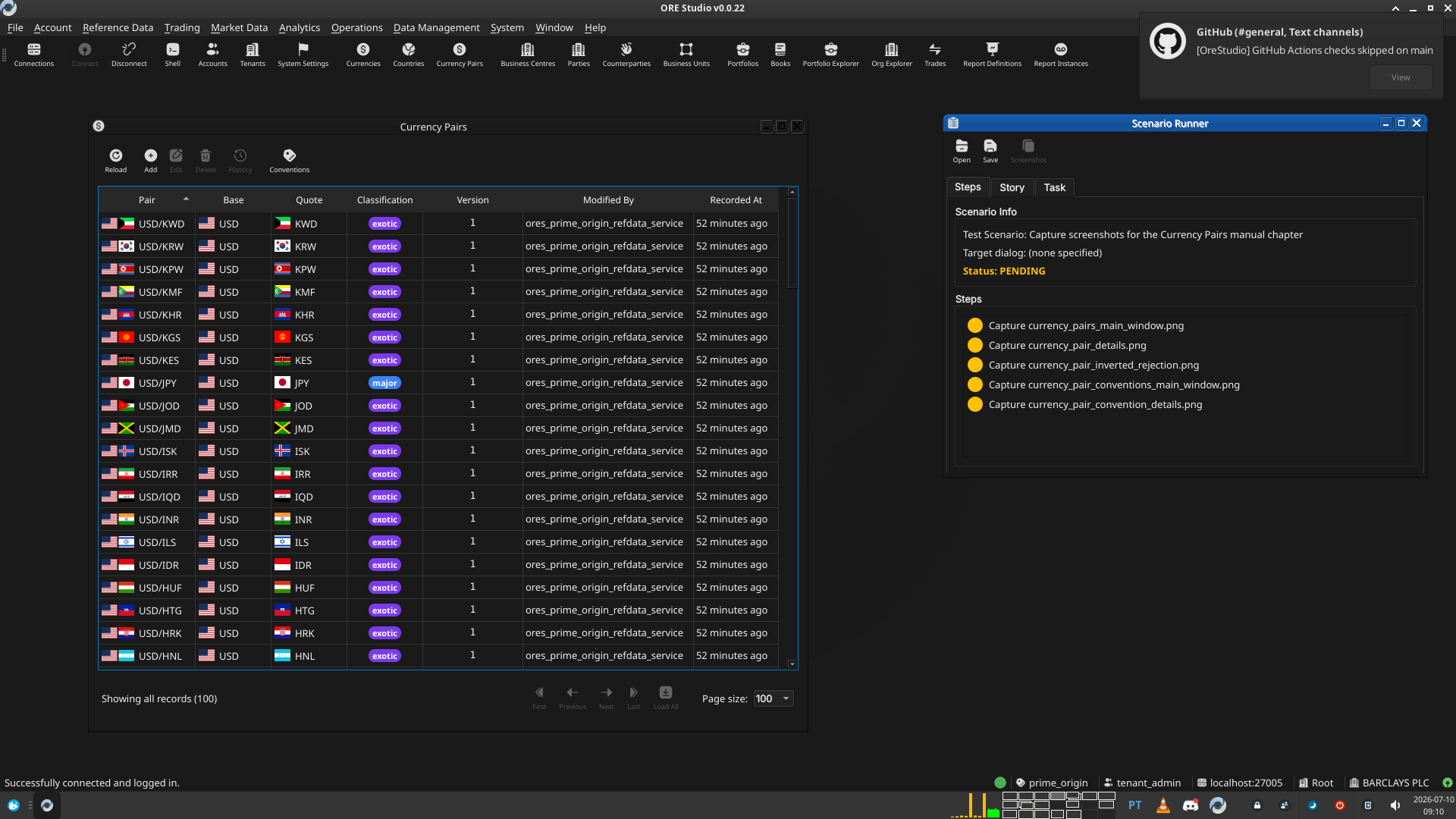
Test Scenario: Capture screenshots for the Currency Pairs manual chapter
Table of Contents
- 1. Scenario Info
- 2. Context
- 3. Steps
- 3.1. Capture currency_pairs_main_window.png
- 3.2. Capture currency_pair_details.png
- 3.3. Capture currency_pair_inverted_rejection.png
- 3.4. Capture currency_pair_conventions_main_window.png
- 3.5. Capture currency_pair_convention_details.png
- 3.6. Read the manual in the Qt client
- 3.7. Check the built PDF
- 4. Results
- 5. Notes
This page documents a test scenario verifying Document currency pairs and conventions in the user manual in Currency pair support in reference data. It is filled in with the target dialog and checklist of steps before testing starts; the QA Validation Runner panel rewrites * Results in place on save.
1. Scenario Info
| Field | Value |
|---|---|
| Verifies task | Document currency pairs and conventions in the user manual |
| Parent story | Currency pair support in reference data |
| Target dialog | CurrencyPairMdiWindow, CurrencyPairDetailDialog, CurrencyPairConventionMdiWindow, CurrencyPairConventionDetailDialog |
| Clients | |
| State | PENDING |
2. Context
Log in as tenant_admin@barclays_plc (password Secure-Password-123)
and select the BARCLAYS PLC party. If the DB was recreated since, run
compass shell -f
projects/ores.shell/scripts/library/provisioning/barclays_system_provision.ores
first — it seeds currency pairs and conventions including JPY
crosses. Services and the Qt client should already be running
(compass services status, compass client start if not).
This scenario is not a pass/fail correctness check; it exists to walk
through the exact UI states needed for the five screenshot
placeholders in chapter_5b_currency_pairs.org. Take the screenshot
at each step, save it under assets/images/ using the filename given,
then mark the step PASS once captured.
3. Steps
3.1. Capture currency_pairs_main_window.png
Open Reference Data → Currency Pairs. Confirm at least 3 pairs are listed spanning at least 2 classifications (e.g. a major and a minor), with the toolbar visible at the top. Capture the whole window.
3.1.1. Result
| Field | Value |
|---|---|
| Status | PASS |
| Notes | 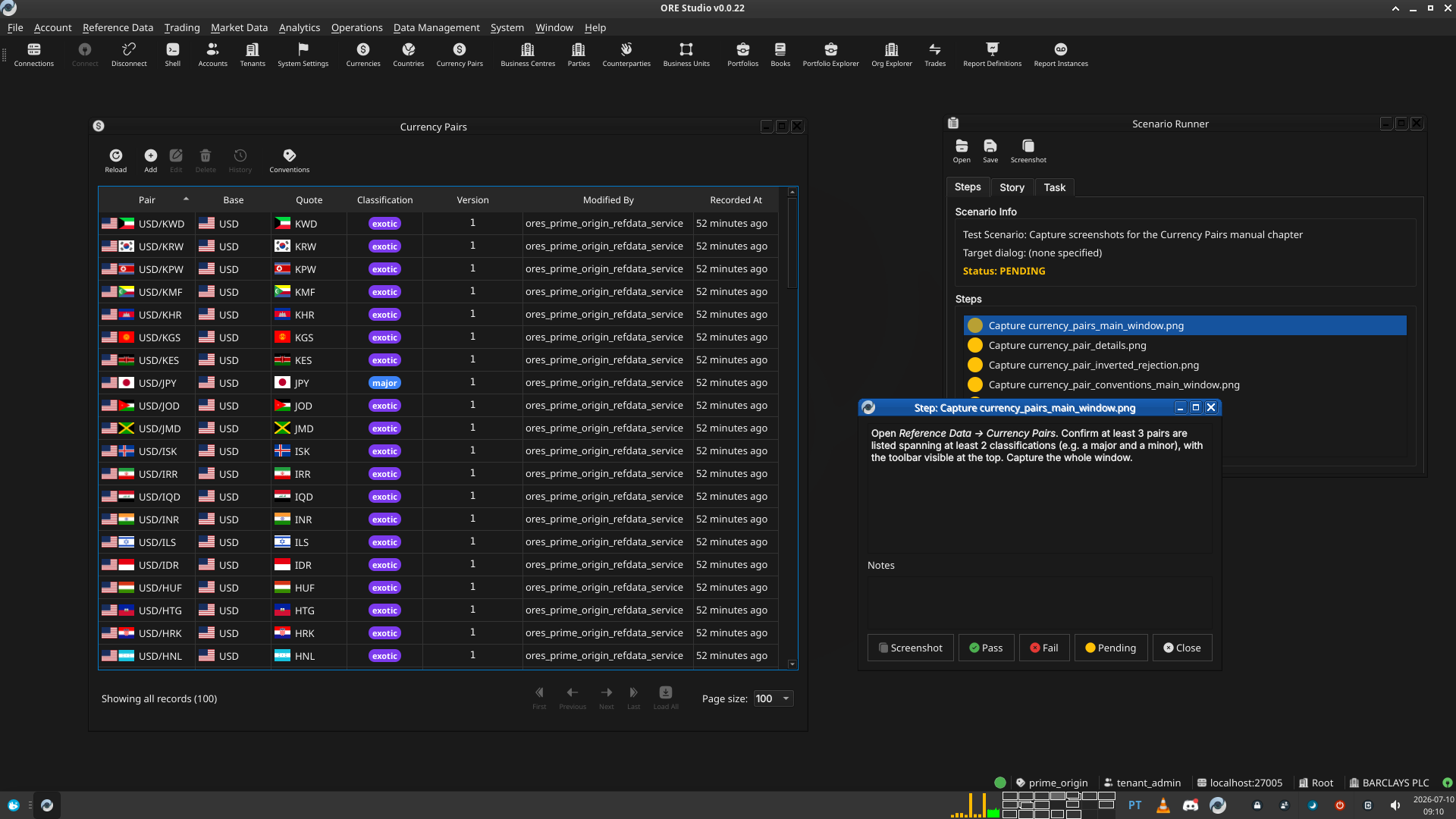 |
3.2. Capture currency_pair_details.png
Double-click an existing pair (e.g. EUR/USD) to open it in edit
mode. Capture the whole dialog, showing the Pair Code field with both
flags, and the locked Base/Quote combos.
3.2.1. Result
| Field | Value |
|---|---|
| Status | PASS |
| Notes | 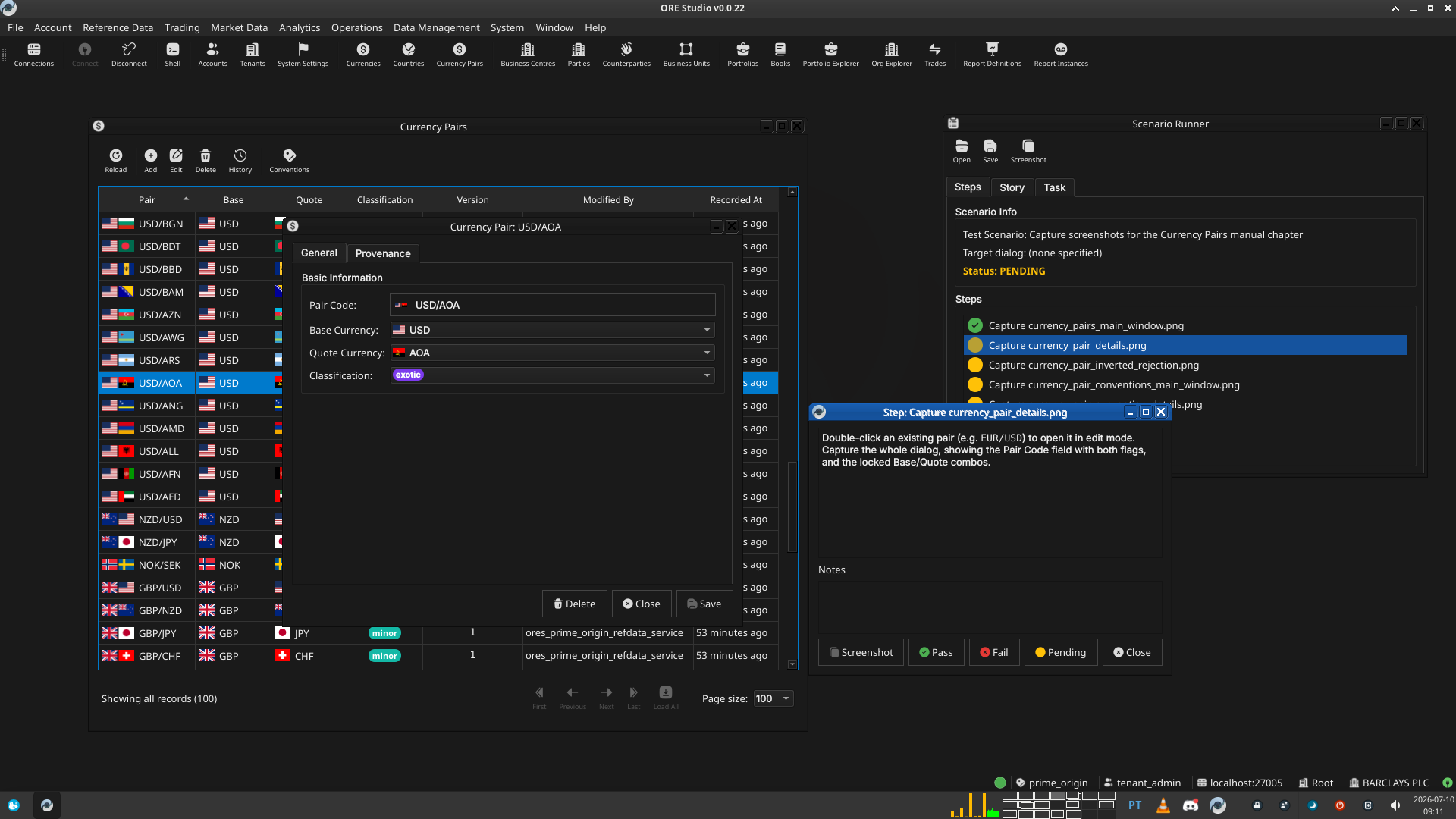 |
3.3. Capture currency_pair_inverted_rejection.png
With EUR/USD already on file, open a new Currency Pair Details
dialog in create mode. Set Base Currency to USD and Quote Currency
to EUR, then click Save. Capture the resulting "Inverted Pair"
warning dialog. Close without saving afterwards.
3.3.1. Result
| Field | Value |
|---|---|
| Status | PASS |
| Notes | Could not take a screenshot due to message box being modal. created a capture. saved screenshot using OS app under ./tmp/Screenshot from 2026-07-10 09-15-56.png |
3.4. Capture currency_pair_conventions_main_window.png
Open Reference Data → Currency Pair Conventions (or click Conventions on the Currency Pairs toolbar). Confirm at least 2 rows are present, ideally one JPY-cross pair (2 decimal places) and one non-JPY pair (4 decimal places). Capture the whole window.
3.4.1. Result
| Field | Value |
|---|---|
| Status | PASS |
| Notes | 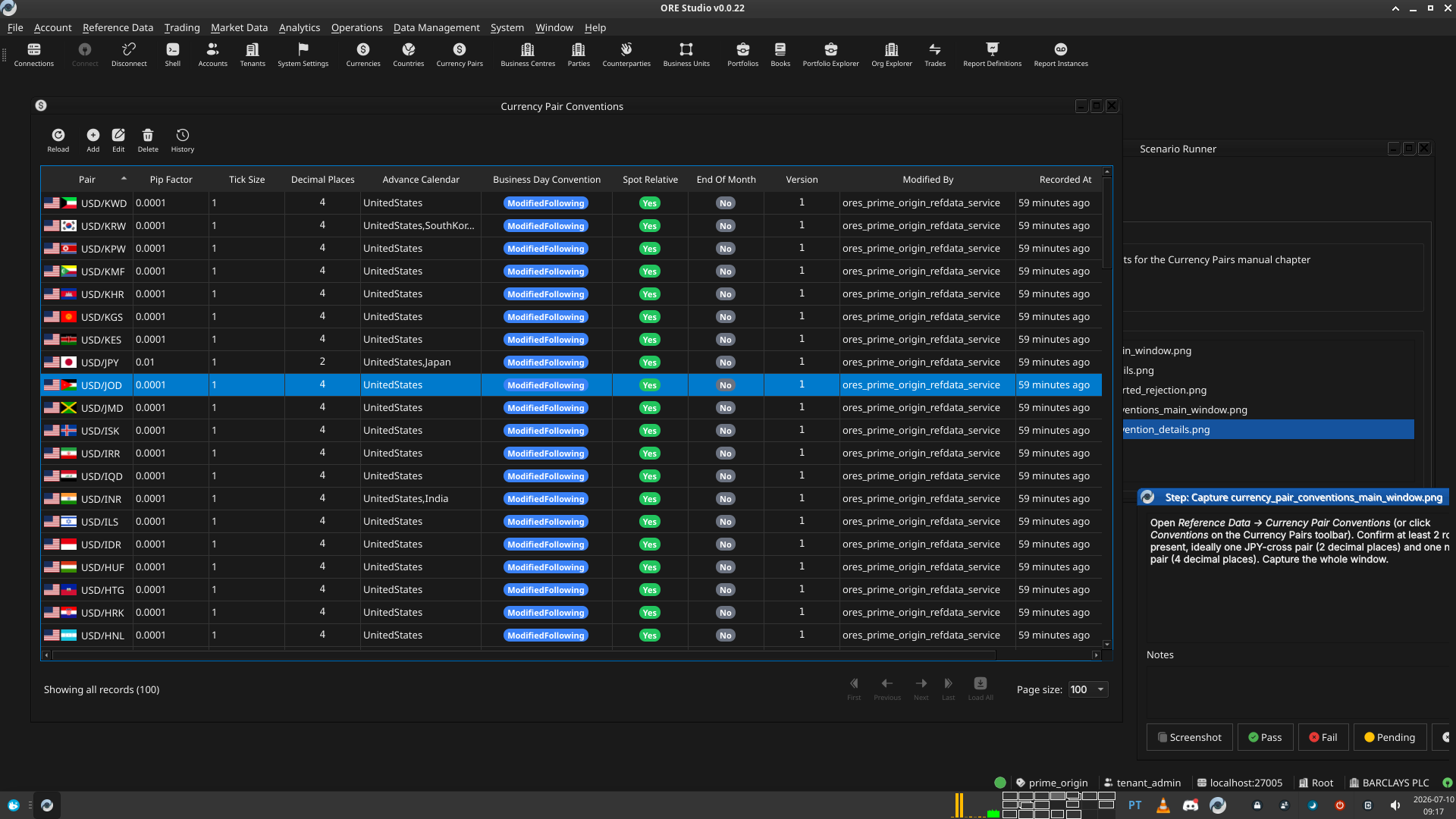 |
3.5. Capture currency_pair_convention_details.png
Double-click an existing convention record (e.g. EUR/USD) to open
it in edit mode. Capture the whole dialog: Pair Code combo (with
flags), Pip Factor, Tick Size, Decimal Places, Advance Calendar,
Business Day Convention, Spot Relative, and End Of Month.
3.5.1. Result
| Field | Value |
|---|---|
| Status | PASS |
| Notes | 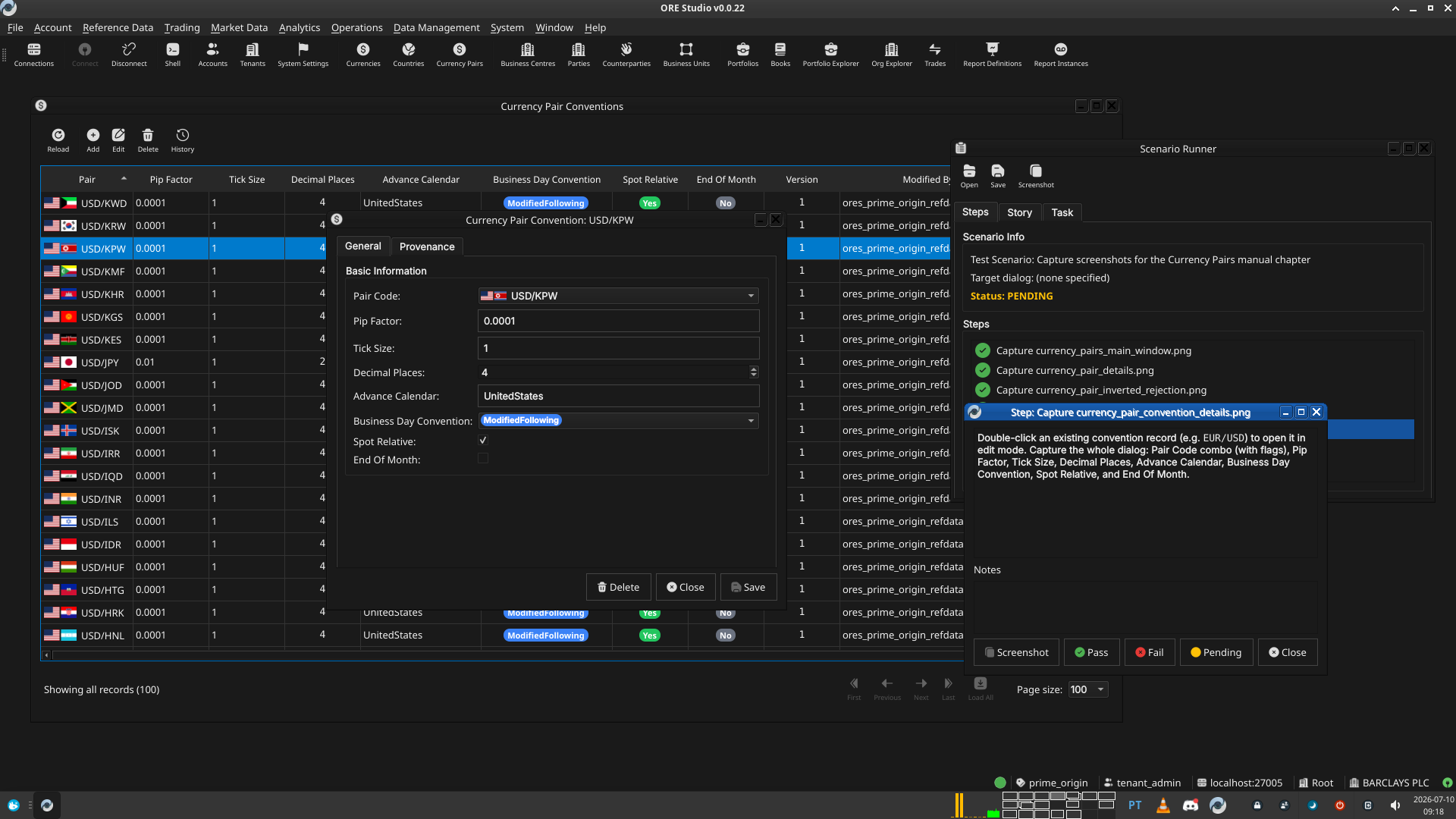 |
3.6. Read the manual in the Qt client
Added retroactively per How do I capture screenshots for a manual chapter? —
not yet run for this scenario. Rebuild the Qt-embedded HTML help
(compass build --direct help then
cmake --build --preset <preset> --target deploy_help_qch), restart the
Qt client, open the Currency Pairs chapter in Help → User Manual, and
read it top to bottom: confirm the prose reads correctly, the segues
work, and every screenshot appears where expected and matches its
caption.
3.6.1. Result
| Field | Value |
|---|---|
| Status | PENDING |
3.7. Check the built PDF
Added retroactively, same as above — not yet run. Open the rebuilt
user_manual.pdf (e.g. zathura or evince) at the Currency Pairs
chapter's pages and confirm layout, figure numbering, and captions look
correct in the PDF's own rendering.
3.7.1. Result
| Field | Value |
|---|---|
| Status | PENDING |
4. Results
| Field | Value |
|---|---|
| Status | PENDING |
| Completed at | 2026-07-10T08:18:17Z (5 capture steps only — the two review steps below were added after this run and still need to be worked) |
| Branch | feature/currency-pair-manual-chapter |
| Commit | 8e69c1f9c |
| Worktree | prime_origin |
5. Notes