Variability
Table of Contents
This page occupies a deliberately narrow place in the documentation as
a whole: it is the glossary, not the record. Everything below is drawn
from MASD and its Dogen reference implementation as a methodology in
the abstract, independent of any product that happens to adopt it, and
the discipline that governs what may appear here follows directly from
that: a sentence belongs on this page only if it would remain true were
ORE Studio to be rewritten from scratch in an entirely different
generator, on an entirely different stack. Nothing here, in
particular, may name an actual feature, an actual file, or an actual
configuration value drawn from ORE Studio's own code generator — the
moment a claim depends on how this product happens to have
instantiated the concept, it has left the territory this page covers
and belongs instead in ORE Studio Variability Model, the sibling document
where the concrete feature catalogue is kept, where the ores.*
activation graph is described in its real, present-day shape, and
where the citations into the code generator's actual source live —
and, consequently, where drift between what the documentation claims
and what the generator actually does is noticed and corrected. A
reader who wants to know what a feature or a profile is, in the
sense the methodology gives those words, should read on here; a reader
who wants to know what ORE Studio's own features and profiles are,
concretely, should turn to that sibling document instead.
MASD separates what to generate (the logical and physical models) from how it is configured (the variability model). In MASD the word variability is reserved for non-structural variability — configuration that does not change the object graph of a model, only how it is rendered. The Variability Metamodel (VMM) formalises this dimension; a Variability Model instantiates it with concrete runtime configuration.
The VMM addresses two things:
- Enabling or disabling regions of physical space — technical spaces, facets, and individual archetypes.
- Configuring projections — naming, file extensions, and feature toggles.
Configuration is supplied as tagged values on UML-style stereotypes.
See Domain Architecture and The MASD Methodology for the formal treatment.
1. The feature architecture
MASD builds on Feature Modelling, simplified:
- A feature is a single configuration point — for example whether the
hashfacet is enabled, or what the output directory should be. Every feature has a qualified name (e.g.masd.cpp.hash.enabled), a type (boolean, string, collection), and a default value. - A feature bundle groups semantically related features.
- A feature template is an abstract feature instantiated over a domain — for
example
masd.archetype, instantiated once per archetype. - A binding point is the set of legal meta-entities at which a feature may be used.
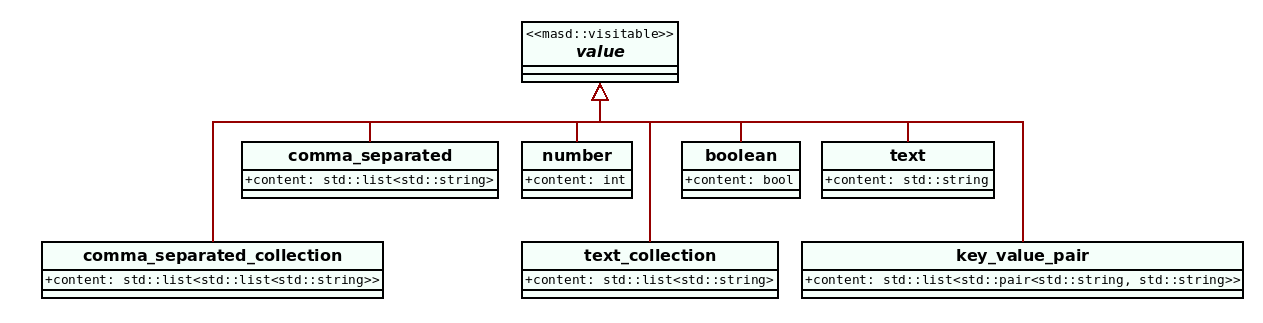
Figure 1: Figure 38 (Dogen): a fragment of the feature bundles defined within the LMM. Source: Domain Architecture.
2. Distinguishing a feature from a computed predicate
Not every value a generator's templates branch on is a feature, and the distinction matters more than it first appears: conflating the two is precisely what causes a variability model to rot into an unreliable, half-duplicated shadow of the logical model it is supposed to stay independent of. The operational test is mechanical, not a matter of judgement. A feature is a configuration point the model's author sets and the generator merely reads through, unchanged, to decide how to render an otherwise-fixed logical entity — nobody computes its value; a human chooses it. A computed, or structural, predicate, by contrast, is a value the generator itself derives from other facts already present in the logical model — some combination of the entity's own attributes, keys, or types — and no human ever authors it directly; it is a consequence of structure, not a choice about projection, and so belongs to the logical model, not the variability model.
The test survives a subtlety that trips up a naive reading of it: a feature whose effect is to add a field, a column, or a class member to the generated output can still look structural, because what it produces plainly is. It is not, and the distinction is not about what a feature produces but about how its value came to be. Structure is measured strictly by what appears in the generated type system — the classes, structs, fields, and methods a facet emits — and a feature is never itself one of those things: authoring a feature's value produces no field, method, or class named after the feature anywhere in the generated code. It is only an internal signal the generator consults to decide whether to branch into the template logic that emits some structural element, nothing more. That decision, and every feature like it, is non-structural variability, full stop, whether it goes on to add a field to the type system or only changes template behaviour that never touches the type system at all, such as a naming convention or a cosmetic default. The resulting field or column, once emitted, is of course a structural fact about that particular entity — but the fact and the feature that decided it belong to two different models: the fact is logical, the feature is variability.
3. Profiles
A profile is a bundle of configuration points that can be bound to logical
elements. Profiles are the primary mechanism for configuring generation without
modifying individual model elements, and they are named after the ability they
confer — serializable, hashable, and so on — so they can be reused across
products and product lines. They compose in a hierarchy:
| Level | Name | Applies to |
|---|---|---|
| Broadest | Base profile | The entire product — product-wide defaults. |
| Intermediate | Component profile | A single component — overrides product defaults. |
| Most specific | Element profile | A single model element — overrides everything above. |
A more specific profile inherits from a broader one and overrides only what it needs to change.
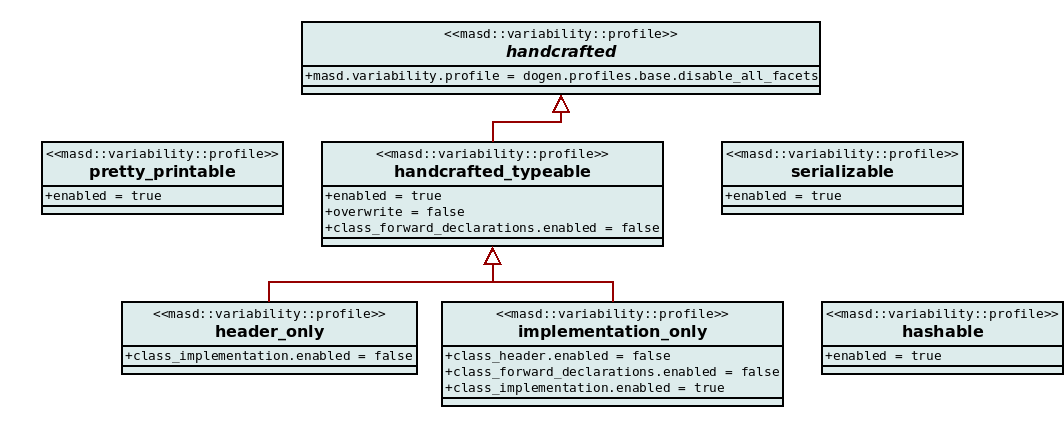
Figure 2: Figure 41 (Dogen): sample reference-implementation profiles. Source: Domain Architecture.
4. Configuration scopes
Feature values can be set at three scopes, from broadest to most specific:
| Scope | Applies to | Example |
|---|---|---|
| Product | Every element in the product | Enable serialisation product-wide |
| Component | Every element in one component | Disable odb for a pure in-memory lib |
| Element | A single logical entity | Enable io on one specific object alone |
A more specific scope always wins. This lets a product set safe defaults and override them surgically at component or element level.
5. See also
- MASD — the structure note that orders this cluster, and where to read this page in it.
- MASD — methodology overview and the conceptual model.
- Facet — what variability most often controls (facet activation).
- Physical Space — the space whose regions variability enables or disables.
- Logical Space — the default facet-per-entity-type table that variability overrides.
- Applied MASD — how one product instantiates this variability model.