Test Scenario: Verify ores.qt.dq plugin: badges and code domains
Table of Contents
- 1. Scenario Info
- 2. Steps
- 3. Results
- 4. Notes
This page documents a test scenario verifying Add a badge_mapping browser UI in Improve badge colour scheme support. It is filled in with the target dialog and checklist of steps before testing starts; the QA Validation Runner panel rewrites * Results in place on save.
1. Scenario Info
| Field | Value |
|---|---|
| Verifies task | Add a badge_mapping browser UI |
| Parent story | Improve badge colour scheme support |
| Target dialog | CodeDomainDetailDialog |
| Clients | |
| State | PENDING |
2. Steps
Each step is its own heading — the title should be short (it's shown
as a single list entry in the QA Validation Runner); put any longer
instructions in the body below the title. The panel writes each
step's PASS/FAIL/PENDING outcome and notes back as a *** Result
child heading directly under it.
2.1. Connect to tenant Barclays Plc
Log in against the prime_origin environment as
tenant_admin@barclays_plc / Secure-Password-123 and select
BARCLAYS PLC.
2.1.1. Result
| Field | Value |
|---|---|
| Status | PASS |
2.2. Confirm Data Quality menu exists
- Menu bar shows a top-level Data &Quality menu (between Data Management and System).
- It contains Badge Definitions, Badge Severities, and Code Domains actions.
2.2.1. Result
| Field | Value |
|---|---|
| Status | PASS |
| Notes | in data quality, do not place badge entities in the top level menu. add a badges sub menu |
2.3. Open Badge Definitions list
- Trigger Data Quality > Badge Definitions.
- List window opens showing seeded rows (active/inactive, etc.), each with a colour swatch, not raw hex text.
2.3.1. Result
| Field | Value |
|---|---|
| Status | PASS |
2.4. Open Badge Severities list
- Trigger Data Quality > Badge Severities.
- List window opens showing seeded severities with swatches.
2.4.1. Result
| Field | Value |
|---|---|
| Status | PASS |
2.5. Open Code Domains list and a detail dialog
- Trigger Data Quality > Code Domains.
- List window opens showing seeded domains (e.g.
book_status). - Open a detail dialog for a domain that has mappings (e.g.
book_statusortenant_status).
2.5.1. Result
| Field | Value |
|---|---|
| Status | PASS |
2.6. Verify the Badge Mappings tab
- On the open Code Domain detail dialog, select the Badge Mappings tab.
- It lists every
entity_code -> badge_definitionmapping for that domain, each cell rendered as a real coloured badge pill (not hex text), matching the colour shown in the Badge Definitions list.
2.6.1. Result
| Field | Value |
|---|---|
| Status | PASS |
| Notes | shows duplicates. RLS problems?; 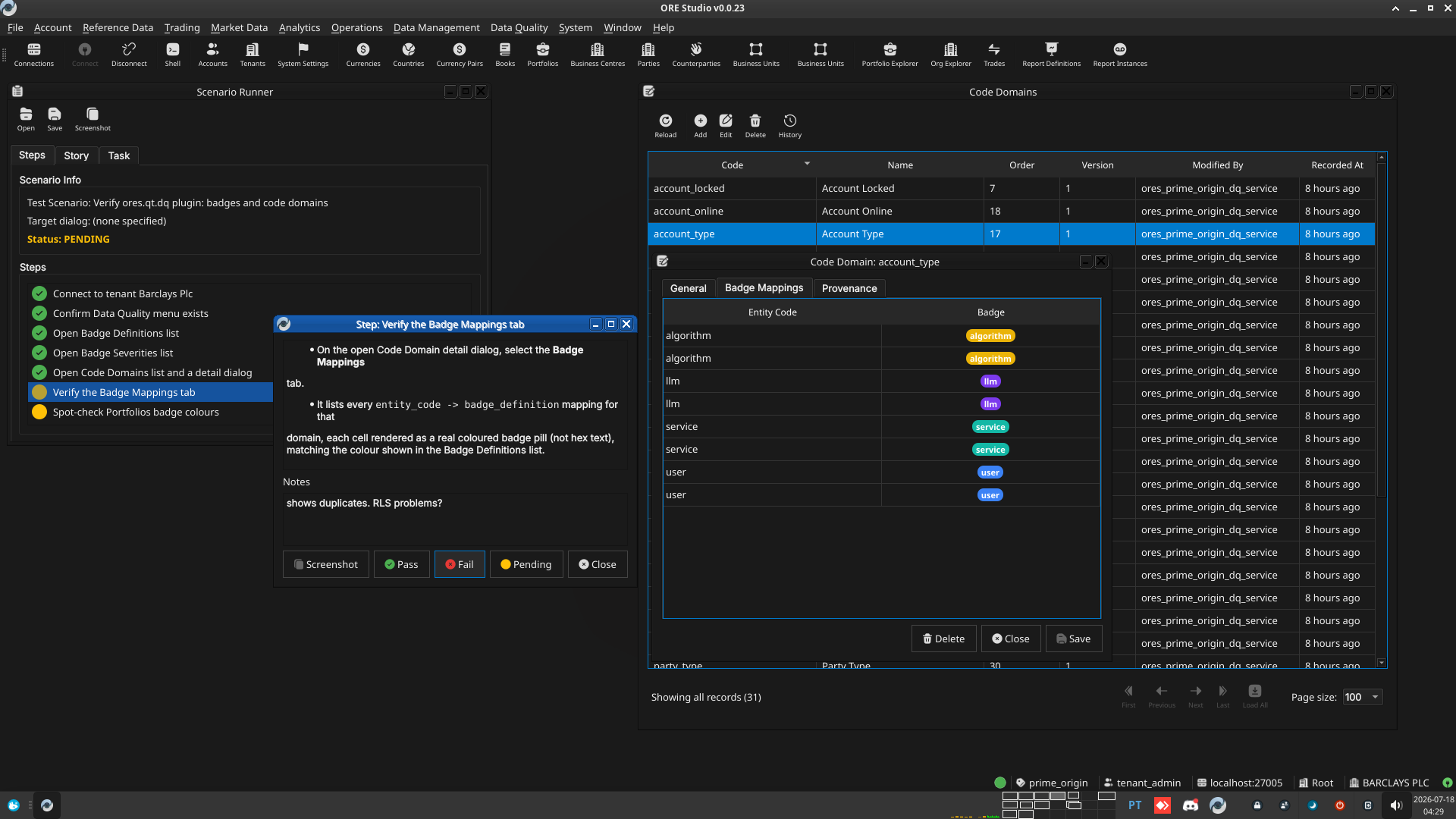 |
2.7. Spot-check Portfolios badge colours
- Open the Portfolios list window (Reference Data menu).
- Confirm the Status and Is Virtual badge columns render with correct, non-fallback colours (this was the originally reported bug — wrong badge colours on Portfolios screens).
- Open a portfolio's detail dialog and confirm the same badges render correctly there too.
2.7.1. Result
| Field | Value |
|---|---|
| Status | PASS |
| Notes | looks good; |
3. Results
| Field | Value |
|---|---|
| Status | PASSED |
| Completed at | 2026-07-18T07:34:55Z |
| Branch | feature/badge-mapping-browser-ui-resume |
| Commit | dbe245671 |
| Worktree | prime_origin |