Test Scenario: Capture screenshots for the auxiliary-lookup sections of the Parties manual chapter
Table of Contents
- 1. Scenario Info
- 2. Context
- 3. Steps
- 3.1. Capture party_types_main_dialog.png
- 3.2. Capture party_type_details_general.png
- 3.3. Capture party_statuses_main_dialog.png
- 3.4. Capture party_status_details_general.png
- 3.5. Capture party_id_schemes_main_dialog.png
- 3.6. Capture party_id_scheme_details_general.png
- 3.7. Read the manual in the Qt client
- 3.8. Check the built PDF
- 4. Results
- 5. Notes
This page documents a test scenario verifying Write party_status manual chapter in Commission: party, counterparty, and party_status. It is filled in with the target dialog and checklist of steps before testing starts; the QA Validation Runner panel rewrites * Results in place on save.
1. Scenario Info
| Field | Value |
|---|---|
| Verifies task | Write party_status manual chapter |
| Parent story | Commission: party, counterparty, and party_status |
| Target dialog | PartyTypeMdiWindow, PartyTypeDetailDialog, PartyStatusMdiWindow, PartyStatusDetailDialog, PartyIdSchemeMdiWindow, PartyIdSchemeDetailDialog |
| Clients | |
| State | PENDING |
2. Context
Log in as tenant_admin@barclays_plc (password Secure-Password-123)
against the brave_hopper environment and select the BARCLAYS PLC
party. If the DB was recreated since, run compass shell -f
projects/ores.shell/scripts/library/provisioning/barclays_system_provision.ores
first. Services and the Qt client should already be running
(compass services status, compass client start if not).
This scenario is not a pass/fail correctness check; it exists to walk
through the exact UI states needed for the six screenshot placeholders
in chapter_8_parties.org. Take the screenshot at each step, save it
under assets/images/ using the filename given, then mark the step
PASS once captured.
3. Steps
3.1. Capture party_types_main_dialog.png
Open Reference Data → Party Types. Capture the whole window, showing at least a couple of rows with Code, Name, Description, and Display Order columns.
3.1.1. Result
| Field | Value |
|---|---|
| Status | PASS |
| Notes | 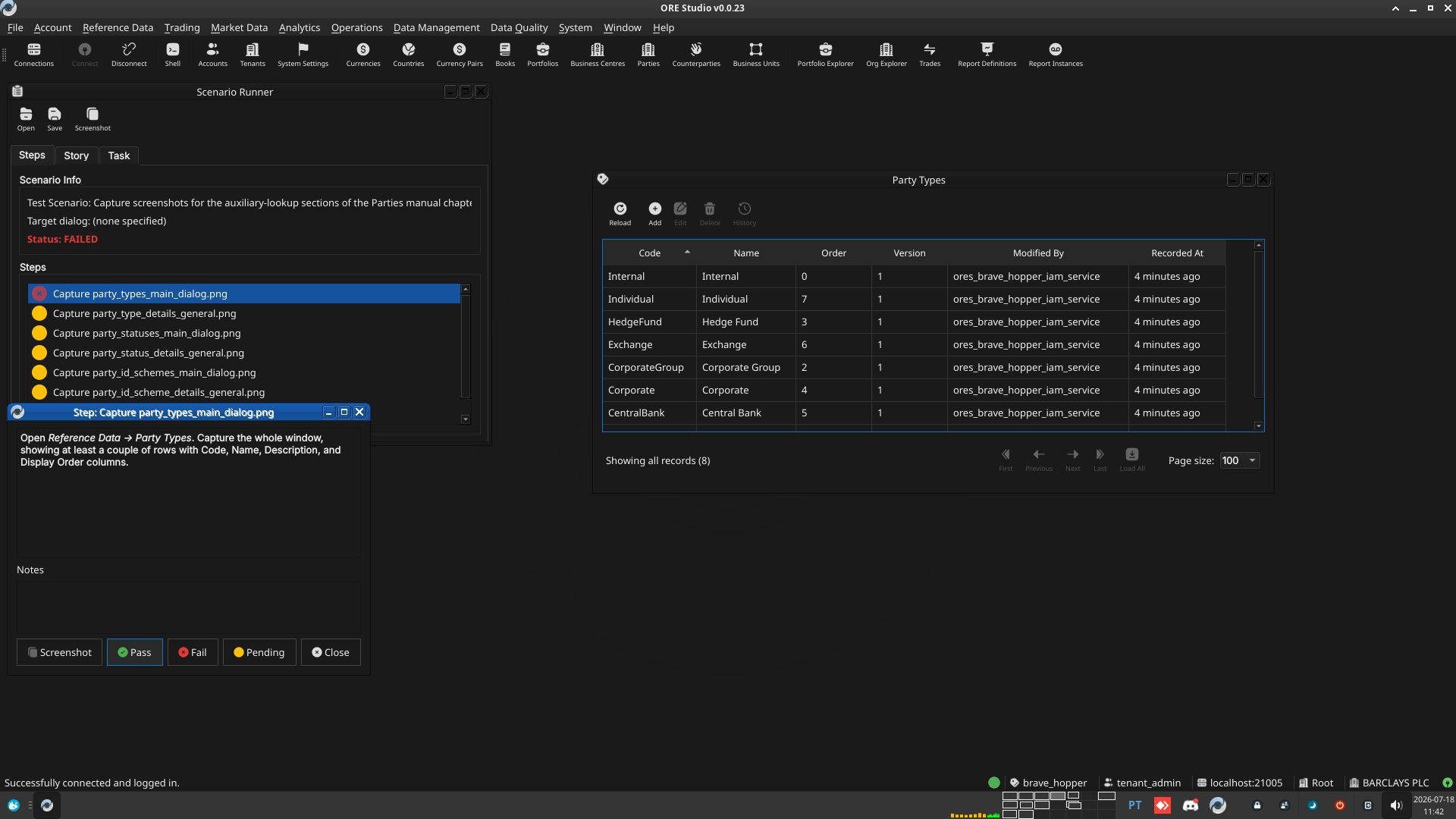 |
3.2. Capture party_type_details_general.png
Double-click an existing party type record to open it. Capture the whole dialog on its General tab (Code, Name, Description, Display Order).
3.2.1. Result
| Field | Value |
|---|---|
| Status | PASS |
| Notes | 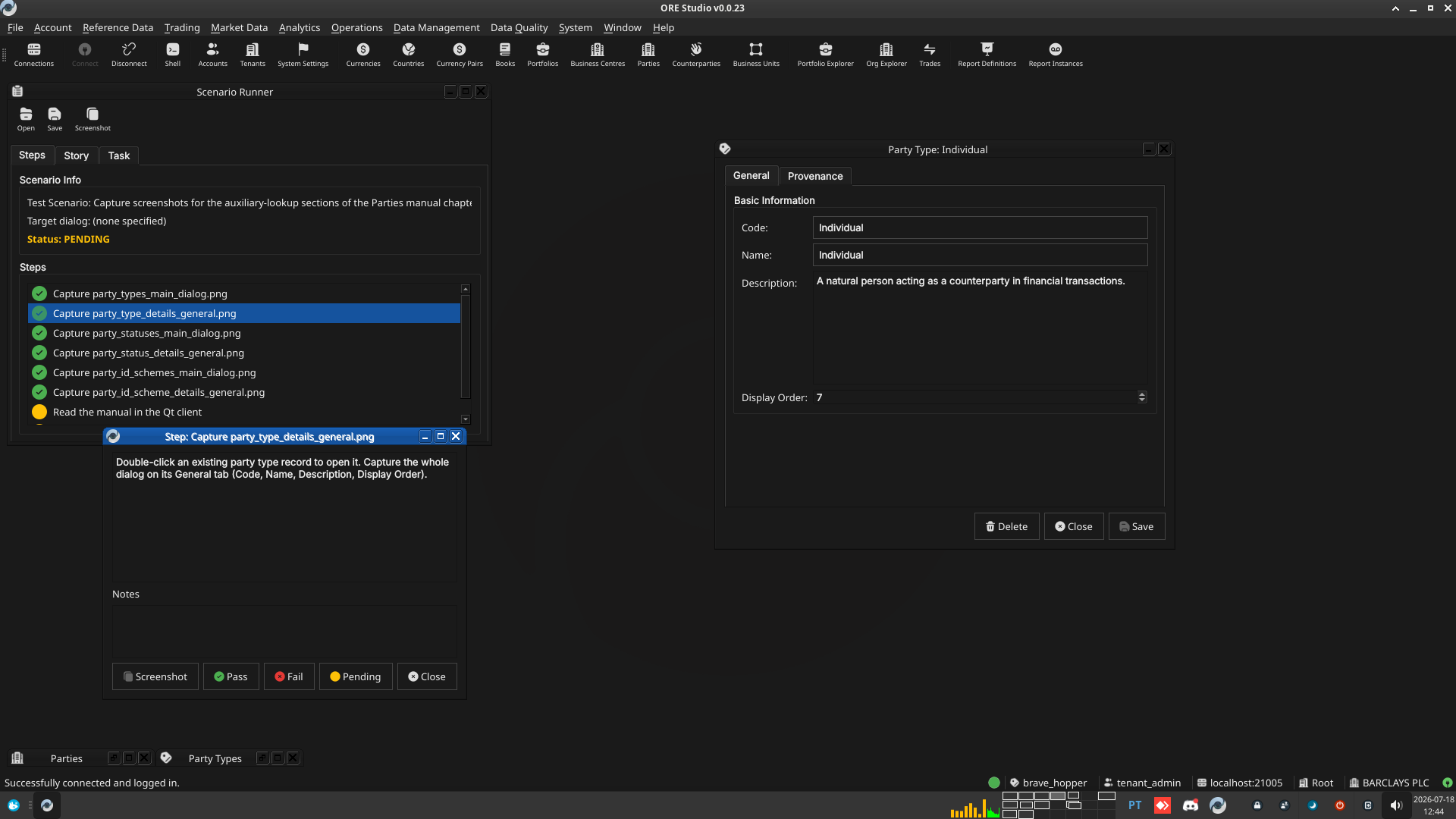 |
3.3. Capture party_statuses_main_dialog.png
Open Reference Data → Party Statuses. Capture the whole window.
3.3.1. Result
| Field | Value |
|---|---|
| Status | PASS |
| Notes | 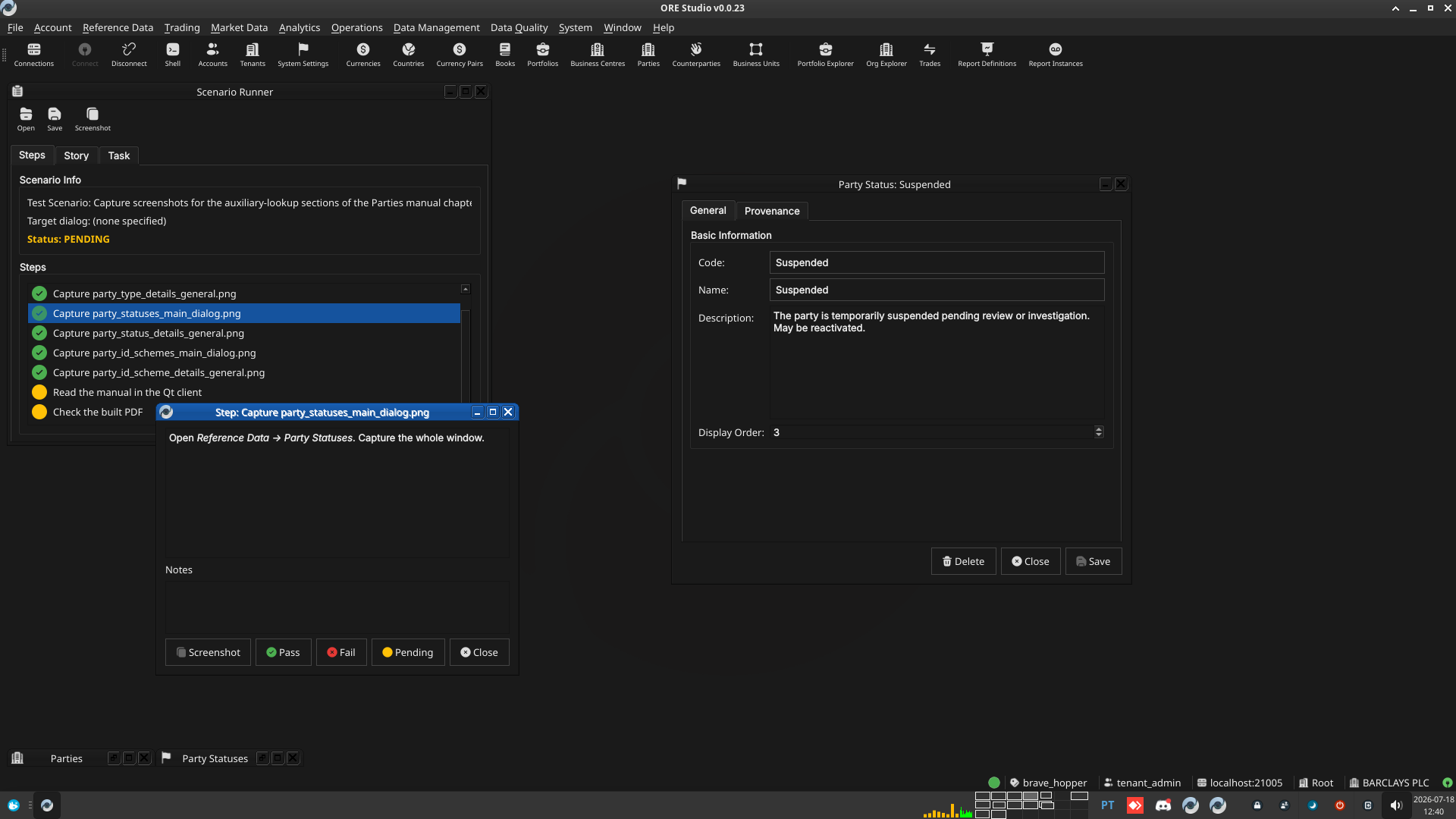 |
3.4. Capture party_status_details_general.png
Double-click an existing party status record to open it. Capture the whole dialog on its General tab.
3.4.1. Result
| Field | Value |
|---|---|
| Status | PASS |
| Notes | 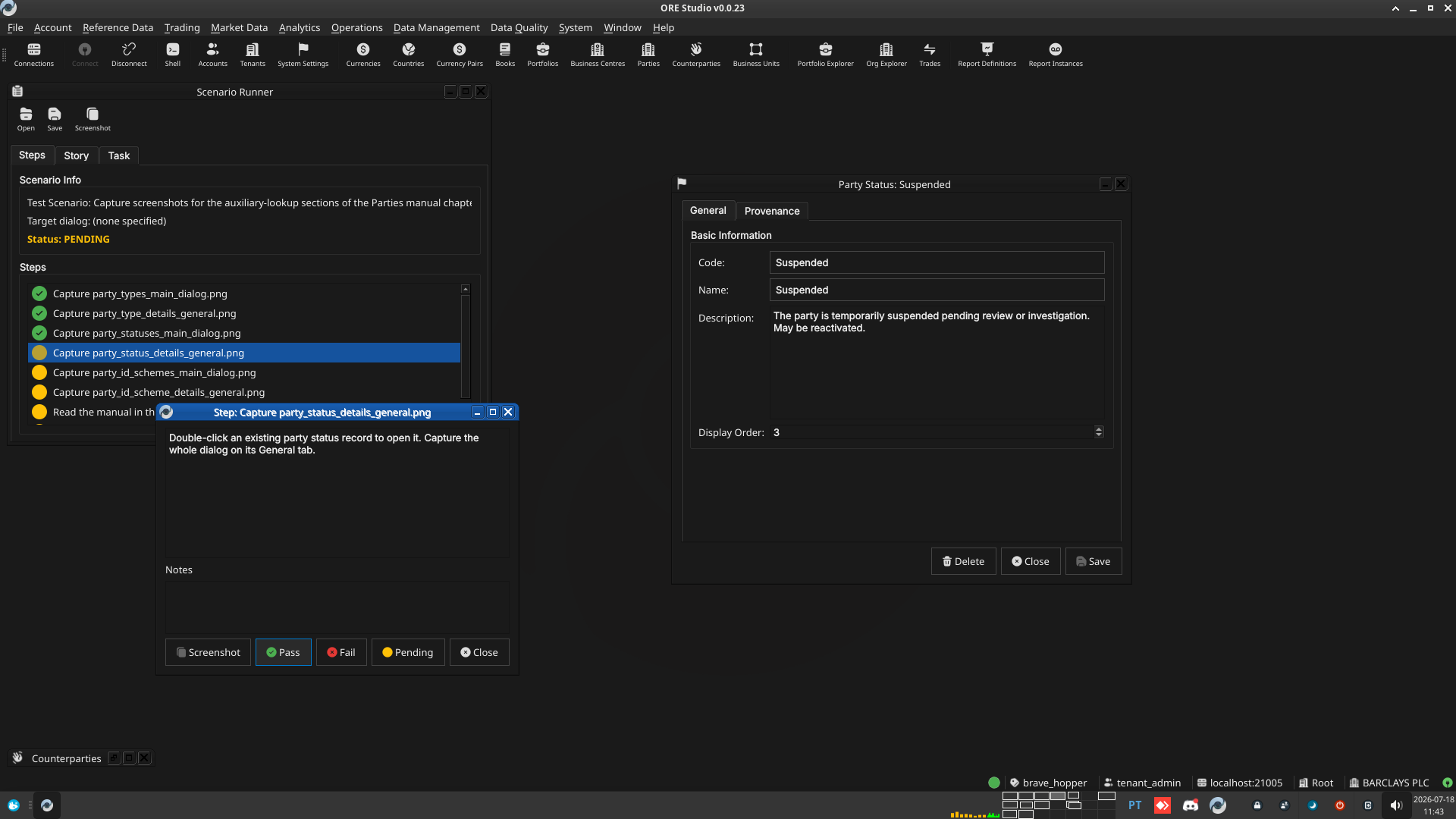 |
3.5. Capture party_id_schemes_main_dialog.png
Open Reference Data → Party Id Schemes. Capture the whole window, showing the Coding Scheme column alongside Code/Name/Description/Order.
3.5.1. Result
| Field | Value |
|---|---|
| Status | PASS |
| Notes | 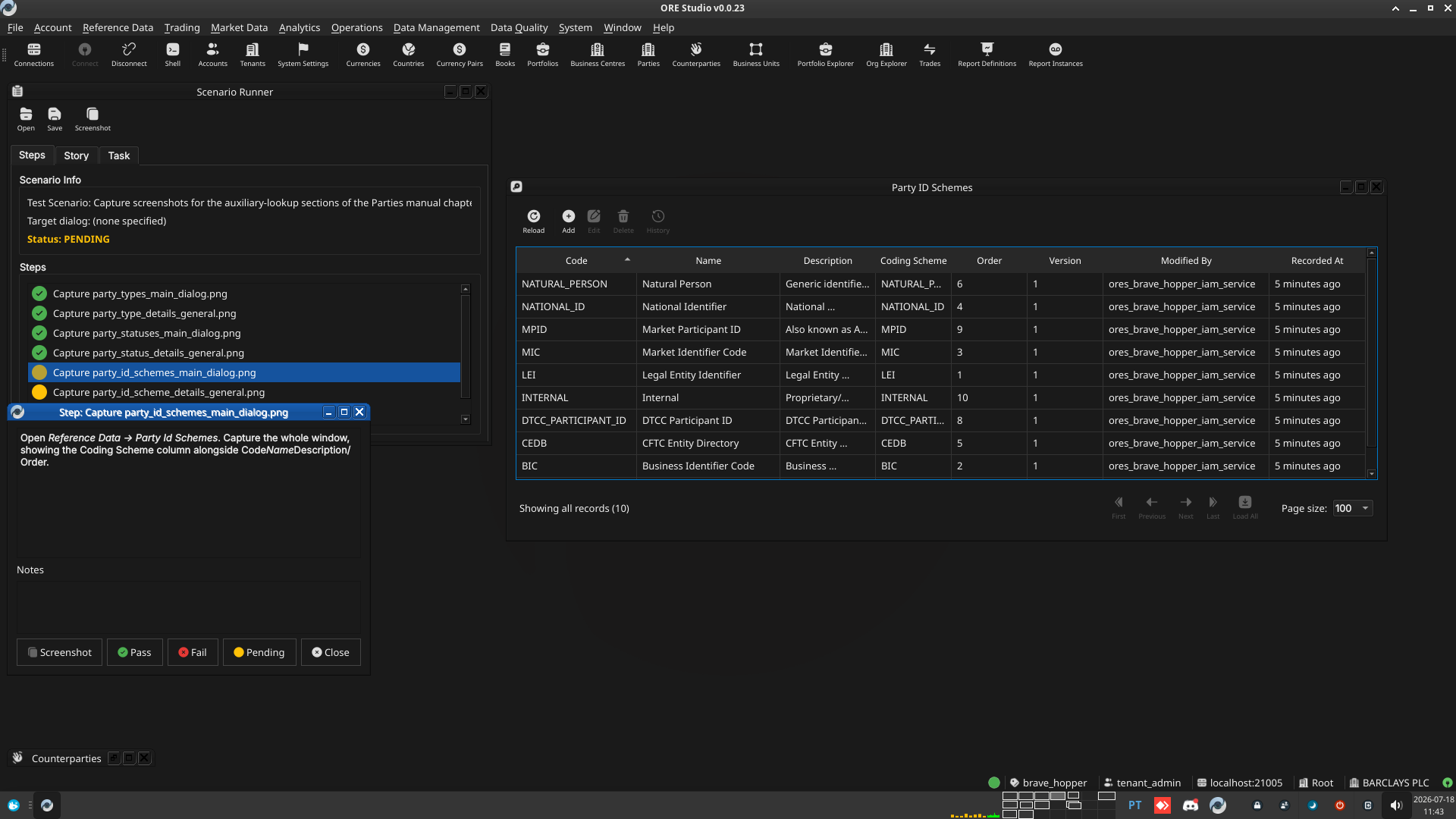 |
3.6. Capture party_id_scheme_details_general.png
Double-click an existing party id scheme record (e.g. LEI) to open
it. Capture the whole dialog on its General tab (Code, Name,
Description, Coding Scheme, Display Order).
3.6.1. Result
| Field | Value |
|---|---|
| Status | PASS |
| Notes | 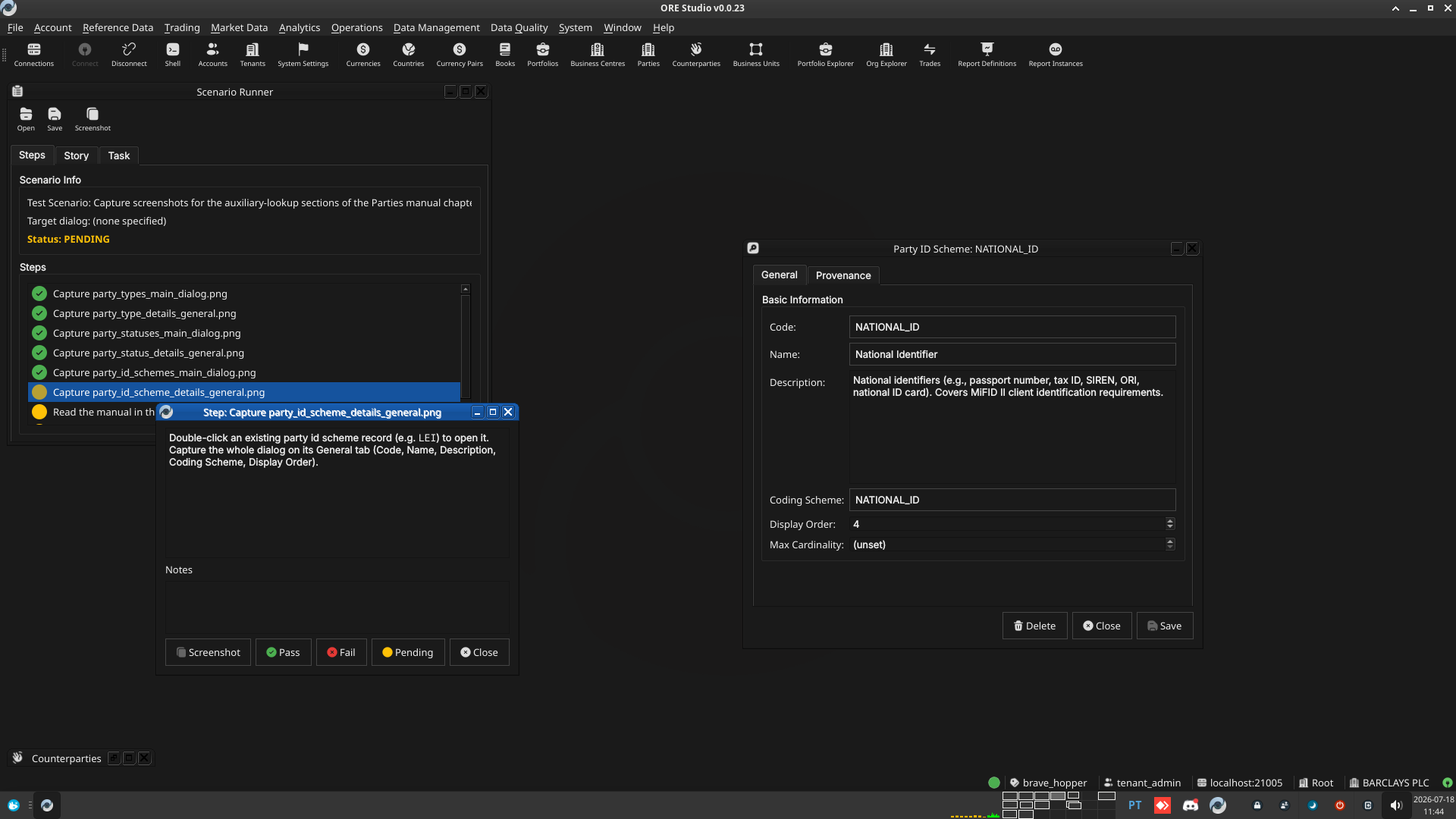 |
3.7. Read the manual in the Qt client
Rebuild the Qt-embedded HTML help (compass build --direct help then
cmake --build --preset <preset> --target deploy_help_qch), restart
the Qt client, open the Parties chapter in Help → User Manual, and
read it top to bottom: confirm the prose reads correctly, the segues
work, and every screenshot appears where expected and matches its
caption.
3.7.1. Result
| Field | Value |
|---|---|
| Status | PENDING |
| Notes | Not yet run — pending the Qt-embedded HTML help + .qch rebuild. |
3.8. Check the built PDF
Open the rebuilt user_manual.pdf (e.g. zathura or evince) at the
Parties chapter's pages and confirm layout, figure numbering, and
captions look correct in the PDF's own rendering.
3.8.1. Result
| Field | Value |
|---|---|
| Status | PASS |
| Notes | Rendered page 155-156 via pdftoppm and visually reviewed: figures 13.1/13.2 (Party Types/Type Details) render correctly with correct captions and figure numbers; List of Figures entries for all 6 new figures (13.1, 13.2, 13.3, 13.4, 13.10, 13.11) confirmed via pdftotext. |
4. Results
| Field | Value |
|---|---|
| Status | PASSED |
| Completed at | 2026-07-18T14:05:00Z |
| Branch | feature/add-lookup-toolbar-buttons-party-counterparty |
| Worktree | brave_hopper |