Test Scenario: Capture screenshots for the Business Centres manual chapter
Table of Contents
- 1. Scenario Info
- 2. Context
- 3. Steps
- 4. Results
- 5. Notes
This page documents a test scenario verifying Write the business_centre manual chapter in Commission: business_centre. It is filled in with the target dialog and checklist of steps before testing starts; the QA Validation Runner panel rewrites * Results in place on save.
1. Scenario Info
| Field | Value |
|---|---|
| Verifies task | Write the business_centre manual chapter |
| Parent story | Commission: business_centre |
| Target dialog | BusinessCentreMdiWindow, BusinessCentreDetailDialog, BusinessCentreHistoryDialog |
| Clients | |
| State | PENDING |
2. Context
Log in as tenant_admin@barclays_plc (password Secure-Password-123)
and select the BARCLAYS PLC party. If the DB was recreated since, run
compass shell -f
projects/ores.shell/scripts/library/provisioning/barclays_system_provision.ores
first — it seeds 212+ business centres including USNY, GBLO, and
the system WRLD centre. Services and the Qt client should already
be running (compass services status, compass client start if
not).
This scenario is not a pass/fail correctness check; it exists to walk
through the exact UI states needed for the four screenshot
placeholders in chapter_6b_business_centres.org. Take the
screenshot at each step, save it under assets/images/ using the
filename given, then mark the step PASS once captured.
3. Steps
3.1. Capture business_centres_main_dialog.png
Open Reference Data → Business Centres with the BARCLAYS PLC party
selected. Confirm several rows are visible with a mix of country
flags and codes (e.g. USNY, GBLO, WRLD). Capture the whole list
window.
3.1.1. Result
| Field | Value |
|---|---|
| Status | PASS |
| Notes | 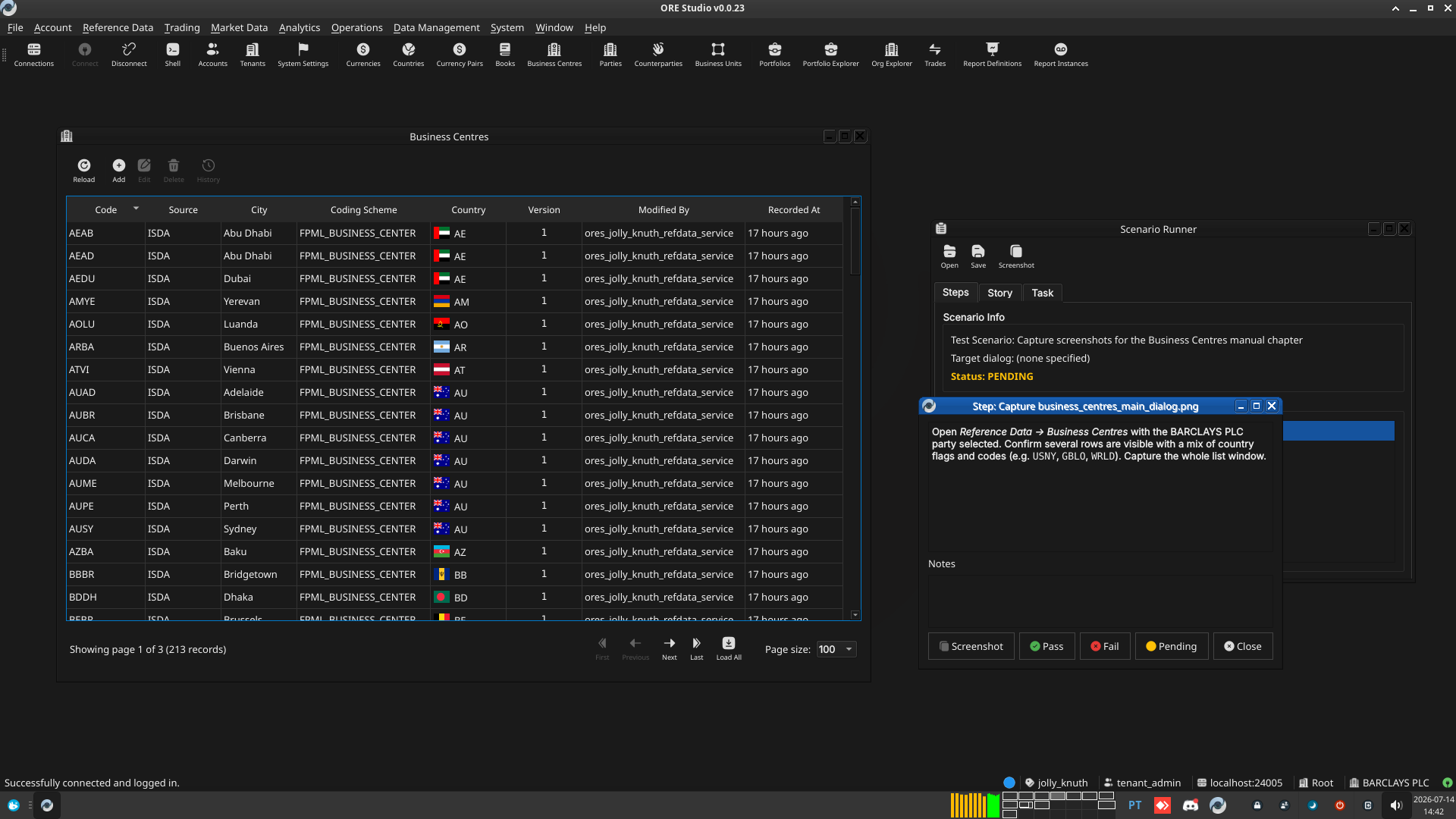 |
3.2. Capture business_centre_details_general.png
Open a business centre with a country set (e.g. USNY) in the detail
dialog by double-clicking its row. Capture the whole General tab,
showing the populated Coding Scheme combo and the flagged Country
combo.
3.2.1. Result
| Field | Value |
|---|---|
| Status | PASS |
| Notes | 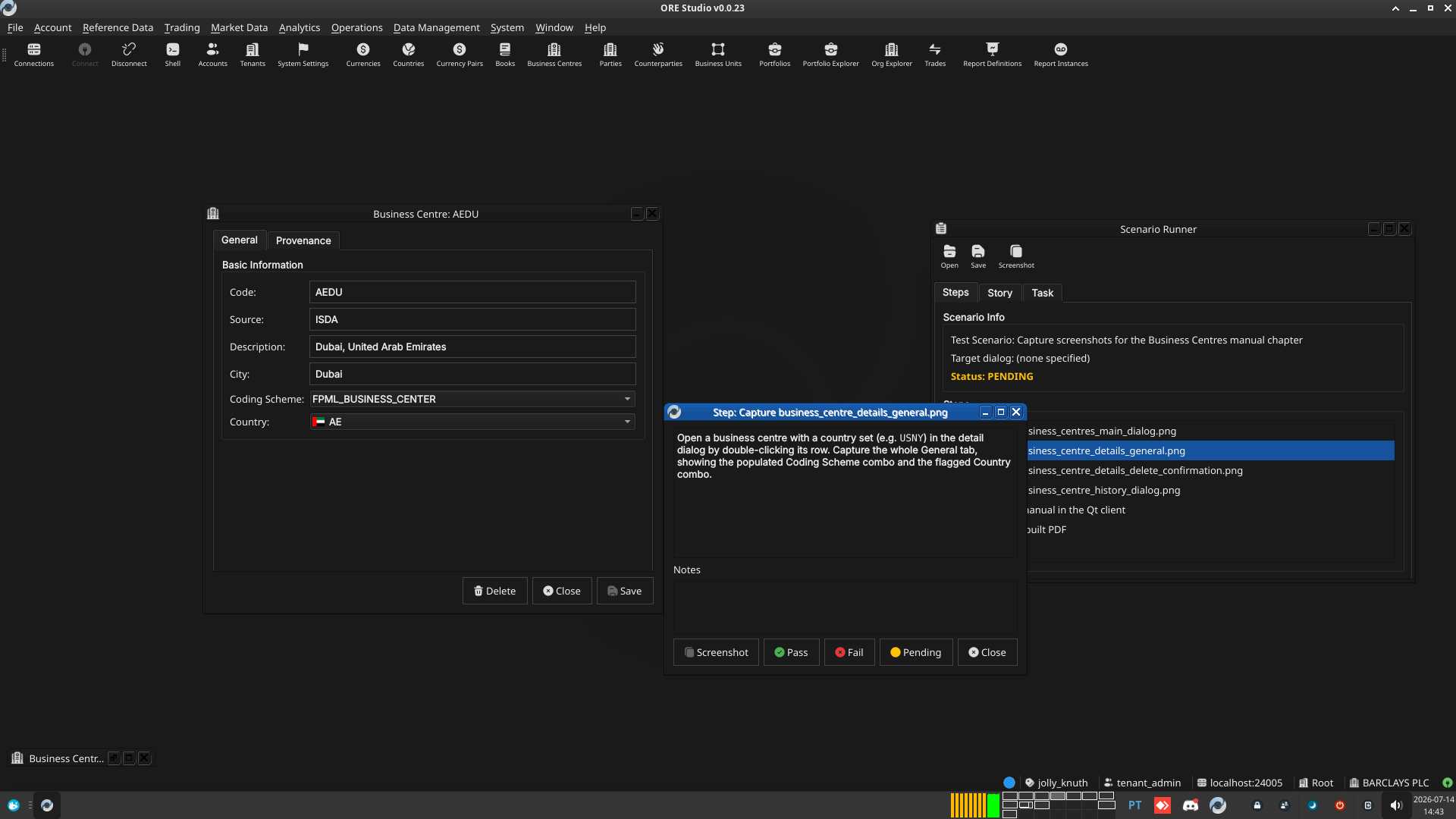 |
3.3. Capture business_centre_details_delete_confirmation.png
Open a business centre that is safe to delete — a fresh test record,
not one referenced by any book or business unit (e.g. add one first
with code ZZTS, coding scheme FPML_BUSINESS_CENTER, country
US). Click Delete and capture the confirmation dialog before
confirming.
3.3.1. Result
| Field | Value |
|---|---|
| Status | FAIL |
| Notes | cannot take screenshots of message boxes with scenario runner because they are modal. took manual one into ./tmp/ |
3.4. Capture business_centre_history_dialog.png
Open the History dialog for a business centre with at least one edit
already recorded (e.g. the ZZTS test record after an edit, before
deleting it). Select a version so the Changes tab shows a populated
field-level diff. Capture the whole dialog.
3.4.1. Result
| Field | Value |
|---|---|
| Status | PASS |
| Notes | 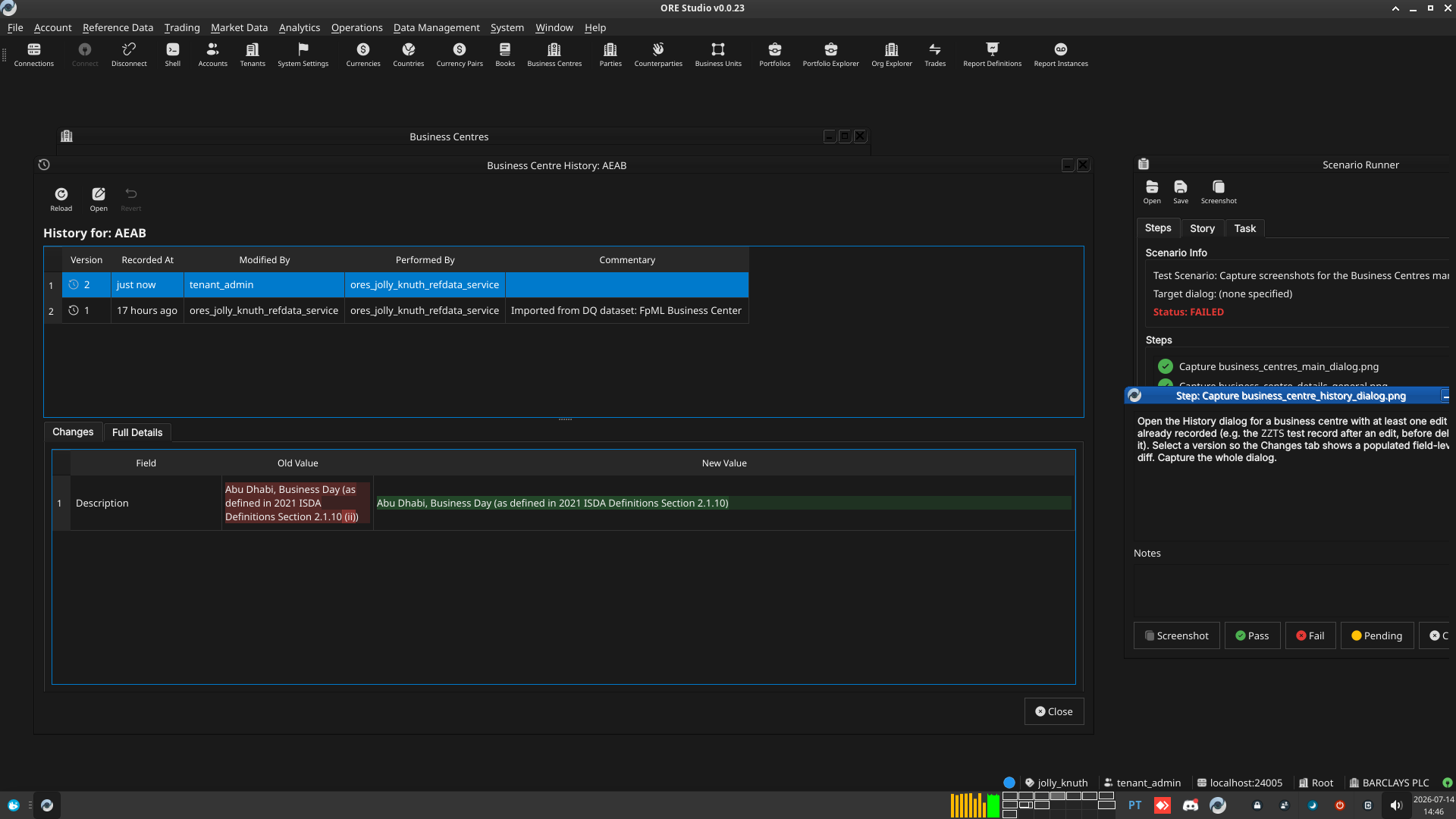 |
3.5. Read the manual in the Qt client
Rebuild the Qt-embedded HTML help (compass build --direct help then
cmake --build --preset <preset> --target deploy_help_qch), restart
the Qt client, open the Business Centres chapter in Help → User
Manual, and read it top to bottom: confirm the prose reads
correctly, the segues work, and every screenshot appears where
expected and matches its caption.
3.5.1. Result
| Field | Value |
|---|---|
| Status | FAIL |
3.6. Check the built PDF
Open the rebuilt user_manual.pdf (e.g. zathura or evince) at
the Business Centres chapter's pages and confirm layout, figure
numbering, and captions look correct in the PDF's own rendering.
3.6.1. Result
| Field | Value |
|---|---|
| Status | FAIL |
4. Results
| Field | Value |
|---|---|
| Status | FAILED |
| Completed at | 2026-07-14T13:49:26Z |
| Branch | feature/document-business-centre |
| Commit | d43b6e9f7 |
| Worktree | jolly_knuth |