Test Scenario: Verify Curve Snapshot viewer: Grid + History tabs
Table of Contents
This page documents a test scenario verifying Curve snapshot builder/viewer in IR Rates synthetic data generation. It is filled in with the target dialog and checklist of steps before testing starts; the QA Validation Runner panel rewrites * Results in place on save.
1. Scenario Info
| Field | Value |
|---|---|
| Verifies task | Curve snapshot builder/viewer |
| Parent story | IR Rates synthetic data generation |
| Target dialog | CurveSnapshotMdiWindow — Market Data > Interest Rate Curves, double-click a row |
| Clients | |
| State | PENDING |
2. Steps
Each step is its own heading — the title should be five to seven
words so it fits on one line in the QA Validation Runner's step list
without wrapping or truncating (e.g. "Edit and save the record", not
a full sentence describing the whole operation). The body below the
title is a bullet-point checklist, not a prose paragraph: give the
tester every piece of context needed to execute that one step without
looking anything up elsewhere — what UI state must already exist,
exactly what to click or type, and exactly what confirms the step
passed. The panel writes each step's PASS/FAIL/PENDING outcome and
notes back as a *** Result child heading directly under it.
2.1. Connect to tenant Barclays Plc
Log in as tenant_admin@barclays_plc / Secure-Password-123 and
select BARCLAYS PLC.
2.1.1. Result
| Field | Value |
|---|---|
| Status | PASS |
2.2. Open Interest Rate Curves
- Menu: Market Data > Interest Rate Curves.
- Confirm a window titled "Interest Rate Curves" opens listing rows for multiple currencies (e.g. RATES / YIELD / USD/SOFR, RATES / YIELD / EUR/ESTR) – this list is the official market_series catalog, not anything synthetic-specific; it would show the same way for a real vendor feed.
2.2.1. Result
| Field | Value |
|---|---|
| Status | PASS |
2.3. Open the Snapshot window for USD/SOFR
- Double-click the USD/SOFR row.
- Confirms pass: a new MDI sub-window titled "Curve Snapshot: USD/ SOFR" opens (not a modal dialog – the Interest Rate Curves window should still be usable behind it), with Grid and History tabs.
2.3.1. Result
| Field | Value |
|---|---|
| Status | PASS |
2.4. Verify the Grid tab
- On the Grid tab: confirm a table on the left with columns Tenor / Rate / Observed, one row per tenor (e.g. 1M, 3M, 6M, 12M, 2Y, 5Y, 10Y), in ascending tenor order.
- Confirm a line chart on the right showing the same points, tenor labels on the X-axis, roughly matching the table's shape.
- If the feed has not published yet, confirm the empty-state message is shown instead of a blank table/chart.
- Click the toolbar Reload button; confirm the table/chart refresh without closing the window.
2.4.1. Result
| Field | Value |
|---|---|
| Status | PASS |
2.5. Verify the History tab
- Switch to the History tab.
- Set Bucket size to a small value (e.g. 1 minute) and Show last to 5, so buckets are quick to observe.
- Confirm a delta table on the left: one column per bucket, each
tenor's rate plus a
(+/-X.X)basis-point delta versus the previous bucket (the oldest shown bucket has no delta). - Confirm an overlay chart on the right: one line per bucket, the newest bold/opaque and older ones visibly fading.
- Change the bucket size/count controls; confirm the table and chart both refresh automatically (no separate reload needed for History).
2.5.1. Result
| Field | Value |
|---|---|
| Status | PASS |
| Notes | - need minutes buckets.; - colour is black, unreadable.; - no legend.; - can't see all columns. ; ; ; 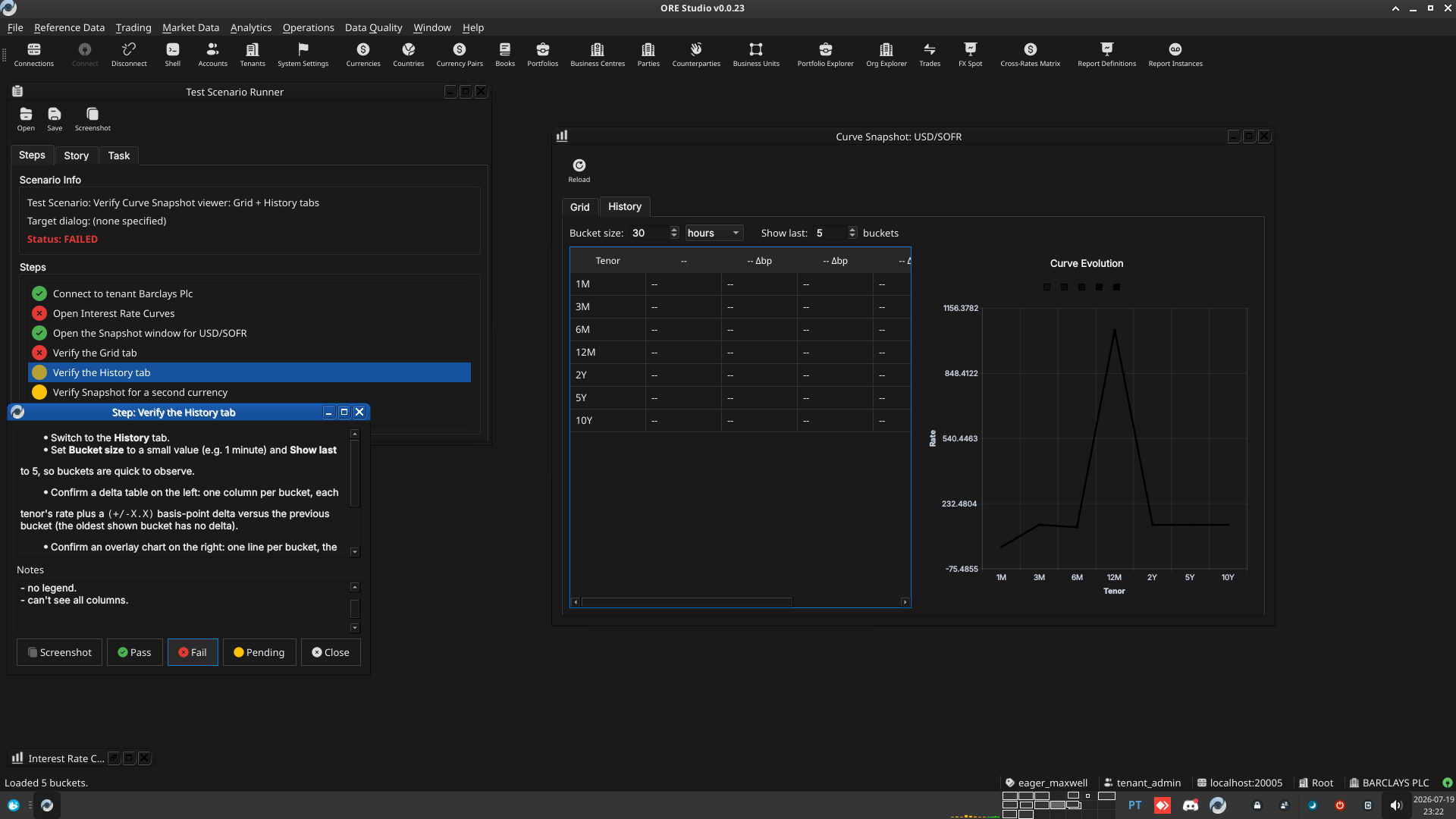 |
2.6. Verify Snapshot for a second currency
- Return to the Interest Rate Curves window (still open behind the snapshot); double-click a different row (e.g. EUR/ESTR).
- Confirm a second, independent Curve Snapshot window opens for EUR/ESTR, correctly labelled, not reusing/overwriting the USD/SOFR window's data.
2.6.1. Result
| Field | Value |
|---|---|
| Status | PASS |
3. Results
| Field | Value |
|---|---|
| Status | PASSED |
| Completed at | 2026-07-19T23:06:56Z |
| Branch | feature/curve-snapshot-builder-viewer |
| Commit | a0c7862c5 |
| Worktree | eager_maxwell |