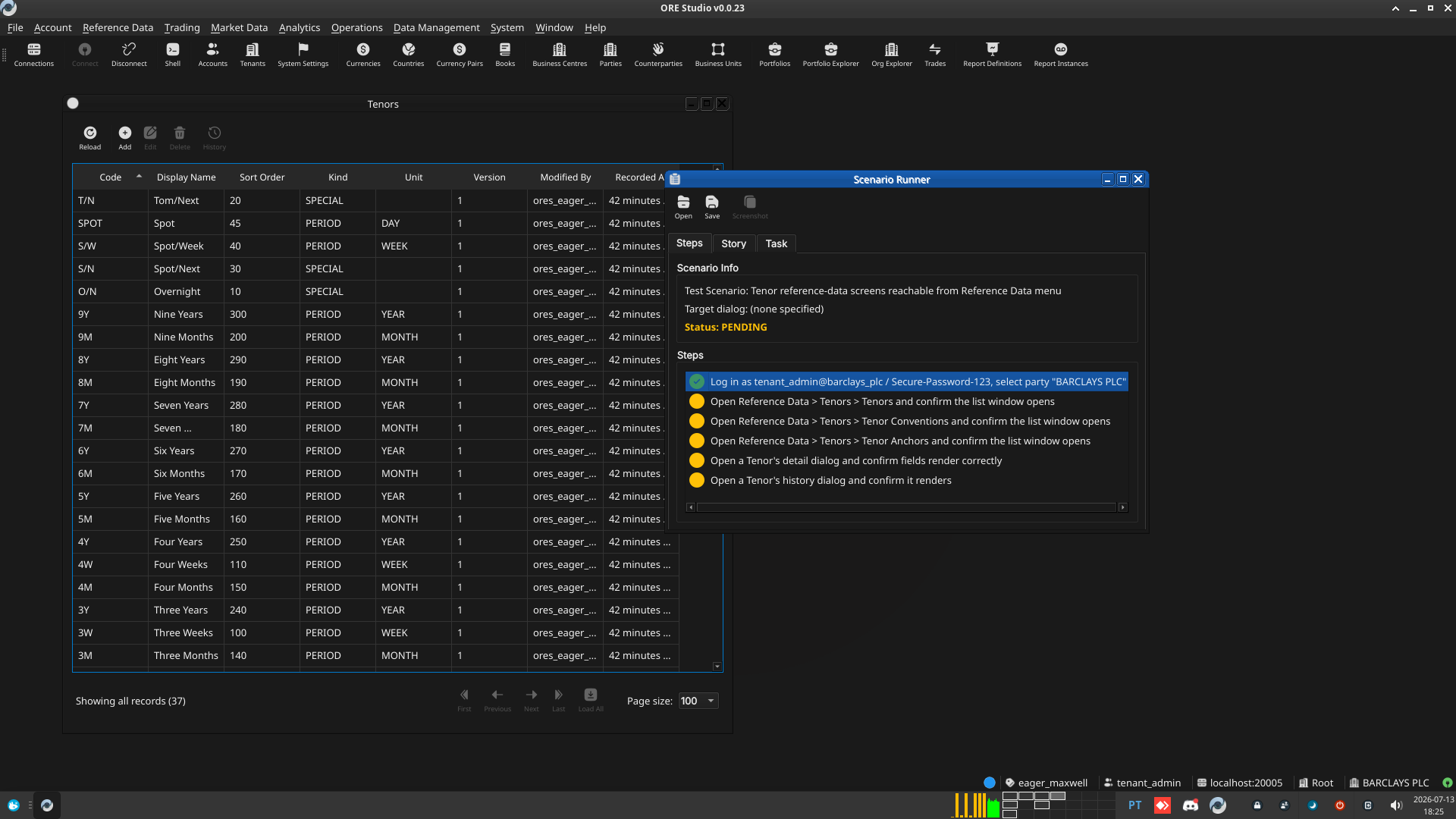
Test Scenario: Tenor reference-data screens reachable from Reference Data menu
Table of Contents
- 1. Scenario Info
- 2. Steps
- 2.1. Log in as tenant_admin@barclays_plc / Secure-Password-123, select party "BARCLAYS PLC"
- 2.2. Open Reference Data > Tenors > Tenors and confirm the list window opens
- 2.3. Open Reference Data > Tenors > Tenor Conventions and confirm the list window opens
- 2.4. Open Reference Data > Tenors > Tenor Anchors and confirm the list window opens
- 2.5. Open a Tenor's detail dialog and confirm fields render correctly
- 2.6. Open a Tenor's history dialog and confirm it renders
- 3. Results
- 4. Notes
This page documents a test scenario verifying Migrate tenor entities to ores.refdata, add tenant provisioner copy fix and Tenor Management UI in IR Rates synthetic data generation. It is filled in with the target dialog and checklist of steps before testing starts; the QA Validation Runner panel rewrites * Results in place on save.
1. Scenario Info
| Field | Value |
|---|---|
| Verifies task | Migrate tenor entities to ores.refdata, add tenant provisioner copy fix and Tenor Management UI |
| Parent story | IR Rates synthetic data generation |
| Target dialog | TenorMdiWindow / TenorConventionMdiWindow / TenorAnchorMdiWindow — Menu: Reference Data > Tenors |
| Clients | |
| State | PENDING |
2. Steps
2.1. Log in as tenant_admin@barclays_plc / Secure-Password-123, select party "BARCLAYS PLC"
If the database was recreated since this tenant was last provisioned,
re-run projects/ores.shell/scripts/library/provisioning/barclays_system_provision.ores
via compass shell -f <path> first.
2.1.1. Result
| Field | Value |
|---|---|
| Status | PASS |
2.2. Open Reference Data > Tenors > Tenors and confirm the list window opens
Should show 37 rows (system default tenor labels: O/N, T/N, S/N, S/W, 1W..1Y etc.) copied into this tenant.
2.2.1. Result
| Field | Value |
|---|---|
| Status | PASS |
| Notes | - default sort column should be the sort order.; - tenor window should have icons in toolbar for conventions and anchors. see how this is done elsewhere with codegen (e.g. currency) |
2.3. Open Reference Data > Tenors > Tenor Conventions and confirm the list window opens
Should show 3 rows (e.g. RATES_SPOT_FORWARD, FX_SWAP_NEAR_LEG, CREDIT_CDS_IMM).
2.3.1. Result
| Field | Value |
|---|---|
| Status | PASS |
2.4. Open Reference Data > Tenors > Tenor Anchors and confirm the list window opens
Should show 5 rows (e.g. SPOT, TODAY, TOMORROW, NEAR_LEG, IMM_ROLL).
2.4.1. Result
| Field | Value |
|---|---|
| Status | PASS |
2.5. Open a Tenor's detail dialog and confirm fields render correctly
Double-click any row in the Tenors list; check code/display_name/kind/ unit/multiplier fields are populated and the dialog closes cleanly.
2.5.1. Result
| Field | Value |
|---|---|
| Status | PASS |
2.6. Open a Tenor's history dialog and confirm it renders
Right-click (or the history action) on a Tenor row; confirm the history dialog opens without error.
2.6.1. Result
| Field | Value |
|---|---|
| Status | PASS |
3. Results
| Field | Value |
|---|---|
| Status | PASSED |
| Completed at | 2026-07-13T17:29:29Z |
| Branch | feature/tenor-management-ui |
| Commit | 0d3c1c71f |
| Worktree | eager_maxwell |
4. Notes