Test Scenario: Acme end-to-end smoke test against the Newton deployment
Table of Contents
This page documents a test scenario verifying Get all 18 services running end-to-end on Newton in Offload service and DB runtime to a WSL host over SSH. It is filled in with the target dialog and checklist of steps before testing starts; the QA Validation Runner panel rewrites * Results in place on save.
1. Scenario Info
| Field | Value |
|---|---|
| Verifies task | Get all 18 services running end-to-end on Newton |
| Parent story | Offload service and DB runtime to a WSL host over SSH |
| Target dialog | CurrencyDetailDialog, ComputeConsoleWindow |
| Clients | |
| State | PENDING |
2. Steps
Each step is its own heading — the title should be five to seven
words so it fits on one line in the QA Validation Runner's step list
without wrapping or truncating (e.g. "Edit and save the record", not
a full sentence describing the whole operation). The body below the
title is a bullet-point checklist, not a prose paragraph: give the
tester every piece of context needed to execute that one step without
looking anything up elsewhere — what UI state must already exist,
exactly what to click or type, and exactly what confirms the step
passed. The panel writes each step's PASS/FAIL/PENDING outcome and
notes back as a *** Result child heading directly under it.
2.1. Connect to tenant Acme via Newton
Log in as tenant_admin@acme / Secure-Password-123 and select
Lloyds Wealth Management Ltd. This client instance's .env has
ORES_NATS_URL=/=ORES_NATS_MONITOR_URL pointed at Newton
(nats://192.168.1.22:20205) and ORES_DB_HOST=/=ORES_TEST_DB_HOST
at 192.168.1.22=/port =5433 rather than localhost – if this login
fails outright (not an auth error, a connection error), the client is
still pointed at local services; re-check .env before re-running.
If the tenant/party don't exist yet, re-run
compass shell -f projects/ores.shell/scripts/library/provisioning/acme_system_provision.ores
against Newton first (same .env override).
2.1.1. Result
| Field | Value |
|---|---|
| Status | PASS |
2.2. Create a new currency record
- System > Reference Data > Currencies (or the toolbar shortcut).
- Click New, fill in a currency not already present (e.g. code
ZZT, name "Zzyzx Test Dollar", minor unit2). - Save. Confirm the new row appears in the list without a manual refresh (the eventing path: the create should publish a NATS event that live-refreshes the grid).
2.2.1. Result
| Field | Value |
|---|---|
| Status | PASS |
2.3. Edit the currency and save
- Open the
ZZTrow just created, change its name to "Zzyzx Test Dollar (Updated)". - Save. Confirm the grid row updates live, again without a manual refresh.
2.3.1. Result
| Field | Value |
|---|---|
| Status | PASS |
2.4. View the currency's history
- Right-click the
ZZTrow (or use the History toolbar action) to open its history dialog. - Confirm two versions are listed (the original create and the edit), each with the correct =modified_by=/timestamp.
2.4.1. Result
| Field | Value |
|---|---|
| Status | PASS |
2.5. Delete the currency record
- Select the
ZZTrow, delete it (soft-delete / deactivate per the entity's own semantics). - Confirm it disappears from the active list live, and still appears in its history dialog as a closed-out version.
2.5.1. Result
| Field | Value |
|---|---|
| Status | PASS |
2.6. Open the Compute Console
- Menu: Analytics > Console (opens
ComputeConsoleWindow, backed by Newton'sores.compute.service=/=ores.compute.wrapperreplicas – confirmed running, 5 replicas, during this task's own verification). - Confirm the console opens without an error and shows the connected compute cluster (queue/worker state visible, not blank/erroring).
2.6.1. Result
| Field | Value |
|---|---|
| Status | PASS |
| Notes | 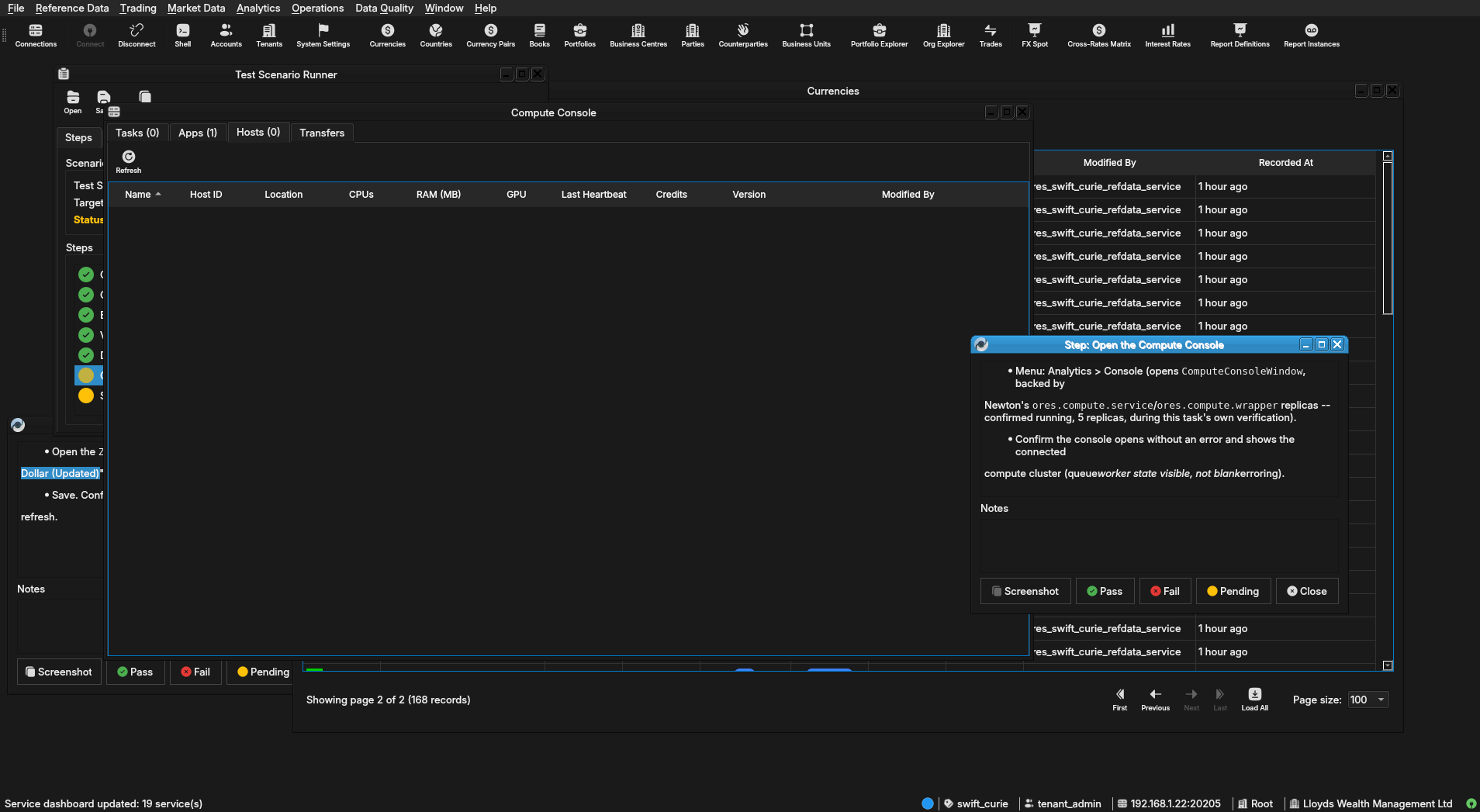 |
2.7. Submit and run a compute job
- Toolbar: New Batch (the
BatchDetailDialog). Fill in the minimum required fields for a batch against Lloyds Wealth Management Ltd's own portfolios/books (created by the Acme synthetic provisioning step) and submit. - Watch the batch progress in the console (queued -> running ->
completed) through to a terminal state. Confirm it reaches
completed(not stuckqueued=/=runningindefinitely, and notfailed) – this exercises the full dispatch path acrossores.compute.service(dispatch) and theores.compute.wrapperreplicas (execution) running on Newton. - Open the batch's result/detail view and confirm output is present (not empty), confirming results made it back through NATS/DB to the client.
2.7.1. Result
| Field | Value |
|---|---|
| Status | PASS |
3. Results
| Field | Value |
|---|---|
| Status | PASSED |
| Completed at | 2026-07-30T19:03:39Z |
| Branch | feature/finish-all-18-services-on-newton |
| Commit | 5d9da9b17 |
| Worktree | swift_curie |