Test Scenario: Verify ores.dq commissioned entities (catalog, change reasons, data domains, artefact types, dataset bundles, LEI registry)
This page documents a test scenario verifying Task: Bind ores.dq entities to profiles; verify zero-diff regen in Story: Entity classification and drift baseline: ores.dq. It is filled in with the target dialog and checklist of steps before testing starts; the QA Validation Runner panel rewrites * Results in place on save.
1. Before you start
- Build must include this branch's commits (
feature/bind-dq-sql-entities-to-profiles,
through the "Commission full C++/Qt for lei_entity, lei_relationship,
report_definition, synthetic_fx_spot_config" commit). Confirm via
compass build (full build, green, including ores.qt.exe).
- The database must be freshly provisioned with Acme Corporation:
compass db recreate -y -k then compass shell -f
projects/ores.shell/scripts/library/provisioning/how_do_i_provision_the_system_with_acme_corporation_holding_group.ores.
Confirm the run completes with no failed steps before starting.
- Services must be running:
compass services start — confirm
ores.dq.service and nats-server reach running via compass
services status.
2. Scenario Info
| Field |
Value |
| Verifies task |
Task: Bind ores.dq entities to profiles; verify zero-diff regen |
| Parent story |
Story: Entity classification and drift baseline: ores.dq |
| Target dialog |
CatalogDetailDialog (Data Quality > Data Catalogue > Catalogues) / DataDomainDetailDialog (Data Quality > Data Catalogue > Data Domains) / ChangeReasonDetailDialog (Data Quality > Audit Trail > Change Reasons) / ChangeReasonCategoryDetailDialog (Data Quality > Audit Trail > Change Reason Categories) / ArtefactTypeDetailDialog (Data Quality > Data Catalogue > Artefact Types) / DatasetBundleDetailDialog (Data Quality > Data Catalogue > Dataset Bundles) / LeiEntityMdiWindow / LeiRelationshipMdiWindow (Data Quality > LEI Registry) |
| Clients |
blue, red |
| State |
PENDING |
3. Steps
3.1. blue
3.1.1. Log in as tenant_admin@acme_corporation
- Username:
tenant_admin@acme_corporation
- Password:
Secure-Password-123
- Confirms: login succeeds and the main window loads with the Data
Quality menu present.
- Result
3.1.2. Create a new catalog record
- Navigate: Data Quality > Data Catalogue > Catalogues.
- Click Add, fill in Name/Description/Owner with any values, Save.
- Confirms: the new row appears in the list without a manual refresh.
- Result
3.1.3. Reopen and verify catalog fields
- Double-click the just-created row to reopen
CatalogDetailDialog.
- Confirms: every field shows exactly what was entered in the
previous step (round-trip through save/reload).
- Result
3.1.4. Edit and save the catalog record
- With the dialog still open, change the Description field and Save.
- Confirms: the list's Description column updates immediately, and
the dialog's title bar / save button returns to its unmodified state.
- Result
3.1.5. Delete the catalog record
- Select the row in the list, use the Delete action, confirm the
prompt.
- Confirms: the row disappears from the list immediately.
- Result
3.1.6. Verify catalog history dialog
- Reselect the (now soft-deleted) row if still visible, or any other
catalog row that was edited above; open its History dialog.
- Confirms: separate entries exist for create, the edit, and the
delete, each with a change reason and timestamp.
- Result
3.1.7. Create and save a data domain
- Navigate: Data Quality > Data Catalogue > Data Domains.
- Add a new record (Name/Description), Save; reopen it to confirm
the fields round-trip; edit the Description and Save again.
- Confirms: list refreshes after each save; reopened values match
what was entered.
- Result
3.1.8. Create and save a change reason category
- Navigate: Data Quality > Audit Trail > Change Reason Categories.
- Add a new record (Code/Description), Save; reopen to confirm
round-trip; edit and Save again.
- Confirms: same as above for this entity.
- Result
| Field |
Value |
| Status |
FAIL |
| Notes |
seem to have two copies, saved by different services: DDL user (population scripts?) and IAM service. all else works correctly.; ; 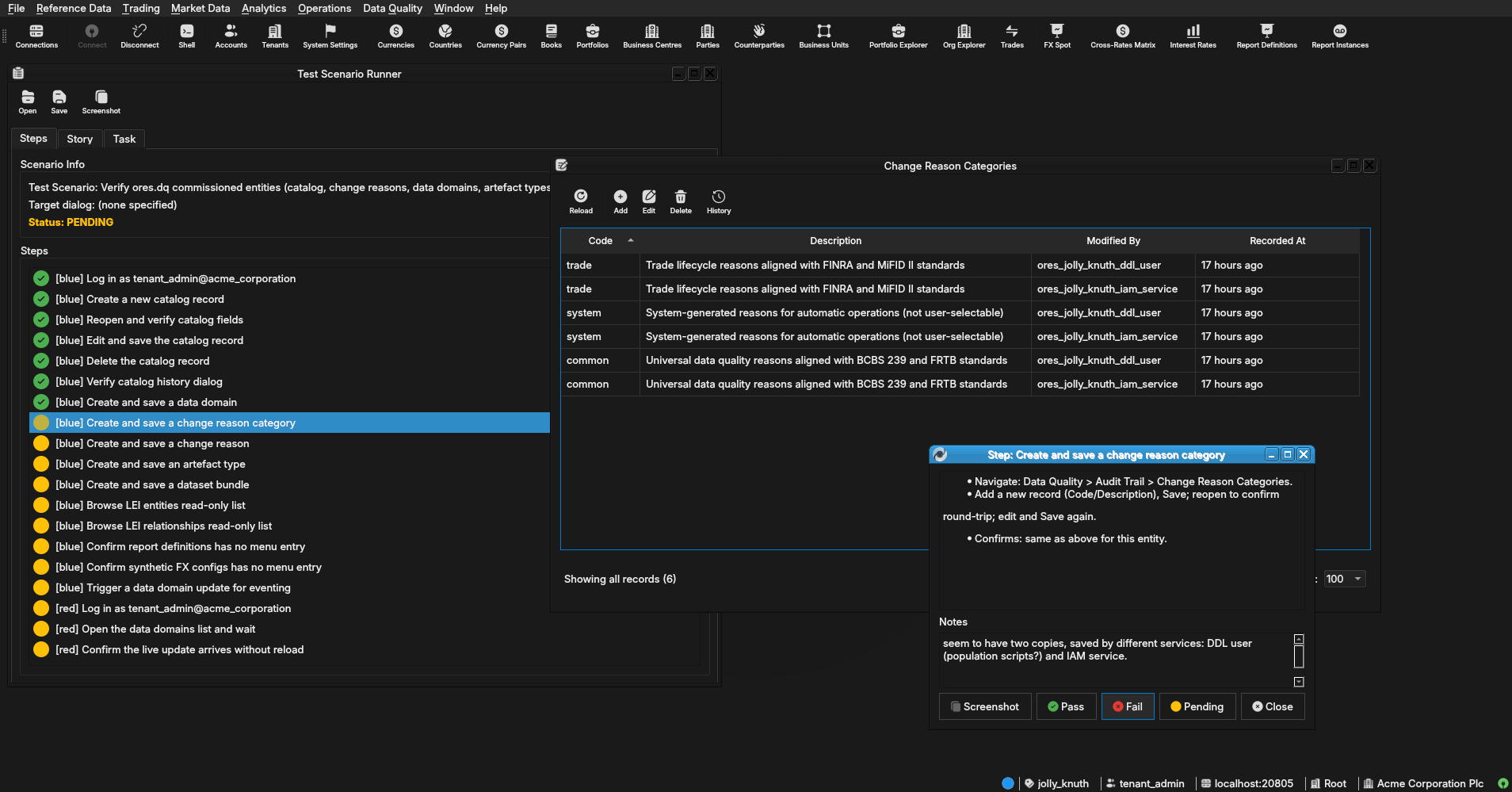 |
3.1.9. Create and save a change reason
- Navigate: Data Quality > Audit Trail > Change Reasons.
- Add a new record (Code/Description/Category — use the category
created above), Save; reopen to confirm round-trip; edit and Save
again.
- Confirms: same as above; the Category column shows the linked code.
- Result
| Field |
Value |
| Status |
FAIL |
| Notes |
same as change reason categories, weird duplication. also change reason categories needs to be a combo box. everything else works correctly.; ; 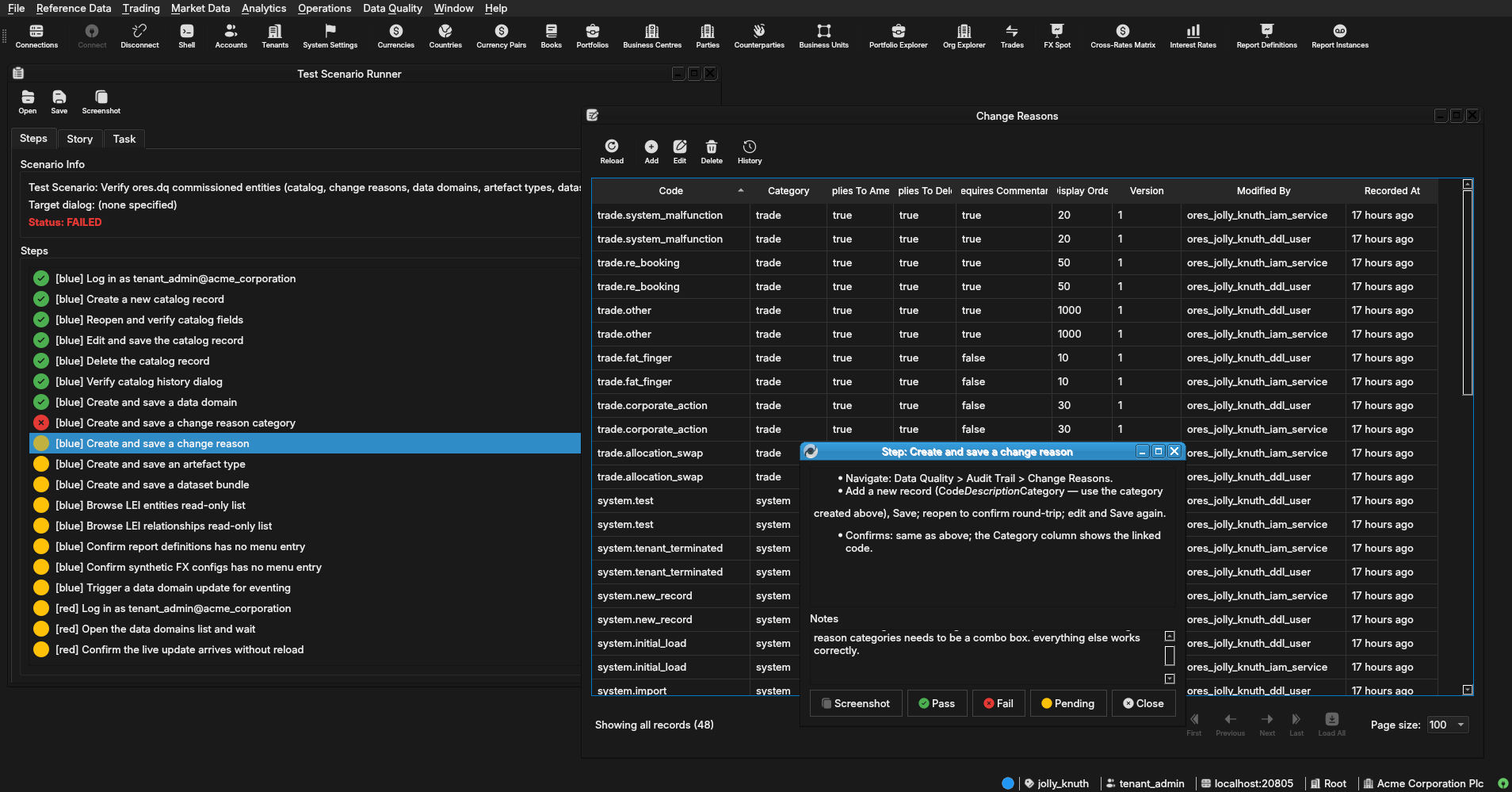 |
3.1.10. Create and save an artefact type
- Navigate: Data Quality > Data Catalogue > Artefact Types.
- Add a new record (Code/Name/Artefact Table/Target Table/Target
Subject), Save; reopen to confirm round-trip.
- Confirms: list shows the new row with all columns populated.
- Result
| Field |
Value |
| Status |
FAIL |
| Notes |
- seem to be missing most fields in details dialog (artefac table, target table, target subject etc).; - eventing not working, but manual reload shows new entry. |
3.1.11. Create and save a dataset bundle
- Navigate: Data Quality > Data Catalogue > Dataset Bundles.
- Add a new record (Code/Name/Description), Save; reopen to confirm
round-trip; edit and Save again.
- Confirms: same as above for this entity.
- Result
| Field |
Value |
| Status |
PENDING |
3.1.12. Browse LEI entities read-only list
- Navigate: Data Quality > LEI Registry > LEI Entities.
- Confirms: the list loads and paginates (page-size/offset controls
work); no Add/Delete action is present anywhere on the list window;
double-clicking a row opens a read-only view with no Save button
(or opens nothing beyond a non-editable display) — there must be no
way to create, edit, or delete a row from this window.
- Result
| Field |
Value |
| Status |
PENDING |
3.1.13. Browse LEI relationships read-only list
- Navigate: Data Quality > LEI Registry > LEI Relationships.
- Confirms: same read-only checks as the previous step.
- Result
| Field |
Value |
| Status |
PENDING |
3.1.14. Confirm report definitions has no menu entry
- Open every submenu under Data Quality (Badges, Classifications,
LEI Registry, Audit Trail, Data Catalogue) and search for
"Report Definition".
- Confirms: no menu item anywhere opens a report_definition window —
this entity is DQ-side staging data only, its Qt UI is deliberately
disabled.
- Result
| Field |
Value |
| Status |
PENDING |
3.1.15. Confirm synthetic FX configs has no menu entry
- Repeat the same menu search for "Synthetic FX" / "FX Spot".
- Confirms: no menu item anywhere opens a synthetic_fx_spot_config
window, for the same reason as the previous step.
- Result
| Field |
Value |
| Status |
PENDING |
3.1.16. Trigger a data domain update for eventing
- Reopen any data domain record saved earlier in this scenario (Data
Quality > Data Catalogue > Data Domains) and change its Description
to a new, distinctive value, then Save.
- Confirms: the save succeeds in this (blue) client as normal — the
red client's corresponding step checks the notification side.
- Result
| Field |
Value |
| Status |
PENDING |
3.2. red
3.2.1. Log in as tenant_admin@acme_corporation
- Username:
tenant_admin@acme_corporation
- Password:
Secure-Password-123
- Confirms: a second, independent client session starts successfully
alongside blue's.
- Result
| Field |
Value |
| Status |
PENDING |
3.2.2. Open the data domains list and wait
- Navigate: Data Quality > Data Catalogue > Data Domains.
- Leave this list window open and visible while blue performs its
"Trigger a data domain update for eventing" step.
- Confirms: nothing yet — this just gets the window into the state
the next step observes.
- Result
| Field |
Value |
| Status |
PENDING |
3.2.3. Confirm the live update arrives without reload
- After blue saves its Description change, watch this (red) client's
already-open Data Domains list.
- Confirms: the changed Description value appears in the list within
a few seconds with no manual refresh/reopen action taken in this
client — this is what actually exercises the LISTEN/NOTIFY-to-NATS
relay end to end for the newly-commissioned registrar wiring, not
just the repository layer ctest already covers.
4. Results
| Field |
Value |
| Status |
FAILED |
| Completed at |
2026-08-07T01:32:35Z |
| Branch |
feature/bind-dq-sql-entities-to-profiles |
| Commit |
e97152a0d |
| Worktree |
jolly_knuth |
| Status |
|
| Completed at |
|
| Branch |
|
| Commit |
|
| Worktree |
|
5. Notes
Emacs 29.3 (Org mode 9.6.15)