Test Scenario: Synthetic data themes (2016 ORE Samples / 2026 Realistic / Uniform Volatility Demo) and the Start-at-Root theme picker
Table of Contents
- 1. Scenario Info
- 2. Steps
- 2.1. Connect to tenant Barclays Plc
- 2.2. Confirm the three root themes are present and renamed
- 2.3. Expand the Uniform Volatility Demo theme
- 2.4. Expand the 2016 ORE Samples theme
- 2.5. Expand the 2026 Realistic theme
- 2.6. Start at the tree root and confirm the theme picker appears
- 2.7. Pick a theme from the Start-at-Root dialog and confirm only it starts
- 2.8. Cancel the Start-at-Root dialog and confirm nothing starts
- 2.9. Stop the started theme
- 3. Results
- 4. Notes
This page documents a test scenario verifying Source vintage historical IR rate dataset + populate script in IR Rates synthetic data: dataset seeding, index cleanup, dual-curve, quoting conventions. It is filled in with the target dialog and checklist of steps before testing starts; the QA Validation Runner panel rewrites * Results in place on save.
1. Scenario Info
| Field | Value |
|---|---|
| Verifies task | Source vintage historical IR rate dataset + populate script |
| Parent story | IR Rates synthetic data: dataset seeding, index cleanup, dual-curve, quoting conventions |
| Target dialog | (Qt dialog class under test, if any.) |
| Clients | |
| State | PENDING |
2. Steps
Each step is its own heading — the title should be five to seven
words so it fits on one line in the QA Validation Runner's step list
without wrapping or truncating (e.g. "Edit and save the record", not
a full sentence describing the whole operation). The body below the
title is a bullet-point checklist, not a prose paragraph: give the
tester every piece of context needed to execute that one step without
looking anything up elsewhere — what UI state must already exist,
exactly what to click or type, and exactly what confirms the step
passed. The panel writes each step's PASS/FAIL/PENDING outcome and
notes back as a *** Result child heading directly under it.
2.1. Connect to tenant Barclays Plc
Log in against the prime_origin environment as
tenant_admin@barclays_plc / Secure-Password-123 and select
BARCLAYS PLC. If the database has been recreated since last use,
re-provision first: compass shell -f
projects/ores.shell/scripts/library/provisioning/barclays_system_provision.ores.
Then open the Market Simulator window (System > Market Simulator).
2.1.1. Result
| Field | Value |
|---|---|
| Status | PASS |
2.2. Confirm the three root themes are present and renamed
- In the Market Simulator tree, expand the root node.
- Confirm exactly three top-level Collection groupings exist, each
appearing twice (once for FX, once for IR curves):
Uniform Volatility Demo2016 ORE Samples2026 Realistic
- Confirms PASS: no other/legacy theme names (e.g. "realistic", "basic") remain in the tree.
2.2.1. Result
| Field | Value |
|---|---|
| Status | PASS |
2.3. Expand the Uniform Volatility Demo theme
- Expand both
Uniform Volatility Democollections (FX and IR). - Confirm FX shows 8 major + 3 EM/exotic driver pairs and IR shows the uniform Vasicek curve set.
- Confirms PASS: node expands without error and item counts look populated (non-empty).
2.3.1. Result
| Field | Value |
|---|---|
| Status | PASS |
2.4. Expand the 2016 ORE Samples theme
- Expand both
2016 ORE Samplescollections (FX and IR). - Confirm IR curves are the legacy IBOR-era set (e.g. LIBOR-style indices, not RFR).
- Confirms PASS: node expands without error and curve names reflect the legacy IBOR-era archetype.
2.4.1. Result
| Field | Value |
|---|---|
| Status | PASS |
2.5. Expand the 2026 Realistic theme
- Expand both
2026 Realisticcollections (FX and IR). - Confirm IR curves are the RFR-era set (e.g. SOFR/ESTR-style indices, not LIBOR).
- Confirms PASS: node expands without error and curve names reflect the RFR archetype.
2.5.1. Result
| Field | Value |
|---|---|
| Status | PASS |
2.6. Start at the tree root and confirm the theme picker appears
- Select the invisible root node (or press "Start" with nothing selected below the root) and click Start.
- Confirms PASS: a dialog appears titled "Start" asking "Starting
everything at once would run mutually-exclusive vintages side by
side. Which dataset would you like to start?" with a dropdown
listing exactly
Uniform Volatility Demo,2016 ORE Samples,2026 Realistic. - Confirms FAIL: Start cascades all themes simultaneously without prompting.
2.6.1. Result
| Field | Value |
|---|---|
| Status | PASS |
| Notes | when i press the start button with the synthetic root folder selected nothing happens.; ; ; 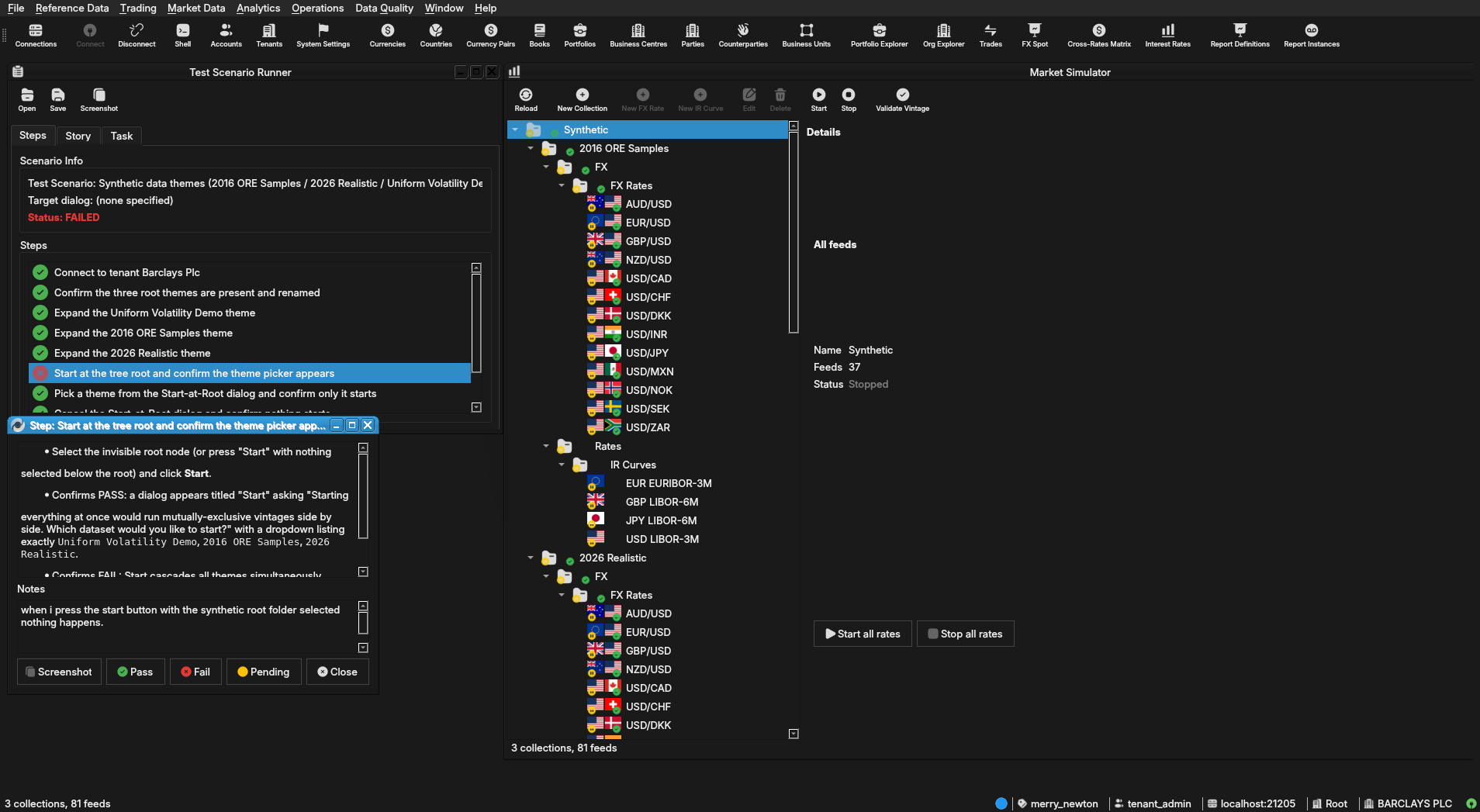 |
2.7. Pick a theme from the Start-at-Root dialog and confirm only it starts
- In the dialog from the previous step, select
2016 ORE Samplesand confirm (OK). - Confirm only the
2016 ORE SamplesFX and IR feeds start (status icons/ticking prices), andUniform Volatility Demo/2026 Realisticfeeds remain stopped. - Confirms PASS: only the chosen theme's feeds are running; the other two themes are untouched.
2.7.1. Result
| Field | Value |
|---|---|
| Status | PASS |
2.8. Cancel the Start-at-Root dialog and confirm nothing starts
- Select the root node again and click Start.
- In the dialog, click Cancel (or close it) without picking a theme.
- Confirm no feeds start as a result — tree stays in the same running/stopped state as before this step.
- Confirms PASS: dialog dismissal is a no-op.
2.8.1. Result
| Field | Value |
|---|---|
| Status | PASS |
2.9. Stop the started theme
- Select the
2016 ORE Samplescollection (or root) and click Stop. - Confirm all
2016 ORE SamplesFX and IR feeds stop cleanly. - Confirms PASS: no feeds left running, no errors in the client log.
2.9.1. Result
| Field | Value |
|---|---|
| Status | PASS |
3. Results
| Field | Value |
|---|---|
| Status | PASSED |
| Completed at | 2026-07-29T11:25:02Z |
| Branch | feature/qa-market-simulator-tree-theme-atomicity |
| Commit | bfc2de04c |
| Worktree | merry_newton |