Test Scenario: Verify day-scaled kappa/sigma calibration fix for IR curve feeds
This page documents a test scenario verifying Fix day-scaled kappa/sigma calibration across short-rate processes in IR Rates synthetic data: dataset seeding, index cleanup, dual-curve, quoting conventions. It is filled in with the target dialog and checklist of steps before testing starts; the QA Validation Runner panel rewrites * Results in place on save.
Before the fix, starting an IR curve config published wildly unrealistic
rates (~150-250%, and a FRA point that never moved) because
discount_factor() accumulated bond-time as if every tick were a full
year regardless of what a tick represents. This scenario starts a real,
provisioned config (synthetic.ir_curve_configs.realistic, CIR-based —
this is the dataset the Barclays provisioning flow actually publishes;
Vasicek's own discount_factor()=/=next() dt-scaling is already covered
by 166 automated Catch2 test cases including dedicated per-process dt
coverage, so this scenario's job is an end-to-end UI-level sanity check
of the published numbers, not a re-verification of the per-process math)
and confirms the published rate is a plausible single-digit percentage
that actually moves across tenors, not a blown-up or frozen one.
2. Steps
Each step is its own heading — the title should be five to seven
words so it fits on one line in the QA Validation Runner's step list
without wrapping or truncating (e.g. "Edit and save the record", not
a full sentence describing the whole operation). The body below the
title is a bullet-point checklist, not a prose paragraph: give the
tester every piece of context needed to execute that one step without
looking anything up elsewhere — what UI state must already exist,
exactly what to click or type, and exactly what confirms the step
passed. The panel writes each step's PASS/FAIL/PENDING outcome and
notes back as a *** Result child heading directly under it.
2.1. Connect to tenant Barclays Plc
- Log in as
tenant_admin@barclays_plc / Secure-Password-123.
- Select party BARCLAYS PLC if not already the default.
- Confirm login succeeds and the main window opens with no error dialog.
2.2. Open IR Curve Generation Configs
- Menu: Market Data > Synthetic > Configuration > IR Curve Generation
Configs.
- Confirm the list is populated (published by the
synthetic.ir_curve_configs.realistic dataset during provisioning
— 20 currency/index rows, CIR process type).
- Pick the
USD/USD-SOFR row (or any enabled row if that exact one
is missing) and note its kappa=/=theta=/=sigma=/=initial_rate
values from the detail dialog — they should be plain, real
annualised numbers now (e.g. theta around 0.04, not a
day-scaled fraction like 0.0001).
2.3. Start the IR curve feed
- With the row from the previous step selected, use the toolbar
Start action.
- Confirm a success status message appears (e.g. "Feed started:
…"), not an error.
- Leave the feed running for at least 30 seconds so several ticks
publish (
ticks_per_hour=60 means roughly one tick per minute of
wall-clock time; a longer wait sees more ticks).
2.3.1. Result
| Field |
Value |
| Status |
PASS |
| Notes |
kappa, sigma, theta etc look fine now; ; 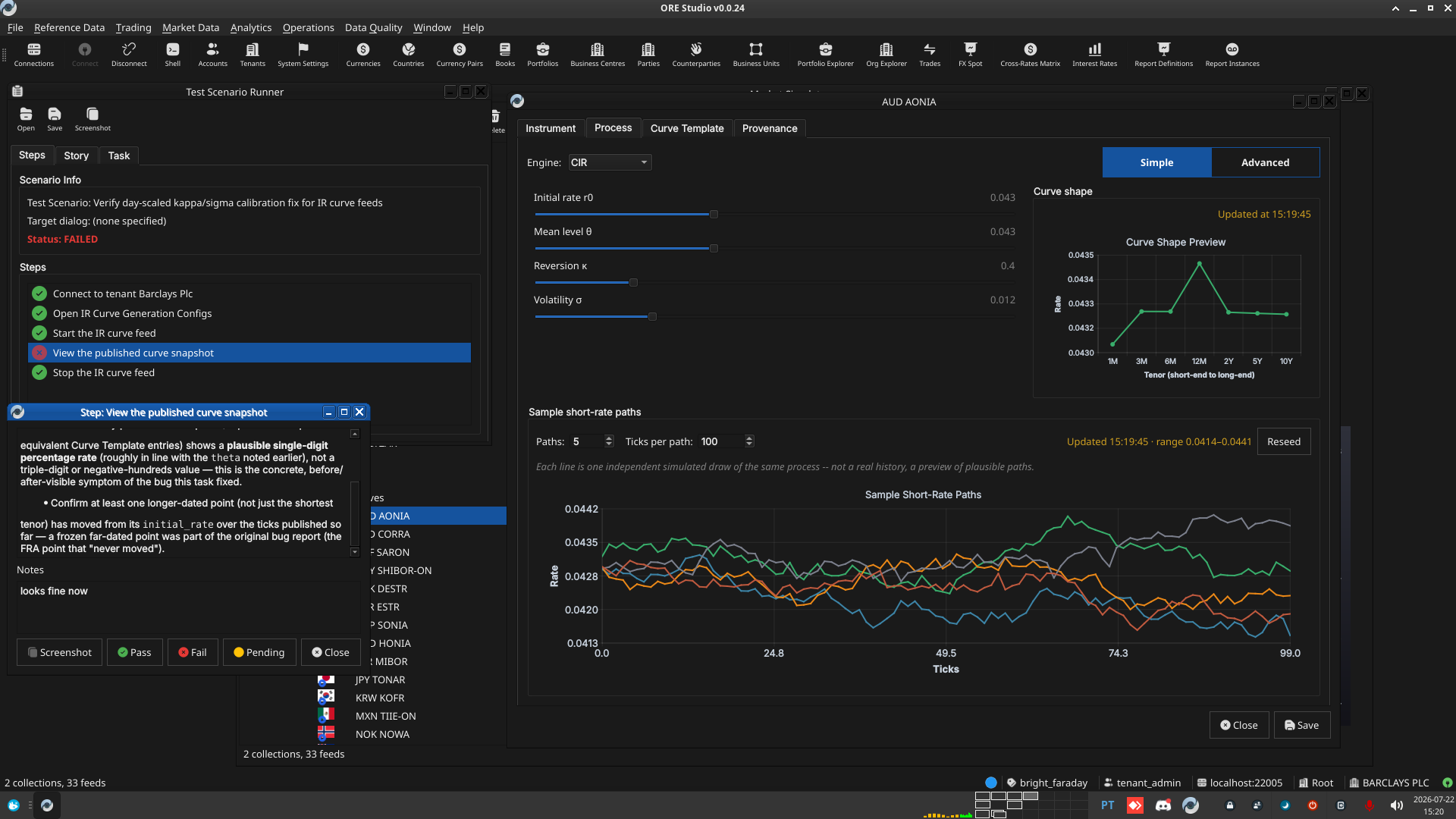 |
2.4. View the published curve snapshot
- Menu: Market Data > Interest Rates.
- Navigate to the same currency/index selected above and open its
Curve Snapshot grid.
- Confirm every published tenor point (Deposit/FRA/Swap or
equivalent Curve Template entries) shows a plausible single-digit
percentage rate (roughly in line with the
theta noted earlier),
not a triple-digit or negative-hundreds value — this is the
concrete, before/after-visible symptom of the bug this task fixed.
- Confirm at least one longer-dated point (not just the shortest
tenor) has moved from its
initial_rate over the ticks published
so far — a frozen far-dated point was part of the original bug
report (the FRA point that "never moved").
2.4.1. Result
| Field |
Value |
| Status |
PASS |
| Notes |
looks fine to me but inspect it; ; 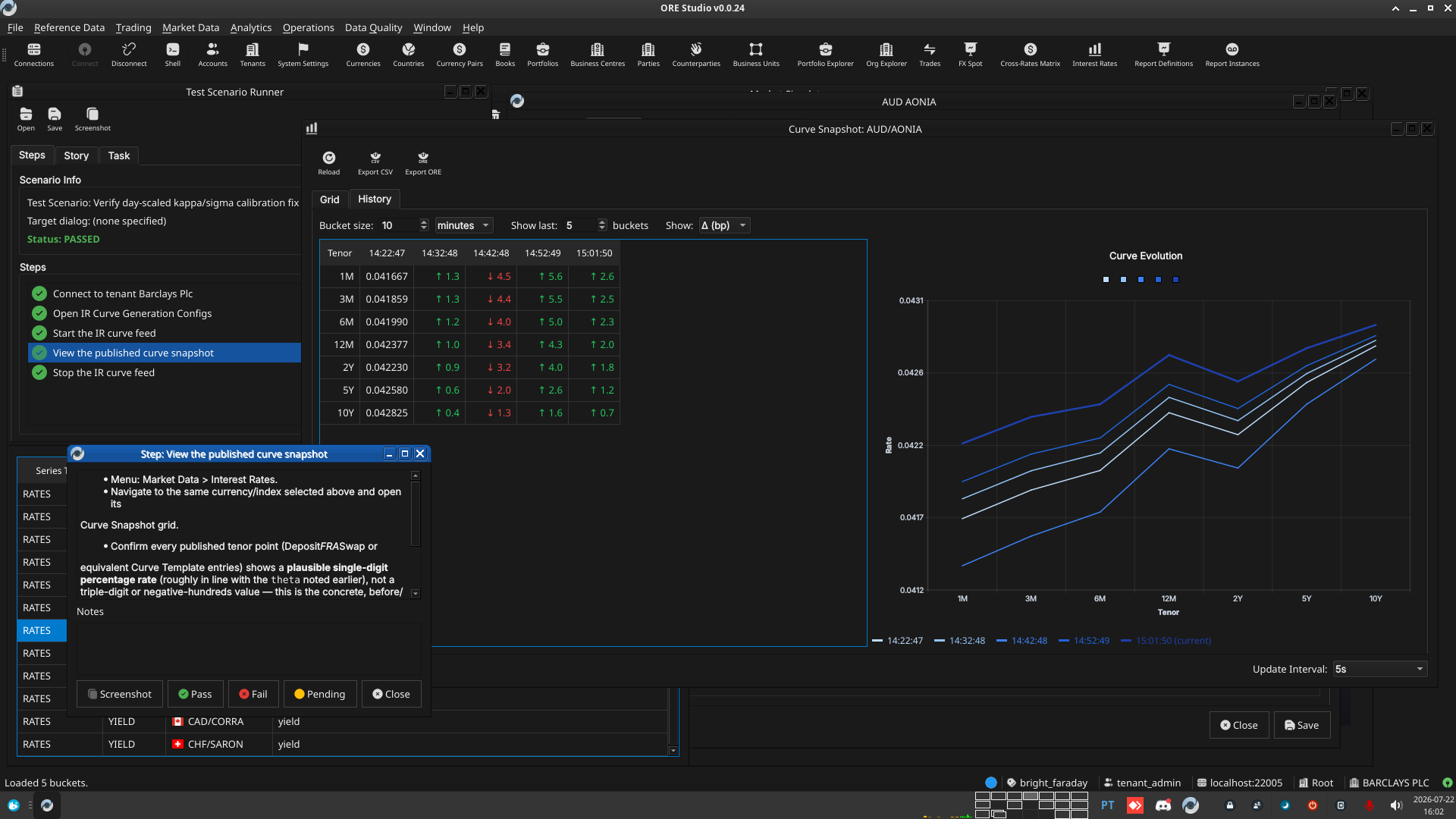 |
2.5. Stop the IR curve feed
- Return to the IR Curve Generation Configs window, select the same
row, and use the toolbar Stop action.
- Confirm a success status message appears and no further ticks
publish after stopping (re-check the Curve Snapshot after another
30 seconds — the last published values should not have changed).
3. Results
| Field |
Value |
| Status |
PASSED |
| Completed at |
2026-07-22T15:33:42Z |
| Branch |
feature/fix-vasicek-day-scaled-calibration |
| Commit |
c720c354d |
| Worktree |
bright_faraday |
4. Notes
Emacs 29.3 (Org mode 9.6.15)