Test Scenario: Verify the structure screens
Table of Contents
- 1. Before you start
- 2. Scenario Info
- 3. Why this scenario is abandoned
- 4. Steps
- 4.1. Log in as diane.kay
- 4.2. Reach the structures list from the area
- 4.3. Read the list's columns and its trees
- 4.4. Search by identifier and by kind
- 4.5. Open a deal and read its identity
- 4.6. See the tree, and open another node from it
- 4.7. Add a leg, then take it out
- 4.8. Read the history and the price notice
- 4.9. Group two trades into a new deal
- 5. Results
- 6. Notes
This page documents a test scenario verifying Build Book a trade in Trade Blotter — the remaining work. It is filled in with the target screens and checklist of steps before testing starts; record the outcome by hand in *** Result.
1. Before you start
Ready to test as it stands. The fleet is up on this checkout, and the database
holds tenant acme_corporation provisioned from acme_demo with its trade
population: 22 structures, each carrying an identifier, and 44 legs over 80
trades.
Sign out and back in before Step 1 if this browser was signed in before the database was last provisioned. A session outlives the data it names, and a stale one shows you the party it was opened with rather than the one the provisioned run made.
What the screen shows is one party's holdings. The structures list is
party-scoped, as every trading read is: signed in as diane.kay you see the
structures of ACME Corporation UK plc, which the population grouped as six
or seven deals of two legs each. The database holds 22 across the four legal
entities; the other fifteen belong to parties this session does not work for.
A rule the data does not yet meet — read this before Step 6. A structure's legs are supposed to share one party and one counterparty. The store enforces the party and not the counterparty, so the population's own pairs carry two different counterparties each. The grouping screen states the rule and refuses a mixed pair, which means a grouping can only succeed where two ungrouped trades happen to share a counterparty. If the picker offers no such pair, Step 6 cannot pass, and that is the data's fault and not the screen's: record it as FAILED with that note, and see the capture filed for it.
2. Scenario Info
| Field | Value |
|---|---|
| Verifies task | Build Book a trade |
| Parent story | Trade Blotter — the remaining work |
| Target screen | Structures and packages, at /trading/structures, and a deal's page under it |
| Clients | |
| State | ABANDONED |
3. Why this scenario is abandoned
The screen it walks no longer exists. The structures list was one of the two lists
the blotter replaced, and /trading/structures now redirects to
Merge the trades and structures screens's
blotter, which reads the trades and the structures in one list, by portfolio tree
or by counterparty. Steps 2 to 5 read that list's columns, its search and its
kind filter, and none of them has a screen to read.
The structure page half of this scenario — open a structure, read its identity,
its tree, add and unlink a leg, read its history — still holds, and the automated
case specs/structures.spec.ts walks it against the provisioned tenant on every
run. What a person should read by hand is the blotter; this scenario is kept for
the record of what the removed list did, with its screenshots.
4. Steps
Each step names what to click and what confirms it passed. The persona is the
provisioned Trading one: diane.kay@acme_corporation / Secure-Password-123.
4.1. Log in as diane.kay
- Open http://127.0.0.1:20802/
- Username
diane.kay@acme_corporation, passwordSecure-Password-123, then Sign in. - Passes when the home page greets Welcome, Diane Kay and the status bar names tenant Acme Corporation and party ACME Corporation UK plc.
4.1.1. Result
| Field | Value |
|---|---|
| Status | PASS |
4.2. Reach the structures list from the area
- Choose Trading in the menu.
- Passes when the area page offers two cards, Trades and Structures and packages.
- Open Structures and packages.
- Passes when the address is
/trading/structuresand the crumb reads Home › Trading › Structures and packages.
4.2.1. Result
| Field | Value |
|---|---|
| Status | PASS |
4.3. Read the list's columns and its trees
- Passes when the header row reads Identifier · Kind · Template · Counterparty · Inside it · Confirms · Priced, in that order.
- Every row shows a reference that starts with
PKG-orDYN-, a kind chip, a counterparty name, and what it holds (2 trades, or N inner · M trades for a structure that contains another). - A structure inside another is drawn under it, indented and marked with
└. - A package row states Each leg confirms on its own and Priced leg by leg; a strategy, typed or dynamic row states Confirmed as one document and Priced as a whole.
- Passes when the footer reads Showing N of N with the same N as the rows you can count.
4.3.1. Result
| Field | Value |
|---|---|
| Status | PASS |
4.4. Search by identifier and by kind
- Type
PKG-into the search box. - Passes when every row left is a package and the footer's total falls.
- Choose Package in the kind filter.
- Passes when the rows stay packages and clearing the filter brings the rest back.
4.4.1. Result
| Field | Value |
|---|---|
| Status | PASS |
4.5. Open a deal and read its identity
- Click a reference in the list.
- Passes when the address is
/trading/structures/<the reference>, the title is the kind (Package), and beneath it sit the reference and the kind chip. - The Details tab is the one open, and holds three cards:
- Identity: Party (a link, with the sentence Shared by every leg, for the
life of the structure.), Counterparty (a link, same sentence), Kind with a
sentence about what the kind is, and Inside —
—for a root. - How it confirms and prices: Confirmation, Pricing and External version, each with the sentence that explains it, and each matching the kind's row in Step 3.
- Trades: the legs table, with LEG · TRADE · TYPE · STATE · EXTERNAL VERSION and an Unlink per row.
- Identity: Party (a link, with the sentence Shared by every leg, for the
life of the structure.), Counterparty (a link, same sentence), Kind with a
sentence about what the kind is, and Inside —
- Passes when every leg shows its product name, a live state chip and its external version. There is no size column: a bond states a notional, a rate leg an amount and an FX trade two amounts, so a single column would state a bond's convention for families that do not have it. The analysis is Analyse how a trade states its size.
4.5.1. Result
| Field | Value |
|---|---|
| Status | FAIL |
| Notes | let's remove the instrument badge, does not seem to add value and makes the tree wonky. also the tree in prototype was an actual tree where we could expand and collapse.; 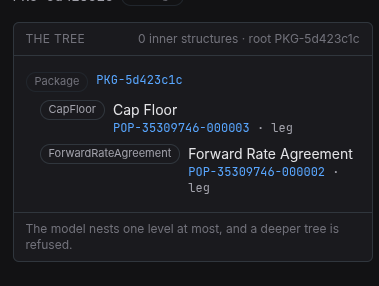 |
4.6. See the tree, and open another node from it
- Read the panel on the left, titled The tree, whose header states N inner structures · root <the reference>.
- Passes when the root row is drawn with its kind chip and reference, each leg beneath it with its product name, its reference and its role (leg), and the note The model nests one level at most, and a deeper tree is refused.
- Fold the tree with the chevron beside the root, then unfold it: a structure opens and closes, and the trades beneath it go and come back with it.
- Click a leg in the tree.
- Passes when that row is marked as the one being read, the panel states Reading <the reference> · leg, and Open the trade leads to the trade's own page, whose Details tab names the deal in a Structure field whose link comes back to this deal.
4.6.1. Result
| Field | Value |
|---|---|
| Status | PASS |
4.7. Add a leg, then take it out
- Open the Members tab: the same legs table, with Add a leg under it.
- Choose a trade in the picker, keep the role
leg, press Add the leg. - Passes when the table gains the row, the count rises, and the new leg states its state and external version.
- Then book a leg from the deal: on Details choose a role beside Book a leg and press it. The form states This trade becomes a leg of <the reference>, and the counterparty is the deal's, offered rather than chosen.
- Fill the form and press Book trade.
- Passes when the deal's page answers rather than the trade's, the count has risen by one, and the new trade is a leg of the deal without being added by hand. It is a live trade with its own external version.
- Back on Members, press Unlink on the leg just booked.
- Passes when the row goes, the count falls, and no error banner appears. The trade itself is untouched: it becomes groupable again and appears in the grouping picker in Step 8.
4.7.1. Result
| Field | Value |
|---|---|
| Status | FAIL |
| Notes | when I book a leg it does not automatically add the trade as a leg. I need to then add the leg as a member.; 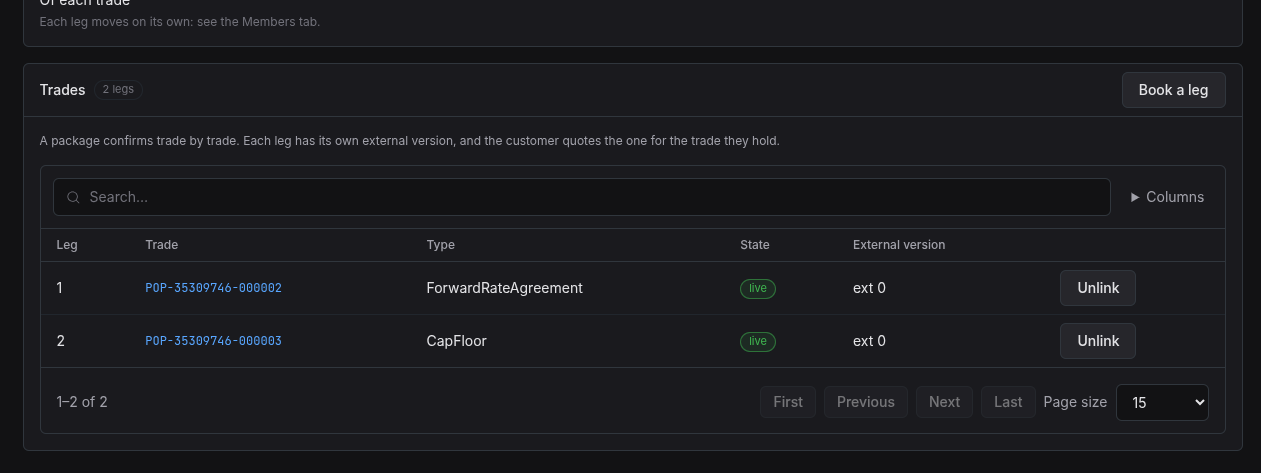 |
4.8. Read the history and the price notice
- Open the History tab.
- Passes when it shows the shared timeline: the event chart, then one line per
version newest first, with Hide system activity, the reason code, the person
who wrote each and the time — the reason you typed when grouping it, or
system.new_recordfor a population's deal. There is no record picker and no two-pane compare: those are the legacy shapes the standard retired. - Passes when the stream is the deal's story as one account: its own versions and the versions of every leg it holds, each leg's entry named Leg <the reference> · leg, merged newest first.
- Open an entry's detail.
- Passes when it draws the fields that changed, the old and the new, and a first version draws the whole record.
- Read the note under the stream.
- Passes when it states that a part deleted from the deal is not in the stream, because the screen reads the history of the legs the deal holds now.
- Open the Price tab.
- Passes when it states that pricing is not read yet, rather than a number.
4.8.1. Result
| Field | Value |
|---|---|
| Status | FAIL |
| Notes | uses a non standard history view. does not show link, unlink etc events. must follow standard history approach.; ;  |
4.9. Group two trades into a new deal
- From the list, press Group trades (or reach it from the blotter's toolbar).
The address is
/trading/structures/group. - Choose a kind. The option states what the kind does: Dynamic — confirmed as one document, Package — each leg confirms on its own.
- Read the picker: it offers only trades no structure holds, and names each trade's counterparty.
- Tick two trades that name the same counterparty.
- Passes when no mixed-counterparty notice appears and Group the trades is enabled; press it.
- Passes when the address is the new deal's reference, both trades are legs of it on Details, and its row now appears in the list with the kind you chose.
4.9.1. Result
| Field | Value |
|---|---|
| Status | PASS |
5. Results
| Field | Value |
|---|---|
| Status | PENDING |
| Completed at | |
| Branch | |
| Commit | |
| Worktree |
6. Notes
- The list is party-scoped by design, so its total is the party's and not the
tenant's. Compare against
select count(*) from
  ores_trading_structures_tbl where valid_to = ores_utility_infinity_timestamp_fn()
only if you are signed in as a system administrator. - The population's pairs carry two counterparties each, so Step 8 may find no valid pair. That is the inconsistency the * Before you start section states, and it is filed as a capture rather than fixed here.
- No size column is drawn on purpose; see the analysis task named in Step 5.