Compute job lifecycle
Table of Contents
- 1. Summary
- 2. Detail
- 2.1. Concepts and state vocabulary
- 2.2. The end-to-end flow
- 2.3. Stage 1 — register the engine package
- 2.4. Stage 2 — prepare an input bundle
- 2.5. Stage 3 — create the batch
- 2.6. Stage 4 — dispatch
- 2.7. Stage 5 — execute on a node
- 2.8. Stage 6 — validate, close, and collect
- 2.9. The whole loop in one script
- 3. See also
Return to Knowledge.
1. Summary
A compute job is a risk run of the ORE engine on a worker node of the
ores.compute grid. The operator starts from the shell: an engine
package and an input bundle are uploaded first, then a batch of
identical jobs is created and dispatched. Dispatch stores one
workunit per job and the service immediately publishes a JetStream
assignment for each; a wrapper node of the matching platform consumes
the assignment, downloads the engine package and the input, runs the
engine as a child process, and uploads the job's Output/ directory
back to storage. A submit message carries the outcome to the service,
which validates the result, records it on the workunit, and closes the
batch once every job has a result. The operator then downloads the
output archive of any result. This document walks that lifecycle end
to end against the implementation; see ores.compute for the component
breakdown and Compute Engine for the numerical engine itself.
2. Detail
2.1. Concepts and state vocabulary
The grid uses the BOINC vocabulary: a batch holds workunits, each
workunit is executed by one result per redundancy copy, and a
host is a worker node. apps, app versions, and platforms
describe what runs where.
| Entity | What it is | Key fields and states |
|---|---|---|
app |
A named engine family (e.g. ORE). |
name |
app_version |
One engine build of an app, tied to a wrapper compatibility level. | engine_version, wrapper_version, min_ram_mb |
app_version_platform |
The published engine bundle for one version on one platform. | platform_code, package_uri, sha256 |
batch |
A set of identical jobs submitted together, with an operator-chosen external_ref. |
status: open → dispatched → closed |
workunit |
One job of a batch. Carries the shared input bundle and the redundancy target. | canonical_result_id empty until a result is accepted; target_redundancy (1 for shell dispatch) |
result |
One execution attempt of a workunit on one host. | server_state: 1 Inactive, 2 Unsent, 4 InProgress, 5 Done; outcome: 1 Success, 3 ClientError, 4 NoReply |
host |
A wrapper node. Registers itself on its first heartbeat and gets a generated display name. | last_rpc_time, bumped by each heartbeat; judged online from heartbeat recency |
The batch statuses and the result server_state transitions are
shown in compute_job_lifecycle_states.puml:
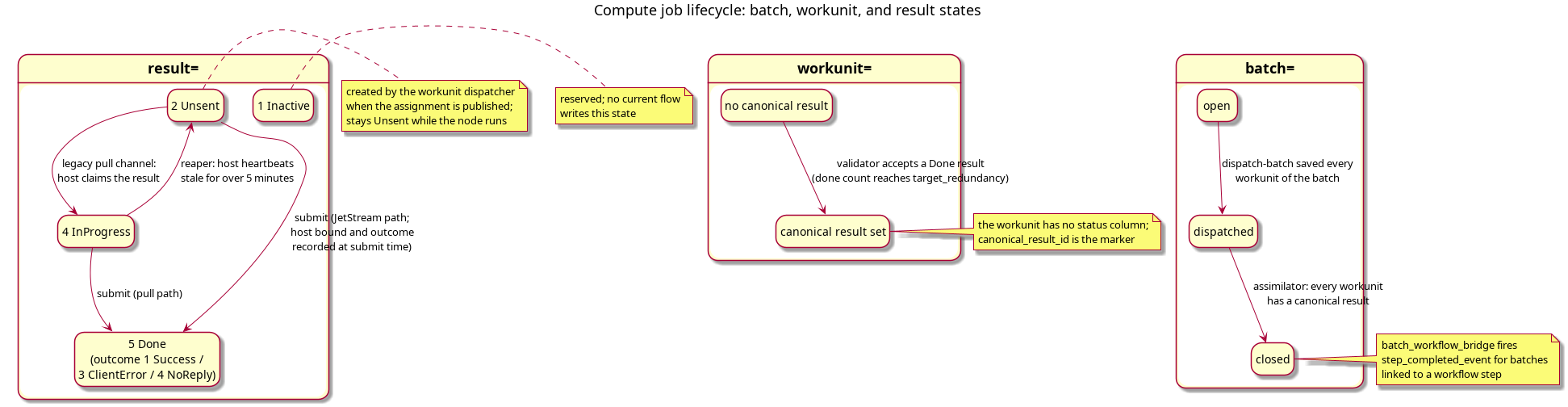
Figure 1: State vocabulary of the compute grid: the batch lifecycle, the workunit's canonical-result marker, and the result's server-side state machine (including the legacy pull channel that sets InProgress and the reaper that re-queues results of stale hosts).
Source: compute_job_lifecycle_states.puml. Regenerate with
plantuml -tpng doc/knowledge/architecture/compute_job_lifecycle_states.puml.
Two points are worth stating explicitly because they are easy to misread:
- The workunit has no status column. Its state is derivable: it has no
canonical_result_idyet, or it has one (the job is done). - The JetStream dispatch path never marks a result
InProgress. The dispatcher creates the result row asUnsentand the state staysUnsentwhile the wrapper executes; the submit message moves it straight toDone.InProgressis set only by the legacypullchannel (a wrapper pulling work by host), where the server binds the host and reaps the result back toUnsentif that host's heartbeats stop for five minutes.
2.2. The end-to-end flow
The interaction diagram below is the map for everything that follows:
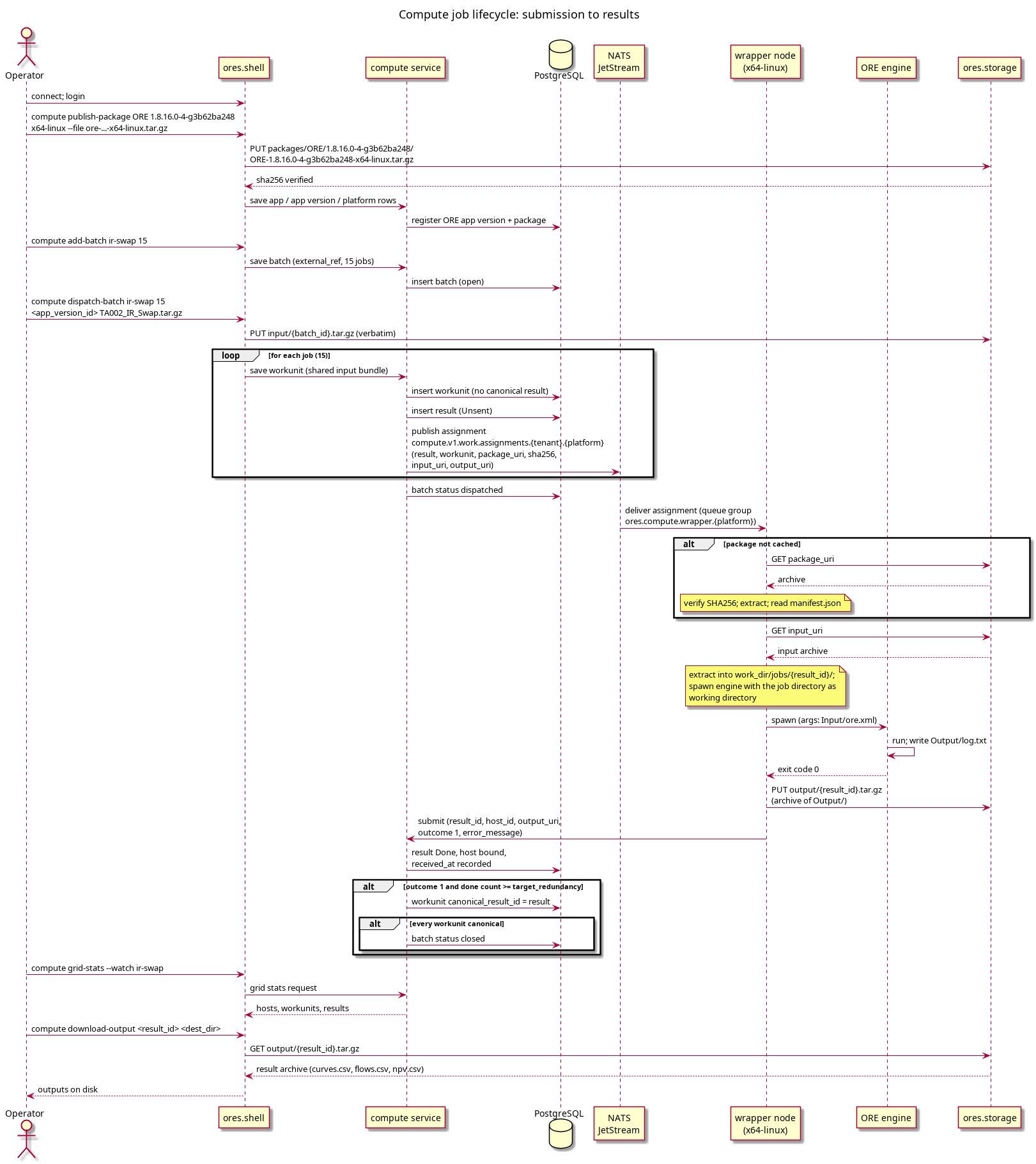
Figure 2: The compute job lifecycle from the operator's shell session to the finished output archive: package and input upload, batch dispatch, JetStream assignment, node execution, result submission, and assimilation.
Source: compute_job_lifecycle_sequence.puml. Regenerate with
plantuml -tpng doc/knowledge/architecture/compute_job_lifecycle_sequence.puml.
The lifecycle has six stages:
- Register the engine — upload the ORE package and register the app.
- Prepare an input bundle — the job's working-directory snapshot.
- Create the batch — with the generated
batches addcommand. - Dispatch — with
compute dispatch-batch; the service stores workunits and publishes one assignment per job. - Execute on a node — the wrapper downloads, verifies, runs, and uploads the output.
- Validate and close — the service accepts results, marks the workunit, and closes the batch; the operator downloads outputs.
2.3. Stage 1 — register the engine package
The engine package is the self-contained tarball a wrapper downloads
and runs. It holds the ore executable, every non-glibc shared
library it needs (under lib/, RPATH-relative), and the minimal
manifest.json the wrapper reads. ORE Studio vendors one package per
engine build under external/ore/packages/; the seed registers the ORE
1.8.17.0 build, ore-1.8.17.0-x64-linux.tar.gz, and the older
ore-1.8.16.0-4-g3b62ba248-x64-linux.tar.gz stays vendored beside it:
ore-1.8.17.0-x64-linux.tar.gz
├── manifest.json          {"executable": "ore-1.8.17.0-x64-linux",
│                           "args": ["Input/ore.xml"]}
├── ore-1.8.17.0-x64-linux
└── lib/                   every shared library the engine needs
The manifest tells the wrapper which executable to spawn and with
which arguments. For ORE the argument is the job's input file
Input/ore.xml, resolved relative to the job's working directory —
which is exactly how a packaged Academy example is laid out. The
wrapper runs the engine with the job directory as its working
directory, so Input/, Output/, and log.txt inside ore.xml all
resolve inside that directory. See
Compute Engine for the engine itself and external/ore/packages/README.md
for how packages are built and self-tested.
Upload the vendored package with compute publish-package. The verb
uploads the tarball to storage under the app's package key, computes
and verifies its SHA256 server-side, and registers (or merges into)
the app, app_version, and app_version_platform rows:
connect $ORES_NATS_URL
login super_admin@localhost Secure-Password-123
compute publish-package ORE 1.8.17.0 x64-linux \
    --wrapper-version 1.0.0 \
    --file external/ore/packages/ore-1.8.17.0-x64-linux.tar.gz
logout
exit
publish-package merges rather than duplicates: the app row is keyed by
name, the app-version row by (name, engine_version,
wrapper_version), and the platform rows of a version are replaced
wholesale (previous platforms are preserved and the published one is
updated). Passing --wrapper-version 1.0.0 lines the upload up with
the row that
projects/ores.sql/populate/compute/compute_ore_app_seed.sql seeds —
run that seed, or run compute_populate.sql, to register the same app
plus the x64-linux platform row that compute_platforms_seed.sql
provides. The seed alone registers only the rows; the package bytes
still need the publish-package upload above.
Storage keys. All blobs live in the compute bucket of ores.storage
(/api/v1/storage/compute/ over HTTP). The seeded ORE package is
registered at:
| Kind | Key |
|---|---|
| Engine package | packages/ORE/1.8.17.0/ORE-1.8.17.0-x64-linux.tar.gz |
| Batch input bundle | input/{batch_id}.tar.gz (one per dispatched batch) |
| Job output archive | output/{result_id}.tar.gz (one per finished result) |
2.4. Stage 2 — prepare an input bundle
Every job of a batch runs against the same input bundle: a tarball
whose root holds the job's input directory, exactly as the engine
expects it. ORE Studio vendors the sample job
external/ore/packages/TA002_IR_Swap.tar.gz, built from the Academy
example TA002_IR_Swap (a 20-year EUR fixed-vs-float interest-rate
swap). Its layout is the working-directory snapshot the engine will
see after extraction:
TA002_IR_Swap.tar.gz
└── Input/
    ├── ore.xml              the run's main config (inputs, Output/, log.txt)
    ├── market.txt, fixings.txt
    ├── todaysmarket.xml, pricingengine.xml, curveconfig.xml,
    │   conventions.xml, irswap.xml
The sample's ExpectedOutput/ (the curves.csv, flows.csv,
npv.csv the engine should produce) lives in the Academy example and
is the reference for the package self-test, not part of the job
bundle. To build a bundle for another job, tar the input directory the
same way — the archive is uploaded verbatim, and the manifest argument
Input/ore.xml is what pins the engine to that layout.
2.5. Stage 3 — create the batch
The generated batches add creates a batch row with status open. The batch
is only a container plus an operator-chosen external_ref; nothing
runs yet:
connect $ORES_NATS_URL
login super_admin@localhost Secure-Password-123
batches add ir-swap-2026-09-06 open system.new_record "first run"
logout
exit
An --smoke batch is bounded to 10–20 jobs and is what the smoke test
uses. See How do I add a compute batch from the shell?.
2.6. Stage 4 — dispatch
compute dispatch-batch takes the batch reference, the job count, the
app-version id, and the input tarball:
app_versions list                  # note the id of the ORE 1.8.17.0 row
compute dispatch-batch ir-swap-2026-09-06 15 \
    <app_version_id> external/ore/packages/TA002_IR_Swap.tar.gz
Only an open batch can be dispatched, and the app version must exist
(the command resolves it before uploading anything). Dispatch then has
three parts:
- Upload the input bundle — the tarball goes verbatim to
input/{batch_id}.tar.gz; every workunit of the batch references that one shared bundle. - Store the workunits — one workunit row per job, each with
priority1,target_redundancy1, andinput_uripointing at the shared bundle. The batch status flips todispatchedonly after every workunit is saved; a save failure partway leaves the batchopenso dispatch can be retried. - Dispatch — each stored workunit raises a domain event that the
service's eventing listener feeds into the
workunit_dispatcher. For every workunit short of its redundancy target the dispatcher creates a result row (server_stateUnsent) and publishes one work-assignment event onto JetStream, keyed per platform:
subject: compute.v1.work.assignments.{tenant_id}.{platform_code}
payload: result_id, workunit_id, app_version_id,
         package_uri, package_sha256, input_uri, output_uri
The event is self-contained — the wrapper needs no further round trips
to run the job. package_uri and package_sha256 come from the
app version's published platform row (hence the warning if a version
has no package: the workunit is stored, no assignment is ever
published, and the job sits Unsent forever). output_uri is
pre-assigned as output/{result_id}.tar.gz.
The dispatcher converges on the redundancy target: a workunit whose result count is already at target gets no new assignment, and a partially failed publish is topped up by the next workunit event instead of stranding the workunit. See How do I dispatch a compute batch from the shell? for the recipe.
2.7. Stage 5 — execute on a node
A wrapper node is an ores.compute.wrapper process pointed at the
environment (--host-id is mandatory; the node also needs its tenant,
work_dir, heartbeat interval, and the storage HTTP base URL). On
startup it ensures the JetStream stream exists and subscribes a
durable, queue-grouped consumer on its own triplet:
subject:    compute.v1.work.assignments.{tenant_id}.{own platform triplet}
durable:    compute_wrapper_{tenant_id}_{platform}
queue:      ores.compute.wrapper.{platform}
Routing is per-triplet: the orchestrator publishes on the platform whose package it resolved, and nodes subscribe only to their own platform, so a node never sees an assignment it cannot run. Within one platform the queue group spreads assignments across the fleet, and JetStream holds a message until a node acknowledges completing it — a job survives a node that dies mid-run.
Every heartbeat_interval (30 seconds by default) the node publishes
compute.v1.work.heartbeat with its host id. The first heartbeat
auto-registers the host row and gives it a deterministic
adjective-animal display name (e.g. clever-echidna); later ones bump
last_rpc_time, which is what the grid uses to judge the host online.
When telemetry is enabled the node additionally publishes node samples
on compute.v1.telemetry.node_samples.
On each assignment the wrapper runs process_assignment:
- Ensure the package —
work_dir/packages/{app_version_id}/holds the extracted engine. If themanifest.jsonis missing, the node downloadspackage_uri, verifies its SHA256 againstpackage_sha256(a mismatch aborts the job — a corrupted or tampered package is never run), and extracts the archive. - Prepare the job directory —
work_dir/jobs/{result_id}/is created; the input archive is downloaded frominput_uriand extracted there. The engine will run with this directory as its working directory. - Run the engine — the executable named in the manifest is spawned
(Boost.Process; no shell involved) with the manifest arguments and
the job directory as
start_dir. For ORE that isInput/ore.xmlrelative to the job directory; ORE writes its run log toOutput/log.txtthere. The engine's own stdout/stderr go toengine.login the job directory, with the exact command line logged for reproduction. - Finish — on exit code 0 the wrapper archives the job's
Output/directory and uploads it tooutput_uri; on any other exit code there is no archive, and the error message carries the tail ofOutput/log.txt. The engine logs are published to the telemetry log-entry subject for the record. - Submit — the node sends a request/reply submit over
compute.v1.results.submit, the trusted machine channel (wrapper nodes hold no user JWT, so the user-session-gated CRUD flow cannot accept their submissions):
subject: compute.v1.results.submit
payload: result_id, host_id, output_uri,
         outcome (1=Success, 3=ClientError), error_message
2.8. Stage 6 — validate, close, and collect
The submit handler (in ores.compute.core, queued as
ores.compute.service so one replica validates) is the validator and
assimilator of the grid:
- Record the result — the result row is marked
Donewith the outcome, the submitting host bound ashost_id, the output URI, and a received timestamp. This is where the host of a JetStream-run job is recorded — the dispatcher created the row without one. - Accept on the workunit — once the workunit has
target_redundancy(1 in shell dispatch) results in stateDone, the validator records the last-submitted result's id as the workunit'scanonical_result_id. Acceptance does not filter by outcome: with redundancy 1 a failed job (ClientError) still satisfies the target, so the grid does not re-dispatch it. Outcome checking is the operator's, throughcompute grid-statsor the result list — the smoke-test script asserts every result has outcome Success and fails otherwise. - Close the batch — when every workunit of the batch has a
canonical result, the batch status moves to
closed(even if some of those canonical results failed).
The operator watches the drain and collects outputs from the shell:
compute grid-stats --watch ir-swap-2026-09-06      # poll until the batch drains
workunits list                                     # canonical_result_id per job
results list                                       # result rows: state, outcome, host
compute download-output <result_id> <dest_dir>     # fetch output/{result_id}.tar.gz
The downloaded archive is the Output/ directory the engine wrote —
for the TA002 sample, the curves.csv, flows.csv, and npv.csv
that the Academy example's ExpectedOutput/ predicts. See
How do I view compute grid stats from the shell? and
How do I download a compute result output from the shell?.
2.9. The whole loop in one script
The smoke-test library script drives the entire lifecycle in one
session: it adds a 15-job --smoke batch, dispatches it to the target
app version with the sample input, watches grid-stats until the
batch drains, and asserts that every online host was exercised and
every result has outcome Success. See
How do I smoke test the compute grid from the shell?.
3. See also
- Data storage — the structure note that orders this cluster, and where to read this page in it.
- ores.compute — component group overview.
- Compute Engine — the ORE engine: what a run computes and how its output is produced.
- How do I add a compute batch from the shell? — batches add.
- How do I dispatch a compute batch from the shell? — compute dispatch-batch.
- How do I view compute grid stats from the shell? — grid-stats.
- How do I download a compute result output from the shell? — download-output.
- How do I download a compute job input from the shell? — download-input.
- How do I smoke test the compute grid from the shell? — the full loop in one script.
- Run a compute job end to end — the provisioning check and the output comparison.