User Journey: Group currencies for the desk
Table of Contents
This page documents a user journey: A reference data administrator keeps a desk group of currencies, such as G11 or Scandies, and its members correct.
A user journey describes what one person is trying to do, before anything is built. It is a design document that outlives any sprint, so it names the screens, the entity fields each screen shows, and the operations and messages each step needs.
1. Goal
"I want each desk group to hold exactly the currencies the desk means by it, so that every report and screen that says G11 or Scandies means the same set." The journey is done when the groups read in the right order and each group lists the right members.
2. Actor and trigger
The actor is the tenant administrator, acting inside their own tenant. The
Operations role may add and remove members, but it cannot read or write the
groups themselves. The trigger is a new desk grouping, a currency that joins or
leaves one, or a report that grouped currencies wrongly. The journey starts at
Desk groups, or at a group link on a currency, and ends when the person
leaves the groups.
3. Steps
- See the groups. The person opens Desk groups. The system lists the groups in display order: code, name, description and the number of members.
- Add or correct a group. The person adds a group, or changes a group's
name, description or order, states a change reason, and saves. The system
writes it with
must_not_existfor a new group andmust_match_versionfor a change. - Open a group. The person selects a group. The system shows its members: each currency's code and name.
- Add a member. The person picks a currency that is not yet a member. The
system writes one
currency_currency_grouprow. - Remove a member. The person removes a currency from the group. The system deletes that row; the currency itself is untouched.
- Remove a group. The person removes a group the desk no longer uses. The system first removes its members, then closes the group. The order matters: the two calls are not atomic, and a failure between them leaves an open group with no members, which is safe and can be retried. The reverse order would leave members pointing at a closed group. See What is missing.
- Check the history. The person opens a group's history. The system shows every version of the group with the field-level difference from the one before, and the person can revert to an older version.
- Leave. The person goes back. Every screen that groups currencies reads the new sets.
No step waits on the server after its reply, and the journey keeps no state.
4. Screens and wireframes
One screen in two parts: the groups on the left, and the chosen group's details and members on the right. The person moves between groups without leaving the screen.
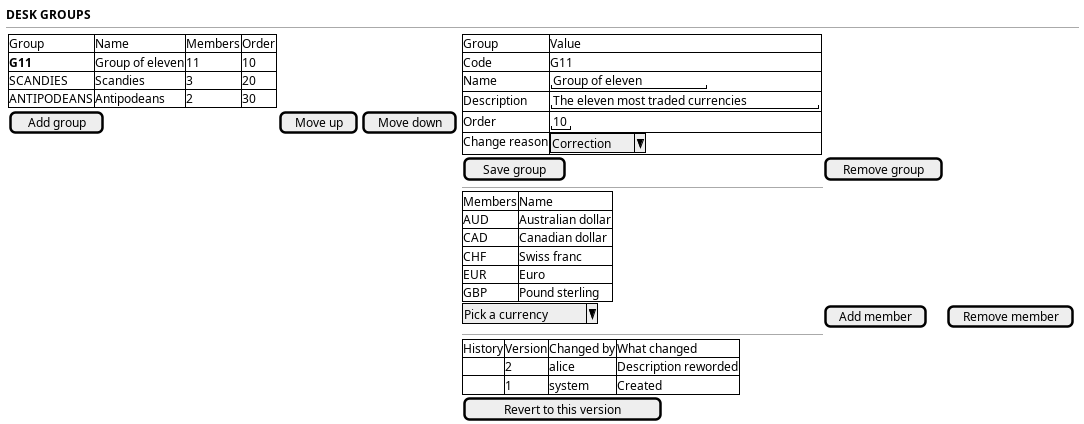
Figure 1: Desk groups: the groups in order, and the chosen group's details, members and history.
4.1. Each step, and the shape that serves it
The screen pipeline judges a journey before its prototype: a step is a CRUD variation that the Record screen standard already draws, a kind's own action, a view no rule draws yet, a missing server operation, or a step that keeps state across a reply and needs a workflow under the Workflows menu. Judged on 2026-10-25, against the screen the web draws today, by the screen pipeline runbook.
| Step | Shape on the screen | Judgement |
|---|---|---|
| 1 See the groups | The record list: code, name, description, display order | Standard list; the member count waits on a read by group |
| 2 Add or correct a group | Add in the header, Edit on the page, the record dialog | Standard create and amend; display order is a field of the dialog, not a reorder mode, because a desk group is a record and not a classification list |
| 3 Open a group | The record page: Details, Members, History | Standard record page |
| 4 Add a member | The Members tab, a link panel with Add | Standard links (RS-RELATED-02) |
| 5 Remove a member | Remove on the row | Standard links (RS-RELATED-03) |
| 6 Remove a group | Delete in the header, the remove dialog that closes the members first | Standard delete; the order of the two calls is the dialog's, as the calendar's delete does with its parts |
| 7 Check the history | The History tab | Standard history on the shared timeline; links have none |
| 8 Leave | The breadcrumb | Standard |
The journey is a CRUD variation of the standard record screen with links; no own action, no workflow.
5. Prototype
Currencies, desk groups and pairs prototype, under
doc/prototypes/currencies/, draws every state of this journey's screens at
an address, and its design note cites the rule identifiers each state follows
and names what it leaves to the server.
6. Entities composed
| Entity | What it contributes | Model |
|---|---|---|
currency_group |
The groups list and the group form: code, name, description, order | ores.refdata.currency_group |
currency_currency_group |
The members list | ores.refdata.currency_currency_group_junction |
currency |
The member names and the currency picker | ores.refdata.currency |
The group is versioned and has a history. The membership rows keep closed versions in their table, but no operation reads them, so the members list has no history panel.
7. Operations and messages
| Step | Operation | Subject | Status |
|---|---|---|---|
| See the groups | List the groups | refdata.v1.currency_groups.list |
exists |
| See the groups | Count each group's members | refdata.v1.currency_currency_groups.list |
partial |
| Add or correct a group | Offer the change reasons | dq.v1.change_reasons.list |
exists |
| Add or correct a group | Write the group | refdata.v1.currency_groups.put |
exists |
| Open a group | List the group's members | refdata.v1.currency_currency_groups.list |
partial |
| Open a group | Read the member names | refdata.v1.currencies.get_many |
exists |
| Add a member | Fill the currency picker | refdata.v1.currencies.list |
exists |
| Add a member | Write a membership | refdata.v1.currency_currency_groups.put |
partial |
| Remove a member | Delete a membership | refdata.v1.currency_currency_groups.delete |
exists |
| Remove a group | Delete its memberships | refdata.v1.currency_currency_groups.delete_many |
exists |
| Remove a group | Close the group | refdata.v1.currency_groups.delete |
partial |
| Check the history | Read every version with its diff | refdata.v1.history.get (entity_type ores.refdata.currency_group) |
exists |
| Check the history | Revert by writing the old values | refdata.v1.currency_groups.put |
exists |
8. What is missing
- Members cannot be read by group. Captured as Read desk group members by group, and close them with their group. The membership filter takes currency
codes only, and the only narrowed read is
list_by_currency_iso_code. Listing one group's members, or counting them, means paging through every membership row in the tenant. The candidate islist_by_currency_group_codeand a group filter. Until then the screen pages through the memberships once and groups them itself. - A membership is not checked against its ends. Captured as Refdata junction inserts check neither end of the link. The membership insert checks the tenant only. It does not check that the currency or the group exists, so a row can name a currency or a group that is not there. The candidate is the same existence checks the other refdata writes make. Until then the screen offers only codes it has read from the two lists.
- Removing a group leaves its members behind. Captured with the read by group, above. Closing a group does not close its membership rows. The candidate is to refuse the delete while members remain, or to close them with the group. Until then the screen removes the members first, as step 6 says.
Operationscan change members but not see the groups. Captured as No role below the tenant administrator can maintain reference data. It holds the membership permissions and reads currencies, but holds no permission oncurrency_groups.
9. Related journeys
- Add or correct a currency — each member opens its currency, and the currency screen shows its groups
- Set up a currency pair — pairs whose legs are in a group
10. Related knowledge
- Currency groups (desk groupings)
- Reference Data — versioning, provenance and change reasons