UX Language
Table of Contents
1. Summary
ORE Studio's UI speaks one visual language across every window: colours carry fixed meanings (gray always reads "inactive", orange always reads "missing badge definition"), icons follow the semantic rules of the Icon Guidelines, and every entity presents the same three windows — an MDI list window, a detail dialog, and a history dialog — with identical toolbars, badges and paging behaviour. This document is the umbrella reference for that language; the per-aspect documents it links to carry the inventories. The aesthetic rules (typography, spacing, motion) live in UI design principles; this document covers semantics: what the visual vocabulary means.
2. Detail
2.1. Colour semantics
Badge and indicator colours are drawn from the Tailwind palette and carry fixed, application-wide meanings. The two load-bearing rules:
- Gray (
#6b7280) is reserved for inactive states. Gray exclusively means inactive, off, "no", never-used, or otherwise negative/dormant:Inactive,Never(logged in),Draft,Raw(unprocessed), the "No" half of boolean badges,Pending=/=Unsentresult states. No positive, completed or neutral-active state may be gray — "Unlocked" is green, "Done" is green, "Service" is teal. - Orange (
#f97316) means "badge definition missing". When a badge resolver finds no definition for a code-domain value (or the definition carries an unparseable colour), the badge renders in orange —color_constants::badge_fallback. Orange is never a semantic state colour: an orange badge in the UI is a gap in the badge seed data to be fixed, deliberately visible rather than camouflaged as "inactive". - Green, Red and Amber ("RAG") are reserved for true status
semantics — never for a plain category. Green means healthy/
positive/succeeded, red means broken/failed/dangerous, amber means
caution/needs-attention. Reserve this triad for badges that
genuinely carry one of those three meanings (
active=/=inactive,outcome_success=/=outcome_failed,account_locked,login_old=/=frozen=/=fsm_suspended). A code domain that is purely descriptive — a category with no inherent "good/bad/caution" connotation, such as a currency pair's liquidity tier (major/minor/exotic/commodity) — must not borrow RAG colours even if a naive reading suggests one ("exotic" is not "bad"; it is a different tier). Use the Blue/Violet/Teal/Pink "classification" family instead, so a red or amber badge in the UI reliably means "something needs attention," never "this happens to be one particular category."
The full colour vocabulary:
| Colour | Hex | Meaning |
|---|---|---|
| Green | #22c55e |
Positive/healthy: active, online, success, done, unlocked, actual |
| Red | #ef4444 |
Negative/destructive: locked, failed, fail policy, archived |
| Amber | #eab308 |
Caution: frozen, old login, no-reply, skip policy, suspended, estimated |
| Blue | #3b82f6 |
Informational/neutral: pending, recent, queue, primary origin, user account |
| Sky | #0ea5e9 |
In-progress/transitional: running, cleaned, bootstrapping |
| Teal | #14b8a6 |
Service account type |
| Violet | #7c3aed / #8b5cf6 / #a855f7 |
Classifications: virtual type, derived origin, enriched treatment, LLM account |
| Pink | #ec4899 |
Simulated nature |
| Gray | #6b7280 |
Inactive only: inactive, never, draft, raw, "No" |
| Orange | #f97316 |
Missing badge definition (fallback, never semantic) |
2.1.1. Badge colour catalogue
Badges are database-driven: severities, code domains, definitions and
mappings live in the dq schema, seeded by
projects/ores.sql/populate/dq/dq_badge_system_populate.sql — the
populate script is the source of truth. The mechanism (schema,
BadgeCache, delegate resolution) is described in the
badge system design. The full per-badge and per-code-domain listing
— every definition's hex colour, and every code domain's value→badge
mapping — is Badge Catalogue, kept as its own page since it is long
and grows with every new code domain.
Badges render through two code paths, both resolving via BadgeCache:
DelegatePaintUtils::draw_centered_badge in table delegates, and
BadgeLabelUtils::apply for labels in detail dialogs. Both fall back
to orange per rule 2.
2.2. Iconography
The icon vocabulary — inventory, variants, sizes and semantic usage
rules — lives in the Icon Guidelines. The semantic core: each action
has exactly one icon application-wide (Reload, Add, Edit, Delete,
History never vary between windows), entity types carry their own
identifying icon in window titles and menus, and icon colour follows
the same rules as badges — the standard toolbar tint is
color_constants::icon_color, with gray reserved for disabled actions.
2.3. Entity window anatomy
Every persisted entity presents the same three windows, so a user who has learned one entity has learned them all. The screenshots below use currencies and accounts; the anatomy is identical for any entity.
2.3.1. MDI list window
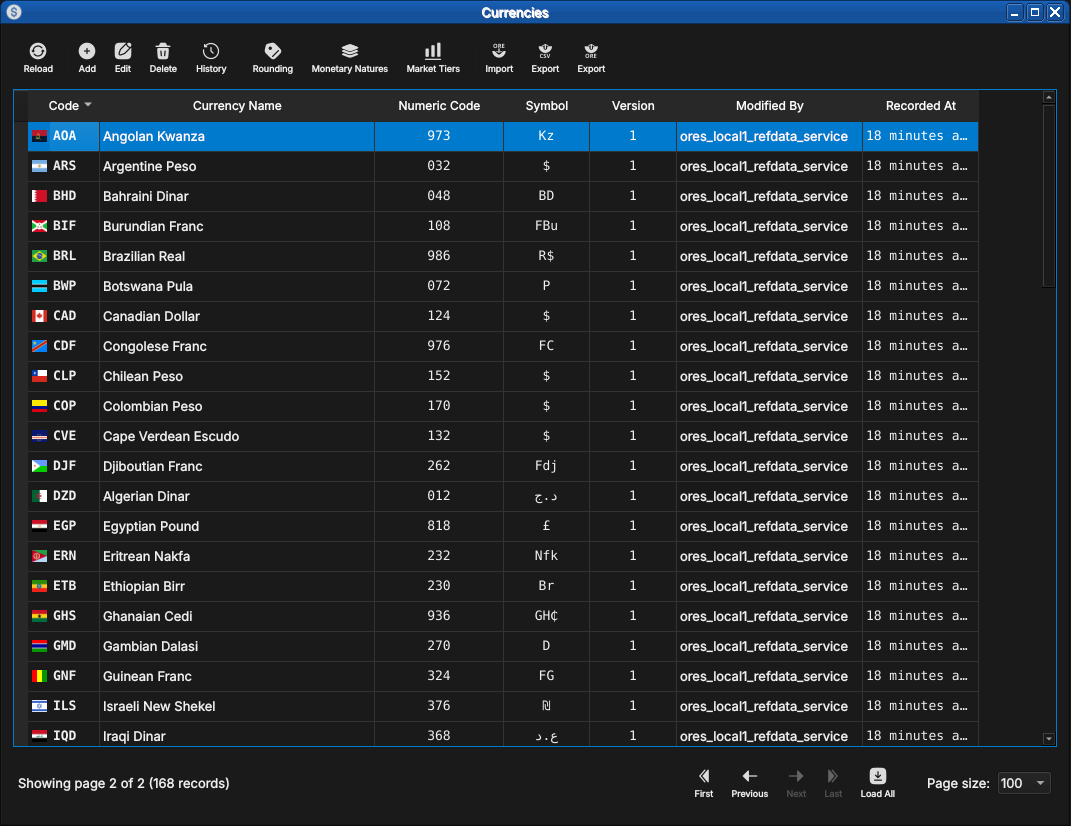
The list window is an MDI child inside the main window:
- Toolbar —
Reload,Add,Edit,Delete,Historyin fixed order with fixed icons. Actions that need a selection (Edit,Delete,History) are disabled — grayed, per the colour rule — until a row is selected. - Table — one row per latest record version. Status-like columns
render as badges (see the colour catalogue);
Versionis monospace;Recorded Atshows relative time ("4 minutes ago"). - Footer — "Showing all records (N)" plus the pagination controls:
First/Previous/Next/Last, aLoad Allaction, and a page-size combo (25/50/100/200/500, default 100). Windows whose record count fits one page show the controls disabled. - Eventing — changes made in another session arrive via NATS and refresh the view without manual reload; the reload button carries a stale indicator when unseen changes are pending.
2.3.2. Detail dialog
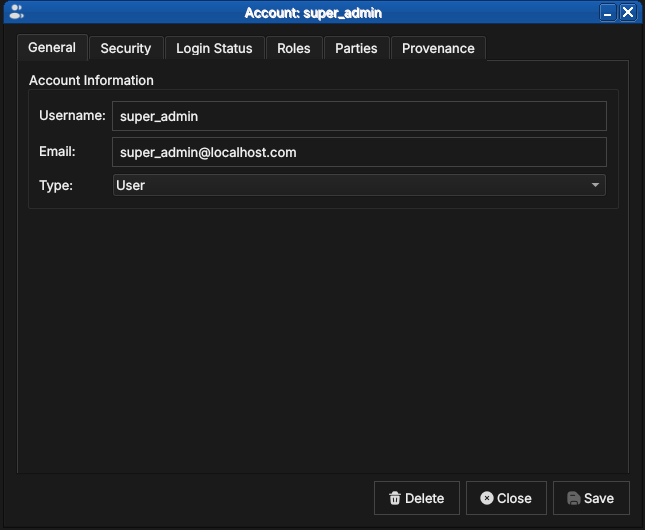
Opened by Add or Edit (or double-click). One dialog serves create,
edit and read-only historical modes:
- Form — the entity's editable fields; combo boxes are populated from reference data and show a loading state while fetching.
- Tabs — related aspects beyond the core form (e.g. an account's
Parties and Roles tabs); read-only status groups render values as
badges via
BadgeLabelUtils(e.g. Online/Locked). - Provenance — who changed the record, when, and why (version, modified by, performed by, change reason, commentary).
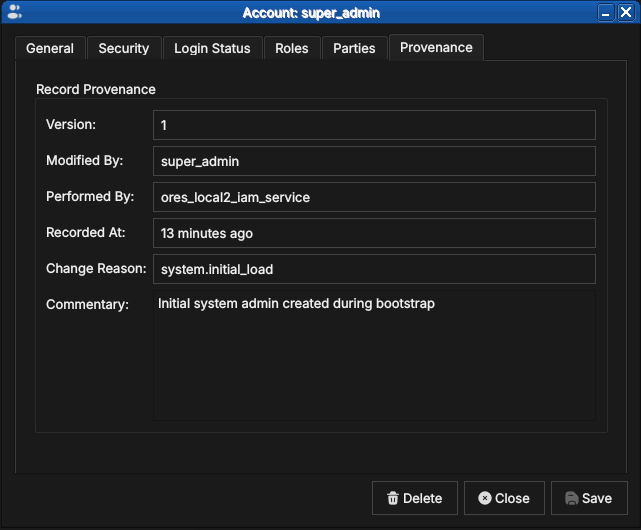
- Change reason flow — saving a modification prompts for a change reason (category-filtered) and optional commentary, which feed the provenance of the new version.
2.3.3. History dialog
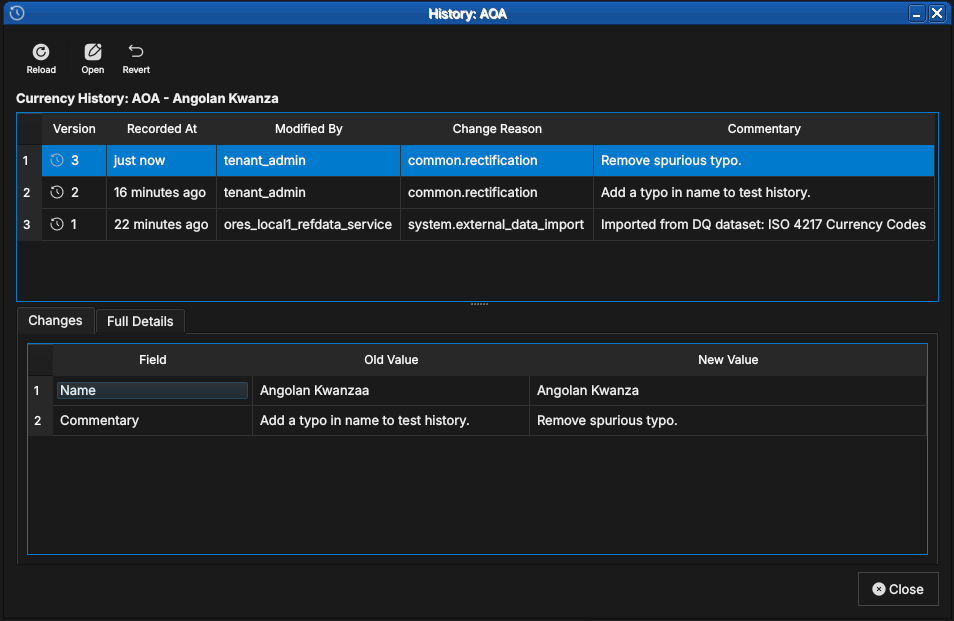
Opened by History on a selected row. Shows every version of the
record, newest first, with the same badge and provenance vocabulary as
the detail dialog. Selecting a version opens it read-only in the
detail dialog. Deleting a record preserves its history.
- Revert semantics —
Revertrestores the selected version as a new current version, after a confirmation dialog. It is disabled when the latest version is selected, where reverting would be a no-op. History is immutable: reverting never removes intermediate versions.
2.3.4. History vs Audit
History always means versioned-entity history: the version list, field-by-field diff, and Open/Revert actions described above. Screens that show a log of events that happened — login sessions, dataset publications, job executions — are called Audit instead, in class names, window titles, menu options and tooltips alike. Audit screens are read-only event logs: they have a Refresh action but no versions, no diff and no revert.
3. See also
- UI design principles — the aesthetic rules: typography, colour values, spacing, motion.
- Icon Guidelines — the icon inventory and semantic usage rules.
- Database-Driven Badge System Design — the badge mechanism: schema, caching, delegate resolution.
- Developer Links — developer-facing index, including this document.