Introduction
Table of Contents
This chapter introduces ORE Studio and frames the manual that follows. It examines what the application is and the problem it solves, the open-source quantitative finance engines it builds upon, the audience it is written for, the functional areas through which it is organised, the boundaries of what it does and does not attempt, and the conventions used throughout this book. Its scope is orientation rather than operation: by the end the reader should understand where ORE Studio sits in the risk-technology landscape and how to navigate the remainder of the manual.
1. Overview
The chapter advances the argument that the reader should understand what ORE Studio is before learning how to use it, and it builds that understanding in layers. It begins by establishing identity in What is ORE Studio?, which explains the application and the open-source engines it rests upon; this is the premise the rest of the chapter depends on. From there it considers for whom the manual is written in Audience, before mapping the territory the application covers in Functional Areas. It then draws the boundary in What ORE Studio Is Not, distinguishing a learning environment from a production system, and shows how the book itself is laid out in How This Manual Is Organised. Finally it sets expectations with two cautions — the Early-Stage Software Notice on the maturity of the software and A Note on This Document on how the manual was produced. The Conclusion draws these steps together.
2. What is ORE Studio?
ORE Studio is a desktop application for exploring, configuring, and running quantitative finance calculations, backed by a set of headless services and a database rather than doing any of that work itself. The Qt client you interact with is a thin presentation layer: it renders what you see and forwards every action to the appropriate backend service, which does the actual work and persists the result. It provides a graphical environment built around the Open Source Risk Engine (ORE)1, 2, a widely-used open-source library for pricing derivatives and measuring financial risk, which is itself built on QuantLib3, 4. ORE Studio handles the data — storing trades, market data, and model configurations, and presenting the results — while ORE and QuantLib provide the mathematics. You cannot understand ORE Studio without understanding these two engines beneath it, so it is worth being precise about what each one is and where ORE Studio sits relative to them.
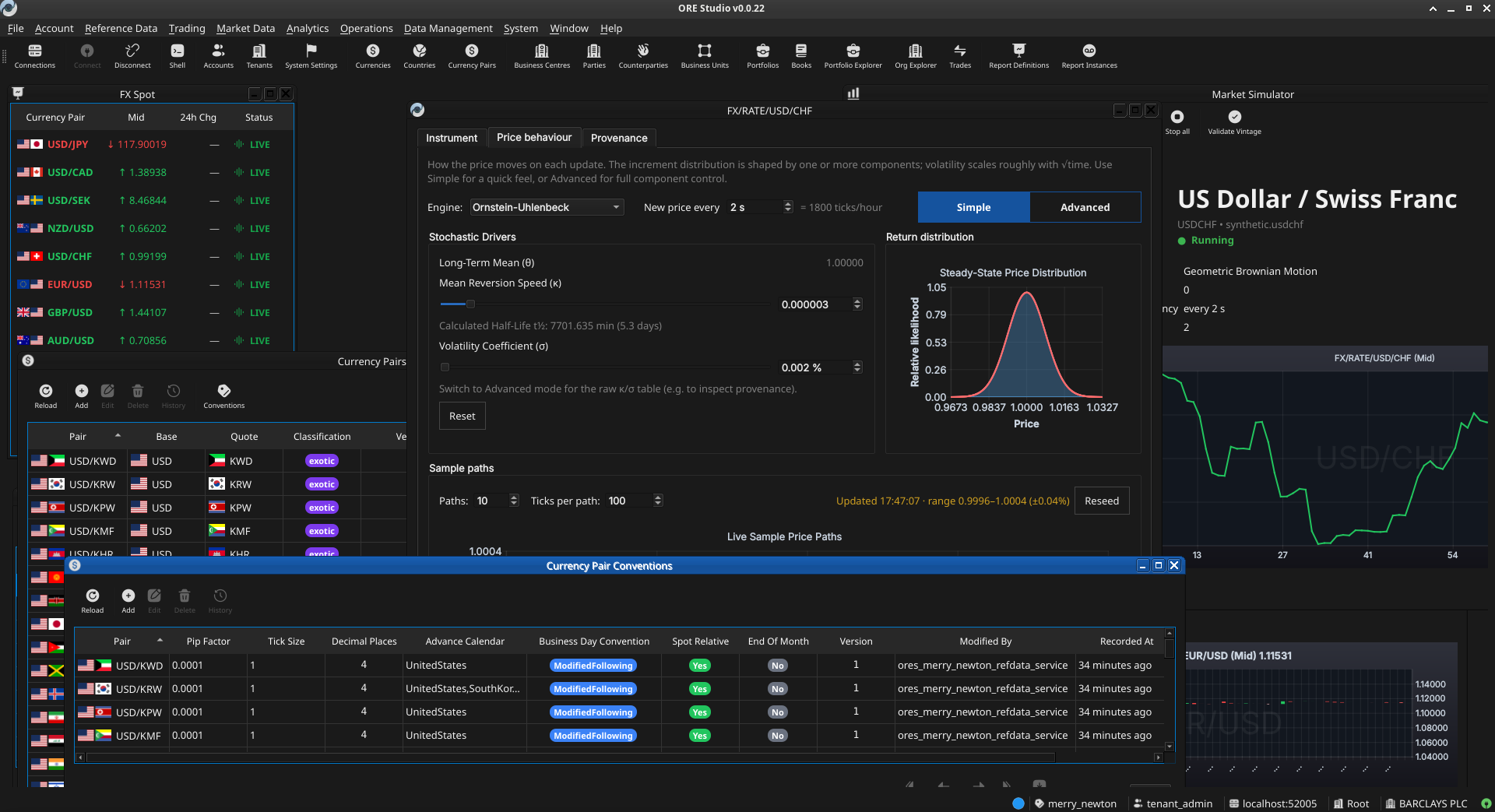
Figure 1: ORE Studio v0.0.22 — the main workspace showing the instrument and trade management views.
2.1. The Open Source Risk Engine
The Open Source Risk Engine is a C++ library for pricing and risk analytics maintained by Acadia, an LSEG (London Stock Exchange Group) business5. It builds on QuantLib and extends it with industry-grade valuation adjustments (XVA), sensitivities, regulatory scenarios, and a broad set of financial instruments, together with interfaces for trade and market data and system configuration via API and XML. ORE Studio is a graphical wrapper around ORE: it imports ORE's XML inputs — trade definitions, market data, model configuration, conventions, fixings, calendars — into a persistent database, drives ORE execution from the configuration you assemble in the interface, and renders ORE's outputs (net present value, XVA, sensitivities, scenarios) back to you. It does not reimplement or modify ORE's pricing and risk models; it inherits ORE's models, conventions, and limitations as they are. ORE Studio is independent of, and unaffiliated with, the ORE project.
2.2. QuantLib
QuantLib is a free, open-source library aimed at providing a comprehensive software framework for quantitative finance — modelling, trading, and risk management. It has been the de-facto standard quantitative-finance library in C++ for over twenty years, and ORE is built directly on top of it. For ORE Studio, QuantLib is two hops upstream: nothing in ORE Studio calls QuantLib directly, and QuantLib's instruments, day-count conventions, and calendars appear in our data only because ORE surfaces them. As with ORE, ORE Studio neither extends nor modifies QuantLib, and inherits any of its conventions or limitations as-is.
3. Audience
This manual is written for several kinds of reader:
- Analysts, traders, quants, and middle-office staff who want to explore financial instruments and risk calculations through a graphical interface. No programming experience is required.
- Students and researchers learning quantitative finance. ORE Studio makes it possible to experiment with derivative pricing, yield curve construction, and risk measures without writing code.
- LLM-based agents and coding assistants that interact with ORE Studio on a user's behalf, help configure workspaces, interpret results, or draft analytical reports. Multimodal models — those capable of processing both text and images — are preferred, as the manual makes extensive use of screenshots to describe the user interface.
The focus throughout is on what you can do through the application itself: entering trades, configuring market data, running analytics, and understanding the results.
4. Functional Areas
ORE Studio is organised around a set of functional areas accessible from the main menu:
- Reference data — currencies, business calendars, counterparties, and market conventions that form the foundation for everything else.
- Instruments and trades — define, store, and manage financial instruments and their terms.
- Market data — yield curves, volatility surfaces, fixing histories, and other inputs to pricing and risk models.
- Model configuration — choose and parameterise pricing engines, simulation models, and sensitivity specifications.
- Analytics — run calculations and view results: net present value, sensitivities (Greeks), credit and funding valuation adjustments (XVA), Monte Carlo simulations, and stress tests.
All data is stored persistently, so trades, curves, and configurations can be saved, revisited, and reused across sessions.
5. What ORE Studio Is Not
ORE Studio is a learning and exploration environment, not a production trading or risk system. It is independent of and unaffiliated with ORE, QuantLib, or any financial institution. For the key valuation cases, the quantitative mathematics are provided by ORE and QuantLib; ORE Studio is the surface through which they are configured and their results explored. ORE Studio does reimplement a small subset of QuantLib for its own internal purposes, but that reimplementation is not used by the engine's valuation code. Users who need production-grade performance, real-time market data feeds, or regulatory reporting should look to enterprise risk platforms.
6. How This Manual Is Organised
The chapters follow the natural order of first use. After this introduction, Connecting to ORE Studio covers launching the application, establishing a connection to the backend, and orienting yourself in the main window; Initial Setup then covers provisioning the system, tenants, and parties. Later chapters cover each functional area in turn. You do not need to read the manual cover to cover; each chapter can be read independently once the system is up and running.
7. Early-Stage Software Notice
Early-stage software. ORE Studio is currently in active development (version 0.x). Features, workflows, and this documentation are all evolving and may change between releases. Numbers produced by the system are for learning and exploration only — they must not be used for real trading, risk management, or any financial decision-making.
8. A Note on This Document
This manual was generated entirely by large language models (LLMs) working under human supervision. While every effort has been made to ensure accuracy, LLM-generated content can contain errors, omissions, or descriptions that do not match the actual software behaviour. If you find a discrepancy between this manual and the application, trust the application. Please report inaccuracies via the project issue tracker so they can be corrected.
9. Conclusion
The chapter set out to orient the reader before any operation begins, and it has done so in layers. It established what ORE Studio is — a desktop surface over the open-source ORE and QuantLib engines — and for whom this manual is written, then mapped the functional areas through which the application is organised and drew a firm boundary around it as a learning and exploration environment rather than a production trading or risk system. With that frame in place it described how the book is arranged for first use and tempered expectations with two cautions: that the software is early-stage and evolving, and that the manual itself was generated by language models under human supervision. The takeaway is a sense of place: the reader now knows where ORE Studio sits in the risk-technology landscape and how to read the chapters that follow, which take up each functional area in turn.
Footnotes:
Open Source Risk Engine, project home: https://www.opensourcerisk.org/.
Open Source Risk Engine, source: https://github.com/OpenSourceRisk/Engine.
QuantLib, project home: https://www.quantlib.org/.
QuantLib, source: https://github.com/lballabio/QuantLib.
Acadia, an LSEG business, which maintains ORE: https://acadia.inc/.