A first schedule
Table of Contents
The smallest useful schedule has three parts: a name, a cron expression, and an action. This page follows one such job from registration to notification, and it uses no other component: the job publishes a message every minute on a subject with no subscriber. The pages after it describe each part in detail; this page describes the whole path first.
1. Detail
1.1. The three parts of a job
A job definition stores a name, a cron expression, an action type and its payload. The name is unique within the tenant. The cron expression defines when the job runs. The action defines what the firing performs and holds the payload it needs. The definition also stores the tenant and party the job runs for, and an active flag.
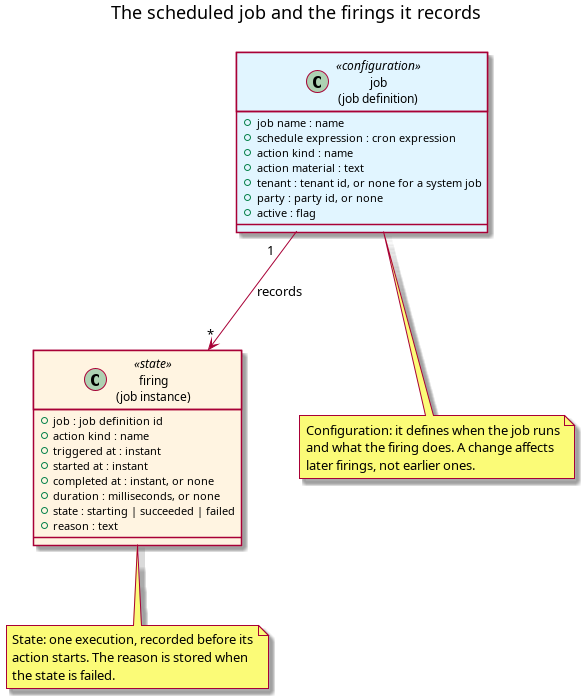
Figure 1: The job definition and its firings: the definition holds the schedule and the action, and each firing records one execution.
Source: scheduler_scheduled_job.puml. Regenerate with
plantuml -tpng doc/knowledge/architecture/scheduler_scheduled_job.puml.
The example job is the smallest job with an observable effect.
| part | the example's value |
|---|---|
| job name | example.heartbeat |
| expression | * * * * *, every minute |
| action type | nats_publish, a published message |
| action payload | the subject example.heartbeat.tick |
| active | yes |
| tenant | the tenant that registered it |
| party | none |
1.2. Registration
Registration writes the job definition through
scheduler.v1.job_definitions.put. The name is the natural key, so
registering the same name again updates that job instead of inserting a
second one, and a caller can register repeatedly without creating
duplicate schedules. An inactive job keeps its row and its execution
history, and a job may have no tenant, which is how the system's jobs are
stored. The job
definition defines the write path, the precondition every write
carries, and the versions a write creates.
No execution has happened yet. The job runs at the next occurrence its expression defines, not at the moment of registration.
1.3. The firing and the notification
The job's next occurrence arrives, the loop wakes, and the job is due.
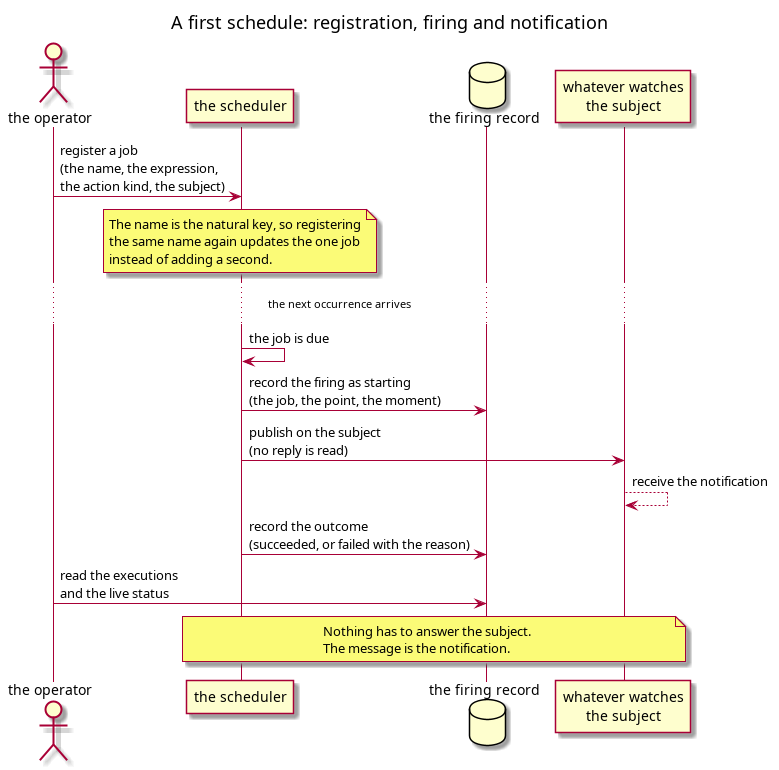
Figure 2: A first schedule: registration, the firing it produces, and the message that is the notification.
Source: scheduler_first_schedule_sequence.puml.
Regenerate with
plantuml -tpng doc/knowledge/architecture/scheduler_first_schedule_sequence.puml.
The scheduler writes the firing, then publishes the message on
example.heartbeat.tick. No component subscribes to that subject, so the
scheduler reads no reply and the firing completes when the publish
returns. The message is the notification, and the subscriber may be a
console, another component, or a tool written for the test. The scheduler
neither knows nor records which it is.
1.4. The record the example produces
The firing was written before the publish, so a publish that failed would still have a row with its error. The execution list shows the firing with the job's name and action type; the live status shows the expression, the active flag, the state of the last firing and the time of the next occurrence. The firing record is the only state the example produces, and it is how the example is verified when nothing was subscribed to the subject.
1.5. Why the example needs no other component
The publish succeeds whether or not a subscriber exists, so no receiver has to be running for the firing to complete. That is why this is the first example: the scheduler can be understood on its own. A reader does not need any other component before reading the pages that follow.
Two cases are outside the example, and both belong to the boundary with other components rather than to scheduling. The first is work that outlives one action, which the job can start but not execute. The second is an action whose result must be known, which turns the publish into a request. Neither changes the expression, the firing or the record; only the reach of the action differs.
2. See also
- Scheduler — the structure note that orders this cluster, and where to read this page in it.
- The Open Group,
crontab— the notation the example's expression is written in.