User Journey: Keep a holiday calendar right
Table of Contents
This page documents a user journey: A reference data administrator keeps a holiday calendar's rules, exceptions and events correct, and checks the business days they produce.
A user journey describes what one person is trying to do, before anything is built. It is a design document that outlives any sprint, so it names the screens, the entity fields each screen shows, and the operations and messages each step needs.
1. Goal
"I want this calendar to say exactly which days are holidays, so that every date the system rolls, settles or fixes on lands where it should." The journey is done when the business days the calendar produces match the published holidays, for every year the desk needs.
2. Actor and trigger
The actor is the tenant administrator: an account with the TenantAdmin role,
acting inside their own tenant. No narrower role holds the calendar
permissions today; see What is missing. The trigger is a newly announced
holiday, a revoked one, a central bank meeting schedule, or a run that settled
on a wrong date. The journey starts at the calendar list, or at a calendar link
from a currency or a currency pair, and ends when the person leaves the
calendar.
A calendar has one of three shapes, and the screen follows the shape:
- QuantLib-sourced (
sourcequantlib,is_editablefalse). Its holidays are generated from QuantLib and held as dated exceptions. The row is read-only; the person changes the dates by deriving a calendar from it. - Derived (
sourceuserwith abase_calendar_code). A delta on top of its base, carried as exceptions only. - Bespoke (
sourceuserwith no base). Built from its own recurring rules, plus exceptions.
3. Steps
- Find the calendar. The person opens Calendars. The system lists the tenant's calendars: code, name, type, country, source and whether it is editable. The person filters by name, country or type.
- Read the calendar. The person selects a row. The system shows one screen: the calendar row, then its rules, its exceptions and its diary events, then the business days it produces. Panels that do not apply to the calendar's shape are hidden, not shown empty: a derived calendar has no rules panel.
- Derive a calendar. On a QuantLib-sourced calendar the person chooses
Derive a calendar, names it, and confirms. The system writes a new
usercalendar whose base is this one. The person continues on the new calendar. - Correct the calendar row. On an editable calendar the person changes the
name, type, country or image, states a change reason, and saves. The system
writes it with
must_match_version. - Maintain the rules. On a bespoke calendar the person adds, changes or removes a recurring rule. The form follows the rule kind: a fixed date asks for month and day; the nth weekday of a month asks for month, weekday and occurrence; the last weekday of a month asks for month and weekday; an Easter offset asks for the offset in days. Every kind asks for the weekend shift and the first and last years it applies.
- Add an exception. The person adds a one-off date, says whether it is a business day or a holiday, and describes it. An extra holiday is an exception that is not a business day; a cancelled holiday is an exception that is a business day. Retiring a recurring holiday from a year onward is a change to the rule's last year, not a deletion, so the history keeps it.
- Record diary events. The person adds a dated event that does not change whether the day is a business day, such as a central bank meeting, with its diary entry type, name and description.
- Rebuild the business days. The person chooses Rebuild business days and says up to which year. The system builds the materialised dates for this calendar from its rules, base and exceptions, for the days it has not built yet. A day already built keeps its value; see What is missing.
- Check the business days. The system shows the year's holidays, one month per block. Each holiday shows what produced it: a rule, an exception or the QuantLib base. The person can add a second calendar, such as the other currency of a pair. The system then shows the union of the two. The union is the business-day definition a pair settles on.
- Check the history. The person opens the history of the calendar row or of one rule, exception or event. The system shows every version with the field-level difference from the one before, and the person can revert to an older version, which the system writes as a new version.
- Export for ORE. The person exports the calendar's adjustments, which ORE
reads as a
CalendarAdjustmentsdocument. - Leave. The person goes back to the list.
Step 8 is the only one whose effect is not immediate in the rest of the system: until the dates are rebuilt, every consumer reads the old business days. The journey still keeps no state of its own; the rebuild completes within the reply.
4. Screens and wireframes
One screen. The calendar row sits at the top, the inputs that produce the dates sit in the middle, and the dates they produce sit at the bottom, so the person reads cause above effect.
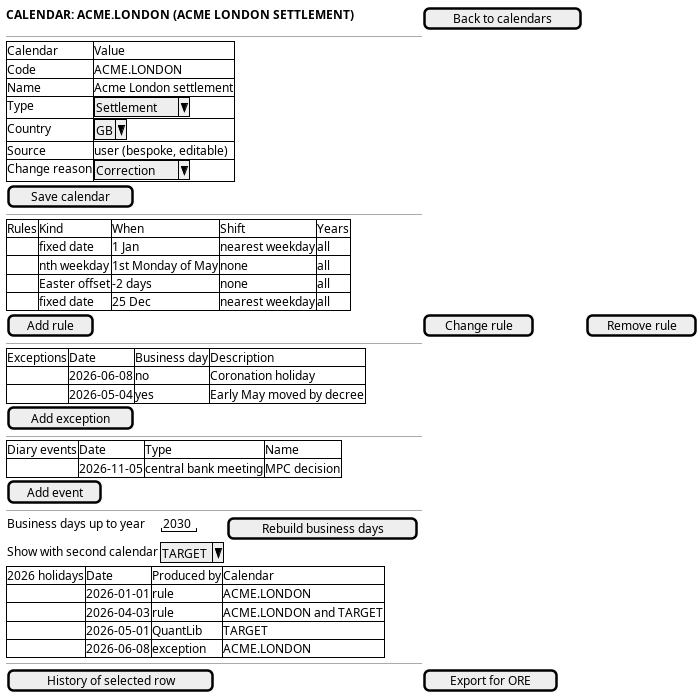
Figure 1: Holiday calendar: the calendar row, its rules, exceptions and events, and the business days they produce.
4.1. Each step, and the shape that serves it
The screen pipeline judges a journey before its prototype: a step is a CRUD variation that the Record screen standard already draws, or it has steps and state of its own and needs a workflow under the Workflows menu. Judged on 2026-10-25, against the screen the web draws today, and signed off by the owner the same day.
| Step | Shape on the screen | Judgement |
|---|---|---|
| 1 Find the calendar | The record list: code, name, type, country and what the calendar is made of | Standard list. The filter by name, country or type is the server search and the one filter the list offers |
| 2 Read the calendar | The record page, with the tabs the shape allows: Details, Rules, Exceptions, Events, Business days, History | Standard record page; the rules, exceptions and events are parts (RS-RELATED-04 to 06), drawn only for the shape that has them |
| 3 Derive a calendar | Derive a calendar in the header, which opens the record dialog with the base, the type and the country given | CRUD variation: one create with the base given, answered in one reply. An own action by RS-PAGE-03, not a workflow |
| 4 Correct the calendar row | Edit in the header, the record dialog with the key fixed | Standard amend |
| 5 Maintain the rules | The Rules tab, a parts panel; the dialog asks the fields the kind needs | Parts panel. The fields that follow the kind are the form's own rule (RS-WRITE-07) |
| 6 Add an exception | The Exceptions tab, a parts panel | Parts panel |
| 7 Record diary events | The Events tab, a parts panel | Parts panel |
| 8 Rebuild the business days | Rebuild business days with the year, on the Business days tab | CRUD variation: one operation, answered in one reply, no state of its own. An own action; RS-PAGE-03 puts own actions in the header, and the owner decided on 2026-10-25 that it moves there from the tab |
| 9 Check the business days | The Business days tab: one year, one block per month, each holiday with what produced it, and a second calendar for the union | A read-only view on the record page. No rule of the standard draws a derived view yet, so the prototype defines it and the standard gains the rule |
| 10 Check the history | The History tab for the calendar; a wide dialog with the timeline for one part | Standard history (RS-HIST, RS-RELATED-06) |
| 11 Export for ORE | Nothing today | A missing server operation, not a screen question; see What is missing |
| 12 Leave | The breadcrumb | Standard |
The journey is a CRUD variation of the standard record screen with parts, two own actions and one derived view. No step keeps state across a reply, so no workflow is needed and the Workflows menu stays empty for calendars. The calendar types and the diary entry types the pickers offer are kept by Maintain a classification list, which is its own journey.
5. Prototype
Keep a holiday calendar right prototype, under
doc/prototypes/calendars/keep-a-holiday-calendar-right/. It draws the list,
a calendar of each shape with the tabs the shape allows, Derive and Rebuild as
own actions in the header, every dialog, the history, the reader's view and the
Business days view, each at its own address. Its design note cites the rule
identifiers each state follows and defines the Business days view for the
standard to take.
6. Entities composed
| Entity | What it contributes | Model |
|---|---|---|
calendar |
The calendar row: code, name, type, country, source, editable, base | ores.refdata.calendar |
calendar_rule |
The rules panel of a bespoke calendar | ores.refdata.calendar_rule |
calendar_exception |
The exceptions panel: one-off holidays and business days | ores.refdata.calendar_exception |
calendar_event |
The diary events panel | ores.refdata.calendar_event |
calendar_date |
The business days panel, read-only | ores.refdata.calendar_date |
calendar_type |
The calendar type picker | ores.refdata.calendar_type |
diary_entry_type |
The diary entry type picker | ores.refdata.diary_entry_type |
country |
The country picker | ores.refdata.country |
The calendar, its rules, exceptions and events are versioned, so each has a history. The business days are derived and keep none; they are rebuilt, not edited.
7. Operations and messages
| Step | Operation | Subject | Status |
|---|---|---|---|
| Find the calendar | List the calendars | refdata.v1.calendars.list |
exists |
| Read the calendar | Read one calendar | refdata.v1.calendars.get |
exists |
| Read the calendar | List its rules | refdata.v1.calendar_rules.list_by_calendar_code |
exists |
| Read the calendar | List its exceptions | refdata.v1.calendar_exceptions.list_by_calendar_code |
exists |
| Read the calendar | List its diary events | refdata.v1.calendar_events.list_by_calendar_code |
exists |
| Derive a calendar | Write the new calendar | refdata.v1.calendars.put |
exists |
| Correct the calendar row | Fill the type and country pickers | refdata.v1.calendar_types.list, refdata.v1.countries.list |
exists |
| Correct the calendar row | Offer the change reasons | dq.v1.change_reasons.list |
exists |
| Correct the calendar row | Write the calendar | refdata.v1.calendars.put |
exists |
| Maintain the rules | Write or remove a rule | refdata.v1.calendar_rules.put, .delete |
exists |
| Add an exception | Write or remove an exception | refdata.v1.calendar_exceptions.put, .delete |
exists |
| Record diary events | Fill the diary entry type picker | refdata.v1.diary_entry_types.list |
exists |
| Record diary events | Write or remove an event | refdata.v1.calendar_events.put, .delete |
exists |
| Rebuild the business days | Regenerate the materialised dates | refdata.v1.ops.regenerate_calendar_dates |
exists |
| Check the business days | Read the dates of one calendar | refdata.v1.calendar_dates.list_by_calendar_code |
partial |
| Check the history | Read every version with its diff | refdata.v1.history.get |
exists |
| Check the history | Revert by writing the old values | the entity's put |
exists |
| Export for ORE | Read the calendar adjustments | refdata.v1.ops.get_calendar_adjustments |
partial |
The history request is the generic one, with entity_type
ores.refdata.calendar, ores.refdata.calendar_rule,
ores.refdata.calendar_exception or ores.refdata.calendar_event; all four
register a history provider. The pair view reads the dates of both calendars
and unions them on the screen; it needs no operation of its own.
8. What is missing
- The business days are not rebuilt when their inputs change, and a rebuild
never rewrites a built day. Captured as A calendar rebuild never rewrites a day it already built and Rebuild business days when their inputs change, and read them by date range. Writing a rule, an exception or a base does not
regenerate
calendar_date, andrefdata.v1.ops.regenerate_calendar_datesonly adds days past the last one built: a changed rule or a new exception never reaches a year already built. The candidate is a rebuild that rewrites the days whose inputs changed. Until then the screen does not rebuild after a save, because that would change nothing; it says what a rebuild does, and it marks each exception that the built days do not show. - A QuantLib calendar builds without its holidays. Captured as A QuantLib calendar builds its business days without its holidays. The rebuild reads only stored rules, and a QuantLib calendar has none: its holidays live in QuantLib. Its days, and the days of a calendar derived from it, mark weekends only. The candidate is for the rebuild to ask QuantLib for the base's holidays. Until then the screen hides the business days of a QuantLib calendar and warns on a calendar derived from one.
- The dates cannot be read by year. Captured as Rebuild business days when their inputs change, and read them by date range. The
calendar_dates_filtertakes only calendar codes, so showing one year means paging through every materialised date in order. The side-by-side view doubles that cost, because it pages through every date of both calendars. The candidate is a date range on the filter. Until then the screen pages from the first date it holds to the end of the year it needs. - The ORE export is data, not a document. Captured as Export currencies and calendar adjustments as ORE documents on the server.
calendar_adjustments.exportreturns the adjustments, and the caller is expected to write theCalendarAdjustmentsXML. A browser has no ORE writer. The candidate is for the operation, or the web back end, to return the document. Until then the screen offers no export. - Externally sourced holidays are not gated. Captured as Externally sourced holidays are not gated by authorisation. The administration model expects a holiday from an untrusted source to wait for authorisation before it takes effect. Nothing models a pending holiday or a trusted source. The candidate is a status on the exception, or a workflow over imports. Until then every written exception takes effect when the dates are rebuilt.
- A holiday has no name. Captured as Holiday rules and business days carry no holiday name. A rule has no name column, and a materialised date carries only whether it is a business day and how it was produced. The screen cannot say "Good Friday"; only exceptions (description) and diary events (name) carry words. The candidate is a name on the rule, carried onto the materialised date. Until then the screen describes a rule by its shape, such as "1st Monday of May".
- Only a tenant administrator can run this journey. Captured as No role below the tenant administrator can maintain reference data. No role below
TenantAdminholds the calendar, rule, exception, event or date permissions. The candidate is a reference data role. - Nothing enforces that a QuantLib calendar is read only. The screen hides Edit and Delete on it, and the server accepts a write all the same. Captured as Nothing enforces that a QuantLib calendar is read only.
9. Related journeys
- Add or correct a currency — the currencies that settle on this calendar
- Maintain a classification list — correct the calendar types or diary entry types the pickers offer
10. Related knowledge
- Holiday Calendar Administration
- Calendars, Holidays and Events
- The Diary/Effects Model
- Date Rolling and Business-Day Calendars
- ORE's AdvanceCalendar Convention Field
- Reference Data — versioning, provenance and change reasons