User Journey: Maintain a classification list
Table of Contents
This page documents a user journey: A reference data administrator picks one of the short code lists that classify reference data and keeps its rows correct.
A user journey describes what one person is trying to do, before anything is built. It is a design document that outlives any sprint, so it names the screens, the entity fields each screen shows, and the operations and messages each step needs.
1. Goal
"I want the codes that classify our reference data to hold exactly the values we use, with names people understand, in the order they expect." The journey is done when the chosen list reads correctly and its history shows why it changed.
2. Actor and trigger
The actor is the tenant administrator: an account with the TenantAdmin role,
acting inside their own tenant. No narrower role holds these permissions today.
The trigger is a value a picker does not offer, a wrong or unclear name, or a
code the tenant no longer uses. The journey starts at Classifications, or at a
"correct this list" link beside any picker that reads one of these lists, and
ends when the person leaves the list.
These lists have no goal of their own, so a plain list with its edit form is the right screen, as in Tune the tenant. The difference is scale: there are 28 lists, so the person first chooses which one.
3. Steps
- Choose the list. The person opens Classifications. The system shows the lists grouped by topic: currencies, calendars, parties, books and portfolios, products and ORE codes, tenors, and market data. The person picks one, or arrives with one already chosen from a picker's link.
- Read the list. The system lists the rows. Most lists carry a code, a name, a description and a display order. Four lists carry only a code and a description: calendar names, day counters, floating index types and leg types. Tenor anchors carry a code, a description and an order, but no name. The columns follow the list.
- Add a row. The person enters a new code and the other columns the list
carries, states a change reason, and saves. The form follows the list, so a
code-only list asks for no name and no order. The system writes it with
must_not_exist, so a duplicate code is refused instead of overwritten. - Correct a row. The person changes the name, description or order. The code
is the key and does not change. The system writes it with
must_match_version. - Reorder. On a list that carries an order, the person moves rows. The system writes each moved row's new order. A list without an order is sorted by code and offers no reordering.
- Remove a row. The person removes a code the tenant no longer uses. The system closes the row; it stays in the history. See What is missing for codes still in use.
- Check the history. The person opens a row's history. The system shows every version with the field-level difference from the one before, and the person can revert to an older version, which the system writes as a new version.
- Leave. The person goes back. Every picker that reads the list offers the values it now holds.
No step waits on the server after its reply, and the journey keeps no state.
4. Screens and wireframes
One screen with two parts: the lists by topic on the left, and the chosen list with its edit form on the right. The person can move between lists without leaving the screen.
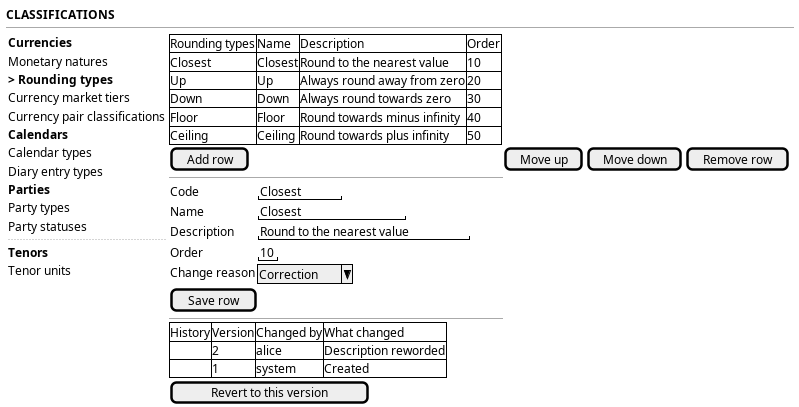
Figure 1: Classifications: the lists by topic, and the chosen list with its edit form and history.
5. Entities composed
The 28 lists, by topic. Every one is versioned and registers a history
provider; every one has list, get, put and delete under the subject
prefix shown.
| Topic | List | Order | Subject prefix |
|---|---|---|---|
| Currencies | Monetary Nature | order | monetary_natures |
| Currencies | Rounding Type | order | rounding_types |
| Currencies | Currency Market Tier | order | currency_market_tiers |
| Currencies | Currency Pair Classification | order | currency_pair_classifications |
| Calendars | Calendar Type | order | calendar_types |
| Calendars | Diary Entry Type | order | diary_entry_types |
| Calendars | Calendar Name | no order | calendar_names |
| Calendars | Business Day Convention Type | order | business_day_convention_types |
| Parties | Party Type | order | party_types |
| Parties | Party Status | order | party_statuses |
| Parties | Contact Type | order | contact_types |
| Books and portfolios | Book Status | order | book_statuses |
| Books and portfolios | Book Purpose Type | order | book_purpose_types |
| Books and portfolios | Ledger Feed Type | order | ledger_feed_types |
| Books and portfolios | Regulatory Book Type | order | regulatory_book_types |
| Books and portfolios | Purpose Type | order | purpose_types |
| Products and ORE codes | Asset Class Code | order | asset_class_codes |
| Products and ORE codes | Leg Type | no order | leg_types |
| Products and ORE codes | Floating Index Type | no order | floating_index_types |
| Products and ORE codes | Day Counter | no order | day_counters |
| Products and ORE codes | Day Count Fraction Type | order | day_count_fraction_types |
| Products and ORE codes | Curve Role | order | curve_roles |
| Tenors | Tenor Kind | order | tenor_kinds |
| Tenors | Tenor Unit | order | tenor_units |
| Tenors | Tenor Anchor | order | tenor_anchors |
| Tenors | Tenor Resolution Algorithm | order | tenor_resolution_algorithms |
| Market data | Derivation Kind | order | derivation_kinds |
| Market data | Series Subclass Code | order | series_subclass_codes |
Currency groups are not here. A group has members, so it is a journey of its own: Group currencies for the desk.
6. Operations and messages
The subjects below are given for one list; every list has the same set under its own prefix.
| Step | Operation | Subject | Status |
|---|---|---|---|
| Read the list | List the rows | refdata.v1.rounding_types.list |
exists |
| Add a row | Offer the change reasons | dq.v1.change_reasons.list |
exists |
| Add a row | Write a new row | refdata.v1.rounding_types.put |
exists |
| Correct a row | Write the changed row | refdata.v1.rounding_types.put |
exists |
| Reorder | Write the moved rows | refdata.v1.rounding_types.put_many |
exists |
| Remove a row | Close the row | refdata.v1.rounding_types.delete |
partial |
| Check the history | Read every version with its diff | refdata.v1.history.get (entity_type ores.refdata.rounding_type) |
exists |
| Check the history | Revert by writing the old values | refdata.v1.rounding_types.put |
exists |
7. What is missing
- Removing a code still in use is not refused. A delete closes the row without checking who refers to it. A currency that uses a removed rounding type keeps the code, and its next save fails, because the currency's validator checks that the code exists. The same holds for every list a record points at. The candidate is an in-use check on delete that names the records still using the code. Until it exists, the screen warns before every removal that records may still use the code.
- Lists ORE defines are editable like any other.
day_counter,calendar_name,floating_index_type,leg_typeandbusiness_day_convention_typehold spellings an ORE document must write exactly. Changing or removing one can produce a document ORE rejects. Calendars mark this withis_editable; these lists have no such marker. The candidate is the same marker on the ORE vocabularies. Until then the screen shows these lists read-only, and says why. - Order is not unique. On the lists that carry it,
display_orderis a free integer, so two rows may share it and the list order is then undefined. The candidate is a unique index per list, or a stated tie-break by code. - Only a tenant administrator can run this journey. No role below
TenantAdminholds these permissions.
8. Related journeys
- Add or correct a currency — its rounding type, monetary nature and market tier pickers read lists from here
- Keep a holiday calendar right — its calendar type and diary entry type pickers read lists from here
- Tune the tenant — the same pattern for the identity lookups
9. Related knowledge
- Reference Data — versioning, provenance and change reasons
- UX Language