User Journey: Tune the tenant
Table of Contents
This page documents a user journey: A tenant administrator maintains tenant details and the reference lookups.
A user journey describes what one person is trying to do, before anything is built. It is a design document that outlives any sprint, so it names the screens, the entity fields each screen shows, and the operations and messages each step needs.
1. Goal
"I want the tenant's own details and the labels that classify things to stay correct." The administrator reads the tenant row and maintains the three lookups: account types, tenant types and tenant statuses. The journey is done when the lookups hold exactly the values the tenant uses, in the right order.
2. Actor and trigger
The tenant administrator: an account of type user that holds the TenantAdmin
role, signed in inside their own tenant. The trigger is a change in
classification: a new kind of account, a new tenant lifecycle state, or a wrong
label. It starts when the administrator opens Tenant settings, and ends when
the lookup rows read correctly.
Tenant create, update and delete are system-administrator work, and so are
tenant provisioning and system reset. They are out of scope for this journey,
which does not design them; the tenant panel on this screen is read-only. The
subjects that do that work are iam.v1.tenants.put, iam.v1.tenants.delete,
iam.v1.tenants.provision-acme, iam.v1.tenants.complete-provisioning,
iam.v1.system.reset-tenant and iam.v1.system.reset. Each needs a
system-level permission, and none of them is a step below.
3. Steps
- Open tenant settings. The administrator opens Tenant settings. The system shows one screen: the tenant's own row, then one plain list per lookup.
- Read the tenant row. The system reads the caller's tenant and shows the code, the name, the hostname, the type and the status.
- Read the lookups. The system lists the account types, the tenant types and the tenant statuses. Each list shows the code, the display name, the description and the display order.
- Add or correct a lookup row. The administrator edits a row or adds one. The
system writes it with the lookup's
putoperation and records the reason for the change. - Remove a lookup row. The administrator deletes a row the tenant no longer
uses. The system soft-deletes it with the lookup's
deleteoperation. - Reorder. The administrator changes the display order so the lists read in the right sequence.
- Leave. The administrator goes back. The lookups offer the values they hold.
4. Screens and wireframes
One screen. This is the one place in these journeys where a plain list of reference rows is the right screen: a lookup has no goal of its own, so it needs no panels beyond the list and its edit form. The tenant's own row sits above the lists because the type and the status columns are the very codes the lookups define.
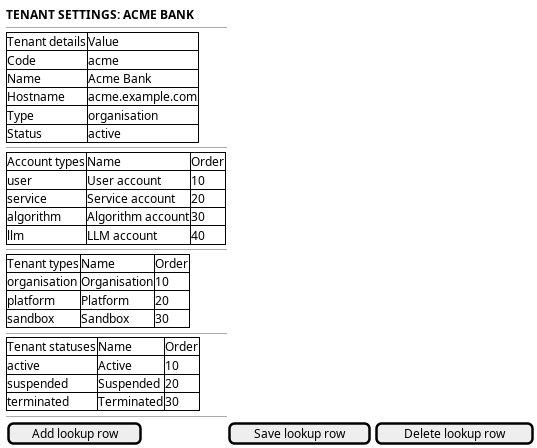
Figure 1: Tenant settings: the tenant's own row above the three lookup lists.
5. Entities composed
| Entity | What it contributes | Model |
|---|---|---|
tenant |
Code, name, hostname, type and status, read-only here | ores.iam.tenant |
account_type |
The codes that classify accounts | ores.iam.account_type |
tenant_type |
The codes that classify tenants | ores.iam.tenant_type |
tenant_status |
The codes for the tenant lifecycle | ores.iam.tenant_status |
The three lookups share one shape: a code that is the primary key, a natural-key name, a description and a display order. That is why one plain list screen fits all three.
6. Operations and messages
| Step | Operation | Subject | Status |
|---|---|---|---|
| Read the tenant row | List the caller's tenant | iam.v1.tenants.list |
exists |
| Read the tenant row | Read one tenant by code | iam.v1.tenants.get |
exists |
| Read the lookups | List the account types | iam.v1.account_types.list |
exists |
| Read the lookups | List the tenant types | iam.v1.tenant_types.list |
exists |
| Read the lookups | List the tenant statuses | iam.v1.tenant_statuses.list |
exists |
| Add or correct a row | Write one account type | iam.v1.account_types.put |
partial |
| Add or correct a row | Write one tenant type | iam.v1.tenant_types.put |
partial |
| Add or correct a row | Write one tenant status | iam.v1.tenant_statuses.put |
partial |
| Remove a row | Delete one account type | iam.v1.account_types.delete |
exists |
| Remove a row | Delete one tenant type | iam.v1.tenant_types.delete |
exists |
| Remove a row | Delete one tenant status | iam.v1.tenant_statuses.delete |
exists |
The writes need iam::account_types:write, iam::tenant_types:write and
iam::tenant_statuses:write. The TenantAdmin role holds every permission, so
the administrator may call them. The lookups also have put_many and
delete_many subjects, which a single edited row does not need.
partial on the three writes is not about permission. It is about effect: the
row is written, but the value never classifies anything. See below.
7. What is missing
- The lookups are read from the system tenant, but written under the caller's
tenant. The three validators –
ores_iam_validate_account_type_fn,ores_iam_validate_tenant_type_fnandores_iam_validate_tenant_status_fn– read only rows whosetenant_idis the system tenant. A tenant administrator writes rows under their own tenant, so those rows are inert: no account and no tenant is ever validated against them. The candidate is to make the three validators tenant-aware, or to make the lookup screens system-administrator work. Until one of those lands, the screen must say that a change here does not change what the system accepts. - No order guard.
display_orderis a free integer with a default of zero, and nothing makes it unique within a lookup. Two rows may share an order, and the list order is then undefined. The candidate is a unique index or a stated tie-break. - The tenant's own details are read-only here.
iam.v1.tenants.putexists and needsiam::tenants:write, but it is system-administrator work by the boundary above. The candidate, if a tenant administrator should correct the display name or the description, is a narrow operation limited to those two fields. Until it exists the panel is read-only.
8. Related journeys
- New tenant — the other end of a tenant's life: provision the tenant whose details you are setting
- Retire or reset a tenant — suspend, terminate or reset the tenant whose details you are configuring
- See who has access — the accounts inside the tenant you are configuring
- Shape the role catalogue — the roles those accounts hold