User Journey: Shape the role catalogue
Table of Contents
This page documents a user journey: A tenant administrator defines roles and the permissions each one bundles.
A user journey describes what one person is trying to do, before anything is built. It is a design document that outlives any sprint, so it names the screens, the entity fields each screen shows, and the operations and messages each step needs.
1. Goal
"I want to decide what a role grants." The tenant administrator defines a role and chooses the permissions it bundles. The journey is done when the role's permission list is exactly what the administrator intended, and an account that holds the role can do exactly those things.
2. Actor and trigger
The tenant administrator, an account inside one tenant that holds the role write permission. The trigger is a new desk, a new capability that needs a home, or an audit finding that a role is too broad. It starts at Roles, and ends when the catalogue and the role's permission list read correctly. This is an administrator acting inside their tenant, not a member.
The Qt client listed a role's permissions read-only and shipped no editor for them, so this journey is new ground. The screen must be designed, not reproduced.
3. Steps
- Open the catalogue. The administrator opens Roles. The system lists the tenant's roles with their names, descriptions and permission counts.
- Create or pick a role. The administrator names a role and writes a description. The system writes a new role version and records the change reason.
- Read the permission catalogue. The system lists every permission the platform defines, with its code and description. Permissions are seeded constants, so the screen offers no "new permission".
- Choose the bundle. The administrator ticks the permissions the role should bundle and unticks the ones it should not. The system has no operation for this step: a role's permissions can only be read.
- Save the bundle. There is nothing to call. The screen cannot save the change, so the bundle stays as it was.
- Check the result. The system re-reads the role and its permissions. The administrator compares them with the intent.
The permission catalogue is system-defined. A code the administrator invents would not be enforced anywhere, and would drift from the seed data, so the screen picks from the seeded list and never creates a permission.
4. Screens and wireframes
One screen, three panels: the role catalogue, the selected role's identity, and the permission bundle. The administrator moves between the three while shaping one role, so they belong together.
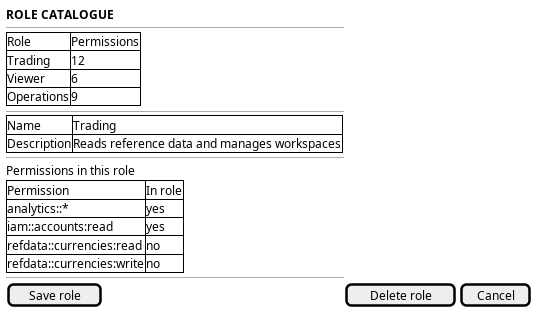
Figure 1: Role catalogue: the tenant's roles, the selected role, and the permissions it bundles.
5. Entities composed
| Entity | What it contributes | Model |
|---|---|---|
role |
Name and description: the role being shaped | ores.iam.role |
permission |
The atomic codes and descriptions the administrator picks from | ores.iam.permission |
role_permission |
The junction row that records which permissions a role bundles | no entity model — junction table |
There is no module entity and no module table. The component segment of the
code — iam in iam::accounts:read — is what plays the part a module would
play, and the catalogue is grouped by that segment.
The role_permission row carries only valid_from and valid_to. It has no
assigned_by, no assigned_at and no change reason, unlike account_role.
So a change to a role's bundle would leave no record of who made it or why.
The question is already open in
Evaluate change reasons for role permission tables.
No credential field appears on this screen. password_hash, password_salt,
service_password_hash, totp_secret, cleartext passwords and JWTs stay on
the server.
6. Operations and messages
| Step | Operation | Subject | Status |
|---|---|---|---|
| Open the catalogue | List the roles in the tenant | iam.v1.roles.list |
exists |
| Create or pick a role | Write a role | iam.v1.roles.put |
partial |
| Read the permission catalogue | List the permissions the platform defines | iam.v1.permissions.list |
exists |
| Choose the bundle | Read the permissions a role bundles | iam.v1.roles.permissions |
exists |
| Choose the bundle | Add a permission to a role | none | missing |
| Choose the bundle | Remove a permission from a role | none | missing |
| Remove a role | Delete a role | iam.v1.roles.delete |
exists |
| Check the result | Read a role and its permissions | iam.v1.roles.get, iam.v1.roles.permissions |
exists |
The role subjects are defined in
ores.iam.authorization_messages.
iam.v1.roles.permissions is a read. No write subject for the
role-to-permission link exists in the generated protocol, and
iam.v1.permissions.put writes the catalogue of atomic permissions, not the
link. So it does not fill the gap.
iam.v1.roles.put checks iam::roles:write. The seeded catalogue defines
iam::roles:update ("Modify role permissions"), not iam::roles:write. Only
an account that holds the bare * wildcard passes the check, and TenantAdmin
holds it. A delegated administrator that holds the documented
iam::roles:update is refused. So partial here means the operation exists and
the permission the caller is meant to hold does not satisfy it.
7. What is missing
- No permission-to-role write. No subject adds or removes a permission on a
role. The candidate is
iam.v1.roles.permissions.putand...put_many, carrying the role id and the chosen permission ids or codes, with a change reason. Until it exists, the screen must show the bundle read-only, exactly as the Qt client did, and a new role stays an empty shell. - The role write permission code disagrees with the catalogue. The handler
asks for
iam::roles:write; the seed definesiam::roles:update. The candidate is to change the handler toiam::roles:update, or to seediam::roles:writeand retire the other. Until then only the bare wildcard reaches the role write. - No audit on the role-permission link.
role_permissioncarriesvalid_fromandvalid_toonly. It has no author, no time and no reason, so a bundle change would not be attributable. The candidate is to give the junction the same audit tail asaccount_role. - Permission CRUD is open to the wildcard alone.
iam.v1.permissions.put,put_many,deleteanddelete_manyexist and checkiam::permissions:writeandiam::permissions:delete. Neither code is seeded, so only the bare wildcard reaches them. The candidate is to seed the two codes, or to drop the permission CRUD subjects, because the model says permissions are system-defined constants seeded from bootstrap data. The role catalogue screen must pick from the seeded list either way.
8. Related journeys
- Change someone's access — a role is only useful once it is assigned to an account
- Know what I may do — the member's view of the roles they hold and the permissions they carry
- Register a service account — non-human accounts consume roles too
- See who has access — the roster that shows which accounts hold the role you are shaping
9. Related knowledge
- Identity and Access Management
- Role-Based Access Control
- Accounts and Roles — the user guide chapter
- How do I add a PlantUML diagram?
- Access journeys — the group hub