User Journey: Know what I may do
Table of Contents
This page documents a user journey: A member sees the roles they hold and the permissions those roles carry.
A user journey describes what one person is trying to do, before anything is built. It is a design document that outlives any sprint, so it names the screens, the entity fields each screen shows, and the operations and messages each step needs.
1. Goal
"I want to see what I am allowed to do, and where it comes from." The member reads the roles on their account and the permissions those roles carry. The journey is done when the member can name every role they hold, and answer "may I do this?" for any action the system offers.
2. Actor and trigger
The member: an account of type user, signed in, reading their own record. The
trigger is a refusal — a screen answers "permission denied" — or curiosity from
the account menu. It starts when the member opens My access, and ends when
they close it. Nothing is written, so the journey keeps no server-side state.
This is the read half of the access topic. An administrator changes the same records for somebody else — see Change someone's access.
3. Steps
- Open my access. The member chooses My access. The system reads the roles assigned to the caller's account and lists them with their descriptions.
- Read the roles. Each row shows the role name and what the role is for. The member's identity in the header comes from the session established at sign-in, not from a second read.
- Read the permissions. The system reads the effective permissions of the
account and lists the codes. Each code follows
component::resource:action, so the member reads the component and the action from the code alone. - Follow a permission back. The member picks a permission and asks which role grants it. The system reads the permissions of the held roles and answers.
- Leave. The member closes the screen. No change has been made.
4. Screens and wireframes
One screen, read-only. Three panels: the caller's identity, the roles they hold, and the permissions those roles carry. The member thinks of the three as one answer to one question, so they are panels of one screen rather than separate screens.
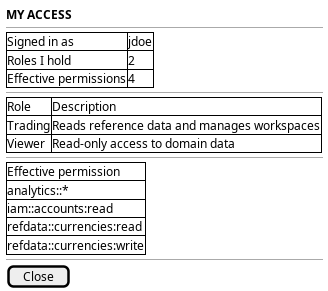
Figure 1: My access: who I am, the roles I hold, and the permissions they carry.
5. Entities composed
| Entity | What it contributes | Model |
|---|---|---|
account |
The signed-in identity in the header: username and full name | ores.iam.account |
role |
The roles the account holds: name and description | ores.iam.role |
permission |
The atomic codes the roles bundle: code and description | ores.iam.permission |
account_role |
The junction row that links the account to each role | no entity model — junction table |
role_permission |
The junction row that links each role to its permissions | no entity model — junction table |
The two junctions have no entity model of their own: they are many-to-many
links, and the joined shape is a query result rather than an entity. There is
also no module entity and no module table. The component segment of the code —
iam in iam::accounts:read — is what plays the part a module would play.
No credential field appears on this screen. password_hash, password_salt,
service_password_hash, totp_secret and cleartext passwords stay on the
server, and no read in this journey returns them.
6. Operations and messages
| Step | Operation | Subject | Status |
|---|---|---|---|
| Open my access | Read the roles on my account | iam.v1.roles.by-account |
exists |
| Open my access | Read my effective permissions | iam.v1.roles.permissions-by-account |
exists |
| Follow a permission back | Read the permissions one role bundles | iam.v1.roles.permissions |
exists |
The three reads are defined in ores.iam.authorization_messages. Each proves that the caller has a session, but checks no permission and takes an arbitrary account id. So a member can read another account's access. That is the gap this journey exposes.
7. What is missing
- No self-scoping and no permission gate.
iam.v1.roles.by-account,iam.v1.roles.permissions-by-accountandiam.v1.roles.permissionstake an arbitrary id and check only that the caller is signed in. The candidate is a self form of each read, such asiam.v1.roles.by-account-self, or aniam::roles:readcheck on the existing reads plus a check that the target account is the caller's own. - No attribution of a permission to a role.
permissions-by-accountreturns a flat list of codes. The screen can show the flat list, or read each held role in turn, but no single read says "this permission arrives through that role". The candidate is a response that pairs each code with the role that grants it. - No assignment dates on the roles read.
iam.v1.roles.by-accountreturnsrolerecords only. The junction row carriesassigned_byandassigned_at, but the response does not. A member cannot see when a role was given or by whom. The administrator's side of the same gap is Change someone's access.
8. Related journeys
- Shape the role catalogue — see the permissions a role you hold actually bundles
- Change someone's access — the administrator's side of the same question, where roles are granted and revoked
- Choose where I work — permissions are exercised in a party, and the session picks one
9. Related knowledge
- Identity and Access Management
- Role-Based Access Control
- Accounts and Roles — the user guide chapter
- How do I add a PlantUML diagram?
- Access journeys — the group hub