User Journey: Change someone's access
Table of Contents
This page documents a user journey: A tenant administrator grants and revokes a colleague's roles.
A user journey describes what one person is trying to do, before anything is built. It is a design document that outlives any sprint, so it names the screens, the entity fields each screen shows, and the operations and messages each step needs.
1. Goal
"I need to give a colleague the roles their job needs, and take away the ones it does not." The tenant administrator sets the role list on a colleague's account. The journey is done when the colleague's access reads correctly, and the record of the change names the administrator, the time and the reason.
2. Actor and trigger
The tenant administrator: an account inside one tenant that holds
iam::roles:assign and iam::roles:revoke. The trigger is a joiner, a move
between desks, or a leaver. It starts when the administrator opens a
colleague's account from Accounts, and ends when the role list is right and
the change is recorded. This is an administrator acting on someone else's
record inside their tenant.
This is the write half of the access topic. The colleague's own read-only view is Know what I may do.
3. Steps
- Find the colleague. The administrator opens Accounts and picks the person. The system lists the accounts in the tenant, so tenant isolation decides who is visible.
- Read what they hold. The system reads the roles assigned to the account and shows them. This list is the starting point.
- Choose a role to grant. The administrator opens the role picker. The system lists the roles defined in the tenant, with their descriptions.
- Grant the role. The administrator selects a role and confirms. The system
writes an
account_rolerow. The row recordsassigned_by(the administrator),assigned_at(the time), the change reason and the commentary. This step is what makes the grant auditable. - Revoke a role. The administrator selects a held role, removes it, and
gives a reason. The system closes the assignment: it sets
valid_toon the open row instead of deleting it, so the grant stays in the history. - Confirm. The system re-reads the role list. The administrator checks the result. The change takes effect on the colleague's next sign-in.
- Leave. The administrator closes the screen.
The assignment row carries assigned_by, assigned_at, change_reason_code
and change_commentary, so a granted role is auditable in a way a plain join
table would not be. A revoke closes the row and a later re-grant opens a new
one, so the whole history of a person's access stays readable.
4. Screens and wireframes
One screen: the colleague's access. The identity header, the roles they hold with the assignment audit, the role picker that adds a role, and the change reason and commentary. The administrator does all of this in one place, so the panels belong together.
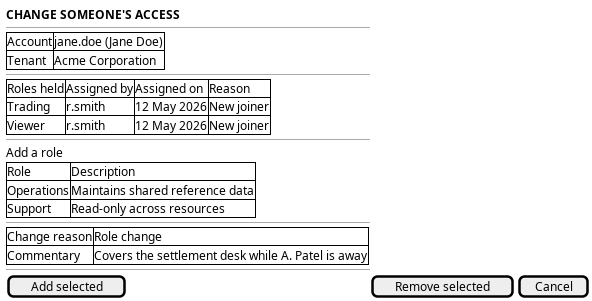
Figure 1: Change someone's access: the colleague, the roles they hold with who assigned each one, the role picker, and the change reason.
5. Entities composed
| Entity | What it contributes | Model |
|---|---|---|
account |
The colleague whose access changes: username, full name, account type | ores.iam.account |
role |
The roles held and the roles on offer: name and description | ores.iam.role |
account_role |
The assignment: assigned_by, assigned_at, change_reason_code and change_commentary |
no entity model — junction table |
permission |
Not shown here. What the roles carry belongs to Know what I may do | ores.iam.permission |
The account_role row is more than a join. It carries an audit tail, so the
grant itself is a record with an author, a time and a reason. There is no
module entity and no module table in this model: the component segment of a
permission code such as iam::roles:assign is what plays the part a module
would play.
This screen shows no credential field. password_hash, password_salt,
service_password_hash, totp_secret, cleartext passwords and JWTs must never
reach the browser. The account read currently returns credential material
anyway, and that is a gap named below.
6. Operations and messages
| Step | Operation | Subject | Status |
|---|---|---|---|
| Find the colleague | List the accounts in the tenant | iam.v1.accounts.list |
exists |
| Read what they hold | Read the roles on the account | iam.v1.roles.by-account |
exists |
| Choose a role to grant | List the roles defined in the tenant | iam.v1.roles.list |
exists |
| Grant the role | Assign a role to the account | iam.v1.roles.assign |
exists |
| Revoke a role | Revoke a role from the account | iam.v1.roles.revoke |
exists |
| Confirm | Read the assignment row: who, when, why | none | missing |
The role subjects are defined in
ores.iam.authorization_messages.
iam.v1.roles.revoke checks iam::roles:revoke before it acts.
iam.v1.roles.assign checks nothing at all, so any signed-in account can grant
any role inside its tenant. The operation exists and the caller may use it;
the missing check is the gap below.
7. What is missing
- No assignment read. No subject returns the
account_rolerow, soassigned_by,assigned_at,change_reason_codeandchange_commentarycannot be shown even though they are stored. The candidate isiam.v1.roles.assignments-by-account, returning each role with its assignment fields. Until it exists, the screen shows the role list without the audit evidence. - No permission check on assign.
iam.v1.roles.assigndoes not testiam::roles:assign, whileiam.v1.roles.revokedoes testiam::roles:revoke. The candidate is to apply the same check to assign, so the operation matches its twin. - No reason on the message.
assign_role_requestandrevoke_role_requestcarry onlyaccount_idandrole_id. The row has change reason and commentary columns, and the insert trigger validates the reason, but the client cannot set either field. The candidate is to addchange_reason_codeandchange_commentaryto both requests, or to addiam.v1.roles.assign-with-reasonand its revoke twin. - The account read carries credential material.
iam.v1.accounts.listandiam.v1.accounts.getreturn the wholeaccountwire shape, which includespassword_hash,password_saltandtotp_secret. The picker needs only a username and a full name. The candidate is a summary shape for the picker, or a server-side redaction, so credential material never leaves the server.service_password_hashis absent from the wire shape already, and must stay absent. - No guard on an empty role list. The account screen warns when an account has no party, but stays silent when it has no role (see the user guide chapter). The same silence applies when a revoke removes the last role. The candidate is a warning before the last role is revoked.
8. Related journeys
- Know what I may do — the colleague's own read-only view of the roles you grant here
- Shape the role catalogue — define or fix a role before the picker offers it
- See who has access — the roster you pick the colleague from and return to afterwards
- Register a service account — create the non-human account when the role belongs to a service or an algorithm
9. Related knowledge
- Identity and Access Management
- Role-Based Access Control
- Accounts and Roles — the user guide chapter
- How do I add a PlantUML diagram?
- Access journeys — the group hub