User Journey: See who has access
Table of Contents
This page documents a user journey: A tenant administrator reads the account roster and each account's state.
A user journey describes what one person is trying to do, before anything is built. It is a design document that outlives any sprint, so it names the screens, the entity fields each screen shows, and the operations and messages each step needs.
1. Goal
"I want to see who can get in, and what state each of them is in." The administrator reads one screen and gets one row per person. The journey is done when every row answers three questions: can this account sign in, what can it reach, and does it owe a password change.
2. Actor and trigger
The tenant administrator: an account of type user that holds the TenantAdmin
role, signed in inside their own tenant. The trigger is a question about access:
a joiner, a leaver, a lock-out, or a periodic review. It starts when the
administrator opens Directory, and ends when the roster reads correctly.
This journey writes nothing. It is the read half of the directory topic; the write half is Bring someone in.
3. Steps
- Open the roster. The administrator opens Directory. The system shows one screen: a filter panel, one row per account, and a state panel for the selected row.
- Read the accounts. The system lists every account in the tenant. Each row shows the username, the full name, the account type and the job title.
- Attach the sign-in state. The system reads the login record for each account and adds the locked flag, the online flag, the last sign-in time and the password-change flag to the row.
- Attach the parties. The system reads the account's party links and turns each party id into a name. The row lists the parties the account may act for.
- Attach the roles. The system reads the roles assigned to the account. The row lists the role names.
- Filter. The administrator narrows the list, for example to locked accounts, or to accounts that must change their password. The filter runs on the rows already loaded.
- Leave. The administrator goes back. Nothing was written, so the journey carries no state.
4. Screens and wireframes
One screen. The filter, the roster table and the selected account's state are
panels of that screen, because the administrator reads them as one answer. The
join is the screen's real work: account holds the identity, login_info holds
the state, account_party holds the scope and role holds the access.
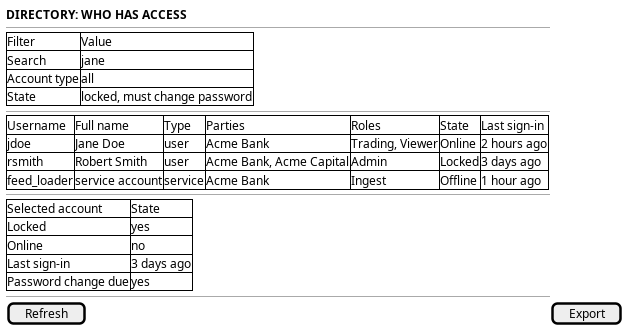
Figure 1: The roster: a filter, one row per account, and the selected account's state.
5. Entities composed
| Entity | What it contributes | Model |
|---|---|---|
account |
Username, full name, account type, job title | ores.iam.account |
login_info |
Locked, online, last sign-in, failed logins, password change due | ores.iam.login_info |
account_party |
The parties the account may act for | ores.iam.account_party |
party |
The name behind each party link | ores.refdata.party |
role |
The role names assigned to the account | ores.iam.role |
The screen shows no field from password_hash, password_salt or totp_secret.
Those columns are secret.
6. Operations and messages
| Step | Operation | Subject | Status |
|---|---|---|---|
| Read the roster | Read the rows and their state in one call | none | missing |
| Read the accounts | List the tenant's accounts | iam.v1.accounts.list |
exists |
| Attach the sign-in state | List the tenant's login records | iam.v1.login_info.list |
exists |
| Attach the parties | List one account's party links | iam.v1.account_parties.list_by_account_id |
exists |
| Attach the parties | Resolve the party ids to names | refdata.v1.parties.get_many |
exists |
| Attach the roles | List one account's roles | iam.v1.roles.by-account |
exists |
| Read a row in full | Read one account by key | iam.v1.accounts.get |
exists |
The server has no joined read. iam.v1.accounts.list returns accounts only, and
its request carries offset, limit and order and nothing else. The screen
builds the row itself: one accounts.list call, one login_info.list call,
then one roles.by-account call and one account_parties.list_by_account_id
call for every account on the page. A page of fifty accounts costs more than a
hundred calls. The join is the journey's real work, and the screen owns it
today.
iam.v1.accounts.get returns one account by key. It is not a substitute for the
roster, because the roster needs the login state and the assignments as well.
7. What is missing
- No joined read. Every row is assembled from four resources, and two of them
are read once per account. The candidate is one read,
iam.v1.accounts.list_with_state, that returns the account with its login state, its party links and its roles. Until it exists the screen composes the calls above and pages the per-account calls. - No filter and no stated order on the roster request.
iam.v1.accounts.listtakes no filter, so the screen cannot ask for locked accounts, or for accounts that must change their password. The handler also refuses a stated order, so the page arrives in key order and the screen cannot sort by username, state or sign-in date. The screen loads pages, sorts them and filters them in the client. The candidate is a filter and a sort on the list request, or on the joined read. - Roles are read one account at a time.
iam.v1.roles.by-accounttakes oneaccount_id. There is no bulk read for a page of accounts. The candidate isiam.v1.roles.by-accounts. - Party names need a second call. The link carries a
party_idonly, so the screen resolves the names withrefdata.v1.parties.get_many. The joined read should carry the name, or the link should. - The read is not permission-gated.
iam::accounts:readandiam::login_info:readexist in the permission list, but no handler checks them. Any signed-in account can list every account and every sign-in record in the tenant. The candidate is to enforce both on the read handlers. - The account read carries secrets. The generated
Accounttype carriespassword_hash,password_saltandtotp_secret, soaccounts.listandaccounts.getdeliver them to the browser. The candidate is to drop them from the wire type, because a screen cannot be trusted to ignore a secret it is handed.
8. Related journeys
- Change someone's access — the row you are looking at is the person whose access you want to change.
- Rescue access — a locked account is read here and unlocked there.
- Audit sign-ins — the roster shows who may sign in, and the audit shows who actually did.
- Bring someone in — the new colleague you cannot find in the roster is created there.
- Register a service account — a non-human identity also appears in this roster, and is created there.