User Journey: Bring someone in
Table of Contents
This page documents a user journey: A tenant administrator creates an account with its parties, roles and first password.
A user journey describes what one person is trying to do, before anything is built. It is a design document that outlives any sprint, so it names the screens, the entity fields each screen shows, and the operations and messages each step needs.
1. Goal
"I want to give a new colleague a working account before their first day." The administrator creates the account, fills in the profile and the contact record, links the parties the person works for, grants the roles, and sets a first password. The journey is done when the new person can sign in and reach the right data.
2. Actor and trigger
The tenant administrator: an account of type user that holds the TenantAdmin
role, signed in inside their own tenant. The trigger is a joiner, or a service
that needs its own identity. It starts when the administrator chooses New
account on the roster, and ends when the new person signs in for the first
time.
The roster this journey writes into is See who has access.
3. Steps
- Open the new-account screen. The administrator chooses New account on the roster. The system shows one screen with five panels: sign-in, profile and contact, parties, roles, and the first password.
- Create the account. The administrator enters the username, the account
type, the email address and a first password. The system creates the account
and its login record, and assigns the
Viewerrole by default. This is one operation:iam.v1.accounts.save. The reply carries the newaccount_id, which every later step addresses. - Add the profile. The administrator enters the full name and the job title.
The system writes them with
iam.v1.accounts.update. This is a second, separate operation: the create request carries no profile fields. - Add the contact record. The administrator enters the address, the phone and
the contact email. The system writes one contact row with
iam.v1.account_contact_informations.put. This is a third, separate operation. - Link the parties. The administrator selects the parties the person works
for. The system writes one link per party with
iam.v1.account_parties.put. This is a fourth, separate operation. - Grant the roles. The administrator adds the roles beyond
Viewer. The system assigns each one withiam.v1.roles.assign. This is a fifth, separate operation. - Force a password change. The account must change its password at first sign-in. No operation sets that flag, so this step is missing.
- Confirm. The system reads the account back and shows the finished row.
- Leave. The administrator returns to the roster with the new account in it.
4. Screens and wireframes
One screen. The five panels belong to one task, so the screen keeps them together and shows the new account's id as soon as the create call returns. That id is what the later steps use to address the account.
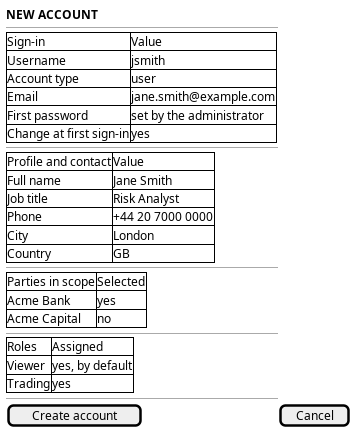
Figure 1: The new-account screen: sign-in, profile and contact, parties, roles, and the first password.
5. Entities composed
| Entity | What it contributes | Model |
|---|---|---|
account |
Username, account type, email, full name, job title, first password | ores.iam.account |
login_info |
The new sign-in record, and the password-change flag | ores.iam.login_info |
account_contact_information |
Address, city, postcode, phone, contact email, web page | ores.iam.account_contact_information |
account_party |
One link per party the person works for | ores.iam.account_party |
party |
The parties the screen offers | ores.refdata.party |
role |
The roles granted, starting with Viewer |
ores.iam.role |
6. Operations and messages
| Step | Operation | Subject | Status |
|---|---|---|---|
| Create the account | Create the account and set the first password | iam.v1.accounts.save |
exists |
| Create the account | Choose the account type | iam.v1.accounts.save |
partial |
| Create the account | Assign the default Viewer role |
internal to iam.v1.accounts.save |
exists |
| Add the profile | Set the full name and the job title | iam.v1.accounts.update |
exists |
| Add the contact record | Write the contact details | iam.v1.account_contact_informations.put |
exists |
| Link the parties | Link one party to the account | iam.v1.account_parties.put |
exists |
| Grant the roles | Assign a further role | iam.v1.roles.assign |
exists |
| Force a password change | Set the password-change flag | none | missing |
| Confirm | Read the new account back | iam.v1.accounts.get |
exists |
iam.v1.accounts.save needs iam::accounts:create. iam.v1.accounts.update
and iam.v1.account_parties.put need iam::accounts:update.
iam.v1.account_contact_informations.put needs
iam::account_contact_informations:write. The TenantAdmin role holds every
permission, so the administrator may call all of them.
partial on the account type means the request carries account_type, but the
handler ignores it: the create path always writes user. A service,
algorithm or llm account cannot be created on this screen today.
7. What is missing
- No forced password change. The service method
set_password_reset_requiredexists, but nothing calls it and no subject exposes it.iam.v1.accounts.reset-passworddoes not help: it callschange_password, which clears the flag. The candidate isiam.v1.accounts.require-password-change, or apassword_reset_requiredfield oniam.v1.accounts.save. Until then the screen cannot keep the "change at first sign-in" promise. - The account type is ignored. The create path hard-codes
user. The candidate is to honouraccount_typeand route the other types to the service-account path, or to split the operation. - No atomic create. The writes are separate requests with separate
transactions. There is no server-side rollback. If
savesucceeds andupdatefails, an account exists with a working password, theViewerrole, no profile and no parties, and it can sign in. The screen must keep theaccount_idand resume the missing steps; otherwise the administrator deletes the account and starts again. The candidate is one server-side journey that owns the whole create and reports each step; the workflow command path oniam.v1.accounts.saveis the place to start. - The create request carries secrets.
save_account_requesthas a cleartextpasswordand a cleartexttotp_secret. The handler ignorestotp_secret, so it should not be on the wire at all. There is no invitation and no one-time credential, so the administrator must type the first password and the browser holds it. The candidate is a server-issued one-time credential the new person redeems. - The confirm step carries secrets back. The generated
Accounttype carriespassword_hash,password_saltandtotp_secret, so the read-back delivers them. - Any caller may assign any role.
iam.v1.roles.assignhas no permission check.iam.v1.roles.revoke, next to it, needsiam::roles:revoke. The candidate is to requireiam::roles:assign.
8. Related journeys
- See who has access — the roster the new account has just joined.
- Change someone's access — the roles are often set or revised right after creation.
- Register a service account — the new identity is not a person.
- Choose where I work — the parties the new account works in are chosen there.
- Change someone's details — the profile and contact fields entered here are corrected there.