User Journey: Choose where I work
Table of Contents
This page documents a user journey: A member picks the party they act for and switches between their parties.
A user journey describes what one person is trying to do, before anything is built. It is a design document that outlives any sprint, so it names the screens, the entity fields each screen shows, and the operations and messages each step needs.
1. Goal
"I want to see where I work, and act for the right one." The member reads the parties their account is associated with, marks one as the party quick sign-in uses, and changes the party the session is working for. The journey is done when the name in the top bar is the party they meant, and no screen shows another party's data.
2. Actor and trigger
The member: an account of type user, signed in, acting on their own
association. The trigger is the party picker at sign-in, or a change of desk.
It starts when the member opens Where I work from the account menu, and ends
when they leave it.
Two rules frame the journey:
- Every account must work in at least one party. An account with no party association is refused at sign-in, so this journey cannot present an empty list.
- An account that works in more than one party chooses one at sign-in, and can switch later.
3. Steps
- Sign in. The system answers with the parties the account is associated with and the stored default. One party goes straight through; more than one asks the member to choose.
- See where I work. The member opens Where I work. The system shows one screen: who they are signed in as, the party they are acting for, and the list of parties with the default called out.
- Set the default party. The member selects a party and chooses Set as default. The system checks that the party is one of the account's associations, and refuses the change when it is not. The choice decides what quick sign-in picks next time.
- Switch the party I act for. The member selects another party and chooses Switch to selected party. The system re-scopes the session to that party and issues a fresh sign-in token, so the screens read that party's data.
- Leave. The member goes back. Every list, detail and report now reads the party they chose.
No step waits on the server after the reply. The journey holds no state of its own: if a switch fails, the member is still signed in and can try again.
4. Screens and wireframes
One screen with three panels. The identity summary, the party list and the actions are panels of that screen rather than separate screens, because the member thinks of them as one question: where am I, and where can I be.
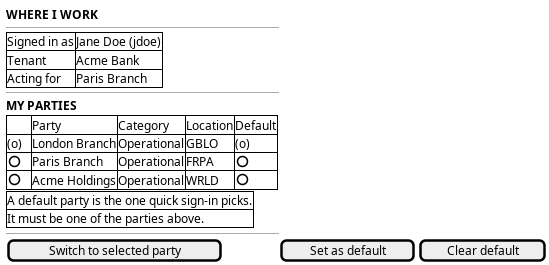
Figure 1: Where I work: who is signed in, the parties the account works in, the default party, and the action buttons.
The rule the screen has to state is the one the server enforces: the default party must be one of the account's assigned parties. The picker offers nothing else, so the member cannot state an invalid default.
5. Entities composed
| Entity | What it contributes | Model |
|---|---|---|
account |
Username, full name, job title, and the stored default party | ores.iam.account |
account_party |
The association itself: which parties this account works in | ores.iam.account_party |
party |
Party name, category and business centre, so the list reads as places | ores.refdata.party |
account.default_party_id is a nullable soft reference to a party, and it is the
only field this journey writes on the account itself. account_party holds the
membership the write is validated against. The account-to-party link is the
junction; it is not a column on either side.
6. Operations and messages
| Step | Operation | Subject | Status |
|---|---|---|---|
| Sign in | Read the parties the account works in, and the default | iam.v1.auth.login |
exists |
| See where I work | Read the account's party associations | iam.v1.account_parties.list_by_account_id |
exists |
| Set the default party | Set my own default party | iam.v1.accounts.set-default-party |
exists |
| Switch the party I act for | Re-scope the session to another party | iam.v1.accounts.switch-party |
exists |
All four subjects come from the generated protocol:
ores.iam.login_messages.org defines iam.v1.auth.login,
ores.iam.account_messages.org defines the three account subjects, and the
account_parties subjects are rendered by the junction model
ores.iam.account_party_junction.org.
iam.v1.accounts.set-default-party is self-service: the handler takes the
account id from the caller's own token, so no permission is needed and the
operation cannot be aimed at somebody else. It also validates membership, and
it is idempotent when the party is already the default. iam.v1.accounts.update
carries the same field default_party_id, but that subject needs
iam::accounts:update, which is a tenant-administrator permission, so it is not
the member's path.
7. What is missing
- No readable party list outside sign-in. The protocol exposes the
account_partiesassociation, which carriesparty_idalone, and no party read that turns an id into a name.iam.v1.auth.loginis the only place that returns party names today, and it belongs to the sign-in step. The screen can show the party it is acting for; the rest of the list has nothing to display. The candidate is a party lookup the member may call, for examplerefdata.v1.parties.get_many, scoped to the parties the account works in. - Nothing in the web client switches party.
wire-protocol/src/client.tscarriesselectPartyandswitchParty, andSessionProviderexposeschooseParty, but the only caller is the sign-in picker. There is no account menu entry and no Where I work screen.TopBar.tsxsays party switching belongs with the account, and leaves it there. - No default-party call at all in the web client.
set-default-partyexists on the server and is mapped to no method, no BFF route and no control. - Clearing the default is not expressible. The wireframe shows Clear
default, but
set_my_default_party_requestcarries onlyparty_id, so there is no way to state "no default". The candidate is a nullable body, or aclear-default-partysubject. Until then the screen leaves the button out. - No client-side wrapper for the association read. The generated protocol has
account_parties.list_by_account_id;wire-protocol/src/operations.tsand the BFF do not speak it, so the screen would have to add the call.
8. Related journeys
- Present myself — the identity summary at the top of this screen shows the name and photo that are corrected there.
- Draw the reporting line — the other half of a person's place in the organisation: who they report to inside the party they chose.
- Protect my account — a switch issues a fresh sign-in token, and the session and sign-in state are read there.
- Know what I may do — the roles that apply change with the party the session acts for, and they are listed there.
9. Related knowledge
10. See also
- ores.iam.account_party - the association this journey reads.