User Journey: Draw the reporting line
Table of Contents
This page documents a user journey: A tenant administrator maintains who reports to whom.
A user journey describes what one person is trying to do, before anything is built. It is a design document that outlives any sprint, so it names the screens, the entity fields each screen shows, and the operations and messages each step needs.
1. Goal
"I want to see the shape of my organisation, and fix the line that is wrong." The administrator sets who each person reports to and reads the result as a tree. The journey is done when every person sits under the right manager and the tree has no surprises: no orphan who should have a manager, no loop.
2. Actor and trigger
The tenant administrator, acting inside their tenant. The trigger is a joiner, a leaver, or a person who changed desk. It starts when the administrator opens Reporting lines, and ends when they leave the tree.
The value of the journey is the shape, not the row. Today the field is edited one account at a time, from the account's detail screen, and the shape only appears when the administrator holds it in their head.
3. Steps
- Open the reporting view. The administrator chooses Reporting lines. The system reads every account in the tenant and draws one card per person, connected to the account they report to.
- Read the shape. The system lays the tree out by reporting depth: roots at the top, each manager above the people who report to them. The administrator sees the branches, and who has no manager.
- Pick a person. The administrator selects a card. The system shows the account behind it: full name, job title, current manager, and the party they work in.
- Set the manager. The administrator chooses another account in the tenant and saves. The system records the change reason, writes a new account version, and redraws the tree.
- Clear a line. When a person leaves a team with no successor, the administrator clears the manager. The system records the same way and the person becomes a root.
- Leave. The administrator goes back. The next reader of the account sees the new line.
Every step ends in a reply; nothing is queued. The journey holds no state of its own, and the tree the administrator sees is assembled by the client from a flat read, not fetched as a tree.
4. Screens and wireframes
One screen with three panels: the tree, the selected account, and the save controls with their change reason. The tree is the point of the screen; the other two panels exist to change it.
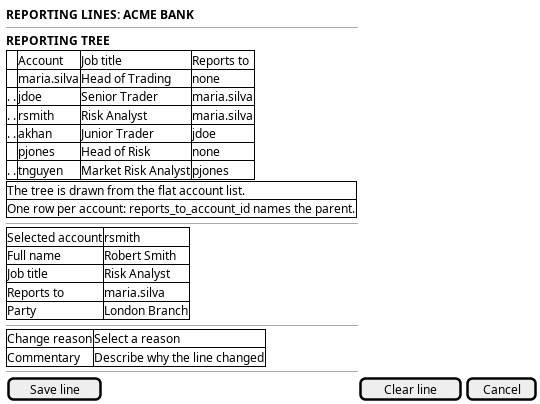
Figure 1: Reporting lines: the reporting tree, the selected account's line, and the save controls with a change reason.
The tree panel is drawn from a flat list. The wireframe says so, because it decides what the screen can promise: no subtree can be fetched on its own, so the screen reads the whole roster and nests it.
5. Entities composed
| Entity | What it contributes | Model |
|---|---|---|
account |
Full name, job title, and the reporting line itself | ores.iam.account |
account_party |
The party a person works in, shown on the card as their office | ores.iam.account_party |
The reporting line is one field on the account: reports_to_account_id is a
nullable soft self-reference to another row in the same table. There is no edge
table and no separate hierarchy model. The reference is validated by foreign
key, so a manager must exist; nothing else about the pair is validated.
The tree this journey draws is the reporting line between people. It is not the business unit tree, which places books and desks rather than people, and the account carries no business unit at all.
6. Operations and messages
| Step | Operation | Subject | Status |
|---|---|---|---|
| Open the reporting view | Read the tenant roster and every account's manager | iam.v1.accounts.list |
exists |
| Read the shape | Read the party each person works in | iam.v1.account_parties.list_by_account_id |
exists |
| Set the manager | Set reports_to_account_id |
iam.v1.accounts.update |
partial |
| Set the manager | Read the change reasons for the picker | dq.v1.change_reasons.list |
exists |
| Clear a line | Clear reports_to_account_id |
iam.v1.accounts.update |
partial |
iam.v1.accounts.update is the only writer of the field, and it is declared in
ores.iam.account_messages.org: reports_to_account_id must be empty or name
another account in the same tenant. partial here means the operation exists
but covers more than this step: it needs iam::accounts:update, and its body
carries the email, full name, default party, job title and image as well. A
caller that changes the reporting line alone must send the other fields back
unchanged, as projects/ores.http/core/src/routes/iam_routes.cpp does today.
7. What is missing
- No tree read. The server answers one flat page of accounts with
reports_to_account_idrepeated per row. There is no subject that returns the reporting structure: no children-by-manager read, no depth, no root list, no subtree. Everything the screen shows about shape it computes in the browser, and the whole roster has to arrive first. The candidate is a tree read, for exampleiam.v1.accounts.reporting_tree, returning each account's manager and depth, so a large tenant can page a branch rather than the world. - No cycle check. The handler validates the manager's UUID format and the
foreign key validates that the account exists. Nothing refuses
A reports to BwhenBalready reports toA. The server accepts the pair, and the result is a loop that has no root. Until a check exists, the client must detect the loop and show it rather than draw it. - No reporting-line-only write. Setting one field means sending the whole
update_account_request, so the screen must carry every other field it read. A concurrent edit to the job title is silently overwritten by the stale copy the screen holds. The candidate is either a narrow subject or a stated precondition on the account version. - Nothing in the web client ships the screen. The generated account
declaration marks the field as a column, and
wire-protocol/src/operations.tsmaps it, but no web screen draws a tree or offers a manager picker. The Qt client did:OrgChartWidget, added for Acme staff, read every tenant account and drew one card per person connected byreports_to_account_id, and it was removed with theores.qttree. This journey is that screen, rebuilt against the web client and the canonical protocol. - Party names are still unreachable. The card shows the office, which needs
the party's name; the account-party read carries
party_idalone. This is the same gap as on Choose where I work, and the first branch to fix, because both journeys show a party and neither can name one. - No history of the line. The account is versioned, so a change is
recoverable through
iam.v1.accounts_versions.list, but the tree screen states none of it. An administrator who is asked "who did this person report to last quarter" has no answer on this screen.
8. Related journeys
- See who has access — the roster is where a person is picked, and it shows the roles and status the card does not.
- Change someone's details — the reporting line is a field on that screen, so the rest of the person's record is corrected there.
- Choose where I work — each card shows the party a person works in, and that party is chosen there.
- Bring someone in — a joiner arrives with no manager, so the new account is created there before the line is drawn here.
9. Related knowledge
10. See also
- ores.iam.account - the model that carries the reporting line.