User Journey: Register a service account
Table of Contents
This page documents a user journey: A tenant administrator creates a non-human account for a service, an algorithm or an LLM.
A user journey describes what one person is trying to do, before anything is built. It is a design document that outlives any sprint, so it names the screens, the entity fields each screen shows, and the operations and messages each step needs.
1. Goal
"I want to give a service its own identity, rather than a person's account."
The administrator registers an account of type service, algorithm or llm,
links the parties it works for, grants its roles, and sets its service
credential. The journey is done when the service signs in through
iam.v1.auth.service-login and reaches what its roles allow.
The account is an identity like any other: it holds roles, its username appears in provenance, and it signs in. Only the sign-in path and the credential differ.
2. Actor and trigger
The tenant administrator: an account of type user that holds the TenantAdmin
role, signed in inside their own tenant. The trigger is a new service, a new
algorithm or a new model that must reach the system without a person behind it.
It starts when the administrator chooses New service account on the roster,
and ends when the service signs in for the first time.
This is the non-human half of the directory topic. The roster it writes into is See who has access; the human half of the same screen is Bring someone in.
3. Steps
- Open the new-service-account screen. The administrator chooses New service account on the roster. The system shows one screen with four panels: identity, service credential, parties in scope, and roles.
- Create the account. The administrator enters the username, chooses the
account type from
service,algorithmorllm, and enters the email address. The system creates the account and its login record withiam.v1.accounts.save. This is the journey's central gap: the request carriesaccount_type, but the handler ignores it and writesuser. The reply carries the newaccount_id, which every later step addresses. - Set the service credential. The administrator sets the secret the service
presents when it signs in. This is not a person's password: it is stored as
service_password_hashand compared bycheck_service_credentials. No operation sets it, so this step is missing. - Link the parties. The administrator selects the parties the service works
for. The system writes one link per party with
iam.v1.account_parties.put. - Grant the roles. The administrator adds the roles the service needs, for
example an ingest role. The system assigns each one with
iam.v1.roles.assign. - Confirm. The system reads the account back and shows the finished row, with the account type the administrator chose.
- Leave. The administrator returns to the roster with the new service account in it.
- Sign in, later. The service authenticates with its credential through
iam.v1.auth.service-login, which returns a token. This step runs outside this screen, but it is what the journey is for.
4. Screens and wireframes
One screen. The four panels belong to one task, so the screen keeps them together and shows the new account's id as soon as the create call returns.
What is absent is as important as what is present: no photo, no full name, no job title, no reporting line and no personal contact record. The account is not a person, so the screen drops the panels that Bring someone in shows.
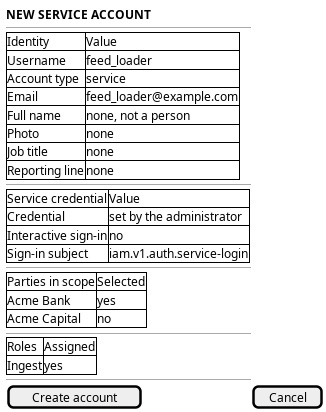
Figure 1: The new-service-account screen: identity, service credential, parties in scope, and roles.
5. Entities composed
| Entity | What it contributes | Model |
|---|---|---|
account |
Username, account type, email, and the service credential behind service_password_hash |
ores.iam.account |
account_type |
The four type codes the picker offers | ores.iam.account_type |
login_info |
The sign-in record the service account starts with | ores.iam.login_info |
account_party |
One link per party the service works in | ores.iam.account_party |
party |
The parties the screen offers | ores.refdata.party |
role |
The roles granted to the service | ores.iam.role |
The credential is a secret and must never come back to the browser.
service_password_hash is already marked :sql_only: true, so the generated
domain type omits it and check_service_credentials reads it from the entity
instead; the screen relies on that and shows nothing of it. password_hash,
password_salt, totp_secret and cleartext credentials are secret too.
6. Operations and messages
| Step | Operation | Subject | Status |
|---|---|---|---|
| Open the screen | Read the account types | iam.v1.account_types.list |
exists |
| Open the screen | Read the parties on offer | refdata.v1.parties.list |
exists |
| Create the account | Create an account of type service, algorithm or llm |
iam.v1.accounts.save |
partial |
| Create the account | Assign a default Viewer role |
internal to iam.v1.accounts.save |
partial |
| Set the service credential | Store the service credential | none | missing |
| Link the parties | Link one party to the account | iam.v1.account_parties.put |
exists |
| Grant the roles | Assign a role | iam.v1.roles.assign |
exists |
| Confirm | Read the new account back | iam.v1.accounts.get |
exists |
| Sign in | Authenticate the service and issue a token | iam.v1.auth.service-login |
exists |
iam.v1.accounts.save needs iam::accounts:create. partial means the request
carries account_type and the handler discards it: the create path calls
create_account, which writes user. The default role is partial for the
same reason: the create path assigns Viewer, a person's read role, while
create_service_account assigns no role at all.
iam.v1.auth.service-login is the service account's own sign-in path. The
interactive path, iam.v1.auth.login, refuses any account whose type is not
user, so a service, algorithm or llm account cannot sign in there.
service-login rejects user accounts in turn, reads service_password_hash,
starts a session and returns a token.
7. What is missing
- The create path ignores the account type. This is the journey's central
gap.
iam.v1.accounts.savecarriesaccount_type, but the handler callscreate_account, which hard-codesuser. Aservice,algorithmorllmaccount cannot be created on this screen at all, so nothing after step 2 works. A service method,create_service_account, already accepts the three non-human types; no subject reaches it. The candidate is to honouraccount_typeoniam.v1.accounts.save, or to addiam.v1.accounts.save-servicethat routes tocreate_service_account. - No operation sets the service credential.
service_password_hashhas no writer on the wire. Its only writer is the database setup path, which hashes the password in the seed upsert.iam.v1.accounts.savecarries a cleartextpassword, but that goes topassword_hash, andcheck_service_credentialsignorespassword_hashand rejects user accounts. Even a service row made by hand therefore has no credential the service can present. The candidate isiam.v1.accounts.set-service-credential, which hashes the secret server-side and writesservice_password_hash. - The credential would cross the wire in cleartext once. Any operation that
sets the credential must carry the cleartext secret on the way in and must
never return it.
save_account_requestshows the shape to avoid: it carries a cleartexttotp_secretthat the handler ignores. The candidate is a write-only credential field that the server hashes and never reads back. - Service sign-in leaves no sign-in state on the account. The roster reads
login_info, and it updates that row on the interactive path only.service-loginwrites a session and leaveslogin_infoalone, so a service that is signed in reads as offline on See who has access. The candidate is to updatelogin_infoon service sign-in, or to have the roster join the live sessions. - The service login response carries only the token.
service_login_responsereturnssuccess,token,messageandaccess_lifetime_s. It does not return the session id, the tenant or the parties thatlogin_responsereturns, so a service that works in more than one party has no stated way to choose one. The candidate is to mirror the interactive response fields.
8. Related journeys
- See who has access — the roster the new service account lands in.
- Bring someone in — the same screen for a person, when the identity turns out to be human.
- Change someone's access — the roles a service needs are granted and revised there.
- Choose where I work — the parties the service works in are chosen there.
- Audit sign-ins — the sessions a service starts are read there.