User Journey: Audit sign-ins
Table of Contents
This page documents a user journey: A tenant administrator reviews active sessions, activity and failed attempts.
A user journey describes what one person is trying to do, before anything is built. It is a design document that outlives any sprint, so it names the screens, the entity fields each screen shows, and the operations and messages each step needs.
1. Goal
"I want to see who is signed in, what they are doing, and who is failing to get in." The administrator reviews the active sessions, the session activity and the failed attempts for the tenant. The journey is done when the administrator can account for every open session, or has raised the ones that cannot be explained.
2. Actor and trigger
The tenant administrator: an account inside the tenant that may read sessions and login records. The trigger is a routine review, an incident, or a support call. It starts when the administrator opens Audit: sign-ins, and ends when they leave it.
This is the record of what actually happened. The member's own half is Protect my account, and the repair is Rescue access.
3. Steps
- Open Audit. The administrator opens Audit: sign-ins. The screen is an event log, not a versioned entity, so it carries no versions, no diff and no revert. Its only action is Refresh.
- Filter. The administrator narrows the view by account, period and event.
- Review the active sessions. The administrator reads one row for each session with no end time: account, client, address, country and start time.
- Read the session activity. The administrator reads the duration and the byte counters for a session, as a time series of samples.
- Review the failed attempts. The administrator reads the failed attempt count, the last attempt address and the lock state for each account. A locked account explains a support call; a burst of failures explains an incident.
- Refresh. The screen re-reads the same subjects. There is nothing to edit here, and no history to browse.
- Leave. The administrator goes back, and raises the sessions that cannot be explained.
4. Screens and wireframes
One screen. The filters, the active sessions, the session activity and the failed attempts are panels of that screen rather than separate screens, because the administrator reads them together.
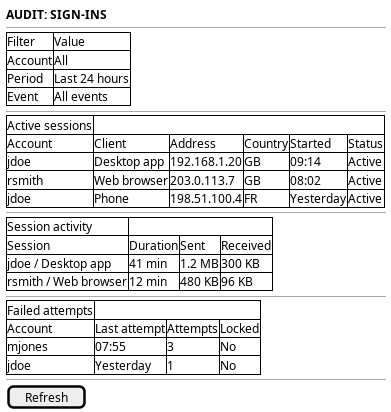
Figure 1: Audit sign-ins: filters, active sessions, session activity and failed attempts, with Refresh as the only action.
5. Entities composed
| Entity | What it contributes | Model |
|---|---|---|
session |
Account, client, address, country, start time, end time and byte counters | ores.iam.session |
session_samples |
Per-session time series of bytes sent and received | ores.iam.session_samples_messages |
login_info |
Failed attempts, last attempt address, locked and online | ores.iam.login_info |
session_samples is a message shape, not an entity: no table backs it, and the
samples are declared in the operation model. The session row holds the running
byte totals; the samples hold how those totals moved.
6. Operations and messages
| Step | Operation | Subject | Status |
|---|---|---|---|
| Open Audit | List every session | iam.v1.sessions.list |
partial |
| Open Audit | List the active sessions | iam.v1.sessions.active |
partial |
| Read the session activity | Read the samples for one session | iam.v1.sessions.samples |
partial |
| Review the failed attempts | List the login records | iam.v1.login_info.list |
exists |
| Read the auth event log | Read the authentication events | none | missing |
| See the statistics | Read the session statistics | none | missing |
| End another account's session | Write the end time of a session | none | missing |
| End another account's session | Delete the session row | iam.v1.sessions.delete |
partial |
The only action on the screen is Refresh, and it re-reads the subjects in the table above. There is no write step, so the screen carries no versions, no diff and no revert.
iam.v1.sessions.list is partial: it pages every session with offset, limit
and order, and takes no account filter, so the screen cannot ask for one
account's sessions. It is declared by
ores.iam.session.
iam.v1.sessions.active and iam.v1.sessions.samples are partial for a
stronger reason. Both subjects exist in
ores.iam.session_messages and
ores.iam.session_samples_messages,
and both handlers reply with success and no rows. The BFF answers the active
sessions from the session repository, so that panel works in the browser today
while the NATS path does not. Nothing serves the samples, over either
transport.
iam.v1.sessions.delete is partial: it removes the audit row, it is keyed by
the composite storage key, and it needs iam::sessions:delete, which is not a
permission of its own. Only a holder of the iam::* wildcard can call it, so
it is not the administrator action this screen needs.
7. What is missing
- No subject for the auth events.
ores_iam_auth_events_tblholds one row per login, failure, logout and token refresh, with hourly and daily continuous aggregates over the same table. No subject reads it. The candidate isiam.v1.auth_events.list. - No subject for the session statistics.
ores_iam_session_stats_daily_vw,ores_iam_session_stats_hourly_vwandores_iam_session_stats_aggregate_daily_vwexist as TimescaleDB continuous aggregates with no subject. The candidate isiam.v1.sessions.statistics. - No operation to end another account's session. The repository method
session_repository::end_sessionwrites the end time, but only the logout path calls it for the caller's own session. The candidate isiam.v1.sessions.end, scoped to the tenant. A lock does not help, becauseiam.v1.accounts.lockleaves open sessions open. - The activity and the audit data have no read path in the browser. The session samples have neither a working subject nor a BFF route. The auth events and the statistics are reachable only by SQL. Until the subjects exist, the session-activity panel must state that the data is not available.
8. Related journeys
- Rescue access — lock or reset the account whose attempts you are reading
- See who has access — the roster view of the same accounts and their sign-in state
- Protect my account — the member's own view of the sessions and failed attempts shown here
- Change someone's access — strip the roles from an account whose sessions you cannot explain