User Journey: Rescue access
Table of Contents
This page documents a user journey: A tenant administrator resets a password and locks or unlocks an account.
A user journey describes what one person is trying to do, before anything is built. It is a design document that outlives any sprint, so it names the screens, the entity fields each screen shows, and the operations and messages each step needs.
1. Goal
"I want to get my colleague back into the system, or shut the account down." The administrator sets a new password for one colleague, then locks or unlocks the account. The journey is done when the colleague can sign in again, or when the account is shut and the administrator has said why.
2. Actor and trigger
The tenant administrator: an account inside the tenant that holds
iam::accounts:reset_password, iam::accounts:lock and
iam::accounts:unlock. The trigger is a support call, because a colleague is
locked out, or because a compromise is suspected. It starts when the
administrator opens Rescue access for one account, and ends when the account
is usable or shut.
This is the administrative half of the credentials topic. The member's own half is Protect my account, and the record of what happened is Audit sign-ins.
3. Steps
- Find the colleague. The administrator opens the screen from the account list and reads the account: username, full name, type and email. The system resolves the account and shows its security state beside it.
- Read the security state. The administrator reads whether the account is locked, the failed attempt count, the last sign-in and whether a password change is required. A run of failed attempts tells the administrator which story this is.
- Set a new password. The administrator types a new password twice and resets it. The system checks the password against the policy, and stores the new hash. The member can sign in with it at once.
- Force a change on the next sign-in. The administrator asks the member to choose their own password at the next sign-in. No operation carries this over NATS, so the screen cannot offer it.
- Lock or unlock. The administrator locks an account that must be shut, or unlocks one that was locked by failed attempts. The system writes the lock flag on the login record, and clears the failed attempt count on unlock.
- Leave. The administrator goes back. The account list shows the new state.
4. Screens and wireframes
One screen. The account being rescued, its security state, the password form and the actions are panels of that screen, because the administrator thinks of them as one decision.
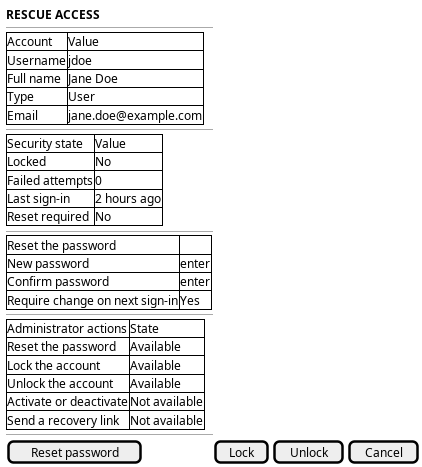
Figure 1: Rescue access: the account, its security state, the reset form and the actions available today.
5. Entities composed
| Entity | What it contributes | Model |
|---|---|---|
account |
Username, full name, type and email; the account being rescued | ores.iam.account |
login_info |
Locked, failed attempts, last sign-in, reset required | ores.iam.login_info |
The screen writes a password hash and never reads one back, so password_hash,
password_salt and totp_secret stay off it.
6. Operations and messages
| Step | Operation | Subject | Status |
|---|---|---|---|
| Find the colleague | List the accounts | iam.v1.accounts.list |
exists |
| Find the colleague | Read one account | iam.v1.accounts.get |
exists |
| Read the security state | Read the login record | iam.v1.login_info.get |
exists |
| Set a new password | Reset the password | iam.v1.accounts.reset-password |
exists |
| Force a change on the next sign-in | Set password reset required | none | missing |
| Lock the account | Lock the account | iam.v1.accounts.lock |
exists |
| Unlock the account | Unlock the account | iam.v1.accounts.unlock |
exists |
| Activate or deactivate the account | Change the account state | none | missing |
| Send a recovery link | Start self-service recovery | none | missing |
All three write subjects are declared in
ores.iam.account_messages.
iam.v1.accounts.reset-password needs iam::accounts:reset_password,
iam.v1.accounts.lock needs iam::accounts:lock, and
iam.v1.accounts.unlock needs iam::accounts:unlock. A tenant administrator
who holds the role has all three, so each is exists.
7. What is missing
- No forgot-password or self-service recovery. Nothing lets a member who
cannot sign in start recovery. The only password subjects are
iam.v1.accounts.change-password(signed in, own account) andiam.v1.accounts.reset-password(administrator only). There is no request subject, no recovery token and no message path. The candidates areiam.v1.accounts.request-password-resetandiam.v1.accounts.complete-password-reset. - No activate or deactivate. An account has no active flag. The only state
an administrator can change is
login_info.locked. A lock can be lifted, but an account cannot be retired and later restored. - The reset flag cannot be set over NATS.
password_reset_requiredexists onlogin_info,account_operations_service::set_password_reset_requiredimplements it, and the HTTP route uses it. No NATS subject calls it, andiam.v1.accounts.reset-passwordwrites a new password directly. The two surfaces disagree: over HTTP the member must choose a password at the next sign-in, over NATS the administrator has already chosen it. - Locking does not end sessions.
iam.v1.accounts.lockwrites the login record only. A session that is already signed in stays open until it expires. The candidate is the same session-end operation that Audit sign-ins needs.
8. Related journeys
- Protect my account — the member's own password change, when they can still sign in
- Audit sign-ins — the failed attempts and sessions that explain why this account is locked
- Bring someone in — create the account when the colleague in the support call has none
- Sign in — where the password you set is first used, and where the forced change happens