User Journey: Sign in
Table of Contents
This page documents a user journey: A person signs in, chooses the party they work as, and lands.
A user journey describes what one person is trying to do, before anything is built. It is a design document that outlives any sprint, so it names the screens, the entity fields each screen shows, and the operations and messages each step needs.
1. Goal
"I want to get in and start work." The person proves who they are, and the system puts them in the right tenant, at the right party. The journey is done when the workspace opens, the top bar names the party they work as, and no screen shows another tenant's data.
Every other journey runs inside the session this one creates. Signing out is the same journey from the other end: it ends the session and returns the person to the door.
2. Actor and trigger
Any person who holds an account: a member, a tenant administrator, or a super administrator. The trigger is opening the client, or being returned to the door by an expired session. It starts at the sign-in screen and ends when the workspace opens, or when the person signs out.
Three rules by the door:
- The tenant is resolved before credentials are checked, because the account is looked up inside the tenant. The deployment knows its tenant from the address it is served at, and the server resolves it from the hostname at sign-in.
- An account must work in at least one party. Zero parties is a misconfiguration and the sign-in is refused with a message that says to contact an administrator.
- An account that works in more than one party chooses one here, and can change it later. The choice binds the session, not the account.
The very first sign-in of a new installation is not this journey: it is part of First run, where the deployment has no account to sign in with.
3. Steps
- Open the door. The person opens the client. The system shows the tenant it is serving, a username field and a password field. The client may first ask whether the deployment is provisioned; a deployment still in bootstrap mode has no account, so it sends the person to first run instead. The submit control stays disabled until both fields have content.
- Enter credentials. The person supplies a username and password. The system resolves the tenant from the hostname, finds the account inside that tenant, and verifies the password. Nothing else is typed: the tenant is not a field, because the address already states it.
- Wrong password. The system refuses with one sentence, Invalid username or password, and says no more. It counts the failed attempt. The counter is not returned to the client, so the screen cannot warn how many attempts remain. After five failed attempts the server locks the account.
- Locked account. A locked account is refused before the password is even checked, with Account is locked due to too many failed attempts. A correct password does not open it. A successful sign-in resets the failed-attempt counter, but only an administrator can clear the lock.
- The password must change. An account flagged
password_reset_requiredmust set a new password before it reaches any other screen. The account has been issued a password by somebody else and has never chosen one; the flag is set by a password reset and cleared when the member changes the password themselves. - No party. The account works in no party at all. The system refuses the sign-in with Account has no party assignment. Please contact your administrator. This is the state that Sign up leaves behind.
- One party. The account works in exactly one party. The system selects it without asking and binds it to the session. The person never sees a picker.
- More than one party. The account works in several parties. The system returns the full list with each party's name, category and business centre, plus the account's stored default party when it is in the list. It does not bind a party yet, and the token it issues can do nothing except choose one. The screen names each party and marks the default, so the person recognises where they work rather than reading a UUID.
- Choose the party. The person picks a party and confirms. The system checks that the party is one of the account's associations, computes the visible party set and binds the party to the session. A party the account does not work in is refused.
- Land. The workspace opens. The session carries the account, the tenant and the party, and every later call is scoped by it. The person sees the party they chose in the top bar.
- Sign out. The person chooses Sign out. The system marks the login record offline, writes the end time on the session record, clears the token and returns the person to the door. The journey is over; a later sign-in is a new session, not a resumption of this one.
Steps 4, 5 and 6 end the journey without a session. Steps 7 and 8 both continue into step 9 or step 10. Nothing here waits on the server after a reply, so the journey holds no state of its own beyond the account and party rows it reads.
4. Screens and wireframes
One screen that changes shape. The credentials form, the party picker, the forced password change and the refusal message are panels of the same screen rather than separate screens, because the person is in one conversation with one door.
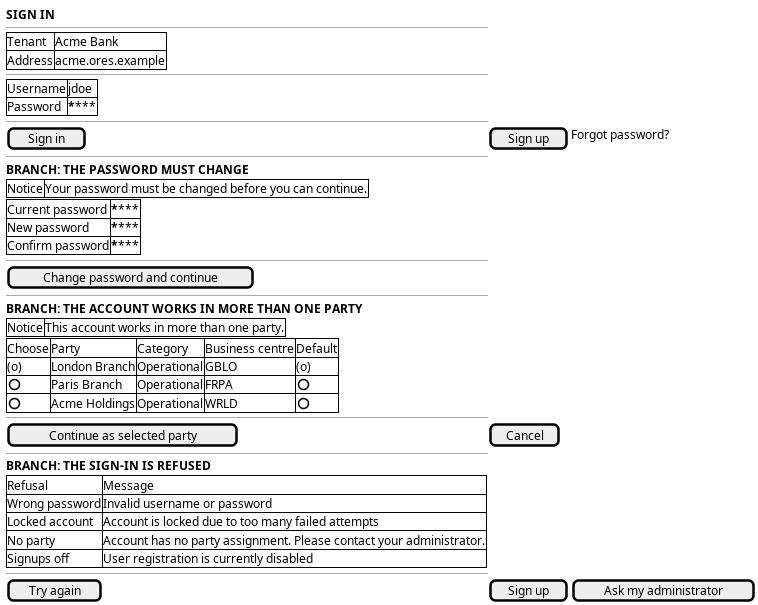
Figure 1: Sign in: the credentials form, the forced password change, the party picker, and the refusal messages.
The order of the branches is the server's order: the lock is checked before the password, the party count after it, and the password change before the workspace. The screen has to state the tenant, because the person cannot see which tenant the address resolved to until the top bar appears.
5. Entities composed
| Entity | What it contributes | Model |
|---|---|---|
account |
Username, email, account type and the stored default party | ores.iam.account |
account_party |
The parties the account works in — the set the picker offers and the rule the choice is validated against | ores.iam.account_party |
party |
Party name, category and business centre, so the picker reads as places | ores.refdata.party |
login_info |
Failed attempts, the lock, the last sign-in, and whether the password must change | ores.iam.login_info |
session |
The session this journey opens: who, when, from where, and when it ended | ores.iam.session |
tenant |
The isolation boundary the hostname resolves to, named on the screen | ores.iam.tenant |
account_type |
Whether the account may sign in this way at all: only user accounts may |
ores.iam.account_type |
The password material — password_hash, password_salt and totp_secret —
never leaves the server, and neither does the token the reply carries.
Two fields the reply exposes are read in the party step and the sign-in summary
elsewhere: selected_party_id and available_parties. The session record
itself does not carry the party, so the party a session worked as is not written
down anywhere the audit can read it. That is gap 3 below.
6. Operations and messages
| Step | Operation | Subject | Status |
|---|---|---|---|
| Open the door | Ask whether the deployment is provisioned | iam.v1.bootstrap.status |
exists |
| Enter credentials | Verify credentials, resolve the tenant, return the parties | iam.v1.auth.login |
exists |
| Wrong password | Count the failed attempt and lock at five | carried by iam.v1.auth.login |
exists |
| Locked account | Read the lock state and refuse before the password | carried by iam.v1.auth.login |
exists |
| The password must change | Signal that a change is required before anything else | login_response.password_reset_required |
partial |
| More than one party | Offer the parties the account works in | iam.v1.auth.login |
exists |
| Choose the party | Bind the chosen party to the session | iam.v1.accounts.select-party |
exists |
| Land | Keep the session alive while the workspace is used | iam.v1.auth.refresh |
exists |
| Sign out | End the session | iam.v1.auth.logout |
exists |
iam.v1.auth.login, iam.v1.auth.logout, iam.v1.auth.refresh and
iam.v1.bootstrap.status come from
ores.iam.login_messages;
iam.v1.accounts.select-party comes from
ores.iam.account_messages.
All of them are present in the generated web protocol
(wire-protocol/src/generated/iam/protocol/login_protocol.ts and its
neighbours).
partial on password_reset_required is exact: the field is declared on
login_response and carried over the wire, but the server never sets it during
sign-in. It is set on the account when an administrator resets the password,
and it is cleared when the member changes the password, but the login handler
does not read it and put it in the reply. So the branch cannot fire today.
Lock, unlock, reset and change-password are separate administrative or
self-service subjects — iam.v1.accounts.lock, iam.v1.accounts.unlock,
iam.v1.accounts.reset-password and iam.v1.accounts.change-password — and
belong to Rescue access and
Protect my account. This journey
only meets their after-effects; it never calls them.
7. What is missing
- No self-service password recovery from the door. There is no subject for a
person who has forgotten a password to obtain a new one. Everything that
exists either needs the current password
(
iam.v1.accounts.change-password) or an administrator (iam.v1.accounts.reset-password). No reset e-mail or reset-token path exists, so the candidate is aiam.v1.auth.request-password-resetsubject plus a delivery mechanism outside IAM. Until it exists the screen offers no Forgot password control and the person must ask an administrator. - The forced change never fires.
login_response.password_reset_requiredis declared but never set, so an account whose password was reset signs in normally and keeps the password somebody else chose. The candidate is for the login handler to copylogin_info.password_reset_requiredinto the response and for the workspace to refuse to open until the member changes the password. - The session does not record the party. The sign-in handler builds a session
record but its
party_idis left unset, and thesessionstable has no column for it:party_idandvisible_party_idsexist only onsession_viewin ores.iam.session_messages. So "who signed in, as which party" is not answerable from the session store, which is exactly the question a multi-party tenant has to answer. The candidate is aparty_idcolumn on the sessions table. - No way out of a lock without an administrator.
iam.v1.accounts.unlockis an administrative operation, so a locked member cannot help themselves and the screen can only tell them to ask. The candidate is a delay-based self-unlock, or a stated cooling-off period, so the lock does not become a support ticket every time. - A refusal cannot say which refusal it is. Every sign-in failure returns
login_response.success = falsewith a sentence inerror_message. There is no code field, so the client distinguishes a locked account from a wrong password only by matching the text. The candidate is an error code on the response, as the sign-up path already has on the server side. - The multi-party token expires silently. The token issued at step 8 can do nothing but choose a party, and it has its own short lifetime. The screen has nothing to show when it lapses, so a person who leaves the picker open is returned to the door with a generic failure rather than being asked to sign in again.
- The web door drops two reply fields.
SignInPage.tsxshows the form and the picker, but notparty_setup_requiredorparty_setup_warning, so a member whose party wizard has not finished is not told. The candidate is a panel on the same screen that names the incomplete setup and links to First run.
8. Related journeys
- Choose where I work — this journey's party step continues there: the same list, the default party, and switching party later without signing out.
- Protect my account — where a signed-in member changes the password deliberately, and reads the sign-in state this journey just wrote.
- Rescue access — where a member who cannot get in is unlocked and given a new password, which is where every refusal on this screen ends.
- Sign up — the door for a person who has no account, when the tenant allows self-registration.
- First run — where a deployment goes when it has no account to sign in with, and where a party setup left incomplete is finished.
9. Related knowledge
- Multi-Party Login Flow — the account-party rules, the branch on the party count, and the party-selection wire protocol.
- Multi-Tenancy Architecture — how the tenant is resolved, isolated and carried on the session.
- Identity and Access Management — the component this journey belongs to.
- How do I add a PlantUML diagram? — the wireframe above.
- Entry journeys — the group.
- User Journeys — the hub.