User Journey: Sign up
Table of Contents
This page documents a user journey: A person registers themselves when the tenant allows self-registration.
A user journey describes what one person is trying to do, before anything is built. It is a design document that outlives any sprint, so it names the screens, the entity fields each screen shows, and the operations and messages each step needs.
1. Goal
"I have no account and I want one." The person registers a username, an email address and a password, and the system creates the account. The journey is done when the confirmation appears and the account exists.
The goal stops one step short of work. Registration creates an account; it does not give the person a place to work, and sign-in refuses an account with no party. So the honest end of this journey is a confirmation screen, not a workspace, and the person needs an administrator before the account is useful.
2. Actor and trigger
A person with no account, on a tenant whose settings allow self-registration. The trigger is the Sign up link on the sign-in screen, or an invitation saying the tenant accepts registrations. It starts when they open the sign-up screen and ends when the account is created.
This journey belongs to the person, not to an administrator: nobody is acting on somebody else's record. The administrator's version of "bring a person in" is Bring someone in, and it creates a usable account in one go.
One gate stands in front: the system flag system.user_signups. When it is off,
registration is refused and the journey never starts. A second flag,
system.signup_requires_authorization, is meant to gate registration on an
approval step; no approval workflow exists, and the sign-up service refuses
registration outright when that flag is on.
3. Steps
- Open sign-up. The person follows the Sign up link from the door. The
system shows the tenant it is serving, and a form with username, email,
password and confirmation. It decides from
system.user_signupswhether the form or a closed notice is the right answer. - Enter the details. The person supplies a username, an email address and a password. The screen states the password rules so the person can satisfy them before submitting; nothing about the tenant's policy is a surprise.
- Submit. The system checks that sign-ups are enabled, that the username is free, that the email address is well formed and unused, and that the password meets the policy. Each refusal is a sentence the person can act on: sign-ups closed, username taken, email already registered, password too weak.
- The account is created. The server writes an account of type
userwith the username, the email address and the password material, and seeds its login record — no failed attempts, not locked, no reset required. It writes no contact record and no profile. - The baseline role is granted. The server assigns the
Viewerrole to the new account. This is the only thing the account gains beyond existing, and it is the floor every account starts from. - Nothing else is granted. No party association is created. No reporting line is drawn. No contact details, photo or job title exist. The account is a name with a password.
- Confirmation. The system confirms the account was created and returns the person to the door. It does not sign them in, and it cannot: the party check would refuse the session anyway.
- The account cannot sign in. At the door, the credential check succeeds and the party check fails. The reply is Account has no party assignment. Please contact your administrator. The gap does not appear on the sign-up screen; it appears here.
The journey carries no state the server has to keep: there is nothing to resume. The only artefact is the account row, and it waits for an administrator.
4. Screens and wireframes
One screen. The form, the refusal messages and the statement of what the new account receives are panels of that screen, because the last panel is the answer to the question the person will have next: what did I just get?
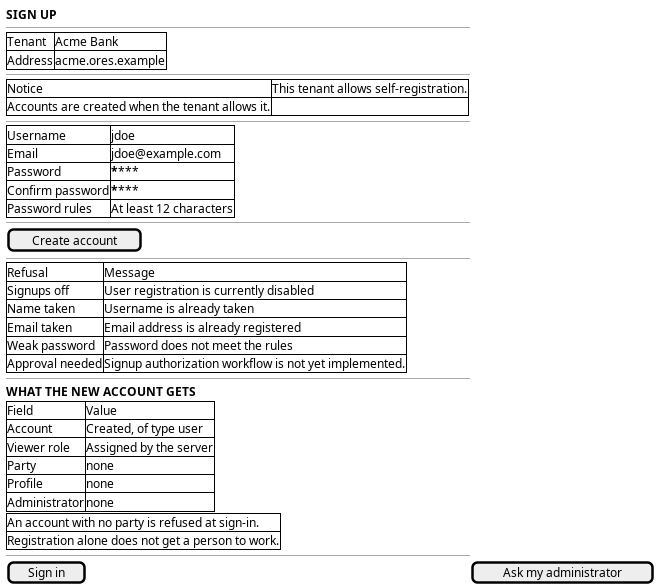
Figure 1: Sign up: the registration form, the refusals, and what the new account does and does not get.
The panel that carries the weight is the last one. It says plainly that the account has no party and no profile, and that an account with no party is refused at sign-in. A screen that hides that would send the person back to the door to fail.
5. Entities composed
| Entity | What it contributes | Model |
|---|---|---|
account |
The username and email the person chose, and the password material the server keeps | ores.iam.account |
account_type |
The new account is type user; the type decides whether password sign-in is offered at all |
ores.iam.account_type |
login_info |
The security state seeded at registration: no failed attempts, not locked, no reset required | ores.iam.login_info |
account_party |
The association that is not created — and whose absence is the refusal at the door | ores.iam.account_party |
role |
The Viewer baseline the server grants, and the only access the account holds |
ores.iam.role |
The password the person typed is never stored, only its hash, and the hash is not sent back. The screen shows the account id at most; nothing else about the account is readable by the caller.
6. Operations and messages
| Step | Operation | Subject | Status |
|---|---|---|---|
| Open sign-up | Ask whether the deployment is provisioned | iam.v1.bootstrap.status |
exists |
| Open sign-up | Read system.user_signups to decide whether to offer the form |
none | missing |
| Submit | Create the account, its login record and its baseline role | iam.v1.auth.signup |
exists |
| Refusals | Say why registration was refused | signup_response.message |
exists |
| The account cannot sign in | Refuse an account that works in no party | carried by iam.v1.auth.login |
exists |
| Fix it | Give the new account a party | iam.v1.account_parties.put |
partial |
iam.v1.auth.signup comes from
ores.iam.signup_messages: the
request carries principal, password and email, and the response carries
success, message and account_id. It is one of the few subjects that needs
no session, because it is what a person without a session uses.
iam.v1.bootstrap.status comes from
ores.iam.login_messages.
partial on iam.v1.account_parties.put means the junction subject exists —
the junction model renders it — but it carries
iam::account_parties:write, a tenant-administrator permission. The new member
cannot give themselves the party they need, which is the point: the fix is
somebody else's action.
7. What is missing
- The web client cannot sign up at all. The generated web protocol has no
sign-up subject and
wire-protocol/src/operations.tshas no entry for it, so the browser cannot calliam.v1.auth.signup.SignUpPage.tsxis a destination rather than a form: it says accounts come from an administrator and offers no fields. The candidate is a sign-up operation in the wire client and a real form. Server-side, the subject exists and a legacy HTTP routePOST /api/v1/auth/signupalready reaches it, which is how the gap stayed invisible. - The screen cannot read the flag that gates it.
system.user_signupslives in the variability settings, and the web protocol generates no settings subject at all: the generated set coversiam,refdata,dq,computeand the rest, but notvariability. So the screen cannot know whether the tenant allows registration, and the person learns the answer only by submitting. The candidate is a readable tenant policy surface — a public settings read for the flags that shape the door, or a field on the bootstrap status. - A new account has no party, and nothing closes that gap. Registration
creates the account and grants the
Viewerrole, and stops. The account is refused at sign-in until an administrator adds it to a party. The candidate is one of: registration places the account in a party the tenant nominates as the default for new sign-ups, or the confirmation screen states what happens next and to whom, or an approval step creates the association. This is the journey's central gap: as built, registration alone does not get a person to work. - The stated baseline and the built behaviour disagree. The server assigns the
Viewerrole at registration, so a new account does have a role. The intended model is that an account gains a role when an administrator gives it one. Either the grant is deliberate and should be documented as the baseline every self-registered account receives, or it should be removed. The journey cannot say which until that is decided. - The approval flag cannot be turned on.
system.signup_requires_authorizationis defined, and the sign-up service refuses registration outright when it is set, with Signup authorization workflow is not yet implemented. Turning the flag on therefore closes the door rather than gating it. The candidate is the approval workflow itself, or the removal of the flag until it exists. - No confirmation reaches the person. Registration returns an account id and nothing else: no email, no verification link, no notice to an administrator that somebody is waiting. A person can register and no one in the tenant ever learns of it. The candidate is a notification on account creation, and an email-verification step if the tenant wants one.
- No rate limit on the door.
rate-limit.tsin the BFF guards the login route. Registration is open to anyone who can reach the address and has no comparable guard, so a tenant with sign-ups enabled can be filled with accounts. The candidate is the same limiter on the sign-up route.
8. Related journeys
- Sign in — the next thing this person does, and where the missing party surfaces as a refusal.
- Bring someone in — the administrator's path that creates a usable account in one step, party and initial role included.
- New party — where the place a new account needs is created, when the tenant has nowhere to put them yet.
- Shape the role catalogue — where the role a new account should start with
is decided, since
Vieweris currently granted without a choice. - First run — where a deployment with no account at all creates its first one, which is the other way accounts come into being.
9. Related knowledge
- Multi-Party Login Flow — the rule that an account with no party is refused at sign-in, which is what makes this journey's gap a gap.
- Identity and Access Management — the component this journey belongs to.
- How do I add a PlantUML diagram? — the wireframe above.
- Entry journeys — the group.
- User Journeys — the hub.