User Journey: New party
Table of Contents
This page documents a user journey: A tenant administrator adds a party and links the accounts that work in it.
A user journey describes what one person is trying to do, before anything is built. It is a design document that outlives any sprint, so it names the screens, the entity fields each screen shows, and the operations and messages each step needs.
1. Goal
"I want a legal entity my team can work as, with the accounts that work in it." The tenant administrator finds the legal entity in the GLEIF register, or adds it by name when it has no LEI, names the party, and chooses the accounts that work in it. The journey is done when the party is active, its essential data is published, and its accounts can sign in to it.
2. Actor and trigger
The tenant administrator: an account of type user that holds the
tenant-administrator role, signed in, and acting inside one tenant. The trigger
is New party on the Parties page. It also starts from Add another party at
the end of this journey. The manual path, "It has no LEI: add it by name", is
the same journey with the search skipped. The tenant administrator never
chooses the tenant: the session already names it.
This is one of the three journeys that carry server-side state. Provisioning
runs on the server and can fail half way. The state lives in ores.workflow,
so the person can leave the page and come back, and the shell can drive the
same steps. Every other group in this corpus describes a journey that keeps no
such state. The order is fixed: this journey needs a running installation, a
signed-in tenant administrator and a tenant that is already active.
3. Steps
- Find the legal entity. The person searches the GLEIF register by name or by LEI. Each result shows the legal name, the country, the LEI and the parent entity, so a subsidiary is recognisable as one. The person picks one, or chooses It has no LEI: add it by name and types the name instead. Nothing is created yet.
- Describe the party. The person sets a short name, taken from the legal name, and ticks the accounts that work in it: this is the account-party association. Accounts that work in the party can sign in to it and act for it, and can switch between parties later. The tenant administrator's own account is ticked by default. There is no data-size question: counterparties are tenant-wide, and the party's bundles come from the tenant's seed profile.
- Review. The person reads one summary: legal entity, LEI, short name, the accounts, and the party data. The screen states that nothing is created until the person confirms.
- Provisioning. The person confirms. The system starts the provision workflow for the party and lists its steps: create the party, activate it, publish its essential data, link its accounts, complete. Each line reads pending, running, done or failed. This is the step that carries the state. The person can leave the page and come back. A failed step stops the instance, the party stays inactive, and a retry resumes from the failed step; the completed steps are kept.
- Next steps. The party is active. The page offers three exits: switch to the new party and work in it now, set up its books, or add another party. The person can also just go back; the Parties page lists the new party as active.
The rail is flat: a person sees five steps. Steps that change server state are final, so there is no Back past them.
4. Screens and wireframes
The same journey page as the tenant journeys: a flat step rail on the left and one step at a time. The party header, the short name and the LEI, appears on every step after the legal entity is chosen.
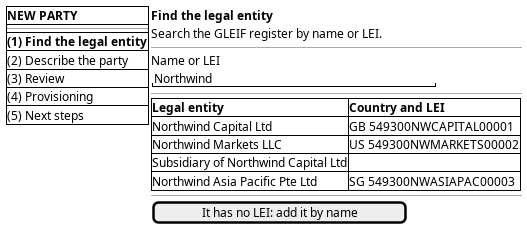
Figure 1: New party: a flat step rail on the left, the GLEIF results, and one step at a time.
5. Prototype
Accepted by the user on 2026-09-22. The prototype is on a throwaway branch and is not merged; the branch is kept as the record.
- Branch
prototype/new-party-journey- Route
/refdata/party/new- Source
projects/ores.web/packages/web/src/pages/prototype/newTenantJourney/- Design record
- Task: Prototype the new party journey
The party journey was the first built on the shared journey page, and it proved the step library: the tenant journey's steps and the party journey's steps come from the same place. It also settled two things. Counterparties are tenant-wide, so the Qt wizard's dataset-size question is gone. And the accounts that work in the party are chosen here, in the describe step, not in a later wizard.
6. Entities composed
| Entity | What it contributes | Model |
|---|---|---|
party |
Short name, legal name, status and type of the party being created | ores.refdata.party |
party_identifier |
The LEI of the legal entity, under the LEI scheme | ores.refdata.party_identifier |
party_id_scheme |
Names the identifier scheme the LEI belongs to | ores.refdata.party_id_scheme |
party_status |
The party moves to active at the activate step | ores.refdata.party_status |
party_type |
The classification the create step sets | ores.refdata.party_type |
account |
The accounts the picker offers, and the one that runs the journey | ores.iam.account |
account_party |
The accounts that work in the party — the association this journey writes | ores.iam.account_party |
counterparty |
The tenant-wide counterparties the tenant's seed profile already published | ores.refdata.counterparty |
| GLEIF legal entity | Legal name, country, LEI and parent, read from the register | none — no model and no subject exist |
No password or secret appears on this screen at all. The person chooses which accounts work in the party; the accounts themselves are created elsewhere.
7. Operations and messages
| Step | Operation | Subject | Status |
|---|---|---|---|
| Find the legal entity | Search the GLEIF register by name or LEI | none | missing |
| Find the legal entity | List the parties already in the tenant | refdata.v1.parties.list |
exists |
| Describe the party | List the accounts that may work in the party | iam.v1.accounts.list |
exists |
| Describe the party | Read the existing account-party associations | iam.v1.account_parties.list |
exists |
| Review | Start the provision-party workflow | none | missing |
| Provisioning | Create the party | refdata.v1.parties.put |
exists |
| Provisioning | Activate the party | refdata.v1.parties.put |
exists |
| Provisioning | Publish the party's essential data | none | missing |
| Provisioning | Link the accounts that work in it | iam.v1.account_parties.put_many |
exists |
| Provisioning | Mark the party provisioning complete | none | missing |
| Provisioning | Retry from the failed step | none | missing |
| Next steps | Switch to the new party | iam.v1.accounts.switch-party |
exists |
| Next steps | Read the party's books | refdata.v1.books.list |
exists |
The two iam.v1.account_parties subjects are declared in
ores.iam.account_party;
iam.v1.accounts.list and iam.v1.accounts.switch-party are declared in
ores.iam.account_messages. The
refdata.v1.parties and refdata.v1.books subjects are generated from their
entity models. All of them exist in the generated web protocol.
Activation is partial in effect: refdata.v1.parties.put writes the row,
including the status, so the activate step has a subject. But nothing runs the
party workflow around it, so the screen cannot show progress or resume a
failure.
8. What is missing
- No GLEIF search. Nothing reads the GLEIF register. The register is a
public API outside ORE Studio, so the candidate is a server-side search that
proxies it and returns legal name, country, LEI and parent, for example
refdata.v1.legal_entities.search. Until it exists the screen can only offer the manual path. - No journey state. The journey lives in
ores.workflow, next to the workflow instance: kind, current step, the party and workflow instance ids, and the actors who may resume. Noores.workflowcomponent and no journey subject exist today. The candidate isiam.v1.journeys.get-activeplus the events that move the journey on. - No provision-party request. The contract makes provision party its own
workflow: activate, onboard, membership, party bundles. No subject starts it.
The candidate is
refdata.v1.parties.provision, taking the party id and the chosen accounts, returning a workflow instance id at once. - No publish of the essential data. The
party_essentialsbundle holdsore.report_definitionsandcrm_topology. Only the ACME handler publishes it today. The candidate is a publish step inside the provision-party workflow, orrefdata.v1.parties.publish-essentialsfor a party on its own. - No completion signal. Nothing states that a party finished provisioning,
so the screen cannot tell "still running" from "done". The candidate is the
same
workflow_instance_changedevent the tenant journey needs, or arefdata.v1.parties.getread of the status. - No streamed progress and no retry. The party steps run client-side in the
shell today, so there is nothing to stream and nothing to resume. The
candidates are the workflow instance progress read and
iam.v1.workflow_instances.retry.
9. Related journeys
- Choose where I work — switch to the party you just created, and set it as your default
- Bring someone in — create the accounts that will work in the new party
- Draw the reporting line — set who reports to whom inside the new party
- New tenant — the tenant's seed profile decides the bundles every party gets
- First run — where the first party is created with the first tenant
10. Related knowledge
- Identity and Access Management — Provision, Onboard, Account-party association, Seed profile
- Parties — the user guide chapter on what a party is
- Document type: user_journey
- How do I add a PlantUML diagram?
- Setup journeys