User Journey: New tenant
Table of Contents
This page documents a user journey: A system administrator provisions a tenant from a seed profile and hands it over.
A user journey describes what one person is trying to do, before anything is built. It is a design document that outlives any sprint, so it names the screens, the entity fields each screen shows, and the operations and messages each step needs.
1. Goal
"I want a new tenant my organisation can start working in." The system administrator chooses a starting point, describes the tenant, reviews it and runs provisioning. The journey is done when the tenant is active, its parties exist, and its administrator can sign in.
2. Actor and trigger
The system administrator: the account created by First run, signed in, and acting outside every tenant. The trigger is New tenant on the Tenants page. The journey starts there and ends at the handoff, where the tenant administrator takes over.
This is one of the three journeys that carry server-side state. Provisioning
runs on the server and takes minutes. It can fail half way. The state lives in
ores.workflow, so the person can leave the page and come back, and the shell
can drive the same steps. Every other group in this corpus describes a journey
that keeps no such state. The order is fixed: this journey needs a running
installation and a signed-in system administrator, so it cannot be the first
thing that happens on an empty database.
3. Steps
- Choose a starting point. The system shows one card per seed profile, each with a tagline, three bullets and its counts: Empty operational for real use, and ACME demo for demos and testing. The ACME card carries the ACME logo. The person picks one. Nothing is created yet.
- Describe the tenant. The person names the tenant and its administrator.
Empty operational asks for the code, name and hostname, the root LEI, the
counterparty set and the administrator's password. ACME demo fills in the
code (
acme_corporation), the name, the hostname, and the administrator username and email; the details sit behind Change settings, and only the administrator's password stays blank. Every new password uses the sharedNewPasswordField, which shows the policy, the strength and a confirmation. - Review. The person reads one summary: starting point, tenant name and code, administrator, and the profile's parameters. The screen states how many steps the profile runs. Nothing is created until the person confirms.
- Provisioning. The person confirms. The system starts the provision workflow and the page lists one line per workflow step: create the tenant and its admin, publish the base reference data, import the counterparties, import the parties, provision each party, complete. Each line reads pending, running, done or failed. This is the step that carries the state. The person can leave the page and come back. A failed step stops the instance, the tenant stays provisioning, and a retry resumes from the failed step; completed steps are kept. A tenant that should not continue can be discarded.
- Hand off. The tenant is active. The page shows the tenant's
administrator as
username@codeand offers two exits. Continue as tenant admin signs out, signs in as that administrator, and opens their first sign-in. Hand off to someone else signs out and shows the username to pass on; that person sets their own password at first sign-in. The web keeps the administrator's password in memory only until this point, and never writes it to storage.
The rail is flat: a person sees five steps and never a journey inside a journey. Steps that change server state are final, so there is no Back past them. The text is short: no introduction box, because the rail already lists the steps, and the "you can leave and come back" note belongs on the provisioning step alone.
4. Screens and wireframes
One page with a flat step rail on the left and one step at a time. The tenant header, the profile's logo and the tenant name, appears on every step after the profile is chosen. The logo sits on a light tile, because ACME's black text fails on the dark theme.
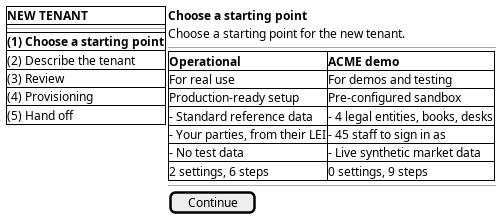
Figure 1: New tenant: a flat step rail on the left, the chosen profile's cards, and one step at a time.
5. Prototype
Accepted by the user on 2026-09-22. The prototype is on a throwaway branch and is not merged; the branch is kept as the record.
- Branch
prototype/new-tenant-journey- Route
/iam/tenant/onboard- Source
projects/ores.web/packages/web/src/pages/prototype/newTenantJourney/- Design record
- Task: Prototype the new tenant journey
Variant A, the stepper page, is the accepted one and is the base the first run journey builds on. Two other variants are kept on the branch and were rejected: B, a drawer over the Tenants list, and C, one progressive page. The prototype also settled the small things: the profile fills in the tenant details, the logo comes from the image store in the real build and not from the bundle, and every new password uses one shared field.
6. Entities composed
| Entity | What it contributes | Model |
|---|---|---|
tenant |
Code, name, hostname, type and status of the tenant being created | ores.iam.tenant |
tenant_type |
The classification the provision step sets | ores.iam.tenant_type |
tenant_status |
The tenant moves from provisioning to active | ores.iam.tenant_status |
account |
The tenant administrator the profile creates: username, email, account type, password (write only) | ores.iam.account |
account_contact_information |
The administrator's email and contact details | ores.iam.account_contact_information |
account_party |
The account-party association between the administrator and the tenant's first party | ores.iam.account_party |
counterparty |
The tenant-wide counterparties the profile publishes | ores.refdata.counterparty |
| Seed profile | The ordered workflow steps, the parameters, and the tenant details the profile prefills | none — no model and no subject exist |
The password material — password_hash, password_salt and
service_password_hash — never reaches this screen. The password field writes
a hash server-side; no read returns one.
7. Operations and messages
| Step | Operation | Subject | Status |
|---|---|---|---|
| Choose a starting point | List the seed profiles | none | missing |
| Choose a starting point | Read a profile's parameter schema | none | missing |
| Describe the tenant | Submit the tenant and its administrator | none | missing |
| Describe the tenant (ACME) | Provision the ACME demo tenant | iam.v1.tenants.provision-acme |
partial |
| Review | Start the provision-tenant workflow | none | missing |
| Provisioning | Follow the workflow instance's progress | none | missing |
| Provisioning | Mark provisioning complete | iam.v1.tenants.complete-provisioning |
exists |
| Provisioning | Retry from the failed step | none | missing |
| Provisioning | Discard a failed tenant | iam.v1.tenants.delete |
partial |
| Hand off | Sign out | iam.v1.auth.logout |
exists |
| Hand off | Sign in as the tenant administrator | iam.v1.auth.login |
exists |
iam.v1.tenants.provision-acme and iam.v1.tenants.complete-provisioning are
declared in
ores.iam.tenant_provisioning_messages;
iam.v1.auth.login and iam.v1.auth.logout are declared in
ores.iam.login_messages. All of
them exist in the generated web protocol.
iam.v1.tenants.provision-acme is partial: it exists and runs the whole
provisioning server-side through internal actor impersonation, but it is
ACME-only, it takes no seed profile, and it returns all its steps at the end,
so it streams no progress. The generic profile-driven request does not exist.
iam.v1.tenants.delete is partial for discard: it soft-deletes the tenant
row and its delete rule sets the status to terminated, but it does not stop a
running workflow and does not clean up half-provisioned data.
Retire or reset a tenant records
that gap in full.
8. What is missing
- No journey state. The journey lives in
ores.workflow, next to the workflow instance: kind, current step, the tenant and workflow instance ids, and the actors who may resume. Noores.workflowcomponent and no journey subject exist today. The candidate isiam.v1.journeys.get-activeplus the events that move the journey on. Until it exists the client keeps the current step in memory, and "you can leave and come back" is not true. - No seed profile model and no read. A profile is registered data that
orders step kinds from a fixed catalogue:
publish_bundle,import_lei_hierarchy,provision_party,load_staff,attach_photos,start_market_feeds. No entity and no subject exist. The candidates areiam.v1.seed_profiles.listandiam.v1.seed_profiles.get, including each profile's parameter schema and its prefilled tenant details. The screen must keep the two cards in code until then. - No generic provision-tenant request. The accepted contract wants one
request that takes the profile code and its parameters, returns a workflow
instance id at once, and streams progress. The candidate is
iam.v1.tenants.provision. - No streamed progress.
provision_acme_tenant_responsereturns its steps only at the end; the shell waits up to 45 minutes with no feedback. The candidate is aworkflow_instance_changedevent, or aiam.v1.workflow_instances.getread the page can poll. - No retry. The contract keeps completed steps and resumes from the failed
one. Nothing starts a retry. The candidate is
iam.v1.workflow_instances.retry. - No discard that stops the workflow.
iam.v1.tenants.deleteterminates the row but leaves the workflow running and the partial data in place. The candidate isiam.v1.tenants.discard, owned by the system administrator.
9. Related journeys
- First run — these same steps run inline there, for the first tenant on an empty installation
- New party — add a legal entity to the tenant you just created
- Sign in — the tenant administrator's first sign-in, where the forced password change lands
- Tune the tenant — change the tenant's settings once it is active
- Retire or reset a tenant — suspend, reset or discard a tenant whose provisioning failed
10. Related knowledge
- Identity and Access Management — the Tenant lifecycle: Provision, Seed profile, Onboard
- Tenants — the user guide chapter on what a tenant is
- Document type: user_journey
- How do I add a PlantUML diagram?
- Setup journeys