User Journey: First run
Table of Contents
This page documents a user journey: An empty installation is brought to life: the system administrator, the first tenant and the first sign-in.
A user journey describes what one person is trying to do, before anything is built. It is a design document that outlives any sprint, so it names the screens, the entity fields each screen shows, and the operations and messages each step needs.
1. Goal
"Get me from an empty installation to a system I can work in." The person creates the system administrator, then the first tenant with its parties and its administrator, then signs that administrator in. The journey is done when the installation leaves bootstrap mode and the last screen reads Ready.
2. Actor and trigger
Two actors share one path. The first steps are open to anyone who reaches the
installation: while system bootstrap
is not complete, the system is in bootstrap mode, nobody can sign in, and the
Setup page is the only page. From the first sign-in onward the actor is the
tenant administrator: an account of type user, signed in, inside the first
tenant. The trigger is a browser pointed at a new installation. The journey
ends at Ready, when the installation stops being in bootstrap mode.
This is one of the three journeys that carry server-side state. The tenant
work runs on the server, it takes minutes, and it can fail half way. The state
lives in ores.workflow, so the person can close the page and come back, and
the shell can drive the same steps. Every other group in this corpus describes
a journey that keeps no such state. The order is fixed: first run is the only
journey that can happen on an empty database.
3. Steps
- Welcome. The system shows the splash, "Welcome to ORE Studio", one sentence, and three unnumbered stage cards: create the administrator, create the first tenant, sign in. The person chooses Get started. No server call happens here.
- Create the administrator. The person enters a username (default
super_admin), an email and a password. The password field applies the shared policy. The system runs system bootstrap: it creates the system administrator and nothing else. No tenant is created at this step, and nobody can sign in yet. - Choose a starting point. The new tenant steps now run inline, as rail steps 2 to 6. The person picks a seed profile: Empty operational or ACME demo. Each card shows a tagline, three bullets and its counts. The ACME card also shows the ACME logo. Nothing is created yet.
- Describe the tenant. For Empty operational the person enters the root LEI and the counterparty set, and sets the administrator's password. For ACME demo the profile fills in the code, name, hostname and administrator username and email; the details show as a summary behind Change settings, and the tenant administrator reuses the system administrator's password. No forced password change follows for ACME, and one does for Empty operational.
- Review. The person reads one summary: starting point, tenant name and code, administrator, and the profile's parameters. The screen states how many steps the profile runs. Nothing is created until the person confirms.
- Provisioning. The person confirms, and the system starts the provision workflow for the first tenant. The rail lists one line per workflow step, and each line reads pending, running, done or failed. This is the step that carries the state. The person can leave the page. A failed step stops the instance, the tenant stays provisioning, and a retry resumes from the failed step; the completed steps are kept.
- Hand off. The tenant is ready. The person chooses Continue as tenant admin, which signs out, signs in as the tenant administrator and opens their first sign-in, or Hand off to someone else, which signs out and shows the username to pass on. The web keeps the administrator's password in memory only until this point; it is never written to storage.
- First sign-in. The tenant administrator sets a password only they know when the profile forces a change, and chooses the party to start in when they work in more than one. This is onboard: a person's first use of a tenant that already exists.
- Ready. The system confirms the installation. The person goes home, or to the Tenants page to create another tenant.
One flat step rail. The new tenant steps are written once, as a library of step definitions, and first run expands them inline. The person sees the Welcome screen first, and then one rail of eight steps, never a journey inside a journey. Steps that change server state are final: there is no Back past them.
4. Screens and wireframes
One page per journey, with a flat step rail on the left and one step at a time. Welcome is the only screen without the rail. The rail is the whole journey, so the page needs no separate progress display.
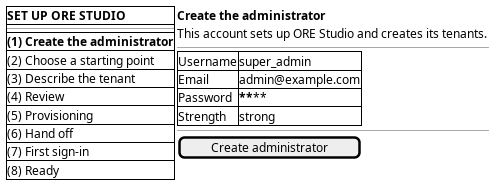
Figure 1: First run: one flat step rail on the left, the current step on the right.
5. Prototype
Accepted by the user on 2026-09-22. The prototype is on a throwaway branch and is not merged; the branch is kept as the record.
- Branch
prototype/first-run-journey- Route
/setup- Source
projects/ores.web/packages/web/src/pages/prototype/newTenantJourney/- Design record
- Task: Prototype the first run journey
The prototype settled three things. Journeys are data: one page renders an ordered list of step definitions, so first run reuses the new tenant steps rather than copying them. Every deployment is multi-tenant, so first run never asks about tenancy. And ACME asks for nothing, in first run and in the new tenant journey alike.
6. Entities composed
| Entity | What it contributes | Model |
|---|---|---|
account |
The system administrator, and the tenant administrator the profile creates: username, email, account type, password (write only) | ores.iam.account |
tenant |
Code, name, hostname, type and status of the first tenant | ores.iam.tenant |
tenant_type |
The classification the provision step sets on the tenant | ores.iam.tenant_type |
tenant_status |
The tenant moves from provisioning to active | ores.iam.tenant_status |
account_party |
The account-party association the first sign-in chooses between | ores.iam.account_party |
| Seed profile | The ordered workflow steps the profile selects, and its parameters | none — no model and no subject exist |
Three values must never reach this screen: password_hash, password_salt
and any cleartext password after it is sent. The password fields write; no
read returns a hash.
7. Operations and messages
| Step | Operation | Subject | Status |
|---|---|---|---|
| Welcome | Read whether the system is in bootstrap mode | iam.v1.bootstrap.status |
exists |
| Create the administrator | Create the system administrator | iam.v1.bootstrap.create-admin |
exists |
| Choose a starting point | List the seed profiles | none | missing |
| Describe the tenant | Provision the first tenant in bootstrap mode | iam.v1.bootstrap.provision-tenant |
partial |
| Describe the tenant | Provision a tenant from a seed profile | none | missing |
| Describe the tenant (ACME) | Provision the ACME demo tenant | iam.v1.tenants.provision-acme |
partial |
| Review | Start the provision-tenant workflow | none | missing |
| Provisioning | Follow the workflow instance's progress | none | missing |
| Provisioning | Mark provisioning complete | iam.v1.tenants.complete-provisioning |
exists |
| Provisioning | Retry from the failed step | none | missing |
| Hand off | Sign out | iam.v1.auth.logout |
exists |
| Hand off | Sign in as the tenant administrator | iam.v1.auth.login |
exists |
| First sign-in | Set a new password | iam.v1.accounts.change-password |
exists |
| First sign-in | Choose the party to start in | iam.v1.accounts.select-party |
exists |
iam.v1.bootstrap.status and iam.v1.bootstrap.create-admin are declared in
ores.iam.bootstrap_messages and
need no session, because the system is in bootstrap mode. The account and
tenant subjects need a session.
iam.v1.bootstrap.provision-tenant is partial and legacy: it exists and
needs no session, because bootstrap mode is still on, but it takes no seed
profile, runs synchronously and returns no instance id. The accepted contract
replaces it for every tenant, the first one included.
iam.v1.tenants.provision-acme is partial. It exists, it runs the whole
provisioning server-side through internal actor impersonation, and it is the
one working path today. But it is ACME-only, it takes no seed profile, and it
returns all its steps at the end, so it streams no progress. The generic
profile-driven request does not exist.
8. What is missing
- No journey state. The setup hub puts the journey in
ores.workflow, next to the workflow instance: kind, current step, the tenant, party and workflow instance ids, and the actors who may resume. Noores.workflowcomponent and no journey subject exist today. The candidate isiam.v1.journeys.get-activeplus the events that move the journey on. Until it exists the client keeps the current step in memory, and "you can leave and come back" is not true. - No seed profile model and no read. A profile is registered data that
orders step kinds from a fixed catalogue:
publish_bundle,import_lei_hierarchy,provision_party,load_staff,attach_photos,start_market_feeds. No entity and no subject exist. The candidates areiam.v1.seed_profiles.listandiam.v1.seed_profiles.get. The screen must keep the two cards in code until then. - No generic provision-tenant request. The accepted contract wants one
request that takes the profile code and its parameters and returns an
instance id at once, for every tenant including the first. The candidate is
iam.v1.tenants.provision, carrying the profile code and the profile's parameters. - No streamed progress.
provision_acme_tenant_responsereturns its steps only at the end; the shell waits up to 45 minutes with no feedback. The candidate is aworkflow_instance_changedevent, or aiam.v1.workflow_instances.getread the page can poll. - No retry and no discard. The contract keeps completed steps and resumes
from the failed one. Nothing starts a retry, and nothing discards a
half-provisioned tenant. The candidates are
iam.v1.workflow_instances.retryandiam.v1.tenants.discard. - No password hand-over flags. First run copies the system administrator's
password hash to the ACME tenant administrator, and only Empty
operational forces a change at first sign-in. The provision request has no
flag for either. The candidates are a
use_caller_passwordfield on the provision request and aforce_password_changefield on the seed profile. - The forced change never fires.
login_info.password_reset_requiredexists as a column andlogin_response.password_reset_requiredis declared, but the login handler never copies the flag into the reply. So the first sign-in step cannot force a new password, and the Empty operational profile cannot enforce its change. The candidate is for the login handler to copy the flag, as Sign in also records. - No password policy read. The shared
NewPasswordFieldshows the rules and a strength hint, and the server states neither to the client. The rules live only in the client today. The candidate is a read that returns the policy the server enforces.
9. Related journeys
- New tenant — the same steps run on their own there, for every tenant after the first
- New party — add another legal entity once the installation is up
- Sign in — the tenant administrator's later sign-ins, and where a forced change lands
- Keep my details current — the profile the tenant administrator completes after their first sign-in
- Tune the tenant — change the first tenant's settings once it is active
10. Related knowledge
- Identity and Access Management — the Tenant lifecycle: System bootstrap, Provision, Onboard, Seed profile
- Document type: user_journey
- How do I add a PlantUML diagram?
- Setup journeys