Tenants
Table of Contents
This chapter examines the tenant as the unit of isolation in OreStudio and the canonical reference for the organisational model built around it: the multi-tenant, multi-party hierarchy of the house and its counterparties, the type taxonomy and lifecycle that govern a tenant's operational posture, and the Tenants window and detail dialog through which tenants are managed. Tenant administration is a platform concern — the window is available to the platform administrator on the system tenant.
1. Overview
The chapter advances the argument that administering a tenant well means first understanding the organisational model it anchors, then the taxonomy that fixes its operational posture, and finally the interface that governs its lifecycle — and it proceeds in that order. It begins by establishing that model in The multi-tenant, multi-party model, which sets out tenant isolation and the party hierarchy of the house and its counterparties; this is the premise the rest of the chapter builds on. From there it turns to Tenant types, the four-way taxonomy that distinguishes the system, production, evaluation, and automation tenants by the controls each carries. It then surveys the body of records in The Tenants window, explaining the list view and its lifecycle status badges, before narrowing to a single record in The tenant detail dialog and its General and Provenance tabs, where an administrator moves a tenant through its lifecycle under the same audit regime as every other entity. This chapter picks up once tenants and parties exist; the Initial Setup chapter walks through the wizards that create them. The Conclusion draws these steps together.
2. The multi-tenant, multi-party model
A tenant's isolation extends to everything it contains: its own users, its own reference data (currencies, counterparties, books), and its own analytics results. Data belonging to one tenant is completely invisible to another tenant; there is no cross-tenant data leakage by design.
A typical deployment has one tenant per organisation. If you are running ORE Studio for your own firm, you will create one tenant representing your organisation. A managed-service provider running ORE Studio on behalf of multiple clients might create one tenant per client.
The system tenant is special — it is created automatically during system provisioning and cannot be deleted. It is the home of the platform administrator accounts. There is exactly one system tenant per deployment. All other tenants are created by platform administrators working from the system tenant.
Tenants come in several types with different operational controls; the next section covers the taxonomy.
2.1. Parties
Within a tenant, a party is a business unit — a legal entity, a branch, a trading desk, or any other organisational subdivision. Parties form a hierarchy: a parent party can see all data belonging to its children and grandchildren; a child party sees only its own data and that of its own descendants.
Every tenant has exactly one system party, created automatically when the tenant is provisioned. The system party is the administrative home for tenant administrator accounts. It is not a business entity and should not be used for trading activity.
Business parties — the entities that actually own trades, books, and analytics results — are operational parties. You create these after the tenant is provisioned, using the Party Provisioner.
In financial industry usage, the set of operational parties representing your own organisation is called the house. The house hierarchy models your corporate structure: the root party is your top-level legal entity; its children are subsidiaries, branches, or regional offices; their children are individual trading desks or booking centres. Trades, positions, and risk reports all belong to a specific party within the house.
Distinct from the house are counterparties — the external legal entities your house trades with (banks, broker-dealers, corporates, funds). Counterparties are reference data: they are attached to trade tickets to identify the facing entity, but they do not own books or belong to the party hierarchy. The house versus counterparty distinction appears throughout OreStudio's UI and data model; keeping it clear is important when working with trades and risk reports.
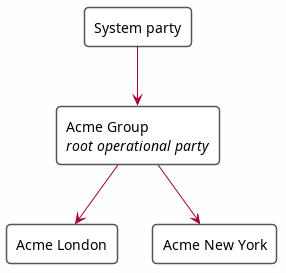
Figure 1: A simple party hierarchy showing the house: the system party at the top, the root operational party (Acme Group) below it, and two child operational parties (Acme London, Acme New York).
A user logs in to a specific party within the house. Their data visibility is determined by their position in the hierarchy: a user logged in at "Acme Group" sees data from both "Acme London" and "Acme New York"; a user logged in at "Acme London" sees only their own data.
3. Tenant types
ORE Studio supports four tenant types, each with different operational controls:
- System — platform administration; one per deployment; platform-managed.
- Production — real customer organisations with live data; strict controls.
- Evaluation — demos, UAT, training, and exploratory testing; relaxed controls.
- Automation — programmatic test infrastructure; not for human use; no controls.
The system tenant is created automatically during system provisioning and cannot be deleted. It is the home of the platform administrator accounts; all other tenants are created by platform administrators working from it.
Production tenants are for live operations. They enforce strict controls including four-eyes authorisation for sensitive operations and KYC-gated counterparty onboarding.
Evaluation tenants provide a realistic but relaxed environment for demonstrations, user acceptance testing, and training. Bulk data import from external sources (such as the GLEIF/LEI registry) is available in evaluation tenants but not in production tenants.
Automation tenants exist for programmatic test infrastructure. They carry no operational controls and are not intended for human use.
4. The Tenants window
Open the Tenants window from the Administration submenu of the System menu.
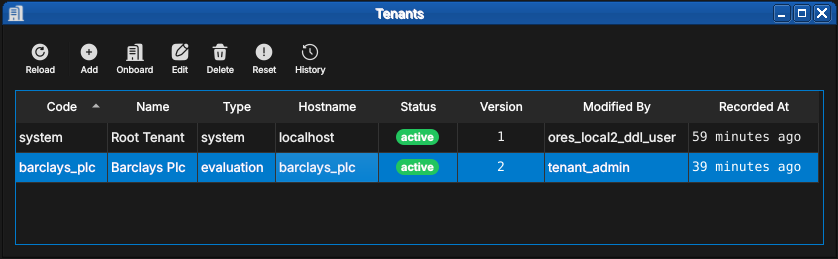
Figure 2: The Tenants window on a freshly provisioned installation: the system root tenant and one business tenant, barclays_plc, both active. Each row shows the tenant code, display name, type, hostname, lifecycle status, and provenance.
Each tenant carries:
- Code — the stable identifier (
system,barclays_plc). - Name — the human-readable display name.
- Type — one of the four tenant types described above;
systemfor the root tenant, hereevaluationfor the business tenant. - Hostname — the hostname the tenant's users connect through, which is how OreStudio routes a login to its tenant.
- Status — the lifecycle state, shown as a badge: bootstrapping while a newly created tenant awaits its provisioning wizard run, active once it is in service, with suspended and terminated closing out the lifecycle.
The toolbar extends the standard entity-window actions with Onboard — which creates a tenant and walks it through provisioning — and Reset, which returns a tenant to its post-provisioning state.
Tenant operations are platform-level and far-reaching: deleting or resetting a tenant affects every account and every record within it. The change-reason dialog applies here as everywhere, so destructive operations leave an audit trail — but there is no undo.
5. The tenant detail dialog
Double-click a tenant (or select it and press Edit) to open the detail dialog.
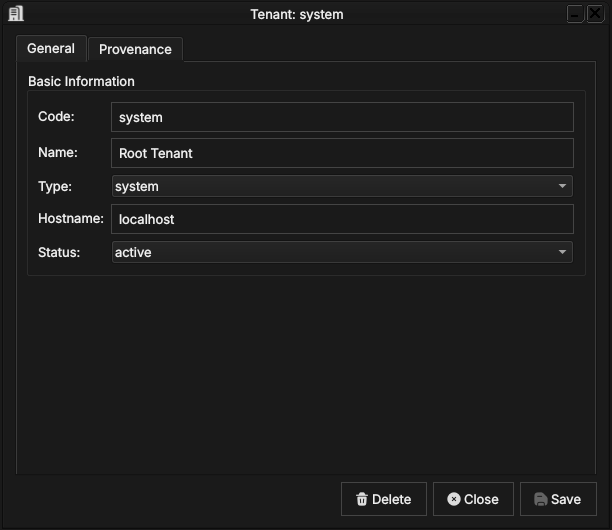
Figure 3: The system root tenant: code, name, type, hostname, and lifecycle status. The status combo is how an administrator suspends or reactivates a tenant.
The General tab carries the fields described above; the status combo is how an administrator moves a tenant through its lifecycle. The second tab holds the record's provenance:
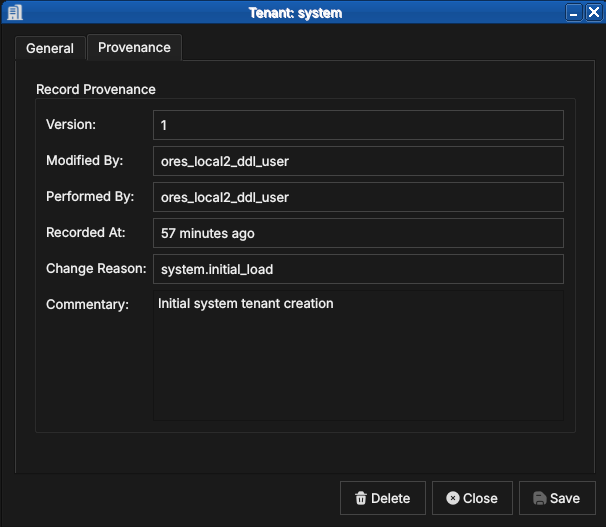
Figure 4: The familiar provenance tab: version, modifier, performing service, change reason and commentary — here the system.initial_load of the root tenant.
Tenant records are versioned with full provenance like every other entity — see the Provenance section of the Reference Data chapter. The History toolbar action shows a tenant's full version history.
6. Conclusion
The chapter set out to show that administering a tenant well follows from understanding its organisational model, its type taxonomy, and its interface in turn, and it has traced exactly that path. The multi-tenant, multi-party model supplied the foundation — the tenant as the unit of isolation and the party hierarchy within it, the house and its counterparties, with visibility following the hierarchy. Building on that, the four tenant types fixed the operational posture of each tenant, ranging from the strictly controlled production tenant to the uncontrolled automation tenant. The Tenants window then took the record from the list view, where lifecycle status reads at a glance from the badges, down to the detail dialog, where an administrator edits a tenant's identity and moves it through its lifecycle under the same provenance regime as every other entity. With connection, provisioning, and administration now covered, the manual turns from the system itself to the data it manages: reference data.
7. See also
- Initial Setup — the tenant model and the provisioning wizards.
- Accounts and Roles — the accounts that live inside each tenant.