User Journey: Retire or reset a tenant
Table of Contents
This page documents a user journey: A system administrator suspends, terminates or resets a tenant.
A user journey describes what one person is trying to do, before anything is built. It is a design document that outlives any sprint, so it names the screens, the entity fields each screen shows, and the operations and messages each step needs.
1. Goal
"I want to end a tenant's life, or clear it out and start again." The system administrator suspends, terminates, deprovisions, purges or resets a tenant. Every one of these actions reaches every account inside the tenant, and most of them cannot be undone. The journey is done when the tenant's status reads what the administrator intended and the data is in the state they chose.
2. Actor and trigger
The system administrator: an account that holds the SuperAdmin role and acts
from the system tenant. The trigger is a tenant that must stop, or a
development cycle that must start over. It starts when the administrator opens
Tenant settings and picks a tenant, and ends when the operation's reply reads
correctly.
This is the destructive end of the tenant topic. A tenant administrator maintains their own tenant's details and cannot reach these operations — see Tune the tenant. Creating and provisioning a tenant is the setup journey New tenant.
3. Steps
- Choose the tenant. The administrator opens Tenant settings and picks a tenant. The system lists every tenant and shows the code, the name, the hostname, the type and the current status of the one chosen.
- Read the status path. The system shows the four seeded statuses in order —
bootstrapping,active,suspended,terminated— and marks where this tenant sits. The path runs one way. A tenant enters atbootstrapping, becomesactivewhen its provisioning wizards finish, and isterminatedwhen its life ends. Only the two resets send a tenant back tobootstrapping. - Read what each operation destroys. The administrator opens the destructive panel. The system labels every operation with its effect in plain words, and with whether the server provides it today.
- Choose one operation. Suspend stops sign-in. Terminate keeps all data and makes the tenant unusable. Deprovision ends every session and hides the tenant's data. Purge deletes every row, the tenant included. Reset returns the tenant to bootstrapping. Reset the system purges every non-system tenant.
- Read the consequence. Before anything is sent, the screen states the target and the loss. For a suspension it says that nothing is deleted. For a purge it says that the data cannot be recovered. The two are not allowed to look alike.
- Confirm. The system names the tenant in the confirmation and requires the administrator to type the tenant's code. The destructive buttons stay disabled until the typed code matches the tenant's own code. The system re-reads the tenant's version so a change made since the screen opened is caught rather than overwritten.
- Run the operation. The system sends the operation and shows the reply. The tenant's status and the operation history update to match.
- Leave. The administrator goes back. The tenant list now shows the new status, or the tenant is gone.
The step from bootstrapping to active is not here. It runs at the end of
New tenant, through
iam.v1.tenants.complete-provisioning.
4. Screens and wireframes
One screen. The tenant's row, the status path, the destructive panel and the confirmation are panels of that screen rather than separate screens, because the administrator reads them together before one decision. The destructive panel is the reason the screen exists, and it must not be a menu item that acts on click: the confirmation is part of the screen, not a browser dialog.
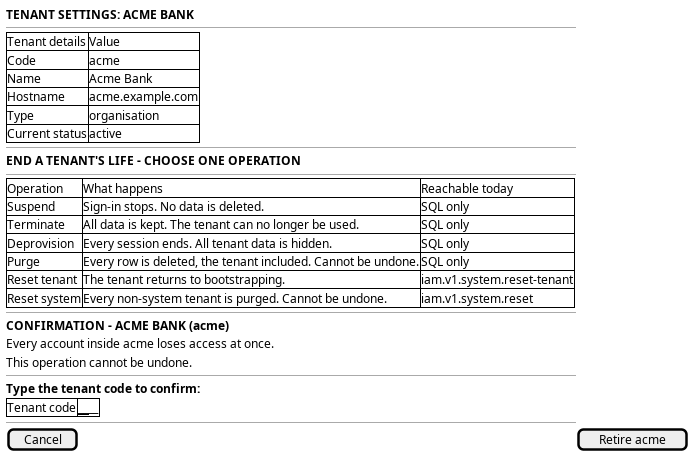
Figure 1: Retire or reset a tenant: the tenant and its status above the destructive operations, with a confirmation that names the tenant.
5. Entities composed
| Entity | What it contributes | Model |
|---|---|---|
tenant |
Code, name, hostname, type and status; the row every operation targets | ores.iam.tenant |
tenant_status |
The four lifecycle codes the status path shows | ores.iam.tenant_status |
session |
The sessions deprovision ends | ores.iam.session |
login_info |
The sign-in records deprovision and purge delete | ores.iam.login_info |
The tenant row is the only row the screen writes. Its status column is the
whole point: it is what the administrator reads before the operation and what
the operation changes. tenant_status is a lookup of four codes, not a state
machine — nothing in the server refuses a transition, so the screen must order
the operations itself.
6. Operations and messages
| Step | Operation | Subject | Status |
|---|---|---|---|
| Choose the tenant | List the tenants | iam.v1.tenants.list |
exists |
| Choose the tenant | Read the current row and version | iam.v1.tenants.get |
exists |
| Read the status path | List the tenant statuses | iam.v1.tenant_statuses.list |
exists |
| Suspend | Set the status to suspended |
none | missing |
| Terminate | Run ores_iam_terminate_tenant_fn |
none | missing |
| Terminate | Soft-delete the row; the delete rule sets terminated |
iam.v1.tenants.delete |
partial |
| Deprovision | Run ores_iam_deprovision_tenant_fn |
none | missing |
| Purge | Run ores_iam_purge_tenant_fn then ores_iam_hard_delete_tenants_fn |
none | missing |
| Reset one tenant | Return the tenant to bootstrapping | iam.v1.system.reset-tenant |
exists |
| Reset one tenant | Soft-delete admin data, keep bootstrap state | none | missing |
| Reset the system | Purge every non-system tenant | iam.v1.system.reset |
exists |
Only the two resets have a NATS subject. iam.v1.system.reset-tenant needs
iam::system:reset-tenant and calls ores_iam_reset_tenant_bootstrap_fn,
which soft-deletes the curated admin tables, flips Operational parties to
Inactive, re-enables system.bootstrap_mode and sets the tenant's status to
bootstrapping. iam.v1.system.reset needs iam::system:reset and calls
ores_iam_reset_system_fn, which hard-purges every non-system tenant, ends the
system tenant's sessions, removes the system admin accounts and re-enables
bootstrap mode. Both permissions sit on SuperAdmin, and each handler refuses
a caller that does not hold it.
Terminate, suspend, deprovision and purge have no subject. They are reachable
only by SQL, and each of the four functions demands system tenant context:
ores_iam_terminate_tenant_fn, ores_iam_deprovision_tenant_fn,
ores_iam_purge_tenant_fn and ores_iam_hard_delete_tenants_fn. None of them
is called by any handler. Suspend has no SQL function at all: it exists as the
seeded status suspended and the seeded permission iam::tenants:suspend, and
nothing performs it.
iam.v1.tenants.delete does terminate a tenant, because the tenant delete rule
sets status = 'terminated' and closes the row. That is why it is partial
rather than missing: it checks iam::tenants:delete, not
iam::tenants:terminate, and unlike ores_iam_terminate_tenant_fn it does not
require system tenant context and does not refuse the system tenant.
The permissions iam::tenants:suspend and iam::tenants:terminate are seeded
and held by SuperAdmin, but no handler uses either one. They are placeholders
for the two subjects that do not exist.
7. What is missing
- No suspend operation. The status row, the permission and the promise that
"users cannot log in" all exist; the operation does not. The candidate is
iam.v1.tenants.suspend, using the seedediam::tenants:suspendpermission and a function that writes the new status version. Until it exists the screen must not offer suspend. - A suspended tenant is not actually stopped. Nothing in the sign-in path
reads a tenant's status, so an account in a tenant whose status is
suspendedstill signs in. The status would change nothing even if a function wrote it. The candidate is a sign-in guard that refuses any tenant whose status is notactive. This is the more important of the two gaps: the vocabulary promises an effect that no code delivers. - No subject for terminate, deprovision or purge. Each has a function and
none has a message. The candidates are
iam.v1.tenants.terminate,iam.v1.tenants.deprovisionandiam.v1.tenants.purge, each requiring system tenant context and a system-level permission. Until they exist, these operations are console work, and the screen must say so. - The generic delete can terminate the system tenant. The dedicated
functions all refuse
ffffffff-ffff-ffff-ffff-ffffffffffff, and the delete rule does not. A caller holdingiam::tenants:deletecan therefore end the system tenant throughiam.v1.tenants.delete. The candidate is to apply the same guard to the delete path, or to give the destructive operations their own subjects and take delete out of the lifecycle. - No subject for a party-level reset.
ores_iam_reset_tenant_fnclears the admin-created data and leaves the tenant active and provisioned; it is SQL-only. The subject that exists runs the bootstrap reset instead, which also sends the tenant back tobootstrappingand re-fires the wizards. "Clear the tenant out but do not reset its provisioning" has no path today. The candidate isiam.v1.tenants.reset. - No transition guard and no server-side confirmation beyond the tenant
code.
tenant_statusis a lookup, so nothing refuses a purge of an active tenant or a reset of a suspended one.iam.v1.system.resetcarries no payload at all, so nothing at the server names what it destroys. The candidates are a stated transition rule the three functions enforce, and a confirmation token on the system reset.
8. Related journeys
- Tune the tenant — maintain the tenant's own details and the status codes this screen walks
- New tenant — the other end of a tenant's life: provision the tenant this screen retires
- Audit sign-ins — the sessions that survive a suspension, and the sign-in records purge deletes
- First run — the state the system reset returns the installation to