Books
Table of Contents
This chapter examines the book as a reference-data entity in OreStudio. A book is the internal ledger unit that owns positions; the chapter sets out what a book represents, the interface that governs its lifecycle, and the meaning of its fields — a flag-icon currency picker, an operational status with its own lifecycle, and its trading-book/banking-book classification.
1. Overview
The chapter advances the argument that managing a book well means first understanding what it represents, then the interface that governs its lifecycle — and it proceeds in that order. It begins by establishing what a book is in What is a Book?, distinguishing a book from the counterparties and portfolios it sits alongside, and by working through the real-world Book lifecycle a book moves through — from its multi-party opening to closure — that the Status field on-screen only partially reflects; this is the premise the rest of the chapter builds on. From there it surveys the body of records in The Books window before narrowing to a single record in Book Details and its General and Provenance tabs. It then turns to changing a record under audit — Editing, Deleting, and Book history — culminating in reverting to an earlier version, the point at which the bitemporal audit trail does its work. The Conclusion draws these steps together.
2. What is a Book?
A book is the internal ledger unit that owns positions within a party's trading organisation. Every trade books into exactly one book; a book aggregates the trades it owns for risk, P&L, and reporting purposes. A book is, first and foremost, an accounting concept rather than a purely trading-system one: it must reconcile with the firm's general ledger, and OreStudio's own view of a book is downstream of that ledger rather than the other way round.
Books sit within a party's organisational structure alongside business units and portfolios, and it helps to keep the two apart: a portfolio groups related books for a trading strategy or desk, and can itself be composed of other portfolios; a book is the leaf-level unit that actually carries positions. A useful shorthand is that books are the physical representation and portfolios the logical one — or, borrowing a filesystem analogy, a portfolio is a folder and a book is a file. In the real-world accounting sense a book can have child books through ledger setup, but ORE Studio deliberately does not model that book-to-book hierarchy: a book has no parent-book field. Instead, all hierarchy in ORE Studio is expressed through the portfolio tree — portfolios can nest inside other portfolios, and every book links to exactly one portfolio — so the folder/file split above is also the whole of the tool's hierarchy, not just an analogy for it.
Every book carries a functional currency — the accounting currency its positions are reported in. Trades themselves can happen in whatever currency the deal was struck in, but the ledger needs one settled currency per book to carry balances and P&L in; that currency is designated by the ledger, not chosen freely by the desk. A book also carries a GL account reference, which is simply the general ledger account in the firm's accounting system that this book's activity maps to — the trading system's record of a position only means something once it can be traced back to a specific line in the firm's books of account. Alongside that sits a cost centre, the internal code that activity in this book is charged against for cost allocation and management reporting; a full treatment of how functional currency, GL accounts, and cost centres compose into the wider accounting hierarchy belongs to a future ledger-focused chapter, not this one.
A book also carries a status — its current operational state, such as active, closed, or frozen — chosen from the set of statuses configured for the tenant. See Book lifecycle below for what drives a book between these states.
Perhaps the most consequential classification a book carries is whether it is a trading book or a banking book — a distinction that traces back to the Basel III/IV capital adequacy framework, and specifically to a component of it called FRTB (the Fundamental Review of the Trading Book).
The distinction is about intent, not instrument type: a position held with the intent of benefiting from short-term price movements, market making, or hedging other trading-book positions belongs in the trading book; a position held to maturity or for longer-term investment purposes belongs in the banking book. The same instrument — a bond, a swap — can sit in either book depending on why it is held.
The distinction matters because the two books are subject to entirely different capital regimes. Trading-book positions are capitalised for market risk — the risk that market prices move against an open position — recognising that these positions may be actively traded and revalued daily. Banking-book positions are instead capitalised for credit risk — the risk that a counterparty fails to pay — reflecting that these positions are typically held to term. Getting this classification wrong, or moving positions between the two books opportunistically to reduce capital charges, is precisely what regulators police most closely; switching a position's classification after the fact is heavily restricted for that reason.
3. Book lifecycle
A book moves through a much heavier real-world process than a simple open/closed flag suggests: a deliberate opening workflow, a live phase in which deals move and access is periodically reviewed, and a closing process gated on the book being flat. This section walks through that process in its own terms; c.f. the Status field on the General tab below, which is OreStudio's simplified, editable reflection of it.
3.1. Opening a book
A new book is not something a desk sets up for itself. Bringing a book live is a deliberately heavyweight, multi-party process, with four separate functions involved:
- The desk initiates the request — it knows it needs a new book (a new product line, a new trading strategy) but cannot create or enrich one itself.
- A controller reviews and approves the initiation request — an independent check that exists specifically to prevent a desk from authorising its own new book.
- Three functions then enrich the book in parallel, each contributing the data their function owns: Finance wires the book into the ledger — its functional currency, cost centre, and monthly balance carry-forward; Market Risk sets its regulatory book type (Trading or Banking) and assigns it to a rates centre for consistent revaluation data; Operations sets up the book's allowed-currency and allowed-product constraints. Because all three enrich the book at the same time rather than in sequence, each must independently approve its own contribution before the book can move on.
- Only once every approval is in does the book's access review begin; once that completes, the book is set up on the booking systems and becomes Active.
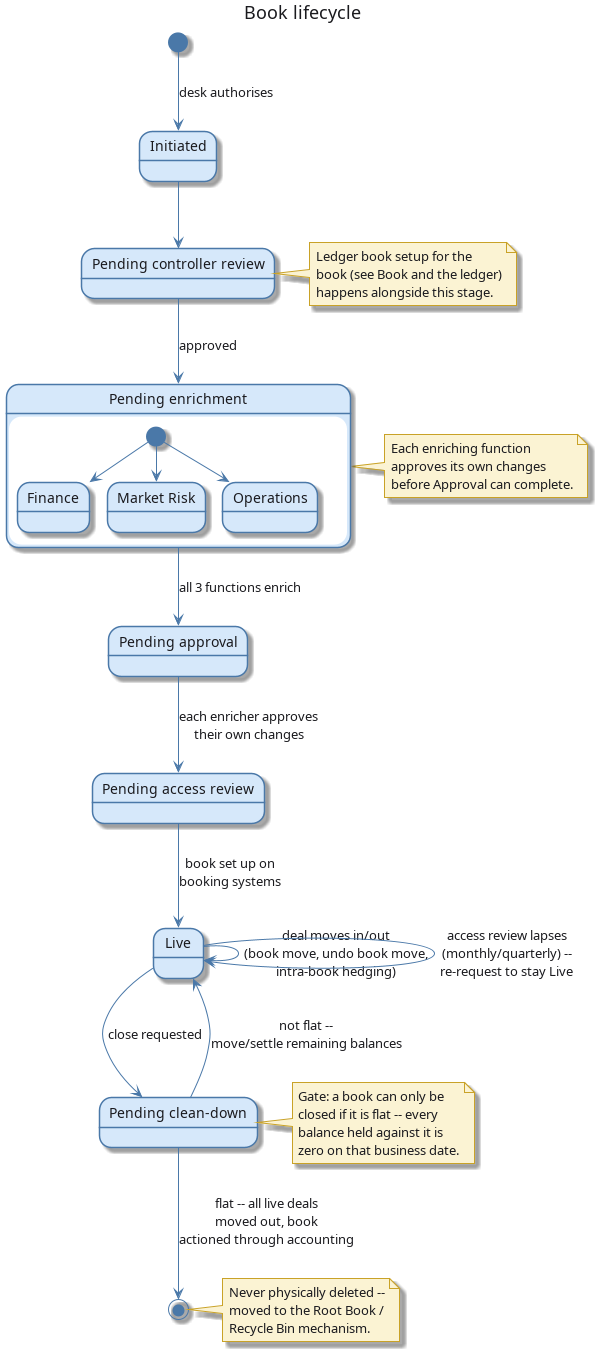
Figure 1: The book lifecycle: the multi-party opening workflow, the live-book loop (deal moves, periodic access review), and the flat-check gate on closing.
3.2. While a book is active
A live book is not static:
- Deals move between books routinely — freely if the move stays within the same legal entity and branch, or via a close-and-rebook if not. An erroneous move can be undone.
- Access to a book is not permanent: it must be periodically reviewed (monthly or quarterly, depending on the tenant's policy). If nobody renews a user's access, it lapses automatically and must be re-requested.
- A book can be temporarily Frozen — taken out of normal trading use without being closed down entirely.
3.3. Closing a book
A book can only be closed once it is flat — every balance held against it is zero on that business date. Closure is executed through accounting: all remaining live deals are moved to a different book, after which the book's status moves to Closed. A closed book is never physically deleted; it is retained in the system for its audit history, exactly like any other historical version.
With the concept and its lifecycle established, the rest of this chapter turns to the interface OreStudio provides for it — starting with the Books window, which lists every book governed by the process just described.
4. The Books window
Open the Books window from the Trading menu. It lists all books defined in the tenant, with one row per book.
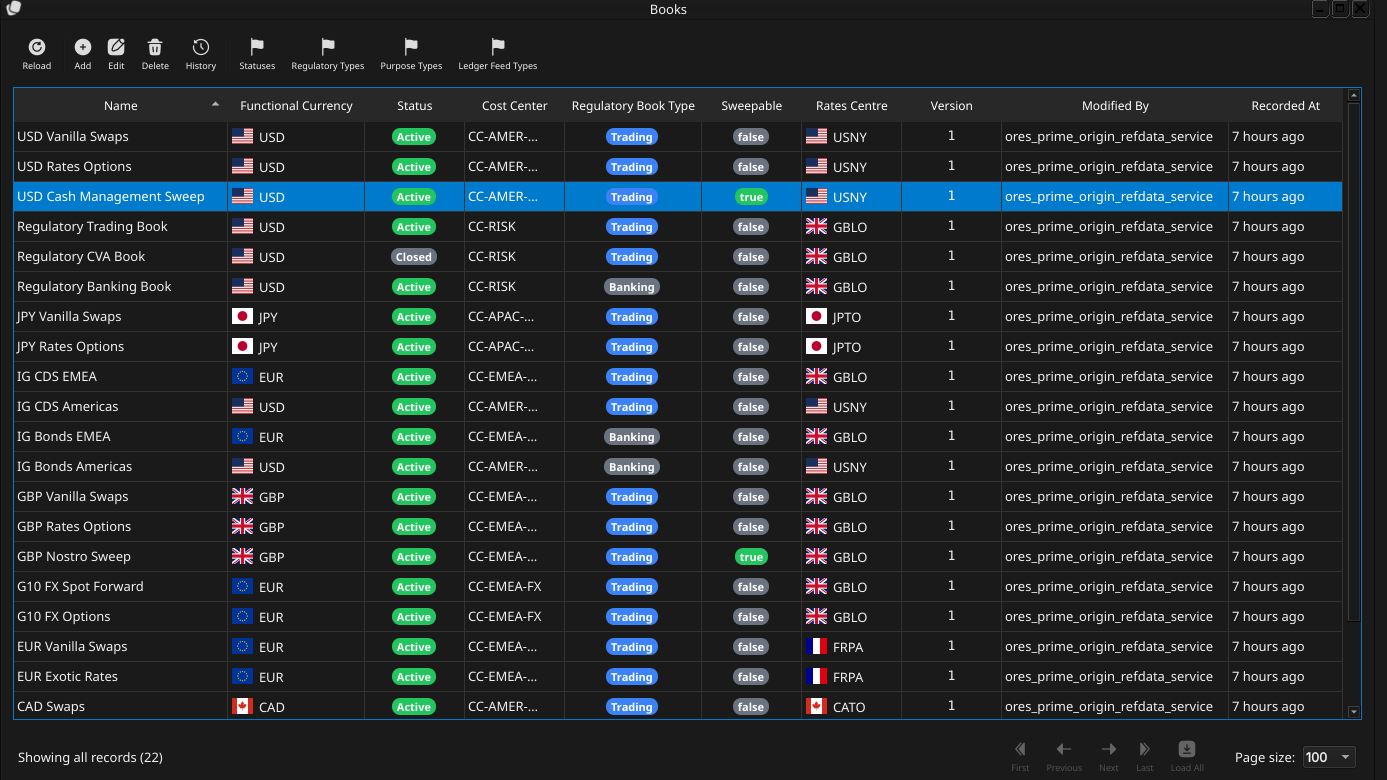
Figure 2: The Books window, showing the full list of books in the tenant. Each row shows the name, functional currency (with flag icon), status (as a colour-coded badge), cost centre, regulatory book type (as a colour-coded Trading/Banking badge), version number, the identity of the last modifier, and when the record was last recorded. The status bar shows the current page and total record count.
The toolbar buttons reload the list and open the add, edit, delete, and history actions. The list is paginated; use the page controls at the bottom right to navigate. Double-clicking a row opens the Book Details dialog.
5. Book Details
The Book Details dialog has two tabs — General and Provenance. The three action buttons at the bottom — Delete, Close, and Save — apply to the book as a whole.
5.1. General
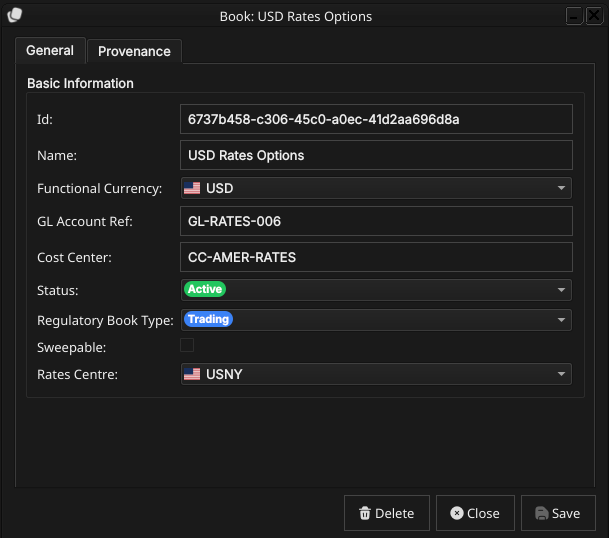
Figure 3: The General tab for a book. It shows the id, name, functional currency, GL account reference, cost centre, status, and regulatory book type.
The General tab carries the fields of the book:
- Id — the book's identifier. This is the primary key and cannot be changed after creation.
- Name — the book's display name. Unlike the id, the name can be changed after creation — real trading systems allow a book to be renamed while its id and GL mapping remain the durable identity.
Functional Currency — the currency this book reports in, designated by the ledger, chosen from a combo box populated with ISO currency codes, each shown with its flag icon.
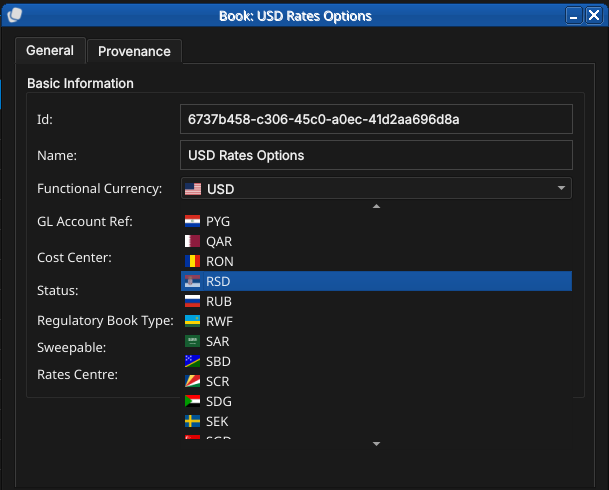
Figure 4: The Functional Currency combo box open, showing the list of ISO currency codes each with its flag icon; c.f. the same combo widget in the Currencies chapter. Selecting a currency updates the closed box to show the chosen code and flag.
- GL Account Ref — free-text reference to the general ledger account this book maps to.
- Cost Center — free-text internal cost allocation code.
Status — the book's position in its operational lifecycle, chosen from a combo box populated from the tenant's configured book statuses and shown as a colour-coded badge once selected. See Book lifecycle above for what each value means.
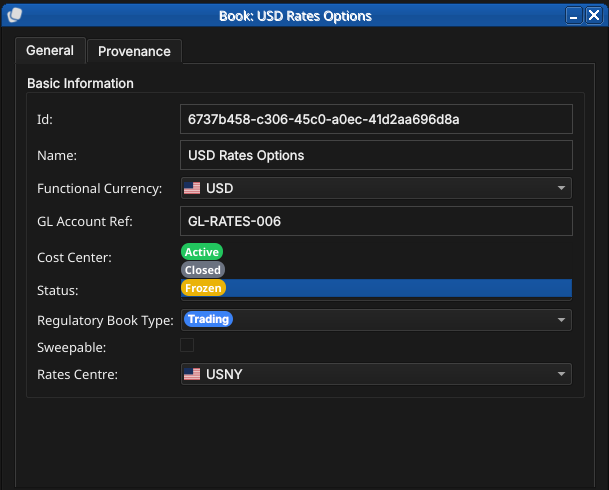
Figure 5: The Status combo box open, showing the badge-coloured status values.
Regulatory Book Type — a combo box choosing the book's Basel classification, Trading or Banking, also shown as a colour-coded badge. See Book lifecycle and What is a Book? above for what the distinction means.
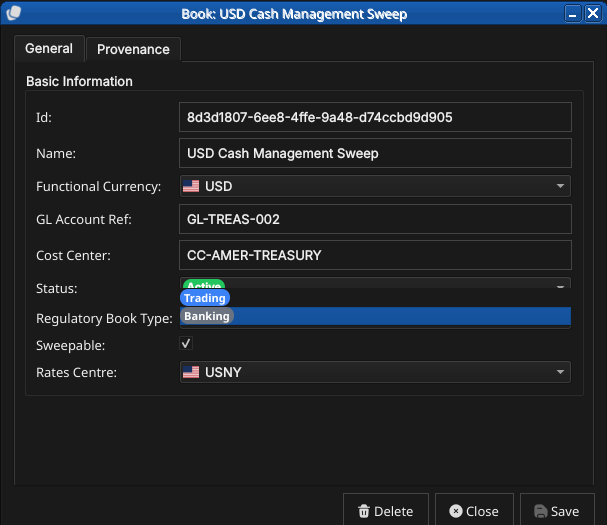
Figure 6: The Regulatory Book Type combo box open, showing both values (Trading, Banking) as coloured badges.
5.2. Provenance
The Provenance tab is read-only and shows the audit metadata for the current version. See the Reference Data — Provenance section for a full description of the provenance fields common to all reference data entities.
6. Editing a book
To edit a book, open it in the Book Details dialog, make your changes, and click Save. Before the record is written, OreStudio prompts for a change reason — the same Change Reason Required dialog shown in the Currencies chapter, and not repeated here. Select a Reason from the drop-down and add optional Commentary, then confirm. Every save creates a new version; the previous version is never overwritten.
7. Deleting a book
To delete a book, open it and click Delete. OreStudio asks for confirmation before the record is closed off. Deletion is a soft close — the record's history is preserved and remains visible in the History dialog.
8. Book history
To view the full change history, open the details dialog and click the history icon in the title bar, or right-click the row and choose History.
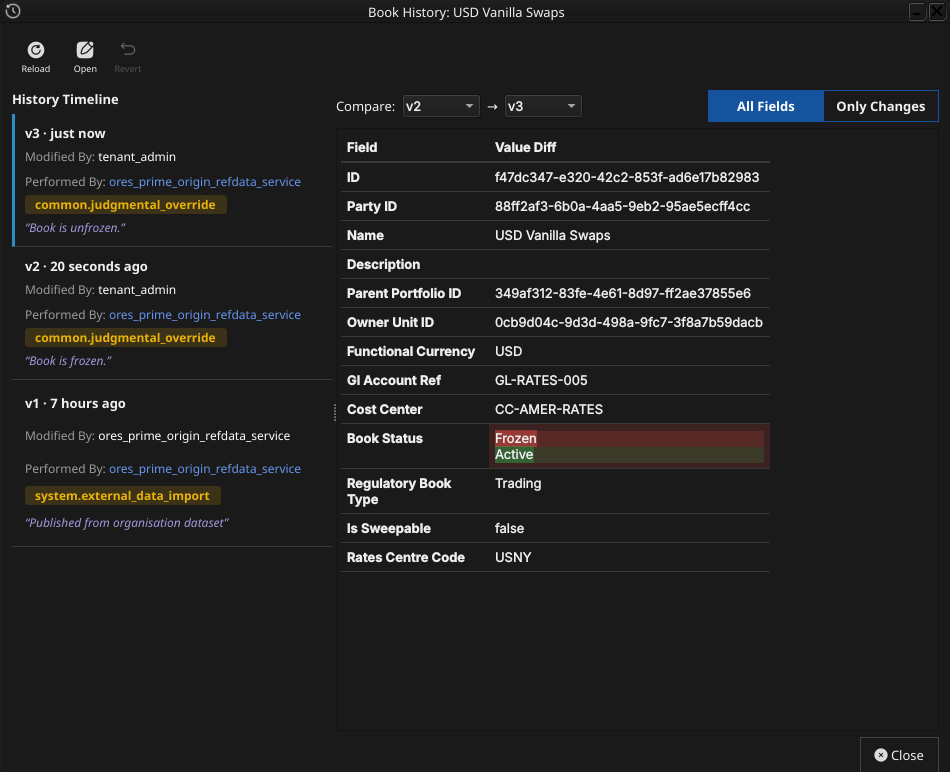
Figure 7: The History dialog for book USD Vanilla Swaps, comparing version 2 against version 3. The Only Changes toggle narrows the field list to the single field that actually differs — Book Status, Frozen to Active.
Pick the two versions to compare from the Compare drop-downs. The All Fields / Only Changes toggle switches between showing every field and showing only the fields that differ between the two selected versions. The Revert button reinstates any historical version as a new version, preserving the full audit chain — the old version is never rewritten.
9. Conclusion
The chapter set out to show that managing a book well follows from understanding what it represents and the interface that governs its lifecycle, and it has traced exactly that path. A book is the leaf-level ledger unit that owns positions, identified within its party by an id and name and carrying a functional currency, a GL mapping, a cost centre, a status, and a trading/non-trading flag. Building on that, the Qt interface took the record from the list view down to a single detail dialog — its currency picker showing flags, its status governed by the book lifecycle — and through the editing, deleting, and history workflows, where reverting to an earlier version demonstrated the same bitemporal audit trail described in the Reference Data chapter. Shell and command-line access to books is not yet implemented; it is tracked separately as part of the shell and CLI commissioning work.
10. See also
- Reference Data — the shared data quality and audit framework this chapter builds on.
- Currencies — the functional currency a book references, and the Change Reason Required dialog.