Currencies
Table of Contents
This chapter examines the currency as a reference-data entity in ORE Studio. Currencies are identified by the international ISO 4217 standard; the chapter sets out that standard and the gaps it leaves, the extensions ORE Studio layers on top — display formatting, rounding rules, market tiers, and monetary natures — and the complete lifecycle of managing currency records through the Qt interface, the interactive shell, and the command-line tool.
1. Overview
The chapter advances the argument that managing a currency well means understanding what a currency actually is, its identity, the extensions that make it usable, the interface that governs its lifecycle, and the programmatic equivalents — and it proceeds in that order. It begins with the conceptual foundation in Money, currency, and cash, distinguishing three terms routinely conflated in casual usage; this framing is what makes the rest of the chapter's choices legible, not just a list of fields. It then turns to a currency's own birth-to-retirement Currency lifecycle, background the chapter draws on without OreStudio exposing it as a field. From there it establishes identity in ISO 4217 and its limitations, which sets out the codes that name a currency and the gaps that motivate ORE Studio's extensions. It then surveys the body of records in The Currencies window before narrowing to a single record in Currency Details and its General, Formatting, Rounding, and Provenance tabs. It then turns to changing a record under audit — Editing and Currency history — culminating in reverting to an earlier version, the point at which the bitemporal audit trail does its work. It then documents the auxiliary classification tables — rounding types, market tiers, and monetary natures — whose values a currency references, and finally shows the same operations automated from the shell. The Conclusion draws these steps together.
2. Money, currency, and cash
Money, currency, and cash are used almost interchangeably in
everyday speech, yet they name three distinct, if related, concepts,
each nested within the one before it. Disentangling them clarifies
what ORE Studio's Currency record is actually modelling, and, just as
importantly, what it deliberately is not.
Money is the broadest of the three terms: any item or verifiable record generally accepted as payment for goods and services, or as repayment of debts, within a particular society. It is best understood not as a physical thing but as a social convention, one that functions precisely because a sufficiently large group of people believes it functions, and which ceases to function the moment that belief collapses. What qualifies as money is best captured by what it does rather than what it is: it serves as a medium of exchange, offering an efficient alternative to barter; as a unit of account, letting value be expressed numerically and compared across otherwise incommensurable goods; as a store of value, preserving purchasing power across time; and as a standard of deferred payment, so that an amount agreed today retains roughly the same value when it falls due in the future. Anything fulfilling these functions counts as money, which is why money has, historically, taken several distinct forms. Commodity money derives its value from the scarcity and physical usefulness of the substance embodying it, gold and silver being the paradigm cases. Fiat money, by contrast, carries no intrinsic value of its own; it is money purely because a government or a mutual agreement between parties declares it so. Bank money is more abstract still, consisting entirely of records: it is created the moment a bank extends a loan by crediting the borrower's deposit account, and destroyed the moment that loan is repaid. Despite the popular association of "money" with notes and coins, bank money constitutes the overwhelming majority of the money supply in any modern economy, physical cash typically accounting for a small single-digit percentage of the total. Cryptocurrencies form a fourth, more recent and non-standard category: digital assets used as a medium of exchange, with ownership recorded cryptographically and, typically, no central issuing authority standing behind them.
Currency narrows money down to a system of money in common use within
a defined area of circulation, usually a country or a group of
countries sharing a monetary union. Two meanings coexist in ordinary
usage, the physical representation of banknotes and coins on one
hand, and the abstract system of money itself on the other, the
latter being the more useful framing for a system such as ORE Studio,
given how small a fraction of any modern money supply physical cash
actually represents. Being standardised by ISO 4217 is not a
precondition for counting as a currency in this conceptual sense;
standardisation is better understood as a seal of approval than as a
definition. The currencies of smaller nations not covered by the
standard, and cryptocurrencies, which rely on informal,
community-driven symbols such as BTC or XBT for Bitcoin rather
than an assigned ISO code, are no less currencies for lacking one. A
currency also has a lifecycle of its own, distinct from the lifecycle
of any individual note or coin — see Currency lifecycle below.
Cash narrows the concept furthest of the three. It is money in the physical form of banknotes and coins, or, in the bookkeeping sense more relevant to a system like ORE Studio, the broader class of current assets comprising currency or currency-equivalents that can be accessed immediately or near-immediately. A bank deposit falls under this broader definition: it is a financial asset rather than physical currency, yet liquid enough to count as cash for most practical purposes. The relationship between the three terms can be summarised as a chain of increasingly narrow specialisation: not all money is a currency in the systemic sense, since commodity money and cryptocurrencies stretch the definition in different directions; and not all currency holdings are cash, since a currency can equally be held in a comparatively illiquid financial-asset form.
ORE Studio's Currency reference-data record, the subject of the
remainder of this chapter, models currency in precisely this
narrower, systemic sense: a named, identified system of money,
equipped with the extensions described in the next section that let
ORE Studio put it to practical use in calculations. The chapter does
not attempt to model money in the abstract, nor the accounting
concept of cash; those notions are drawn upon, where relevant, by the
trading and booking chapters that build upon the currency reference
data documented here.
3. Currency lifecycle
A currency is born when created and put into circulation, lives
while in general use, and dies when eventually withdrawn — whether
replaced by a successor currency, absorbed into a monetary union, or
simply discontinued — though records of transactions conducted
during its life must still be retained long after that withdrawal.
This is background the rest of the chapter builds on, not a field
OreStudio exposes directly: unlike a book, a currency record carries
no status column of its own; a withdrawn currency simply stops
being referenced in new records; its history remains intact under
the same bitemporal audit trail as any other change.
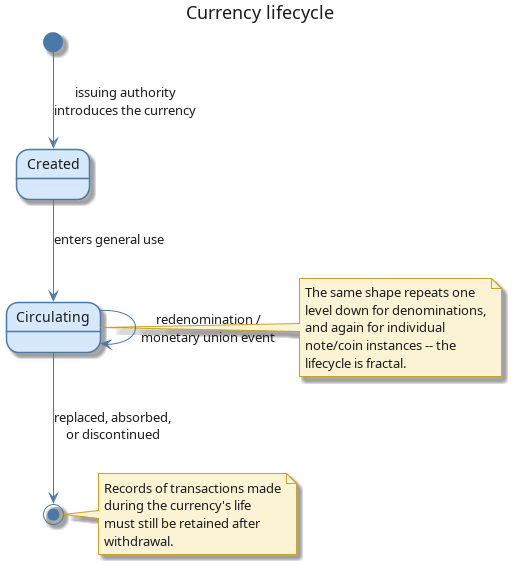
Figure 1: Currency lifecycle: creation, circulation (looping through redenomination and monetary-union events), and eventual withdrawal.
The same birth-life-death shape recurs at three nested levels: the currency itself, its individual denominations (a given note or coin value can be introduced or discontinued independently of the currency surviving), and individual physical instances. Recognising the pattern as fractal is what keeps "currency lifecycle" from being mistaken for a single, currency-wide, all-or-nothing event.
Redenominations, currency replacements, and monetary unions forming or dissolving occur more often than a system designer might expect, and rarely afford the luxury of careful advance planning; a system not built to anticipate such events — positions, reference data, and historical records all still keyed to a code that has just been withdrawn or redefined — can find itself significantly disrupted when one eventually occurs.
4. ISO 4217 and its limitations
The international standard for currency codes is ISO 4217. It defines
a three-letter alphabetic code (USD, EUR, GBP), a three-digit
numeric code (840, 978, 826), a currency name, and the number of
decimal places — for example, USD has 2 minor units, meaning amounts
are expressed to the nearest cent.
ISO 4217 is widely adopted and ORE Studio uses it as its primary identifier. However, the standard has gaps that matter in practice:
- It does not classify currencies by market tier — the distinction between major G10 currencies and emerging-market currencies is economically important but absent from the standard.
- It does not cover digital assets. Cryptocurrencies such as Bitcoin or Ethereum are increasingly relevant in financial systems but have no ISO 4217 code.
- It says nothing about display formatting — whether a symbol precedes or follows the amount, what the thousands and decimal separators are, or how the fractional unit is labelled.
- It does not specify rounding conventions — whether a calculation result should be rounded up, down, or to the nearest unit.
ORE Studio extends the ISO 4217 model with additional fields to cover these gaps: monetary nature, market tier, currency symbol, fraction symbol, a printf-style format string, and configurable rounding rules. The standard fields remain primary; the extensions are supplementary.
With the underlying model in place, both the standard fields ISO 4217 provides and the extensions layered on top of them, the rest of the chapter turns from what a currency record contains to where you go to work with one. That begins, as it does for any list-backed entity in ORE Studio, with the window listing every currency the tenant holds.
5. The Currencies window
Open the Currencies window from the Reference Data menu. It lists all currencies defined in the tenant, with one row per currency.
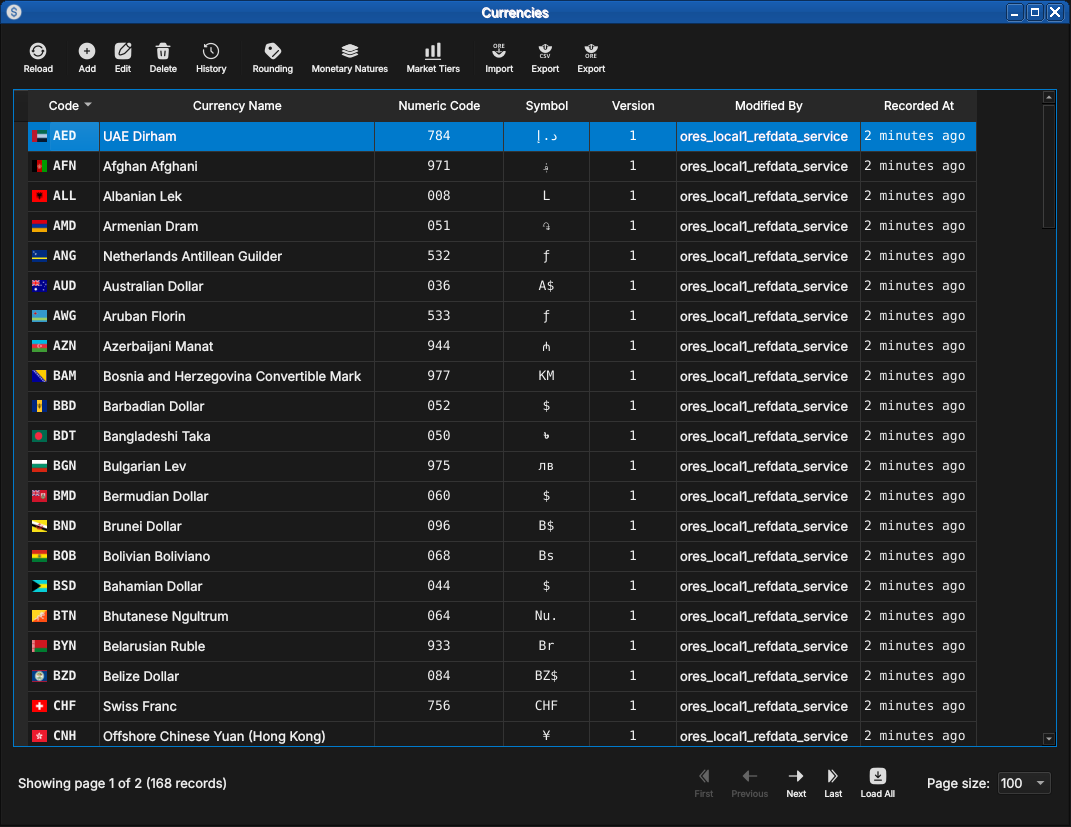
Figure 2: The Currencies window, showing the full list of currencies in the tenant. Each row shows the ISO code, name, numeric code, symbol, version number, the identity of the last modifier, and when the record was last recorded. The status bar shows the current page and total record count.
The toolbar buttons reload the list and adjust the display. The list is paginated; use the page controls at the bottom right to navigate. Double-clicking a row opens the Currency Details dialog.
6. Currency Details
The Currency Details dialog has four tabs: General, Formatting, Rounding, and Provenance. The three action buttons at the bottom — Delete, Close, and Save — apply to the currency as a whole.
6.1. General
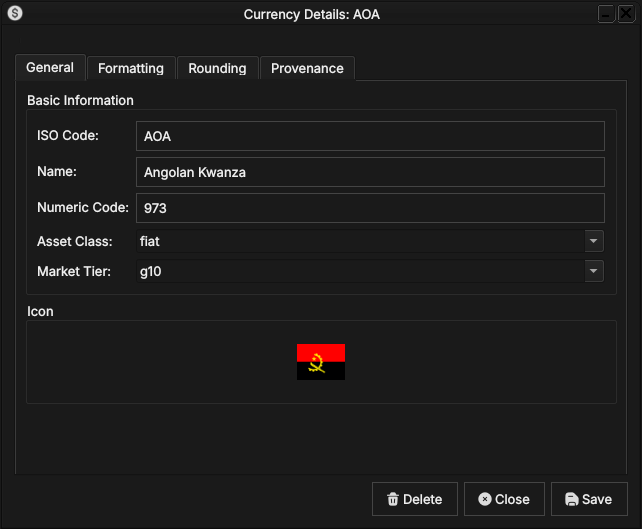
Figure 3: The General tab for the Angolan Kwanza (AOA). It shows the ISO code, full name, numeric code, monetary nature, market tier, and the country flag icon associated with the currency.
The General tab carries the core identity of the currency:
- ISO Code — the three-letter ISO 4217 alphabetic code. This is the primary key and cannot be changed after creation.
- Name — the full English name of the currency (e.g. Angolan Kwanza).
- Numeric Code — the ISO 4217 numeric code (e.g.
973for AOA). - Asset Class — the monetary nature of the currency:
fiatfor a government-issued currency,crypto.majorfor a major digital asset. See Monetary Natures below for the full list. - Market Tier — the currency's liquidity classification:
g10for the major currencies,emergingfor others. See Market Tiers below. - Icon — the country flag for the currency's issuing nation, populated automatically from the system's image dataset on import.
6.2. Formatting
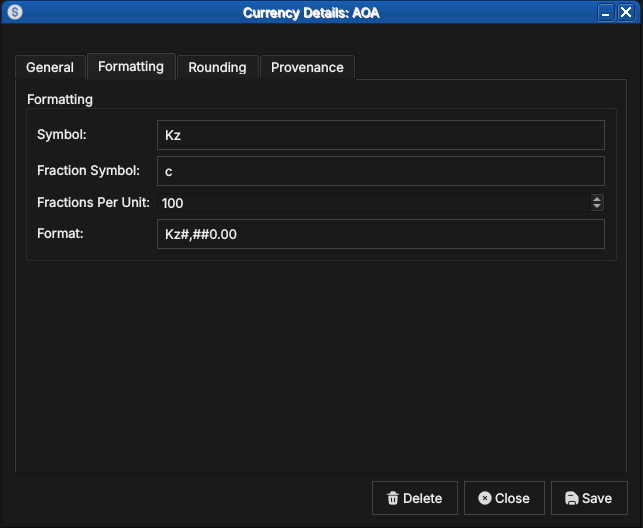
Figure 4: The Formatting tab for AOA, showing the currency symbol (Kz), the fractional unit symbol (c for centavo), fractions per unit (100), and the display format string.
The Formatting tab controls how currency amounts are displayed:
- Symbol — the currency symbol, e.g.
Kzfor the Kwanza or$for the US Dollar. - Fraction Symbol — the symbol for the fractional unit, e.g.
cfor centavo. - Fractions Per Unit — the number of fractional units in one whole
unit. Most fiat currencies use
100; the Kuwaiti Dinar uses1000; currencies with no fractional unit (e.g. Japanese Yen) use0; cryptocurrencies typically use100000000. - Format — a printf-style format string controlling amount rendering,
e.g.
Kz#,##0.00producesKz1,234.56.
6.3. Rounding
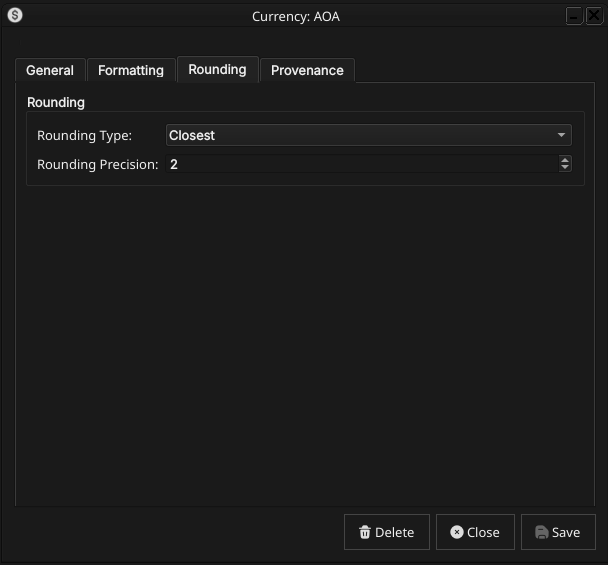
Figure 5: The Rounding tab for AOA, showing the rounding type (Closest) and rounding precision (2).
The Rounding tab controls how calculated amounts are rounded before storage and display:
- Rounding Type — the rounding algorithm applied to amounts in this currency. See Rounding Types below for the full list of options.
- Rounding Precision — the number of decimal places to round to.
Typically
2for most fiat currencies and8for cryptocurrencies.
6.4. Provenance
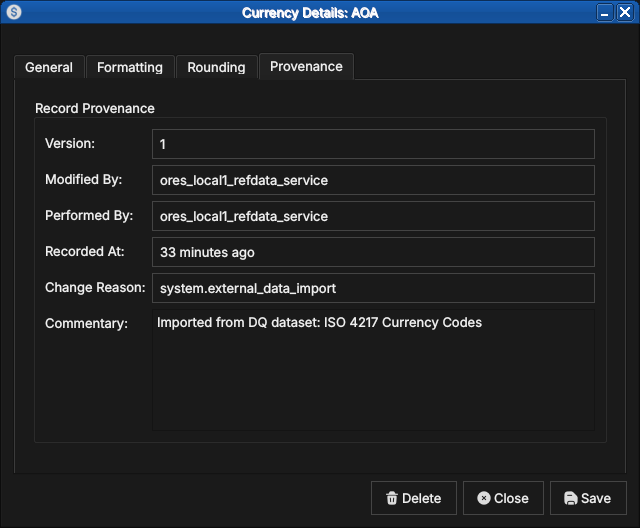
Figure 6: The Provenance tab showing record metadata: version number, the service that last modified the record, who performed the operation, when it was recorded, the change reason code, and a free-text commentary.
The Provenance tab is read-only and shows the audit metadata for the current version. See the Reference Data — Provenance section for a full description of the provenance fields common to all reference data entities.
7. Editing a currency
To edit a currency, open it in the Currency Details dialog, make your changes, and click Save. Before the record is written, ORE Studio prompts for a change reason.
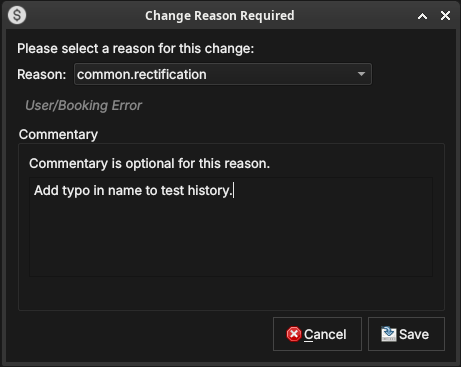
Figure 7: The Change Reason Required dialog, which appears before every save. A reason code must be selected; commentary is optional for some reason codes and required for others.
Select a Reason from the drop-down and add optional Commentary. Click Save to confirm. Every save creates a new version; the previous version is never overwritten.
8. Currency history
To view the full change history, open the details dialog and click the history icon in the title bar, or right-click the row and choose History.
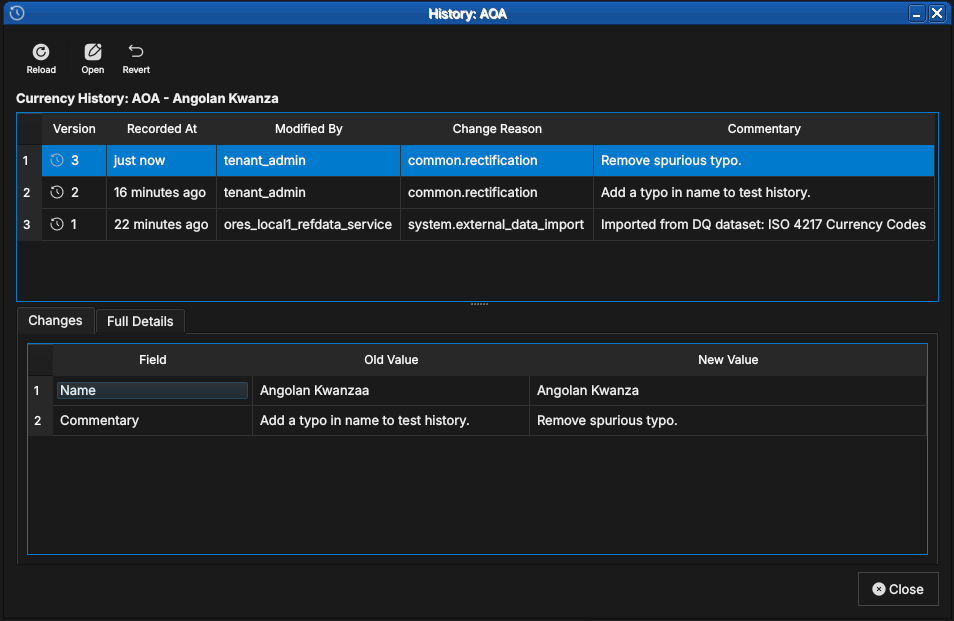
Figure 8: The History dialog for the Angolan Kwanza, showing three versions: the original ISO 4217 import (version 1), a test correction (version 2), and a final rectification (version 3, currently selected). The Only Changes toggle narrows the field list to what actually differs between version 2 and version 3.
Pick the two versions to compare from the Compare drop-downs. The All Fields / Only Changes toggle switches between showing every field and showing only the fields that differ between the two selected versions. The Revert button reinstates any historical version as a new version, preserving the full audit chain.
9. Auxiliary Data
The three tables described in this section act as classification vocabularies for currencies. In a standard deployment their values are fixed at provisioning time and rarely change; ORE Studio still versions and audits them the same way as any other reference data. They are managed by the system tenant and are accessible from the Reference Data → Currencies sub-menu.
9.1. Rounding Types
Rounding types specify the algorithm used to round currency amounts
in financial calculations. The values match the roundingType
enumeration in ORE's XML schema, ensuring consistency with any ORE
configuration files loaded into the system.
Open the Rounding Types window from Reference Data → Currency Codes or from the toolbar within the Currency Detail dialog.
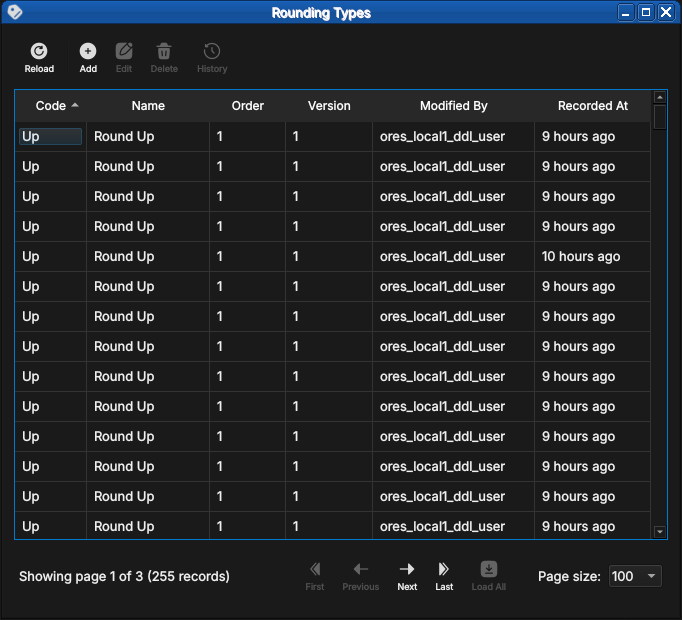
Figure 9: The Rounding Types list window showing the five standard rounding methods with their display order, version, and provenance.
Double-clicking a row opens the detail dialog, which shows the code, name, and a description that includes numeric examples at two decimal places.
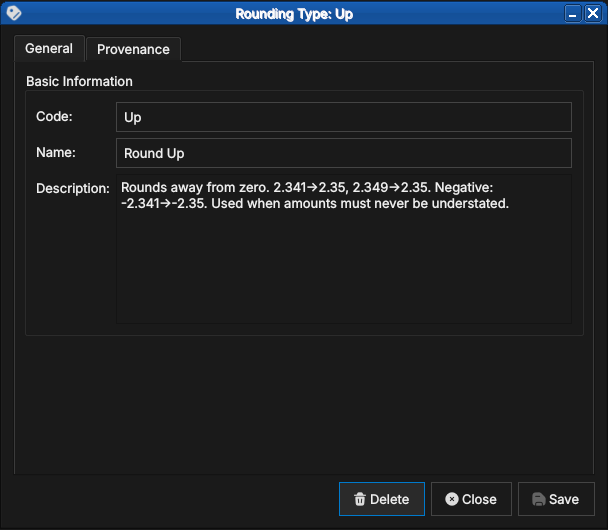
Figure 10: The detail dialog for the Up rounding type, showing the code, human-readable name, and a description with concrete examples.
There are five standard values:
9.1.1. Up
Rounds away from zero regardless of the fractional part. The amount is always moved to the next representable value in the direction away from zero.
Examples at 2 decimal places: 2.341 → 2.35, 2.349 → 2.35.
For negative amounts: -2.341 → -2.35.
Use Up when amounts must never be understated — for example, when
calculating a fee that must cover the full cost.
9.1.2. Down
Truncates toward zero. The fractional part is discarded.
Examples: 2.349 → 2.34, -2.341 → -2.34.
Use Down in conservative contexts where overstating an amount would
be the more serious error — for example, when reporting a liability
that should not be exaggerated.
9.1.3. Closest
Rounds to the nearest representable value, with halves rounded away from zero. This is the most common rounding mode for financial amounts and is the default for most fiat currencies.
Examples: 2.344 → 2.34, 2.345 → 2.35, -2.345 → -2.35.
9.1.4. Floor
Always rounds toward negative infinity — i.e., to the next lower
value regardless of sign. Unlike Down, which rounds toward zero,
Floor produces different results for negative amounts.
Examples: 2.349 → 2.34, -2.341 → -2.35.
Use Floor when rounding must never produce a value higher than the
unrounded input, even for negative amounts.
9.1.5. Ceiling
Always rounds toward positive infinity — i.e., to the next higher value regardless of sign.
Examples: 2.341 → 2.35, -2.349 → -2.34.
Use Ceiling when rounding must never produce a value lower than the
unrounded input.
9.2. Market Tiers
Market tiers classify currencies by liquidity profile and market accessibility. The classification feeds into margin calculations, settlement conventions, and risk limits in downstream analytics.
Open the Currency Market Tiers window from Reference Data → Classifications.
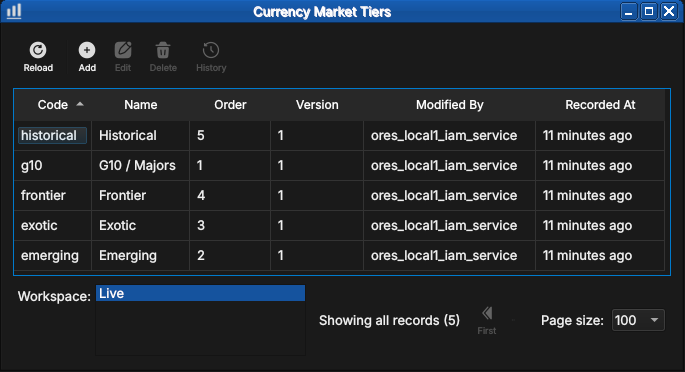
Figure 11: The Currency Market Tiers list showing all five standard tiers — historical, g10, frontier, exotic, and emerging — with their display order and provenance.
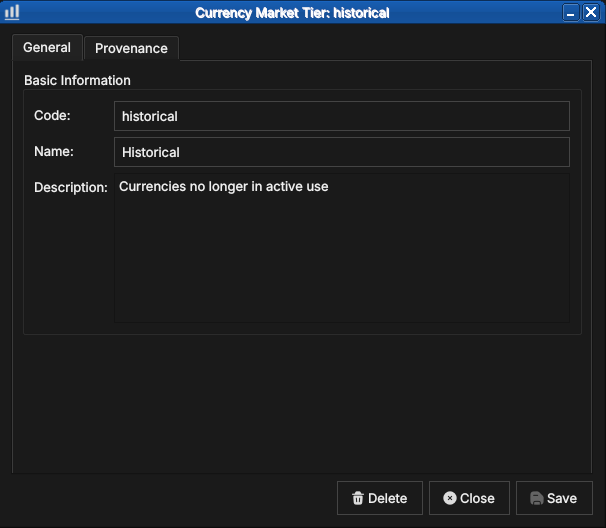
Figure 12: The detail dialog for the historical tier, showing the code, name, and description.
There are five standard tiers:
9.2.1. G10 / Majors
The ten most liquid and widely traded global currencies: USD, EUR, GBP, JPY, CHF, AUD, NZD, CAD, SEK, and NOK. G10 currencies have deep interbank markets, tight bid/offer spreads, and continuous 24-hour liquidity. They are the primary currencies for derivatives trading and the dominant funding and collateral currencies in global finance.
9.2.2. Emerging
Currencies from developing economies with growing but still maturing financial markets. They typically have moderate liquidity, wider spreads than G10, and may be subject to capital controls or central bank intervention. Examples include BRL (Brazilian Real), MXN (Mexican Peso), ZAR (South African Rand), INR (Indian Rupee), and CNY (Chinese Renminbi).
9.2.3. Exotic
Thinly traded currencies with wide bid/offer spreads and limited liquidity outside their domestic market. Forward markets may be shallow or absent. Examples include currencies of smaller African, Central Asian, or Pacific island nations.
9.2.4. Frontier
Currencies from frontier markets with limited or restricted convertibility. These may be pegged to a major currency, subject to official exchange rates, or carry transfer restrictions that make them impractical for cross-border settlement. Examples include currencies from markets classified as frontier by MSCI or FTSE Russell.
9.2.5. Historical
Currencies no longer in active use. This includes legacy eurozone currencies superseded by the Euro (DEM, FRF, ITL, ESP, and others), as well as currencies from defunct states or monetary unions. Historical currencies are retained in the system for back-office reconciliation and historical analytics on older trade populations.
9.3. Monetary Natures
Monetary nature classifies currencies by the underlying economic mechanism that gives them value. The classification matters for collateral eligibility, regulatory capital treatment, and the applicability of pricing models.
Open the Monetary Natures window from Reference Data → Classifications.
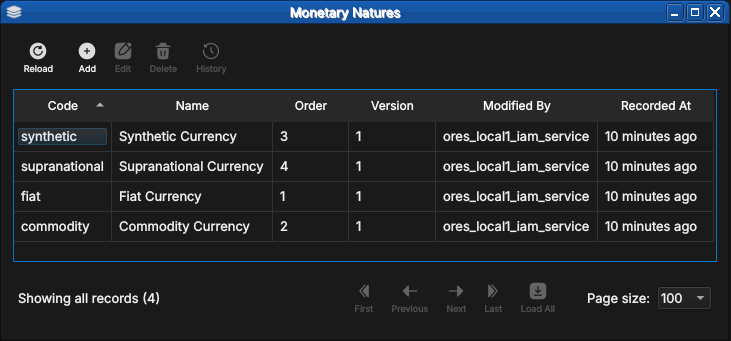
Figure 13: The Monetary Natures list showing all four standard values — synthetic, supranational, fiat, and commodity — with their display order and provenance.
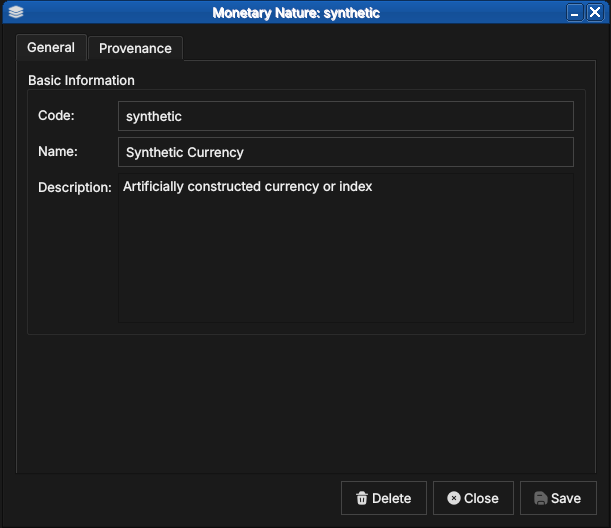
Figure 14: The detail dialog for the synthetic monetary nature, showing the code, name, and description.
There are four standard values:
9.3.1. Fiat
Government-issued currency that derives its value from legal tender status rather than from a physical commodity. The issuing central bank or treasury manages supply through monetary policy. The overwhelming majority of currencies in the ISO 4217 standard are fiat — USD, EUR, GBP, JPY, and so on.
9.3.2. Commodity
Currency backed by or representing a claim on a physical commodity.
In practice this covers the ISO 4217 commodity codes: XAU (gold),
XAG (silver), XPT (platinum), and XPD (palladium). Pricing is
driven by spot commodity markets rather than interest rate differentials.
9.3.3. Synthetic
Artificially constructed currency or index that does not correspond to any single government or commodity. Examples include basket currencies and internal transfer pricing units used within large financial institutions.
9.3.4. Supranational
Currency issued by a multi-national authority rather than a single
sovereign. The primary example is XDR (Special Drawing Rights),
issued by the International Monetary Fund as an international reserve
asset and valued as a basket of USD, EUR, CNY, JPY, and GBP —
reviewed and revised by the IMF every five years.
10. Shell commands
The ORE Studio interactive shell provides quick currency access without opening the Qt UI:
# List all currencies (paginated)
currencies get

# Add a new currency:
#   <iso_code> <name> <numeric_code> <symbol> <fractions_per_unit>
#   <change_reason_code> <change_commentary>
currencies add XTS "Test Currency" 963 T$ 100 system.test "manual example"

# Delete a currency by ISO code
currencies delete XTS

# Show history for a currency
currencies history USD
11. Conclusion
The chapter set out to show that managing a currency well follows from understanding its identity, the extensions that make it usable, its interface, and its programmatic equivalents in turn, and it has traced exactly that path. Its own birth-to-retirement lifecycle set the background the rest of the chapter operates against. ISO 4217 supplies the standard identity — code, numeric code, name, and minor units — while ORE Studio's extensions cover what the standard leaves out: market tiers, monetary natures for digital assets, display formatting, and rounding conventions. Building on that, the Qt interface took the record from the list view down to a single detail dialog and through the editing and history workflows, where reverting to an earlier version demonstrated the bitemporal audit trail keeping the full record intact. The three auxiliary classification tables then fixed the vocabulary a currency may reference, and the shell reproduced the same operations for scripted use. Currencies are the template: subsequent entity chapters follow this same progression.
12. See also
- Currency Lifecycle — the domain-knowledge note this chapter's Currency lifecycle section is drawn from.
- ISO 4217 Currency Codes — the international standard for currency identification.
- SIX Financial Information — the ISO 4217 maintenance agency.
- MSCI Market Classification — framework for developed, emerging, and frontier market designations.