ores.lisp
Table of Contents
1. Dashboard
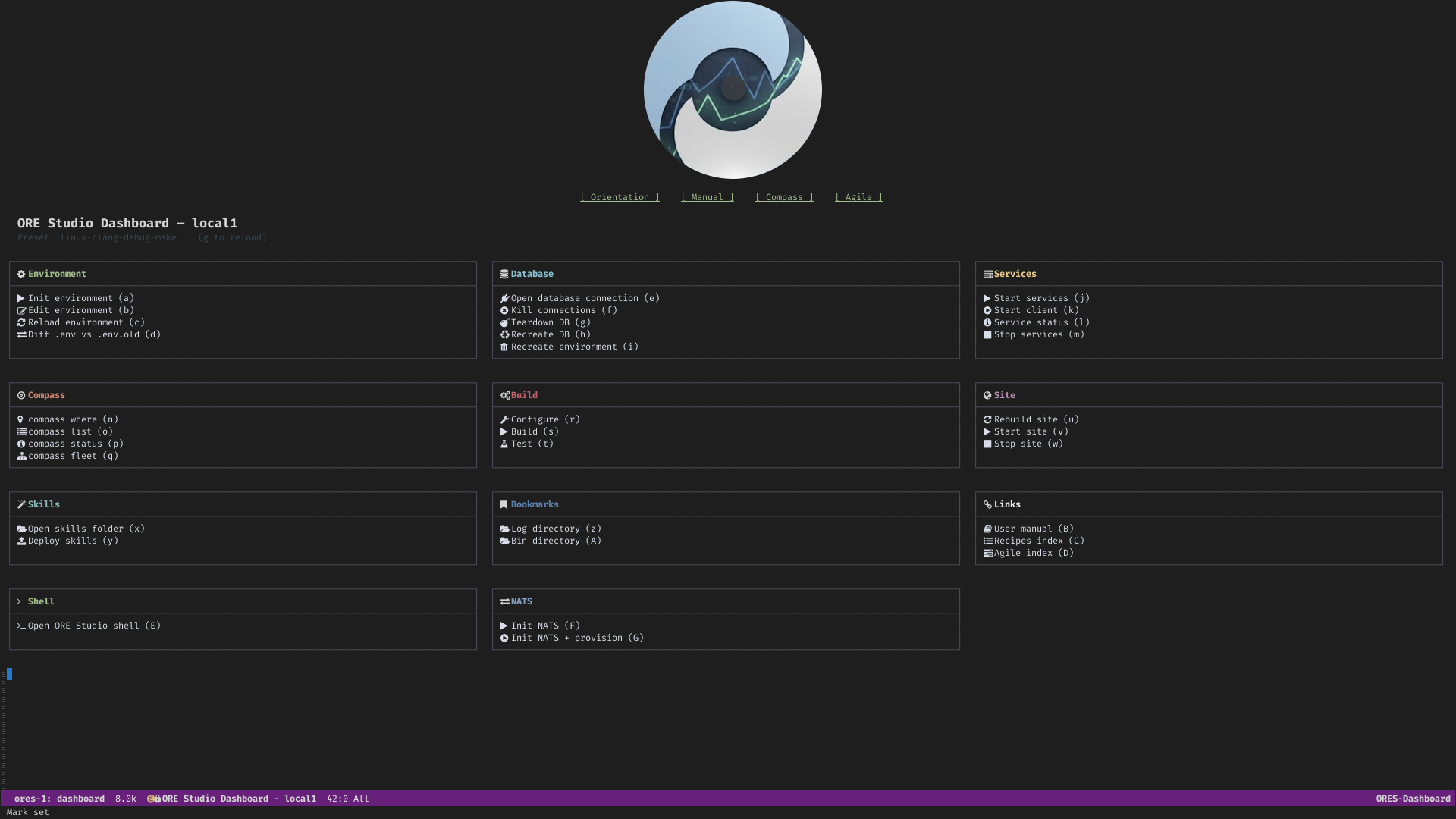
Figure 1: ORE Studio Dashboard
2. Summary
ores.lisp is the Emacs Lisp tooling layer for ORE Studio development. It
provides a per-checkout interactive console (ores-dashboard), database
management UI (ores-db), shell integration (ores-shell), environment
loading (ores-env), org-roam export pipeline (ores-org-roam-export),
and process supervision via Prodigy (ores-prodigy). None of these modules
are part of the production system; they exist solely to improve developer
ergonomics.
3. Inputs
.env— checkout-specific environment variables (label, preset, passwords, per-service DB credentials).sql-connection-alist— populated at session start viaores-db/setup-connections.build/scripts/— shell scripts invoked for init, build, site, NATS, and DB operations.
4. Outputs
ORES DashboardEmacs buffer — interactive card-based console with keyboard shortcuts for every action.*ores-<label>-db-<svc>*SQL interaction buffers.*ores-<label>-shell*ores.shell REPL buffer.- Compilation buffers for build, site, services, and DB scripts.
- Org-roam HTML export artefacts (via
ores-org-roam-export).
5. Entry points
M-x ores/dashboard— primary developer console; opens theORES Dashboardcard layout.M-x ores-db/list-databases— tabulated database browser; list, connect, kill, teardown, and recreate.M-x ores-shell— launch (or switch to) anores.shellREPL comint buffer.M-x ores/capture— capture a product-backlog note viacompass.sh capture --note(CLI-driven; for interactive Org Capture use yasnippet triggercapin an.orgbuffer).
6. Source files
ores-env.el— parses the checkout.envfile into an alist and exposesores/load-dotenvandores/checkout-root. Foundation module; required by all others.ores-dashboard.el— per-checkout interactive development console. Renders a card-based layout (Environment, Database, Services, Compass, Build, Site, Skills, Bookmarks, Links, Shell, NATS) with global keyboard shortcuts (a=–=z,A=–=Z). Entry point:M-x ores/dashboard.ores-db.el— tabulated database browser and SQL connection manager. Discovers allores_*databases on localhost, supports connect, kill connections, teardown, and recreate operations. Entry point:M-x ores-db/list-databases.ores-shell.el— launches anores.shellREPL as a comint buffer, pointed at the preset's published binary. Entry point:M-x ores-shell.ores-shell-mode.el— trivial major mode for theores.shellREPL buffer. Provides font-lock highlighting for shell commands (connect,login,accounts,create,exit) so they stand out from arguments.ores-babel.el— configures Org Babel#+begin_src shblocks in recipe files to run withdefault-directoryset to the repo root, so paths like./projects/ores.compass/compass.shresolve consistently regardless of where the.orgfile lives.ores-prodigy.el— registers all ORE Studio background services (databases, NATS, HTTP server, domain services) with Prodigy for point-and-click process lifecycle management.ores-capture.el— product-backlog capture integration. Providesores/setup-capture-templates(registers key"c"inorg-capture-templates; creates a timestamped file ininbox/and expands thecaptureyasnippet for interactive filling via TAB) andores/capture(interactive command that delegates tocompass.sh capture --note; for LLM-driven and CLI-style use). The yasnippet atsnippets/org-mode/capture(trigger"cap") is the single template source shared by both entry points.ores-org-roam-export.el— org-roam → HTML export pipeline; walks the node graph and publishes the documentation site.
7. Dependencies
sql-mode(Emacs built-in) — interactive SQL buffers.nerd-icons— icon glyphs in the dashboard.org-roam— node graph for export pipeline.prodigy— service process management.compilation-mode(Emacs built-in) — script output buffers.
8. Dashboard functionality
The ORES Dashboard buffer is divided into cards. Each card groups related
actions under a short heading and maps them to single-keystroke bindings.
| Card | Key(s) | What it does |
|---|---|---|
| Environment | e |
Display the loaded .env values (label, preset, credentials). |
| Database | d, k, t, r |
Connect to a DB, kill connections, teardown schema, recreate schema. |
| Services | p |
Open Prodigy process manager (NATS, HTTP server, domain services). |
| Compass | c |
Run a compass search query; output appears in the output pane. |
| Build | b |
Invoke cmake --build for the current preset. |
| Site | s |
Run deploy_site (Emacs batch, org → HTML + graph export). |
| Skills | S |
Run deploy_skills (tangle Claude Code skills from Org Babel blocks). |
| Bookmarks | o |
Jump to a frequently-used file or directory. |
| Links | l |
Open a curated list of project web links (GitHub, site, Doxygen). |
| Shell | x |
Launch (or switch to) an ores.shell REPL comint buffer. |
| NATS | n |
Send a test NATS message or open the NATS monitoring page. |
9. See also
- ORE Studio Site — how the site is built, the menu bar definition, the 404 page, and the org-roam graph injection.
- ORE Studio Manual — how the PDF user manual is built via ox-latex, Tufte layout, margin figures, and version stamping.
- Emacs — editor overview and the build targets (
deploy_site,deploy_manual, etc.) thatores.lispscripts drive. - org-roam — the knowledge graph layer that
ores-org-roam-export.elexports. - System Model — architectural context.
- ores.shell — the REPL that the dashboard launches.
- ores.sql — database scripts invoked by the dashboard.