User Journey: Ask for a publish to be approved
Table of Contents
This page documents a user journey: A trader who owns a curve puts the day's candidate set in front of a second pair of eyes, so that only an approved curve can become the one the system uses.
A user journey describes what one person is trying to do, before anything is built. It is a design document that outlives any sprint, so it names the screens, the entity fields each screen shows, and the operations and messages each step needs.
1. Goal
"I built today's curve from the market, and I want it to be the curve the desk prices from. Somebody else has to say yes first." The journey is done when the system holds a raised approval request that names the curve, the as-of instant and the party it authorises, and the trader can read it back as waiting. The subject is the request's own detail, so the request authorises that curve at that instant and nothing else.
2. Actor and trigger
The actor is the trader who owns the curve: the maker. This is the person who holds the market-data management role, updated the series from the feed or by hand, and holds the raise permission. The trigger is a candidate curve that has been built or refreshed and reviewed, and is now ready to leave the trader's hands. The journey starts at the curve's candidates for a value date and ends when the request is raised and visible under My requests. It does not end with a published curve: a second person decides that in Decide a publish, and the approved set becomes usable in Publish the approved set.
A request waits on a person, so the ask is written down rather than kept in the browser. The trader leaves the screen after raising it; the request carries the state. The trader must not decide their own request. That rule is a rule of the approval record, not of this screen; see What is missing.
3. Steps
- Open the curve. The trader opens the curve by its
oresmd_uri. The system reads the series and shows its identity, how it was derived, and the recipe that produced it. - Read the candidates for a date. The system lists the observation rows the
derivation wrote for the value date: each point named by its
oresmd_uri, with its value, itsobservation_datetimeand itssourcetag. The trader reads the day's points as one set, keyed by the identity the points carry. - See what changed against the last published. The trader asks for the difference between these candidates and the curve the system last published. The system knows which set is published and who published it: the snapshot read states the published as-of, the publisher and the request that authorised it. It returns no point-by-point difference; see What is missing. Until it does, the panel shows the published as-of beside the candidates and the trader compares by eye against the snapshot it names.
- Read the provenance. For each derived point the system shows the
observation_lineagerow: the derivation config, its version and the source as-of the point was built from. Beside it the trader reads the recipe's config and pillars, so the set can be named point by point. - Write the reason. The trader writes why the set should be published, in their own words. The system keeps the reason on the request; there is no candidate-set entity to hang it on yet.
- Raise the request. The trader chooses Raise publish request. The system
raises an approval request of the kind
marketdata.curve_publishfor the signed-in trader, waiting, and writes its detail: the curve configuration, the as-of instant and the party the configuration belongs to. The raise is one call ofmarketdata.v1.ops.publish_curvewith no approved request named, carrying the configuration and the as-of. That call writes the request and its subject and publishes nothing. A call that names no configuration, or no as-of, is refused: a request that names no subject authorises nothing. - Confirm the separation of duties. The system does not offer decision controls to the person who raised the request, and refuses a decision by the asker. The trader reads the request back as waiting, under My requests.
- Leave. The trader goes back to the curve. The request stays waiting until somebody decides it, or until its kind's expiry closes it.
Step 6 is the step that leaves somebody waiting, so the journey carries state from that step on: the request is a record, and both this screen and the approver's screen read the same one.
4. Screens and wireframes
One screen. The curve and its recipe sit at the top, the candidate points sit in the middle — with the change against the last published beside them — and the ask and the trader's requests sit at the bottom, so the trader reads what they are asking about above the act of asking.
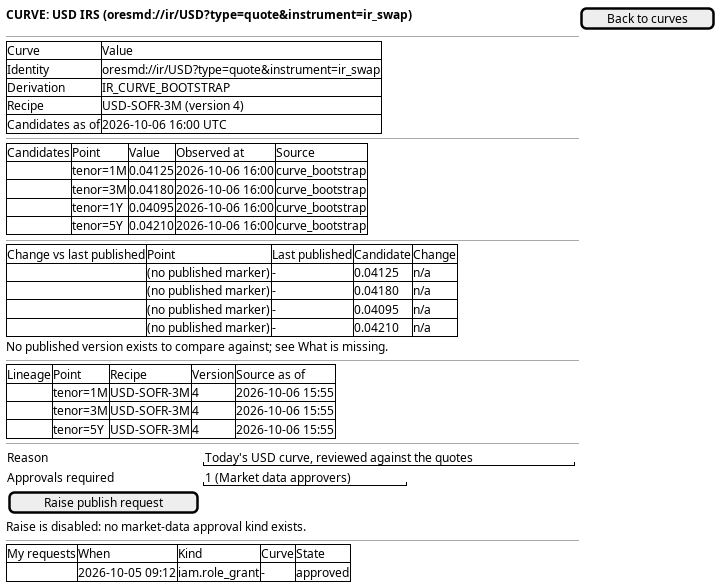
Figure 1: Ask for a publish: the curve and its recipe, the candidate points and their proposed change, the ask, and the trader's own requests.
The raise control offers the ask, and the panel states the kind the request will be raised with, so the trader reads what the decider answers before they ask.
5. Prototype
A static page at doc/prototypes/market_data/ask-for-a-publish-to-be-approved/index.html: mock data only, no backend,
no build step and no session. It argues that a publish is a request, not a save: the maker raises it with the delta and cannot decide it.
- Variants
- a a per-curve changed list, b a node-level diff, c a summary by currency
- States
- nothing, ready, raised
- Source
doc/prototypes/market_data/ask-for-a-publish-to-be-approved/index.html- Open
/OreStudio/doc/prototypes/market_data/ask-for-a-publish-to-be-approved/once the site is built, or the file directly
6. Entities composed
| Entity | What it contributes | Model |
|---|---|---|
market_series |
The curve's identity, its derivation kind, and the recipe it was built under | ores.marketdata.market_series |
market_observation |
The candidate points: value, observation time and source, each identified by its oresmd_uri |
ores.marketdata.market_observation |
observation_lineage |
Which config and version produced each derived point, and which source as-of it read | ores.marketdata.observation_lineage |
ir_curve_bootstrap_config |
The recipe named on the request | ores.refdata.ir_curve_bootstrap_config |
ir_curve_bootstrap_pillar |
The pillars the recipe asks for, so the set can be named point by point | ores.refdata.ir_curve_bootstrap_pillar |
approval_request |
The ask itself: who asked, which kind, why, and where it waits | ores.inbox.approval_request |
approval_kind |
How many approvals the ask needs, and the permission a decider must hold | ores.inbox.approval_kind |
approval_decision |
The decisions others have taken, read back under My requests | ores.inbox.approval_decision |
approval_request_state |
The state the request is in, so the trader reads "waiting" rather than a code | ores.inbox.approval_request_state |
curve_publish |
The subject the request authorises: the curve configuration, the as-of and the party; and later the publisher and the instant | ores.marketdata.curve_publish |
A market observation is evidence: nobody signs it off. What this journey asks
for is a decision about a set of those observations, and the decision is the
approval_request, which is why the ask is an ores.inbox record and not a
column on market_series. The subject the decision is about is
curve_publish, the kind's detail row, keyed by the request.
7. Operations and messages
| Step | Operation | Subject | Status |
|---|---|---|---|
| Open the curve | List and read the series | marketdata.v1.market_series.list, .get |
exists |
| Read the candidates | List one series' observations | marketdata.v1.market_observations.list_by_series_id |
exists |
| Read the candidates | Read the latest snapshot of the curve | marketdata.v1.curve_snapshot.get |
exists |
| Compare to the last published | Show the change against the published version | marketdata.v1.curve_candidates.diff |
missing |
| Read the provenance | Read the config and its pillars | refdata.v1.ir_curve_bootstrap_configs.get, refdata.v1.ir_curve_bootstrap_pillars.list |
exists |
| Read the provenance | Read one point's lineage | marketdata.v1.observation_lineages.list |
exists |
| Raise the request | List the approval kinds on offer | inbox.v1.approval_kinds.list |
exists |
| Raise the request | Raise the request | inbox.v1.ops.raise_approval |
exists |
| Raise the request | Raise the request and write the subject | marketdata.v1.ops.publish_curve with no approved request |
exists |
| Raise the request | Read the subject a request names | marketdata.v1.curve_publishes.list_by_request_id |
exists |
| Raise the request | Apply the decision when it comes (the kind's owning operation) | marketdata.v1.ops.publish_curve with the approved request |
exists |
| Confirm the separation of duties | Read my own requests and their state | inbox.v1.ops.list_my_approval_requests |
exists |
| Confirm the separation of duties | Read the decisions on the request | inbox.v1.approval_decisions.list_by_request_id |
exists |
inbox.v1.ops.raise_approval is generic: it is defined in
ores.inbox.approval_operations and
takes a kind_code and a reason, and writes no detail. A market-data ask is
therefore raised through the kind's own operation, publish_curve, which reads
the subject out of the configuration, raises the request and writes the detail
in one act. The kind's owning operation applies the approval too, as the third
journey draws it.
8. What is missing
- There is no candidate set. A point of the curve is held by
market_observation, whose identity is theoresmd_uriand which has nopoint_idand no tenor column; nothing groups the day's points into the one thing a publish is about. The candidate is a set marker, or a detail table keyed by the request's id that names the series and the as-of the set was built at. Until then the screen lists the points for one as-of and the trader names the set in the reason. - There is no change against the last published. A publish record marks the
set that is in use, and it names the as-of the set was built at, but nothing
returns a point-by-point difference against it. The candidate is a read such
as
marketdata.v1.curve_candidates.diffthat takes the published as-of from the record. Until it exists the change column is shown empty, with the reason stated, and the trader compares against the snapshot the record names. - The apply is the publish operation, and it is not a workflow.
marketdata.v1.ops.publish_curveapplies an approved request, but nothing starts it when the last decider approves: the trader calls it again, as Publish the approved set draws it. A kind that names an apply workflow would apply the set without the trader, and no such workflow exists. - No permission pair separates maker from checker. The approval record refuses a decision by the person who asked, so four-eyes holds at the record. Nothing in market data yet splits the raise permission from the decide permission, so one account can hold both. The candidate is a pair of permission codes on the kind, one to raise and one to decide. Until then the screen shows the decide permission as read-only text and cannot warn the trader that they hold it. The pair, and the codes recommended, is the decision stated in Decide a publish.
- Nothing tells the approver that a request waits. No notification kind
exists for a market-data request, so the queue is the only signal. The
candidate is an
ores.inbox.notification_kindsuch asmarketdata.curve_publish_requested. Until then the screen says the request was raised and does not promise anybody is told.
9. Related journeys
- Bootstrap or refresh a curve — where the candidate set this request is about is built.
- Adjust a curve or surface by hand — a candidate point written by hand rather than derived, and carried in the same set.
- Check a curve's fit — the review the trader finishes before raising the request.
- Decide a publish — where a second person answers the request this screen raises.
- Publish the approved set — where the approved candidates become the curve the system uses.
- See who changed a curve, and when — the trail the trader checks before asking, and the auditor reads after.
10. Related knowledge
- Interest Rate Curves
- Funding and Projection Curves
- Curve Point Provenance
- Term Structures and Tenors
- Tenor and Curve Bootstrapping Architecture
- Approval requests — the record, the kinds, the lifecycle and the rules every kind shares
- Market Data Architecture
11. See also
- Bootstrapping a curve: from quotes to a published set — the structure note that orders this cluster, and where to read this page in it.
- The market data path: a public fixing, a curve, a report — the structure note that orders this cluster, and where to read this page in it.
- Market data journeys — the group hub
- User Journeys
- ores.marketdata.market_series — the curve asked about
- ores.marketdata.market_observation — the candidate points
- ores.inbox.approval_request — the ask the journey raises
- ores.inbox.approval_kind — how many approvals, and who may decide