User Journey: Author an FX price feed
Table of Contents
This page documents a user journey: A quant composes one FX feed: the pair it quotes, the process that drives its ticks, the mixture of Gaussians it draws from, and the sample paths that say whether the choice is a price feed at all.
A user journey describes what one person is trying to do, before anything is built. It is a design document that outlives any sprint, so it names the screens, the entity fields each screen shows, and the operations and messages each step needs.
1. Goal
"I want this feed to produce the pair I mean, at a believable price, so the desk can test against something that behaves like the market." The journey is done when the config and its mixture are saved and read back with the pair, the derived oresmd URI, the tick rate and the process the person chose, and when the sample paths the screen drew look like a price rather than a number.
2. Actor and trigger
The actor is a quant or a trader who holds the synthetic configuration
permission. The quant is a member acting on their own party's records: the
config carries party_id, and another party's feeds stay out of reach. The
trigger is a pair the desk must generate and has no feed for, a price behaviour
that has to change, or a mixture that no longer fits the pair. The journey
starts at the feed tree the Market Simulator draws and ends when the person
leaves the saved feed.
A saved config is a candidate. Nothing it describes is produced until a party demands it; the demand comes from the subscriptions and the routes. An operator can start it as a test, and the tick rate it carries is the one a running feed honours. The model calls this record the FX spot generation config, and the screen calls it the feed.
3. Steps
- Find the feed. The person opens Market data, then Synthetic, and reads the folder tree. The system lists the party's FX feeds under their folder: the base and quote codes, the oresmd URI, the source name, the tick rate, the engine and the enabled and auto-start flags. The person filters the list by pair or by source name.
- Open or start a feed. The person selects a feed and the system shows the
editor for it, or the person chooses New FX Rate and the system shows the
same editor empty. Opening a feed reads its mixture of
gmm_componentrows beside the config, because the two are one answer. - Name the instrument. The person enters the base and quote currency codes.
The system derives the oresmd quote URI,
oresmd://fx/EUR?type=quote&instrument=fx_spot"e=rate&ccy=USD, from the pair, and suggests a source name from it. The person may change the source name and add a description. The system offers the currency codes from the reference data and the pairs from the pair catalogue, and it states the pair is not quoted when the catalogue does not hold it. - Set the price behaviour. The person chooses the engine, which is the
process_typecolumn:geometric,arithmeticorornstein_uhlenbeck. The person sets how often a new price is produced, as ticks per hour, and enters the initial price. For the mean-reverting engine the screen adds the long-term mean and the reversion speed and shows the half-life they imply. - Edit the mixture. The person adds, changes and removes the Gaussians the process draws from. Each row carries a zero-based index, a description, a mean log-return, a standard deviation and a weight. The system shows the raw sum of the weights and says that the draw normalises them; a sum that is not one is a warning and not a refusal. The save keeps the weights as typed.
- Say where the initial price comes from. A new feed starts on
fixing: it reads the newest public fixing of its pair from the candidates its class policy derives, and sizes its mixture to their spread. The person choosesfixedonly for a pair no public source fixes, and then the initial price is the one entered. The calibration screen shows the item the feed would start from and why. - Look at the process before it is saved. The person reads the return distribution the mixture implies and a batch of sample price paths. The system draws both from the values on the screen and adds a seed and a path count; Reseed draws a new batch from the same mixture. Nothing the preview computes is stored and nothing reaches the feed.
- Validate and save. The person chooses Save feed. The screen holds the save while a rule fails: both currency codes are three letters and differ, the price source has what it needs, the mixture holds at least one component and the weights sum above zero. The system then writes the config, writes the mixture, and replies with the version it wrote. The feed is not started by the save. Demand starts it; an operator can start it as a test.
- Check the history. The person opens the history of the config or of one component. The system shows every version with the field-level difference from the one before. A revert is a new version, not a deletion.
- Delete a feed that is no longer wanted. The person chooses Delete. The system removes the mixture first and the config after it, and asks for a reason. A running generator is stopped before the feed can be removed.
- Leave. The person goes back to the feed tree. Nothing has been published, and no tick has been produced.
Steps 8 and 10 are each two writes, not one: the config and its mixture are separate resources, so a failure between them leaves a feed whose mixture is partly updated, or orphaned component rows; see What is missing.
4. Screens and wireframes
One screen. The feed's identity and the pair sit at the top, the price behaviour, the mixture and the rules sit in the middle in the order the save reads them, and the two previews sit beside them, so the person reads the choice and what it does at once. Save sits at the end of the form it commits.
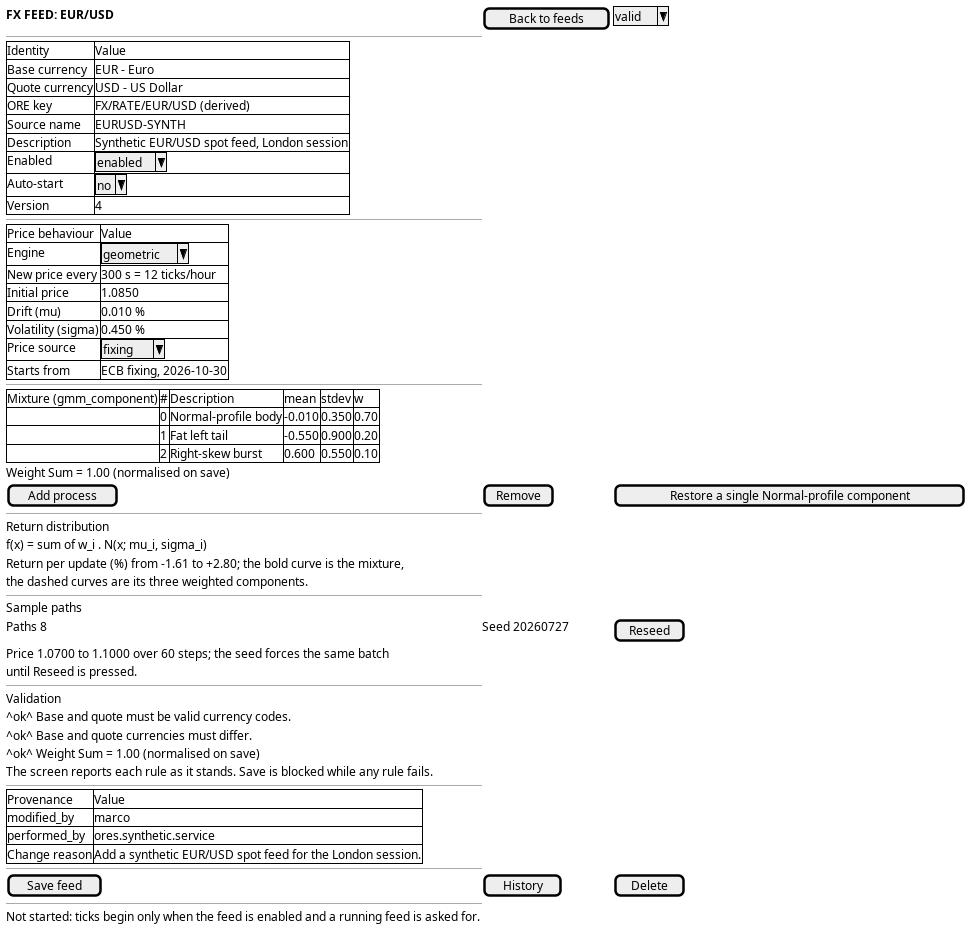
Figure 1: FX feed authoring: the pair and derived oresmd URI, the price behaviour and the mixture of Gaussians, the validation rules, and the return distribution and sample paths they imply.
5. Prototype
A static page at doc/prototypes/market_data/author-an-fx-price-feed/index.html: mock data only, no backend, no build step and no session. It argues that an FX feed is an instrument, a tick clock and a process, and that the process must be read twice before it is saved, as the return distribution it implies and as the sample paths it produces.
- Author an FX price feed prototype
- Variants
- a the instrument and the provenance rows, b the price behaviour with the tick clock and the two previews, c the advanced mixture editor with the raw weight sum
- States
- geometric, ou, gmm, invalid (base and quote both
US, weights summing to 0.95, and a disconnected vintage browser reading No vintages found) - Source
doc/prototypes/market_data/author-an-fx-price-feed/index.html- Open
/OreStudio/doc/prototypes/market_data/author-an-fx-price-feed/once the site is built, or the file directly
- Manage GMM components prototype
- Variants
- a every feed's components in one table with the per-feed weight sum, b the mixture density and its moments, c the raw sum beside the normalised weight per component
- States
- normal, unnormalised (GBP/USD's raw weights sum to 0.90 and are flagged), single (USD/JPY has one component, a plain Gaussian)
- Source
doc/prototypes/market_data/manage-gmm-components/index.html- Open
/OreStudio/doc/prototypes/market_data/manage-gmm-components/once the site is built, or the file directly
The second prototype answers the same mixture from the other side: the rows a feed editor writes are also a catalogue read across every feed at once, and the screen that reads them has to show the typed weight and the stored weight as two numbers.
6. Entities composed
| Entity | What it contributes | Model |
|---|---|---|
fx_spot_generation_config |
The generator row: the pair, the derived oresmd URI, the vendor instrument, the tick rate, the engine, the initial price and where it comes from, the enabled and auto-start flags, and the folder it sits under | ores.synthetic.fx_spot_generation_config |
gmm_component |
The mixture the process draws from: one weighted Gaussian per row, with its index, description, mean, standard deviation and weight | ores.synthetic.gmm_component |
market_data_generation_config |
The named container the feed belongs to, which supplies the collection the tree groups the feed under | ores.synthetic.market_data_generation_config |
folder |
The hierarchy node the feed hangs from, so a person finds it in the tree rather than by its vendor id | ores.synthetic.folder |
The pair is two soft references: base_currency_code and
quote_currency_code are text and point at ores.refdata.currency without a
declared foreign key. The ticks a saved feed produces land in a market_series
whose series URI is derived from the feed's quote URI by series_of, and the feed references
that series only through the URI. oresmd: ORE Studio Market Data URI states how a series names a curve or a rate. Both configs and components are versioned, so each
has a history, and the mixture is stored as rows and never as a blob.
7. Operations and messages
| Step | Operation | Subject | Status |
|---|---|---|---|
| Find the feed | List the FX feeds, one page searched and ordered | synthetic.v1.fx_spot_generation_configs.list |
exists |
| Find the feed | List the party's containers | synthetic.v1.market_data_generation_configs.list |
exists |
| Find the feed | List the folder tree | synthetic.v1.folders.list |
exists |
| Find the feed | Read one collection's row | synthetic.v1.market_data_generation_configs.get |
exists |
| Open or start a feed | Read one feed | synthetic.v1.fx_spot_generation_configs.get |
exists |
| Open or start a feed | List the feed's mixture | synthetic.v1.gmm_components.list, filtered by fx_spot_config_id |
exists |
| Name the instrument | Fill the currency picker | refdata.v1.currencies.list |
exists |
| Name the instrument | Offer the quoted pairs | refdata.v1.currency_pairs.list |
exists |
| Set the price behaviour | Choose the engine and the tick rate | synthetic.v1.fx_spot_generation_configs.put |
exists |
| Say where the price comes from | Store the price source and the fallback initial price | synthetic.v1.fx_spot_generation_configs.put |
exists |
| Say where the price comes from | Browse the vintages the source offers | none | missing |
| Edit the mixture | Write, add or reorder a component | synthetic.v1.gmm_components.put, .put_many |
exists |
| Edit the mixture | Remove a component | synthetic.v1.gmm_components.delete |
exists |
| Read the process before saving | Simulate sample FX spot paths | synthetic.v1.ops.simulate_fx_spot_paths |
exists |
| Validate and save | Write the feed | synthetic.v1.fx_spot_generation_configs.put |
exists |
| Check the history | List a feed's versions | synthetic.v1.fx_spot_generation_configs_versions.list |
exists |
| Check the history | List a component's versions | synthetic.v1.gmm_components_versions.list |
exists |
| Check the history | Read one version | synthetic.v1.fx_spot_generation_configs_versions.get, synthetic.v1.gmm_components_versions.get |
exists |
| Check the history | Read every version with its diff | synthetic.v1.history.get |
exists |
| Check the history | Revert by writing the old values | the entity's put |
exists |
| Delete a feed | Remove the feed's mixture | synthetic.v1.gmm_components.delete_many |
exists |
| Delete a feed | Remove the feed | synthetic.v1.fx_spot_generation_configs.delete |
exists |
The history request is the generic one, with entity_type
ores.synthetic.fx_spot_generation_config or ores.synthetic.gmm_component;
both register a history provider. The mixture is its own resource, so saving a
feed and saving its weights are separate calls, and no operation writes both
together. The FX simulate takes the mixture as request parameters rather than
reading the config, so it previews the values on the screen and never the saved
row.
8. What is missing
- The feed is not in the tree. The web screen is Market data, then FX price feeds: a paged list searched and ordered on the server, and a page per feed with its details, its mixture and its history. The folder tree, and starting and stopping a feed, belong to the collection screen, which is not built. Until then a person finds a feed by its pair or its source name in the list.
- The engine picker does not select the mixture. The screen presents three
engines, while
process_typeholdsgeometric,arithmeticorornstein_uhlenbeck, and thegmm_componentrows are what the draw actually mixes. Nothing in the row says the mixture is the engine, so a saved feed does not reproduce what was previewed. The candidate is a process type that names the mixture, or a rule that a mixture is always the source of the returns. The mean-reverting engine reuses the rows for other numbers: it reads the first component's weight as the reversion speed κ and its deviation as the volatility σ, and ignores the rest. Until then the screen says which engine the config holds, draws the mixture for the two mixing engines, and says how the mean-reverting engine reads the rows. - The preview does not name its feed. The simulate request carries the mixture, the price and the seed, and no config id, so the paths a person judges are the screen's numbers and not the stored feed's. The candidate is a preview that reads a saved config by id. Until then the screen states that the preview uses the unsaved values.
- A new feed has no folder.
folder_idis optional and only the publish-from-dq path fills it, so a feed made by hand has no place in the tree and the person cannot find it where they left it. The candidate is a folder the editor resolves or creates on save. Until then the screen lists the feed under the collection that owns it. - The feed and its mixture are saved apart. The mixture is written in one
put_many, so it lands whole or not at all. The config is a separate resource with its ownput, and no operation writes both. The screen saves the config from its dialog and the mixture from its tab, and a new feed opens on the Price behaviour tab after its config is saved. The candidate is an apply operation that writes the config and its mixture together. - The pair is not validated against a declared reference. The base and quote codes are text, the pair catalogue is read on the page, and no operation answers "is this pair quoted". The candidate is a declared reference or a validation call. Until then the screen marks a pair the catalogue does not hold and lets the save through.
- No approval kind covers a feed. A change to a feed that a running producer honours is written with no second pair of eyes and no comment. The candidate is an approval kind for the feed, with its decide permission. Until then a save takes effect at once and the history names the writer alone.
9. Related journeys
- Keep the market data feeds running — the operations journey that watches the sources these feeds publish through.
- Manage a curve's blueprint — the IR equivalent of this feed, and the shape this editor follows.
- Bootstrap or refresh a curve — where a generated rate becomes a candidate curve, with the provenance marked generated.
- Market data journeys — the group that consumes what a feed produces.
10. Related knowledge
11. See also
- The market simulator screens — the window this editor belongs to, and the prototype behind each screen.
- User Journey Extraction Standard — the checklist this document follows.
- Prototypes — the index of every prototype, and where to open each one.