User Journey: Author an IR curve feed
Table of Contents
This page documents a user journey: A quant composes one interest-rate curve feed: its currency, index and role, the short-rate process and the parameter values it is seeded with, the tenor ladder the curve is bootstrapped from, and the previews that say whether the choice is sane.
A user journey describes what one person is trying to do, before anything is built. It is a design document that outlives any sprint, so it names the screens, the entity fields each screen shows, and the operations and messages each step needs.
1. Goal
"I want the feed to publish the curve the desk agreed, rather than a flat or inverted one that nobody notices until pricing uses it." The journey is done when the feed is saved and reads back with the chosen process, one value row per parameter definition, and an ordered ladder of at least one entry.
This journey authors a generated curve. It is not the market-data curve blueprint, which shapes a real curve from quotes. Here the short-rate process decides the shape the synthetic curve will have, and the Curve Template decides the grid it is published on; neither is the other's consequence.
2. Actor and trigger
The actor is a quant who holds the market-data management role, or a desk analyst acting for the collection. The quant is the maker: the feed is theirs to author. The trigger is a new currency and index to simulate, a new short-rate model, a changed parameter set, or a changed ladder. The journey starts at the collection in the synthetic tree and ends when the person leaves the saved feed.
A saved feed is a configuration. It produces nothing until a party demands it;
demand is computed from the subscriptions and the routes. Starting it as an
operator test is a separate journey. The model calls this record the
ir_curve_generation_config and the screen calls it the curve feed.
3. Steps
- Open the collection. The person opens Market data, then Synthetic, and chooses a collection in the tree. The system shows the collection's folders and its feeds: for each IR curve feed the currency, the index family, the tenor, the role, the process type, the source name and whether it is enabled. The person filters on the page.
- Open or start a feed. The person selects a row and the system shows the feed screen, or the person chooses New IR curve and the system shows the same screen empty. The collection and the owning party come from the tree; they are not typed again.
- Set the curve's identity and its price source. On the Instrument tab the
person chooses the currency, the index family, the tenor and the role
(
discount,projectionorself_discounting), names the fixed-leg payment frequency that a swap ladder resolves its schedule with, and writes a description. The tenor is empty for an overnight family and may beFOMConly forsofr. The curve starts from theinitial_ratevalue as entered: no public source fixes a short rate yet, so the fixed rate is the stated fallback for every curve. - Choose the short-rate process. On the Process tab the person chooses a
process from the yield curve process type catalogue:
VASICEK,COX_INGERSOLL_ROSS,HULL_WHITEorTWO_FACTOR_GAUSSIAN. Changing the process replaces the parameter rows with that process's definitions, and the system shows each definition's description. - Fill the parameter values. The system lists one row per parameter definition of the chosen process: the symbol, the label, the description, the default, and the minimum and maximum where the definition carries them. The person enters a value in each row. The screen refuses a value outside its bounds; the server refuses a missing parameter, a duplicate, and a value whose definition belongs to another process type.
- Read the previews. The person asks for the curve shape and the system draws the rate against the tenor implied by the current parameter values and ladder rows, one marker per ladder entry. The person reseeds and chooses between one and eight paths, and the system draws that many sample short-rate draws over the horizon at the matching seed. Both previews are stateless and save nothing.
- Define the ladder. On the Curve Template tab the person adds, changes,
removes and reorders rows. Each row carries a zero-based sequence, a start
tenor, an end tenor and an instrument. A point instrument, a deposit or a
swap, sets its start to
SPOT; an interval instrument, a forward rate agreement, sets its start to the period's own front tenor. The system refuses an empty ladder and a pair of overlapping windows. - Check the provenance and the history. On the Provenance tab the person reads the price source, who changed the feed and when, and every version with the change from the one before. A revert is a new version, not a deletion.
- Save the feed. The person chooses Save. The system writes the config, then its parameter values, then its ladder rows, and replies with the version it wrote. The feed is not running; a running feed keeps its old parameters until it is stopped and restarted.
- Leave. The person goes back to the collection. Nothing has been published, and the feed has produced no curve yet.
Step 9 is three writes, not one: the config, its values and its ladder are separate resources, so a failure between them leaves a config whose process or ladder is partly updated; see What is missing.
4. Screens and wireframes
In ores.web the journey is the IR curve feed screens under Market data, drawn by the same list and page as the FX price feeds, as the Feed screen standard sets. The list is the dashboard with the run controls. The page has the tabs Details, Process, Curve template and History: the identity and the price source are on Details and in the add and edit dialogs, the engine, the parameters and the two previews are on Process, and the ladder is on Curve template. The words are the Qt editor's: New IR curve, Index name, Role with Self-discounting, Discount and Projection, Fixed leg frequency, Start tenor, End tenor and Instrument. The page also shows the oresmd series the curve's pillars land in, as oresmd: ORE Studio Market Data URI describes a curve.
One screen. The curve's identity sits at the top, the process and its parameters, the two previews and the ladder sit in the middle, and the provenance and the save sit at the bottom, so the person reads cause above effect.
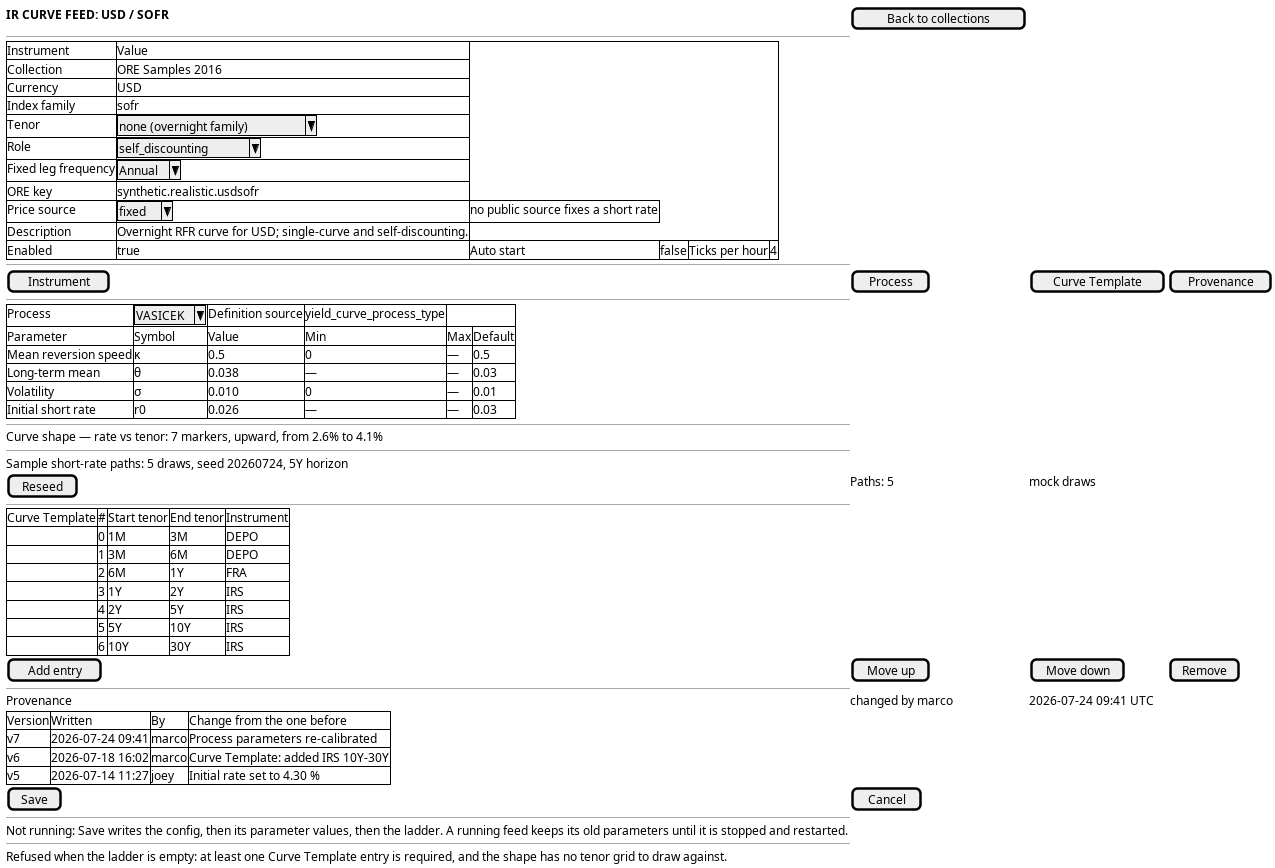
Figure 1: IR curve feed: the curve's identity, the short-rate process and its parameter values, the curve-shape and short-rate-path previews, and the tenor ladder the curve is bootstrapped from.
5. Prototype
A static page at doc/prototypes/market_data/author-an-ir-curve-feed/index.html: mock data only, no backend, no build step and no session. It argues that an IR curve feed is three decisions made together, a short-rate process, the parameter values it is seeded with, and the tenor ladder the curve is bootstrapped from, and it draws both previews so the three can be judged against a curve shape and a set of sample short-rate paths rather than in the abstract.
- Author an IR curve feed prototype
- a Curve Template, the template tab with the curve-shape chart it implies; b Process, the parameter rows with the curve shape and the sampled paths; c Combined editor, both panels side by side above the shape and the paths
- vasicek (the default, drawn upward), cir (a higher upward curve), hull_white (an inverted curve), incomplete (no ladder entries, so the shape cannot be drawn and Save is refused)
doc/prototypes/market_data/author-an-ir-curve-feed/index.html/OreStudio/doc/prototypes/market_data/author-an-ir-curve-feed/once the site is built, or the file directly
6. Entities composed
| Entity | What it contributes | Model |
|---|---|---|
ir_curve_generation_config |
The feed row: currency, index family, tenor, role, process type, ticks per hour, enabled, auto start, price source, description, source name, folder | ores.synthetic.ir_curve_generation_config |
ir_curve_template_entry |
The ladder and its order: sequence index, start and end tenor, instrument code | ores.synthetic.ir_curve_template_entry |
ir_curve_generation_config_process_parameter_value |
One value per parameter definition of the chosen process | ores.synthetic.ir_curve_generation_config_process_parameter_value |
yield_curve_process_type |
The process engines the feed selects between, and the description the screen shows | ores.synthetic.yield_curve_process_type |
yield_curve_process_parameter_definition |
The parameter vocabulary: name, symbol, label, description, bounds, default, display order | ores.synthetic.yield_curve_process_parameter_definition |
market_data_generation_config |
The collection the feed hangs under through config_id |
ores.synthetic.market_data_generation_config |
folder |
The instrument-type folder the feed lives under | ores.synthetic.folder |
The config and its two child row sets are versioned, so each has a history. The process types and their parameter definitions are system-tenant reference data: the screen reads them and never writes them.
7. Operations and messages
| Step | Operation | Subject | Status |
|---|---|---|---|
| Open the collection | Read the folder tree | synthetic.v1.folders.list |
exists |
| Open the collection | List the collections | synthetic.v1.market_data_generation_configs.list |
exists |
| Open the collection | List the IR curve feeds | synthetic.v1.ir_curve_generation_configs.list |
partial |
| Open or start a feed | Read one feed | synthetic.v1.ir_curve_generation_configs.get |
exists |
| Open or start a feed | List the feed's parameter values | synthetic.v1.ir_curve_generation_config_process_parameter_values.list |
partial |
| Open or start a feed | List the feed's ladder rows | synthetic.v1.ir_curve_template_entries.list |
partial |
| Set the identity | Fill the currency picker | refdata.v1.currencies.list |
exists |
| Set the identity | Fill the index-family picker | refdata.v1.overnight_index_conventions.list, refdata.v1.ibor_index_conventions.list |
exists |
| Set the identity | Fill the tenor picker | refdata.v1.tenors.list |
exists |
| Set the identity | Fill the fixed-leg frequency picker | refdata.v1.payment_frequencies.list |
exists |
| Set the identity | Write the feed row | synthetic.v1.ir_curve_generation_configs.put |
exists |
| Choose the process | List the process types | synthetic.v1.yield_curve_process_types.list |
exists |
| Fill the parameter values | List the parameter definitions | synthetic.v1.yield_curve_process_parameter_definitions.list |
exists |
| Fill the parameter values | Write, change or remove the values | synthetic.v1.ir_curve_generation_config_process_parameter_values.put, .put_many, .delete |
exists |
| Read the previews | Preview the curve shape | synthetic.v1.ops.preview_ir_curve_shape |
exists |
| Read the previews | Simulate the short-rate paths | synthetic.v1.ops.simulate_ir_curve_paths |
exists |
| Define the ladder | Fill the instrument picker | refdata.v1.instrument_codes.list |
exists |
| Define the ladder | Write, reorder or remove ladder rows | synthetic.v1.ir_curve_template_entries.put, .put_many, .delete |
exists |
| Check the history | Read every version with its diff | synthetic.v1.ir_curve_generation_configs_versions.list, .get |
exists |
| Save the feed | Write the config, one or many | synthetic.v1.ir_curve_generation_configs.put, .put_many |
exists |
| Remove a feed | Delete the config | synthetic.v1.ir_curve_generation_configs.delete |
exists |
The three partial rows are the generated list verbs: each filter is
id_one_of alone, so no list is scoped to a parent collection or to a parent
feed. The screen lists the tenant's rows and matches on the page. Every other
subject above is generated from the component's protocol and exists.
8. What is missing
- Saving a feed is three writes, not one. The config, its parameter values
and its ladder rows are separate generated resources with separate
putsubjects, and no operation writes all three together. A failure between the writes leaves a config whose process or ladder is partly updated. The candidate is an apply operation that writes the config and both child sets together. Until then the screen writes the config first, then the values, then the ladder, and says what it wrote. - No list is scoped to its parent. Every filter is
id_one_of: nothing names "the IR curve feeds under this collection", "the parameter values of this feed" or "the ladder rows of this feed". The candidate is a parent filter on each list, or a scoped read. Until then the screen lists the tenant's rows and matches on the page. - No screen exists. No web page, HTTP route or shell verb reaches any synthetic curve operation. The Market Simulator window was the removed Qt client's, and the generated detail dialog for this config is disabled. The candidate is a web page and a route. Until then the journey runs only from the shell.
- A saved feed is not a running feed. Save writes the configuration; the feed produces nothing until a party demands it. A running generator keeps its old parameters, values and ladder until it is restarted, by demand returning or by the operator test. The screen says so and offers no restart. The candidate is a restart on save.
- The previews take loose inputs, not a saved feed. Both operations take a process type and a parameter vector rather than a config id, so the editor assembles the request and the server never reads the stored row. The candidate is a preview keyed by the feed. Until then the editor sends what the form holds.
- No approval kind covers a feed change. The inbox models a generic approval
kind, but only
iam.role_grantis seeded. A feed change is written with no second pair of eyes, and no comment. The candidate is an approval kind for a feed, with its decide permission and its required approvals. Until then a save takes effect at once and the history names the writer alone. - The tenor and instrument references are undeclared. The ladder's start and end tenors, the index tenor and the instrument code are soft references: the screen offers the reference-data list, but the database holds only text, and the application layer validates it. The screen cannot tell a stored code the list does not hold. The candidate is a declared reference. Until then the screen marks a value it cannot find in the list.
9. Related journeys
- Author an FX price feed — the sibling generated feed, whose editor makes the same process, parameters and preview decision.
- Keep the market data feeds running — start, stop and watch the feed this journey authors.
- Manage a curve's blueprint — the blueprint analogue, for a curve built from quotes rather than generated.
10. Related knowledge
11. See also
- Market data journeys
- User Journeys
- The market simulator screens — the inventory this editor belongs to.
- Synthetic market data generation: approach — why the platform generates market data.