User Journey: Run the public sources
Table of Contents
This page documents a user journey: A system administrator sees whether each public publisher's fixings are arriving, accepts or declines its terms, pauses or resumes it, asks for a backfill, and reads where each feed started.
A user journey describes what one person is trying to do, before anything is built. It is a design document that outlives any sprint, so it names the screens, the entity fields each screen shows, and the operations and messages each step needs.
1. Goal
"I want to know whether the rates we use are actually arriving, and to do something about it when they are not — accept a publisher's terms, pause one that costs too much, fetch a range we missed — without asking someone to run a command." The journey is done when the person has read the state of every public publisher, has acted on each one that needed it, and knows which feeds started from which published value.
2. Actor and trigger
The actor is the system administrator, because every public publisher is system
data and a person accepts its terms on the system's behalf. Reading the
publishers and the fixings needs marketdata::publishers:read and
marketdata::market_fixings:read. Accepting or declining terms needs
marketdata::publishers:accept_terms. Pausing, resuming and starting a backfill
need a permission the server does not define yet, and deleting a publisher's
fixings needs a delete permission the server does not define yet.
The trigger is one of four events. A publisher's terms change, and the person must accept them again or stop using its data. A fixing a desk needs is late, and the person looks for the cause. A pair or a publisher is new, and the person checks that its data arrives before anyone builds on it. A bill or a coverage review says a publisher is not worth its cost, and the person pauses it.
The journey starts at Market data, then Public rates, and ends when the person leaves the screen. A person who came from a feed's page returns there, because that page carries the value a run started from.
3. Steps
The screen is the record screen shape of the Record screen standard: a list of publishers, one publisher's page with its fixings, and a pair comparison. This journey adds the operational facts the screen already has data for and the two acts the architecture can carry.
- Read the publishers. The person opens Market data and then Official rates. The system lists every public publisher that has terms: its name, the kind of publisher it is, whether its terms are accepted at the version shown, the items it serves, and its freshness. The route that reaches it, Frankfurter or later another, is on the adapter's health, not on the row.
- Read the freshness. For each publisher the row states the last fixing's date, the time it was received, and whether the next expected publication is late. A publisher that has never had a fixing says so in words rather than showing a blank cell.
- Tell the three failures apart. An adapter that is not serving, a publisher whose next publication is late, and a publisher that has never had a fixing read as three different states, each with the sentence that says what to do. The adapter's state, heartbeat and the ids it refuses come from the adapter status read the marketdata service already answers.
- Accept or decline terms. The person opens a publisher whose terms are not accepted, reads the terms page and the credit it asks for, and accepts them at the version shown or declines. The service refuses an acceptance of a version that changed since the person read it, and the screen reloads and says so. The service fetches a publisher only after someone accepts its terms.
- Read a publisher's fixings. The person opens the publisher and reads its series as a table and a chart over a window, one item at a time. Each value keeps the publisher's own id of the item and the time it was received.
- Compare a pair. The person compares one pair across every publisher, as published, inverted, or crossed through the publisher's base, and the screen names the route of each value.
- Pause and resume. The person pauses a publisher that is not worth its cost, and the system stops demanding its items. The fixings the publisher already published stay, and a feed that started from one keeps its start. Resume restores the demand. Each act is audited with an actor and a reason.
- Force a fetch. The person opens the Fetch tab, picks today, yesterday or a range, all publishers or one, one pair or every pair, and asks for it. The service asks the adapters for exactly that, and the screen says the fetch is running and names the days it has fetched. A range that overlaps what the store holds adds nothing, because the store skips a fixing it already has.
- Delete the fixings of a publisher whose terms withdrew storage. When a new terms version withdraws permission to store, the person deletes that publisher's fixings. The deletion records who did it and when, and the screen says which feeds started from a value that is now gone.
- See where a feed started. From a synthetic feed's page the person reads the publisher, the item, the value as published and the time it was received of the fixing the run started from. The screen links back to this one.
- See who changed it. The person opens the publisher's history: terms acceptances and declines, pauses and resumes, backfills and deletions, each with its actor and its reason.
- Read the availability of one underlying. The person opens the Availability tab and picks a pair. The system lists each publisher that fixes the pair, with the first and last date it holds, the count, and the gaps. A publisher whose terms are not accepted shows as a row with no data and the reason.
- Compare the publishers. The person opens the Compare tab for the same pair. The system draws each publisher's fixing over the window on one axis, the difference of each against the others in basis points, and the largest disagreement. It names the publisher whose value is furthest from the rest.
- Read one publisher's history for one underlying. The person opens the publisher and picks the pair. The system shows the fixings over the window, the corrections, the days with no value, and the feeds that started from a value, with the value each took.
- Read a publisher's configuration. The person opens the publisher's record page. The Details tab shows its name, kind, terms page, credit, credential reference and whether storage is allowed. The History tab is the shared timeline: every version and every acceptance, with the person and the time.
- Leave. The person returns to Market data.
4. Two screens, and the words they use
Setup and reading are two jobs for two people. Connectivity configures who publishes, who supplies, and how a feed is delivered. Public rates reads the values and says whether they are arriving. A person moves between them through a link on the publisher's page and on the feed's page.
The journey uses the words of the model. Each word has one meaning and one example.
| Word | Meaning | Example |
|---|---|---|
| Publisher | Owns the ids, the credit and the terms. | ecb, imf, ust, bloomberg for its own data |
| Supplier | Who we contract with and connect to. | frankfurter, synthetic |
| Adapter | Code class that speaks one supplier protocol. | frankfurter 0.0.29, synthetic 0.0.29 |
| Session | One configured adapter: supplier, environment, endpoint, credential, settings. | frankfurter-eu (production) |
| Environment | Where a session runs. | production, test, dr, simulated |
| Service | What a session offers; it decides the feed's shape. | real_time, delayed, end_of_day, reference, historical |
| Feed | One publisher on one service through one session, with key, scope and schedule. | ecb-frankfurter |
| Route | A party's feed for one publisher and one asset class. | System Party, ecb, FX → ecb-frankfurter |
| Item | The internal identity a value is stored under. | FX-ECB-EUR-CAD |
| Fixing | The daily value a public publisher publishes for one item. | the ECB EUR/CAD fixing, 1.5638 on 2026-10-28 |
| Screen | Surface | The question it answers |
|---|---|---|
| Connectivity | Publishers | Which publishers are there, what are their terms, and which feeds serve them? |
| Suppliers | What is the delivery tree: supplier, its sessions, and the feeds off them? | |
| Adapters | What code does the release provide, with which services and configuration schema? | |
| Feeds | Every feed: publisher, supplier, session, service, scope, schedule, state | |
| Publisher record | The terms, and the feeds that serve each class | |
| Supplier dashboard | The contract, sessions, coverage, feeds needing attention, and recent activity | |
| Session record | Endpoint, environment, credential, settings, services, runtime, feeds | |
| Feed record | Publisher, service, publisher key, scope, schedule, routes | |
| Public rates | Publishers | Which publisher and class are arriving, through which routed feed, and how fresh? |
| Publisher record | What did it publish per class, over time, and which routed feed serves it? | |
| Availability | For one underlying, what does each publisher hold, through which feed, and what gaps does it have? | |
| Compare | For one underlying, how far apart are the publishers' values, and which one is off? | |
| Fetch | Ask for data now: a day or a range, one publisher or all, one pair or every pair |
The schedule is not the reading screen's. The scheduler runs a job for each feed
on the publisher's rhythm for the end_of_day service; a real_time feed is
demand driven. The Fetch tab sends the same request on demand, so one request
serves the schedule and the person.
5. Screens and wireframes
Two screens. Connectivity draws the delivery tree: supplier → session → feed, with the adapter on the session. Public rates draws the publishers with a freshness line and the feed that serves each class, the publisher page, the fetch range dialog, and a pause dialog that names what stops and what stays.
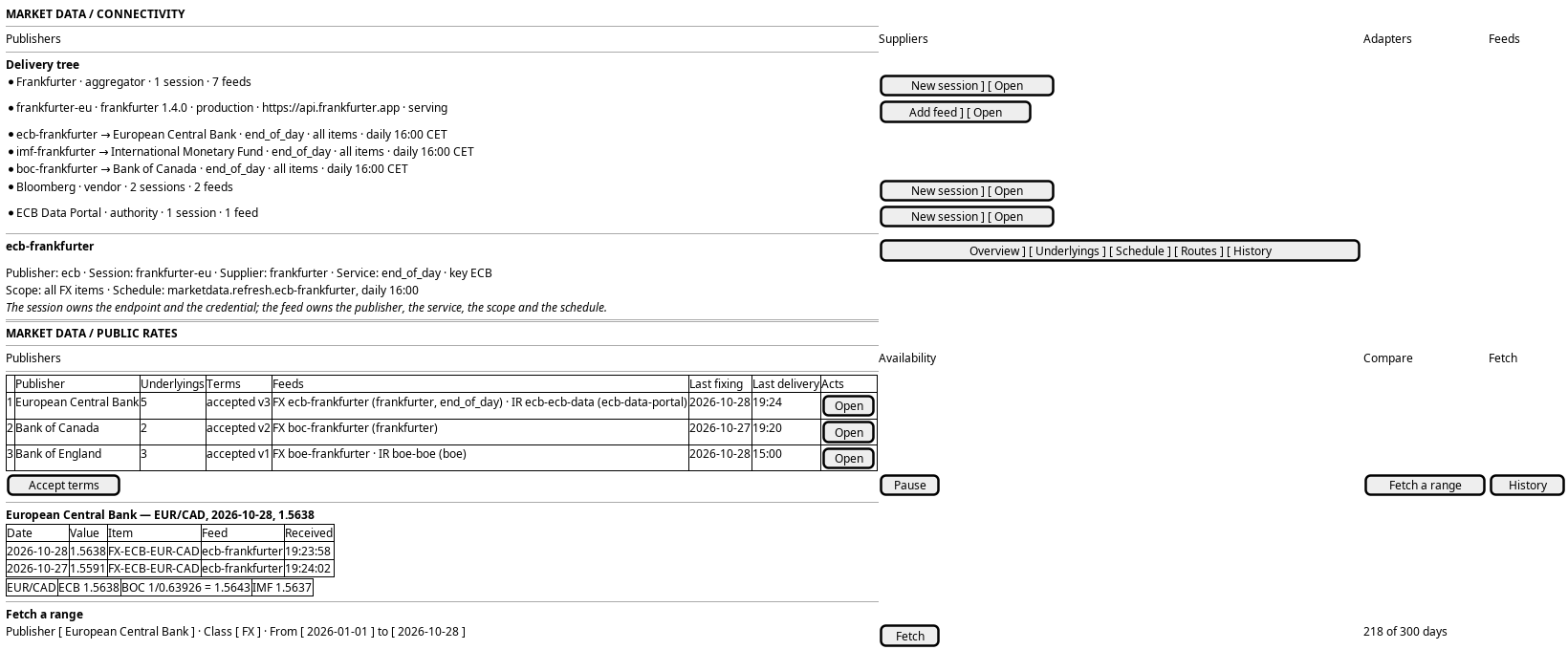
Figure 1: Connectivity with its supplier, session and feed tree, and Public rates with the publisher list, one publisher's fixings, the comparison and the fetch range.
Every step is judged against what the standard draws today, and what the server answers today.
| Step | Shape on the screen | Judgement |
|---|---|---|
| 1 | The publisher list of the standard | The screen already draws it |
| 2 | A freshness line on each row: last fixing, received, next expected | A view no rule draws yet; the data is joined from the fixings read and the adapter read |
| 3 | A state badge on each row, with the sentence below the list | A kind's own state, by RS-PAGE-03; needs the three sentences fixed |
| 4 | Accept terms from the row, at the version shown | The screen and the service already do it |
| 5 | The publisher page's fixings table and chart | The screen already draws it |
| 6 | The pair comparison | The screen already draws it |
| 7 | Pause and resume from the row, with a dialog | A missing server operation; see Decide how a publisher is paused |
| 8 | A range dialog and a progress state | A missing server operation; see Design a backfill request on the adapter contract |
| 9 | Delete fixings offered after a withdrawal | A missing server operation and a permission |
| 10 | The feed page's start notice | Already built; the screen shows where a run started |
| 11 | The shared timeline of the publisher | The standard's history tab, once the acts exist |
6. Prototype
6.1. Connectivity
- Directory
- doc/prototypes/market_data/connectivity/
- Note
- the design note
- Tabs
index.html,?tab=suppliers,?tab=adapters,?tab=feeds- Publisher
?publisher=ecb&pbtab=overview|feeds|history- Supplier
?supplier=frankfurter&sutab=overview|sessions|history- Session
?session=frankfurter-eu&setab=overview|feeds|runtime|history- Feed
?feed=ecb-frankfurter&ftab=overview|underlyings|schedule|routes|history- New session
?add-session=1&supplier=frankfurter- New feed
?add-feed=1&publisher=ecb
6.2. Public rates
- Directory
- doc/prototypes/market_data/public-rates/
- Note
- the design note
- Surfaces
?tab=publishers|availability|compare|fetch- Publishers
?tab=publishers&filter=serving|not serving|terms,?paused=muted|hidden,?terms=withdraw- Publisher record
?publisher=ecb&rtab=overview|underlyings|fixings|history- Availability
?tab=availability&class=fx|ir- Compare
?tab=compare- Fetch
?tab=fetch,&fetch=progress,&fetch=done
Both are static pages: no build, no server, no session. Connectivity draws the delivery tree and the five records. Public rates draws the publishers, their feeds, the values and the fetch.
7. Entities composed
| Entity | What it contributes | Model |
|---|---|---|
publisher |
The name, the kind and the terms state | projects/ores.marketdata/modeling/ores.marketdata.publisher.org |
supplier |
The delivery party, its contract and support | the supplier catalogue |
adapter |
The code module, its version, services and schema | the adapter catalogue |
session |
Supplier, adapter, environment, endpoint, credential, settings | the session model |
feed |
Publisher, session, service, publisher key, scope, schedule | the feed model |
route |
The party, the publisher, the class and the feed | projects/ores.marketdata/modeling/ores.marketdata.route.org |
publisher terms |
The terms page, the credit, whether storage is allowed, and who accepted which version | the same model |
feed |
The feed name, publisher, session, service, default flag and description | the feed model (the code calls it market_data_source today) |
route |
The party, the publisher, the class and the one feed it reads | projects/ores.marketdata/modeling/ores.marketdata.route.org |
adapter |
The runtime identity, its state and the ids it serves and refuses | projects/ores.marketdata/modeling/ores.marketdata.adapter_operations.org |
market_fixing |
The values of a publisher's item, with the publisher's publication time and the time received | projects/ores.marketdata/modeling/ores.marketdata.market_fixing.org |
market_series |
The series an item is stored under, per party | projects/ores.marketdata/modeling/ores.marketdata.market_series.org |
market_data_mapping, market_data_vendor_instrument |
The publisher's own vendor id of an item | the marketdata vendor models |
| adapter status | The state, the heartbeat and the ids an adapter serves or refuses; a read, not an entity | marketdata.v1.ops.list_adapter_status |
fx_spot_fixing_item |
The ranked items a synthetic feed may start from | projects/ores.synthetic/modeling/ores.synthetic.fx_spot_fixing_item.org |
8. Operations and messages
| Step | Operation | Subject | Status |
|---|---|---|---|
| 1, 4 | List the public publishers with their terms and series | marketdata.v1.publishers.list |
exists |
| 4 | Accept or decline a publisher's terms at a version | marketdata.v1.ops.accept_publisher_terms |
exists |
| 5, 6 | Read the fixings of up to twelve series | marketdata.v1.ops.get_fixings |
exists |
| 2, 3 | Read every adapter's state, heartbeat and counts | marketdata.v1.ops.list_adapter_status |
exists |
| 10 | Read where a feed run started | synthetic.v1.feed_configs.list |
exists |
| 7 | Pause or resume a publisher | none yet | missing |
| 8 | Ask an adapter for a date range | none yet | missing |
| 9 | Delete a publisher's fixings, with an actor | none yet | missing |
9. What is missing
- Pause and resume a publisher. The download follows demand, so the act is either a demand change or a new publisher state. The decision is Decide how a publisher is paused. Until it exists the screen states that a publisher is fetched because the system party subscribes to it, and names the subscription.
- A fetch on demand and on a schedule. The adapter contract carries announce, demand, tick and heartbeat, and no fetch request. One request must serve the scheduler's job and the screen's Fetch tab, and the design is Design the refresh request the scheduler and the screen share. Until it exists the screen offers only the window the service fetches on its own.
- Deleting a publisher's fixings. The durable table is never deleted today, because the terms in force when a value was stored keep it. A terms version that withdraws storage needs an act with an actor, which Decide how a publisher is paused carries alongside the pause.
- Freshness in one read. The fixings read answers one item at a time, so the screen reads the latest fixing of every item a publisher serves. A single read that answers the last fixing of each series would make the row cheap; until then the screen reads the publisher's best item and says which one it read. The row and the three states are Show each publisher's freshness and its adapter's health.
10. Related journeys
- Manage market data subscriptions — the party's view of the same publishers: which ones a party takes and what each costs.
- Keep the market data sources running — the sources under the publishers, their state and their routes.
- Watch the market and clear its exceptions — the quotes a subscription delivers, and the ones that failed.
- Author an FX price feed — the feed that starts from a fixing, and the choice of which items it may start from.
11. Related knowledge
- Public publishers publish daily fixings through a supplier session — the publishers, the suppliers, the sessions, the store and the reader behind this screen.
- Market Data Architecture — the structure note that orders the market data cluster.
- Spot rate governance — why an official rate is not the live market, and who approves a rate set.
- The tick ingest pipeline — how a published value reaches the durable store.
- A source tick is stored once and entitled when it is read — the party entitlement a fixing read carries.
12. See also
- Prototypes — the inventory the prototype answers to.
- Calibrate the synthetic ticks from free public sources — the task that made a feed start from a fixing and showed where it started.
- How do I add a PlantUML diagram? — how the wireframe above was drawn.