User Journey: Author a pricing engine configuration
Table of Contents
This page documents a user journey: A market-risk owner or tenant administrator builds a pricing engine configuration step by step: the products it covers, the model and engine for each, their parameters, and a check of what the configuration leaves unpriced.
A user journey describes what one person is trying to do, before anything is built. It is a design document that outlives any sprint, so it names the screens, the entity fields each screen shows, and the operations and messages each step needs.
1. Goal
"I need a configuration that prices what we trade, the way we want it priced." The person knows the products the party trades and has a view on how each should be priced, but a pricing engine document is a long list of product types, each with a model, an engine and settings, and the names are ORE's own. The person should not need to know which engines exist or which settings a model needs. The journey is done when a configuration is saved that covers the products the person chose, with a model, an engine and every setting the pair needs, and the person has read what it still leaves unpriced.
2. Actor and trigger
A market-risk owner or a tenant administrator runs this journey, inside their own tenant, for their own party.
The trigger is a party with no configuration for a set of products, a new desk that trades a product type the existing configurations do not cover, a candidate that model risk asked for, or a quant who wants to try a change without touching the official configuration. The journey starts from Add on the list in See the pricing engine configurations a party holds and ends on the new configuration's page, ready to bind to a report.
The journey writes one configuration, its products and its parameters. It binds nothing to a report. Binding is a step of Create a report.
A party holds few official configurations: one for each cycle, signed off by model risk. This journey does not make an official configuration. It makes a draft. A draft is a place to try a change, and no official report can bind it. The person may also say that the configuration is a candidate for the official configuration of a cycle. A candidate is submitted for sign-off, and it replaces the official configuration only after the sign-off completes. To change an official configuration, the person proposes a new version of it, which is Change how a product is priced. The person should not build a second configuration for the same cycle.
3. Steps
The journey is a wizard of six steps on the standard steps UI, titled Author a pricing engine configuration. The rail is drawn from one computed list, and the last step is final.
3.1. Step 1: name it, say what it is for, and choose where to start
- Name the configuration. The person writes a
name, adescriptionthat says what it prices and for whom, and an optionalconfig_varianttag. The name must be new in the party; a name in use is refused where it is typed. - Say what it is for. Three choices. A draft to try a change is the default. It cannot be bound by an official report. A candidate for the official EOD configuration and a candidate for the official Intraday configuration name the cycle. The step names the official configuration of that cycle today and its version, and states how many product types the reports of that cycle need. Before the choice, a notice says that a party holds few official configurations and links to Propose a change.
- Choose a starting point. Three choices, one panel: Start empty, Start from a copy of a configuration the party holds, or Start from an ORE file, which hands the person to Bring in a pricing engine configuration file and returns with the rows read. A copy carries the products and parameters of the source and nothing else; it does not carry the source's report bindings.
3.2. Step 2: choose the products
- Pick the product types. The panel lists the pricing engine types the system knows, grouped by asset class (rates, FX, credit, equity, commodity), each with its description and the instrument type it maps to. The person ticks the ones the configuration covers. A search runs over the code and the description.
- See what a product is. A row says in plain words what the code means. A code
such as
BermudanSwaptionis not self-evident to everyone who owns a report. - Start from the party's book. A button ticks every type the party's trades use. When the person chose a cycle, the button ticks the product types the reports of that cycle hold instead. It is offered only when the book can be read, and the panel says so when it cannot.
- Read the count. The panel states how many types are chosen, and that a type not chosen will have no model in a run.
3.3. Step 3: choose the model and the engine
- One row for each chosen type. Each row has two combo boxes: the model and the engine. Both are searchable. The engine list narrows to the engines that are known to run the model chosen.
- Take the usual pair. Each row offers Use the usual for its product, which fills the model and the engine most configurations in the system use for it. The pair is a suggestion the person can change, and the row says where the suggestion comes from.
- Say what the pair means. Beside a row, one sentence says what the pair does
in plain words, for example that
LGMwith theGridengine prices a Bermudan swaption by a lattice on a calibrated one-factor model. A pair that is not known to work is marked, never refused: the person may know better than the list. - Order the rows. The rows are written in
positionorder. The person drags a row, or leaves the order alone.
3.4. Step 4: set the parameters
- Three groups. The global parameters of the whole document, then for each product its model parameters and its engine parameters. A product with no parameter says so.
- Add a setting by name. Each group offers the settings the pair is known to take, with a note on what the setting means and a usual value, and a way to add a setting by name when the person knows one the list does not. A value is text, because ORE reads text.
- Fill what the pair needs. A pair such as
LGMwithGridneeds calibration settings. The step marks a setting the pair usually needs and the row does not have, as a prompt, not a refusal. - Read the global settings. The global group holds document-wide settings
such as
ContinueOnCalibrationError. It states what each one changes for every product.
3.5. Step 5: check it
- Coverage. The step states the rule: a report needs a price for every product type in its portfolio, and a configuration that several reports bind must cover all of their portfolios together. One table lists each product type the reports need, and whether the configuration covers it. For a candidate, a second table lists the reports of the cycle and what the configuration leaves unpriced for each. For a draft the table lists the product types the party trades. A product that is needed and not covered is named. The step offers to go back to step 2.
- Completeness. One table of the rows that look unfinished: a pair that is not known to work, a setting the pair usually needs and the row lacks, and a row whose model or engine is empty.
- Findings do not block a draft. A finding is a statement. The person may save a draft with findings, and the review step repeats them. The server does not check any of them today, so the screen is the only reader. The next step does not offer Submit for sign-off while a needed product type has no row.
3.6. Step 6: review and submit
- Read it back. The final step names the status the configuration has after the save, whether it is a candidate for a cycle, every value (the name, the products in order with their model and engine, every parameter with its scope) and the findings. The rail goes back.
- Save or submit. Save as draft writes the document in one request. The change
reason is
system.new_record, stated in a note and not asked for. A name that exists is refused and the refusal names it. Submit for sign-off is offered when the person chose a cycle and every needed product type has a row. It writes the document and opens the sign-off, as in Sign off a pricing engine change. The official configuration of the cycle stays in force until the sign-off completes. - See the result. A draft opens its page. It offers no Bind to a report, because no official report can bind a draft. A submitted candidate opens the sign-off.
4. Screens and wireframes
One screen, drawn as six steps on the rail. The rail shows position, not readiness, so a step with findings is not marked on the rail; the step 5 table carries that state.
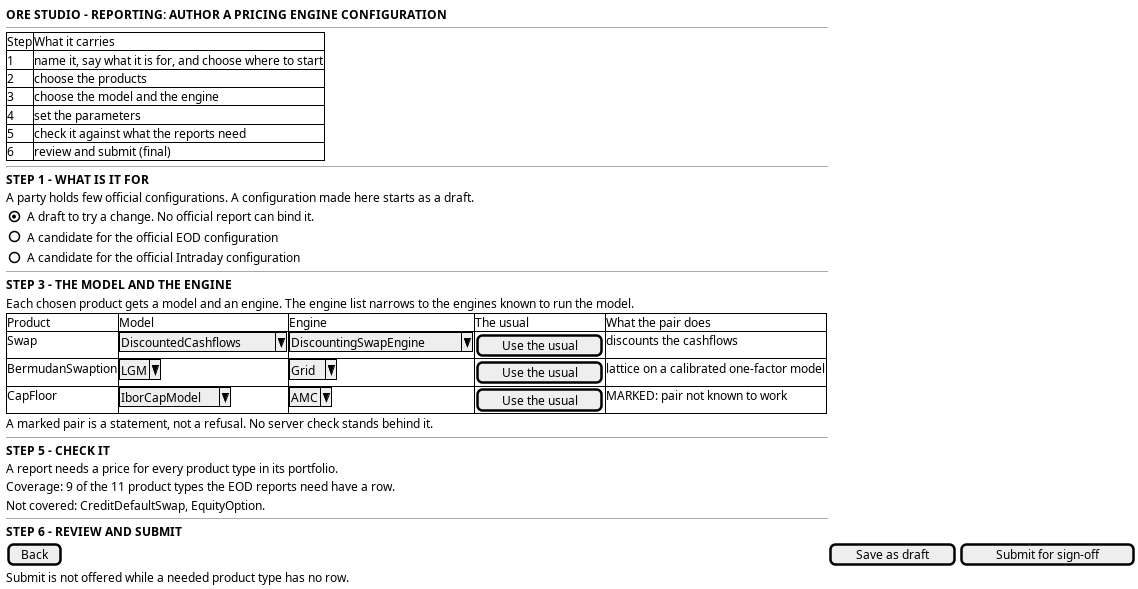
Figure 1: Author a pricing engine configuration: the rail, the purpose, the model and engine of each product, the coverage against what the reports need, and the submit.
5. Prototype
The author a pricing engine configuration prototype owns this journey, and
its design note says what it argues, which states it can reach and what is
fake. It belongs at
doc/prototypes/reporting/author-a-pricing-engine-configuration/.
It must draw the six steps on the standard steps UI, copied from the first-run
prototype. Step 3 must carry ?variant=A|B|C as three readings of the
model-and-engine step, because that layout is the open question: a table with two
combo boxes in a row, a card for each product, and a guided walk one product at a
time. It must show a pair that is not known to work as a mark and not a refusal,
the purpose choice with the official configuration of each cycle, the coverage
table against what the reports of a cycle need, with a product that is needed and
not covered, and the final step reading every value back with Save as draft
and a Submit for sign-off that is not offered while the coverage is incomplete.
It switches the purpose with ?cycle=none|eod|intraday. It must state that no server
check stands behind any finding. Every value is a fixture.
6. Entities composed
| Entity | What it contributes | Model |
|---|---|---|
pricing_model_config |
Step 1: name, description, config_variant |
ores.analytics.pricing_model_config |
pricing_engine_type |
Step 2: the product types, and the instrument type each maps to | ores.analytics.pricing_engine_type |
pricing_model_product |
Step 3: model, engine and position for each chosen type |
ores.analytics.pricing_model_product |
pricing_model_product_parameter |
Step 4: parameter_scope, parameter_name, parameter_value |
ores.analytics.pricing_model_product_parameter |
The three tables are one document, pricing_engines_document. The configuration
is created together with its products and parameters, and the document message
carries all three as arrays.
7. Operations and messages
| Step | Operation | Subject | Status |
|---|---|---|---|
| 1, name in use | List the configurations | analytics.v1.pricing_model_configs.list |
exists |
| 1, copy | Read the source document | analytics.v1.pricing_engines_documents.get |
exists |
| 2, the types | List the product types | analytics.v1.pricing_engine_types.list |
exists |
| 2, the book | Read the instrument types the party trades | (no operation) | missing |
| 3, models and engines | Read the models and engines the system knows | analytics.v1.pricing_model_engine_pairs.list |
exists |
| 3, the usual pair | Read the pair other configurations use | analytics.v1.pricing_model_engine_pairs.list, the is_usual column |
exists |
| 4, known settings | Read the settings a pair takes, with notes and usual values | analytics.v1.pricing_pair_settings.list |
exists |
| 5, checks | Check a document before saving | (no operation) | missing |
| 5, the portfolios | Read the product types of the reports of a cycle | (no operation) | missing |
| 6, submit | Write a candidate and open its sign-off | (no operation for a status or a sign-off) | missing |
| 6, save | Write the document | analytics.v1.pricing_engines_documents.put |
exists |
| The screen | Author from the browser | POST /api/reporting/pricing-engines |
exists, as a draft with no sign-off |
8. What is missing
- Built: the vocabulary. Two lookup tables,
pricing_model_engine_pairandpricing_pair_setting, hold the pairs that price each product type, the pair that ORE's examples use most, and the settings a pair takes with their kind, options and usual value. The seeds come from the same ORE files as the prototype fixture. The models and the engines are the distinct values of the pair table. The screen reads all three lists in one request, and the combo boxes in steps 3 and 4 draw from it. A pair the tables do not know is marked and never refused. - Still open: where the pair rows come from. The seeds hold 24 pairs and 12 settings from the files the project holds. A person cannot add a pair from a screen yet. The shell and the lookup operations can.
- No check on write. Nothing validates a document when it is written: not an empty model, not a pair that does not work, not a missing calibration setting. Every finding in step 5 is the screen's own, and the failure arrives in the run. This is the same silence the analytics screen defends against.
- The write is not one transaction. The document service writes the configuration, then the products, then the parameters in sequence, with no unit of work, so a failure part way leaves a configuration without its parameters. The bundle catalogue records it as B3, "wrongly shaped". The screen cannot repair it, and the final step says what it would do after a failed write: read the document back and show what landed.
- The party's book and the portfolios. Steps 2 and 5 need the instrument types of the party's trades and of each report's portfolio, and no operation returns them.
- A copy has no operation. The copy is the screen reading a document and writing a new one with new identifiers. Nothing makes a copy on the server.
- No status, no cycle, no sign-off. A draft, a candidate and an official configuration are the same row today. The same gap as in See the pricing engine configurations a party holds. A candidate that replaces the official configuration also rebinds the reports of the cycle in one step. No operation does that, and the sign-off prototype does not draw the step.
9. Related journeys
- See the pricing engine configurations a party holds — where this journey starts and ends
- Bring in a pricing engine configuration file — the way to start from an ORE file
- Change how a product is priced — the way to change one row after the configuration exists
- Sign off a pricing engine change — where a candidate goes after it is submitted
- Create a report — step 4 binds the configuration this journey saves
10. Related knowledge
- Reporting journeys — the group this journey belongs to
- ORE Model Configuration — the
pricingengine.xmlschema, and the layers it feeds - Bundle catalogue — the document write and its shape
- User Journeys — the index
11. See also
- User Journey Extraction Standard — the checklist this journey is written against
- UX — the standard the screen follows