User Journey: Sign off a pricing engine change
Table of Contents
This page documents a user journey: Each approval part that model risk names reads a proposed change to an official pricing engine configuration, approves or refuses it, and a proposal that every part approved is made official. The person who proposed a change cannot sign it off.
A user journey describes what one person is trying to do, before anything is built. It is a design document that outlives any sprint, so it names the screens, the entity fields each screen shows, and the operations and messages each step needs.
1. Goal
"I must decide if this change to the way we price is safe, and I must leave a record that I decided." The model settings of a party are under model risk control. A party holds few official pricing configurations, one for each cycle, and every official report of that cycle runs with one of them. A change to an official configuration therefore changes the numbers of every report that binds it. Each approval part that model risk names must read the change, and the system must keep who approved it and when. The journey is done when the proposal is in force, or refused, or withdrawn, and the record says which and who decided.
2. The approval is the inbox's
The platform already has an approval engine in ores.inbox, and this journey uses it. It does not invent a second one.
- A proposal is an approval request (ores.inbox.approval_request) of a
kind (ores.inbox.approval_kind). The kind here would be
analytics.pricing_engines_change. The component that owns the kind owns the detail row, which holds the proposed version. - A part (ores.inbox.approval_part) is a function whose approval a request
needs. A part is not a role. It names a permission, such as
inbox::approvals:decide_market_risk, and a tenant grants that permission to whichever role does the work. Each part has an answer order. A part with a lower order approves first. Parts with the same order answer together. - A decision (ores.inbox.approval_decision) is one row for each act: approve, refuse, hold, resume, withdraw, reverse. A decision is never edited.
- A refusal from a part that can answer ends the request. The requester alone may withdraw it.
- The schema enforces four eyes. A trigger refuses a decision from the person who raised the request, and a unique index lets one person approve a request once.
Four parts exist today: controller, finance, market_risk and operations.
This journey needs three. Market Risk is the seeded part. Quant and Model
Validation are new, and their names are assumed until model risk confirms them.
The prototype draws Quant first, then Market Risk and Model Validation together.
That order is also an assumption.
3. Actor and trigger
Four people take part. All act inside their own tenant, for their own party.
| Actor | What they do |
|---|---|
| The proposer, usually a market-risk owner | Raises the request, answers a refusal, rebases an out-of-date proposal, withdraws it. Cannot decide it, even when the proposer holds one of the parts. |
| A signer, one for each part | Holds the part's permission. Reads the proposal and approves it or refuses it for that part. |
| Whoever makes a proposal official | Any person who may write the configuration. They do it after every part approved. |
| A viewer | Reads the queue and the proposals. Changes nothing. |
The trigger is a proposal. It comes from Change how a product is priced, from Bring in a pricing engine configuration file, from a proposed revert on the History tab, or from a candidate in Author a pricing engine configuration. A signer starts from the queue under Workflows on See the pricing engine configurations a party holds. The journey ends on the proposal's page, with the proposal in a final state.
4. Steps
- Open the queue. The person opens Sign-off. The screen is a record list as the
Record screen standard draws one.
A row is one proposal: the configuration, the cycle it serves, the change as
version N to N+1, who proposed it, when, the parts that approved so far, its state and what it needs from the reader. A tag says Needs your sign-off when the reader holds a part that can answer now and did not propose the change. A search runs over the configuration and the change. A filter shows the open proposals, the ones that need the reader, or all, with the closed ones. - Open a proposal. The title names the configuration and the proposed version. The lead line states the state and that the version in force stays in force until the proposal is approved. The tabs are Sign-off, Changes, Reach and History.
- Read the changes. The Changes tab compares the proposal with the version it was written on, as a diff, and shows the proposer's reason and commentary. It lists the evidence the proposer attached, such as a back-test.
- Read the reach. The Reach tab states the rule: a report needs a price for every product type in its portfolio. It lists the reports the configuration serves, with each report's cycle, portfolio, the products it holds that change, and whether the proposal still prices every product type the report needs. It states that a run made after the change is in force is not comparable with an earlier run for the changed products.
- Read the sign-off. The Sign-off tab lists each approval part, its decision, the person who decided, when, and the comment. A part that must wait for an earlier part says so: Waits for Quant. It states the four-eyes rule: the person who raised the request cannot decide it, even when they hold one of the parts, and one person approves a request once.
- Approve. A signer who holds a part that can answer now sees Approve and Refuse on that part's row. Approve opens a dialog that asks the signer to confirm that they read the changes and the reports they reach, and takes an optional comment. After the last part approves, the proposal moves to Approved, not in force.
- Refuse the proposer. When the signer proposed the change, the row shows no button and says: you proposed this change, another person who holds the part must sign it off. The inbox refuses the same decision already.
- Refuse. Refuse opens a dialog that needs a reason. The request ends and the proposal moves to Refused. The version in force stays in force. The proposer reads the reason and changes the proposal and submits it again, or withdraws it. A refusal never deletes the proposal.
- Make it official. When every part approved, any person who may write the configuration sees Make version N+1 official. The dialog names the reports it reaches and states that no report is rebound and that the previous version stays in the history. After it, the version is in force, and the next run of each report that binds the configuration uses it.
- Rebase an out-of-date proposal. When another proposal became the version in force first, this proposal sits on an old version. The page says so and offers the proposer Rebase. A rebase moves the proposal onto the version in force and clears the approvals, because the parts approved a different base.
- Withdraw. The proposer may withdraw an open proposal. It changes nothing and stays in the history.
- Read the history. The History tab lists what happened to the proposal, newest first: who proposed it, each approval and refusal with its comment, and when it was made official.
5. Screens and wireframes
Two screens: the queue, and the proposal's page with four tabs. The sign-off has its own screen because it is the control: a part reads one change and decides, and the screen keeps the decision.
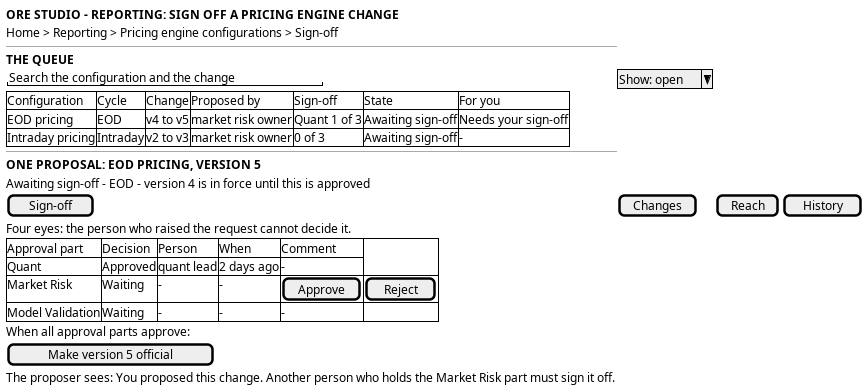
Figure 1: The sign-off queue and one proposal's page: the approval parts, the four-eyes rule, and the actions.
6. Prototype
The sign off a pricing engine change prototype owns this journey, and
its design note says what it argues, which states it can reach and what is
fake. It belongs at doc/prototypes/reporting/sign-off-a-pricing-engine-change/.
It must draw the queue and the proposal page as the Record screen standard draws
them. It must switch the state of the first proposal behind
?proposal=pending|partly|ready|rejected|superseded and the person behind
?actor=proposer|quant|risk|validator|viewer. The proposer must hold the Market
Risk part, so that the four-eyes refusal is reachable. It must show the answer
order: Quant answers first, and the other two rows say Waits for Quant. It must
show an approval, a refusal with a reason, the point where every part has
approved, the making of a proposal official, a rebase and a withdrawal. It must
state that the kind, the Quant part and the Model Validation part do not exist, and
that their names and order are assumed. Every value is a fixture.
7. Entities composed
The first three rows exist in the analytics and reporting services. The next four exist in the inbox. The last two are new.
| Entity | What it contributes | Model |
|---|---|---|
pricing_model_config |
The configuration, and the version in force | ores.analytics.pricing_model_config |
pricing_model_product |
The rows that change | ores.analytics.pricing_model_product |
report_configuration |
The bindings that give the reach | ores.reporting.report_configuration |
approval_request |
The proposal: who raised it, when, why, its state | ores.inbox.approval_request |
approval_decision |
One part's approval or refusal, with the person, the time and the comment | ores.inbox.approval_decision |
approval_part |
The parts, their permission and their answer order | ores.inbox.approval_part |
approval_kind |
What the request asks for, and how many approvals close it | ores.inbox.approval_kind |
| a pricing engine configuration change detail | The proposed version, held apart from the version in force, with its base version | (missing) |
a policy row for a put of pricing_model_config |
Says which parts must approve a write, so that a direct write to an approved version is refused | (missing; the inbox holds the table) |
8. Operations and messages
The inbox operations are generic. The queue, the decision and the withdrawal need no new subject. The kind, two parts, a policy row and the detail are the new work.
| Step | Operation | Subject | Status |
|---|---|---|---|
| 1, the queue | List the approvals that wait for the reader | inbox.v1.ops.list_approval_queue |
exists; the kind and its detail are missing |
| 1, the reader's own | List the requests the reader raised | inbox.v1.ops.list_my_approval_requests |
exists |
| 2, raise the proposal | Raise an approval request with its parts | inbox.v1.ops.raise_approval |
exists; the kind is missing |
| 3, the changes | Read the proposal and the version it sits on | analytics.v1.pricing_engines_documents.get for the version; none for the proposed one |
partial |
| 4, the reach | Read the definitions bound to the configuration | reporting.v1.report_configurations.list |
partial; no read by configuration id |
| 4, the portfolios | Read the product types of a report's portfolio | (no operation) | missing |
| 5, the parts | Read the parts, their order and their permission | the approval_part read |
exists as data; Quant and Model Validation are missing |
| 6 to 8, decide | Approve or refuse for a part | inbox.v1.ops.decide_approval |
exists; four eyes enforced in the schema |
| 9, make official | Make a proposal the version in force | (no operation) | missing; the apply workflow of the kind may do it |
| 10, rebase | Move a proposal onto the version in force | (no operation) | missing |
| 11, withdraw | Close an open proposal | inbox.v1.ops.withdraw_approval |
exists |
| 12, the history | Read the events of a proposal | the request's versions and decisions | exists as data |
| The screen | Sign off from the browser | (no BFF route) | missing |
9. What is missing
- The kind and its detail. No approval kind names a pricing engine configuration change, and no detail row holds the proposed version. A proposal must not replace the rows that a run reads, so the detail holds it apart.
- Two parts.
market_riskexists. Aquantpart and amodel_validationpart do not, and neither do their decide permissions. Model risk must confirm the names, the answer order and which role holds each permission. The kind says how many approvals close a request, and one person approves once. - The policy row. The inbox policy says which part must approve a put of an
entity. A row for
pricing_model_configmakes a direct write to an approved version go through a request. Without it, a person who holds a part can write the configuration directly, and the sign-off controls nothing. The service must also read the policy. - Make it official. An approved request applies through the kind's apply workflow, inside an apply window. The prototype draws a person who makes the proposal official instead. The choice is open.
- The version a run used. No operation says which version of a configuration a run was made with. The sign-off proves that a version was approved, and the run cannot prove it was made with that version. Model risk needs both.
- A report binds a configuration, not a version.
report_configurationholds the configuration. Making a version official must change what the next run reads, in one step, with no rebinding. - A candidate that replaces the official configuration. A candidate from Author a pricing engine configuration also moves the reports of a cycle from one configuration to another. That is a rebinding step, and the prototype does not draw it.
- Rebase. The inbox has no operation that moves a request onto a newer base.
- The evidence. A proposal carries a back-test or a note. No operation attaches a document, and the prototype draws the files as a fixture.
- Hold, resume, expiry and reversal. The inbox has these decisions and an expiry. The prototype draws approve, refuse and withdraw only.
10. Related journeys
- See the pricing engine configurations a party holds — where the queue starts, and where a proposal shows as a banner
- Change how a product is priced — the main way a proposal starts
- Bring in a pricing engine configuration file — a proposal from a file
- Author a pricing engine configuration — a candidate for a cycle
- Change what a report runs — the same reach statement, for the analytics
11. Related knowledge
- Reporting journeys — the group this journey belongs to
- Record screen standard — the list, the record page, the reasons and the history
- User Journeys — the index
12. See also
- User Journey Extraction Standard — the checklist this journey is written against
- UX — the standard the screen follows