User Journey: Bring in a pricing engine configuration file
Table of Contents
This page documents a user journey: A market-risk owner or tenant administrator brings in an ORE pricing engine configuration file, reads what it holds against what the party already has, and saves it as a new draft or as a proposal for a new version of a configuration.
A user journey describes what one person is trying to do, before anything is built. It is a design document that outlives any sprint, so it names the screens, the entity fields each screen shows, and the operations and messages each step needs.
1. Goal
"I have the ORE pricingengine.xml my quants use. I want it in ORE Studio, and I
want to know what it changes before it does." Most pricing configurations start
life as an ORE file; the project holds about seventy variants. The person should
not retype a file. The journey is done when the file's products and settings are
saved, and the person has read what the file holds, what it adds to or changes in
a configuration the party already has, and what it holds that the system cannot
read. A file never becomes an official configuration directly. A new file is saved
as a draft. A file put into an approved configuration is a proposal for a new
version, and it waits for sign-off. A file put into a draft changes the draft in
place.
2. Actor and trigger
A market-risk owner or a tenant administrator runs this journey, inside their own tenant, for their own party.
The trigger is a file from a quant, from an ORE example, or from another installation, or a change to a configuration the quants maintain in a file. The journey starts from Workflows on the list in See the pricing engine configurations a party holds, or from step 1 of Author a pricing engine configuration, and ends on the saved configuration's page.
This is a workflow with its own address and several steps, not a dialog, because it reads a file, compares and then writes. It is not a data exchange of a whole party. That is covered by the data exchange journeys.
3. Steps
- Choose the file. The person chooses a file or pastes its text. The screen
accepts
<PricingEngines>documents. A file of another kind is refused with the root element it found. - Read what the file holds. The screen parses the file and states, before
anything is written: the count of
Productelements, the count of distinct models and engines, the count of model and engine parameters, and the global parameters. The products are listed in file order with their type, model and engine. - Read what the system does not know. Three lists, each only when not empty:
- Product types the system has no code for. A
Product typethat is not in the pricing engine type vocabulary. Each is shown with the choice Skip or Add the type first. - Elements the screen cannot read. An element, an attribute or a parameter the file holds that has no column. The screen lists it and states that it is dropped.
- Duplicates. A product type that appears twice. The screen shows both and asks which one to keep.
- Product types the system has no code for. A
- Choose the target. Two choices:
- Save as a new draft configuration. The person gives a name, a description
and a variant. The variant tag is filled from the file name when it follows the
ORE naming, such as
pricingengine_amc.xmlgivingAMC. No official report can bind a draft. - Put it into a configuration the party holds. The person chooses the configuration from a combo box, which shows each status. For an approved configuration the file is a proposal: version N+1 waits for sign-off, version N stays in force, and the reach panel names the reports that the change would reach after the sign-off, as in Change how a product is priced. For a draft the file changes the draft in place and reaches no run.
- Save as a new draft configuration. The person gives a name, a description
and a variant. The variant tag is filled from the file name when it follows the
ORE naming, such as
- Read the difference. When the target is an existing configuration, a three-part table compares it with the file: added products, changed products with the model, engine or parameter that differs, and removed products, the ones the configuration has and the file does not. The removed list is the one that matters most and is drawn first. A new configuration has nothing to compare, and the step says so.
- Decide the removed products. For each removed product the person chooses Keep it or Drop it. The default is Keep it, because a file that omits a product usually leaves it out by accident. A product kept stays in the new version unchanged.
- Review and submit. The final step names the products that will be written, in
order, with the counts of added, changed, kept and dropped, and the elements
that were dropped because they cannot be read. A new draft has Save as draft
and is written with the reason
system.new_record. A draft target has Save and asks for a change reason and a commentary. An approved target has Submit for sign-off, asks for a change reason and a commentary, claims the version read, and states that the configuration does not change and that the person who submits cannot sign off. - See the result. A draft opens its page, where the History tab shows the new version with its diff, and the commentary names the file. A proposal opens Sign off a pricing engine change.
4. Screens and wireframes
One workflow, five panels: the file and what it holds, what the system does not know, the target, the difference, and the review. The difference is the screen's reason to exist, so it has the width.
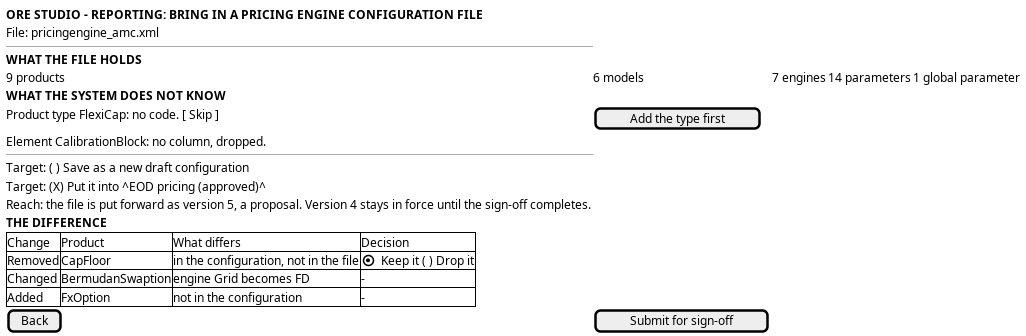
Figure 1: Bring in a pricing engine configuration file: what the file holds, what the system does not know, and the difference against a configuration the party holds.
5. Prototype
The bring in a pricing engine configuration file prototype owns this journey, and
its design note says what it argues, which states it can reach and what is
fake. It belongs at doc/prototypes/reporting/bring-in-a-pricing-engines-file/.
It must draw the five panels on the standard steps UI. It must offer three
fixture files behind ?file=|: a clean file, a file with a product type the
system has no code for and an element the screen cannot read, and a file that
omits a product the target already has. It must offer three targets behind
?target=new|c2|c3: a new draft, an approved configuration and a draft. It must draw the added, changed and
removed table and the keep-or-drop choice, and the final review. It must state
that the parse is a mock and which operation would parse a file. Every value is a
fixture.
6. Entities composed
| Entity | What it contributes | Model |
|---|---|---|
pricing_model_config |
The target: a new row, or the row that gets a new version | ores.analytics.pricing_model_config |
pricing_model_product |
The products the file holds, and the products the target has | ores.analytics.pricing_model_product |
pricing_model_product_parameter |
The settings the file holds, in model, engine and global scope | ores.analytics.pricing_model_product_parameter |
pricing_engine_type |
The vocabulary a file's Product type must belong to |
ores.analytics.pricing_engine_type |
7. Operations and messages
| Step | Operation | Subject | Status |
|---|---|---|---|
| 2, parse | Turn the file into a pricing engine configuration document | (no operation for a person's file) | missing |
| 3, the types | List the product types | analytics.v1.pricing_engine_types.list |
exists |
| 3, a new type | Write a product type | analytics.v1.pricing_engine_types.put |
exists |
| 4, the target | List the configurations | analytics.v1.pricing_model_configs.list |
exists |
| 5, the difference | Read the target document | analytics.v1.pricing_engines_documents.get |
exists |
| 7, save a draft | Write the document | analytics.v1.pricing_engines_documents.put |
exists |
| 7, a proposal | Hold the new version apart from the version in force | (no operation) | missing |
| The screen | Import from the browser | (no BFF route) | missing |
8. What is missing
- A parse for a person's file. The data quality publisher turns a cleared
document into the three tables through
analytics.v1.ops.publish_pricing_engines_from_dq, and the shell imports ORE files. Nothing takes a file a person chooses in a browser and returns apricing_engines_document. The screen either parses in the browser, which makes a second parser that can drift from the server's, or a new operation parses on the server. The second is the answer. The XML document codec prototype shows a codec that turns an ORE document into records through generated tables, which is the shape the operation would take. - A preview that writes nothing. The parse must return the document without saving it. The publisher saves, so the screen needs the parse as its own request.
- A diff between two documents. The difference in step 5 is the screen's own computation over two documents. A server diff would give the History tab and this step the same result.
- A new version of a document. The document write replaces the rows of the configuration. It does not state which products were kept and which were dropped. The history shows the configuration as changed and the diff is recomputed from the versions.
- No home for a proposal. A file put into an approved configuration must not replace the rows that a run reads. The same gap as in Change how a product is priced.
- The unreadable elements. ORE files hold elements the tables do not, such as an inline calibration block. The screen lists them and drops them. A later model can keep them.
- The write is not one transaction. The same gap as in Author a pricing engine configuration.
9. Related journeys
- See the pricing engine configurations a party holds — where this journey starts and ends
- Author a pricing engine configuration — step 1 hands a person here, and takes the rows back
- Change how a product is priced — the reach statement, and the changes one row at a time
- Sign off a pricing engine change — where a proposal from a file goes
10. Related knowledge
- Reporting journeys — the group this journey belongs to
- ORE Model Configuration — the
pricingengine.xmlschema and how it maps to the tables - The XML document codec prototype — the codec an import operation would use
- User Journeys — the index
11. See also
- User Journey Extraction Standard — the checklist this journey is written against
- UX — the standard the screen follows